Axis APIs - Convert Pixel to Data coordinates
SciChart Android provides a clean and simple API to transform pixels to data-values and vice versa via the following methods:
- getCoordinate(Comparable value) - expects a chart
data-valueand returns the corresponding pixel coordinate. - getDataValue(float pixelCoordinate) - expects a
coordinate in pixelsand returns the closest data value to that coordinate.
It is also possible, to perform such conversion using our CoordinateCalculator APIs
Where Pixel Coordinates are measured from
It is important to note when converting Pixels to Data Coordinates and vice versa that pixels are measured from the top-left inside corner of the chart. So, let's see correspondence of the pixel coordinate and data-values in the table below:
| Pixel Coordinate | Data-Value |
|---|---|
[0, 0] |
[xAxis.getVisibleRange().getMin(), yAxis.getVisibleRange().getMax()] |
[width, height] |
[xAxis.getVisibleRange().getMax(), yAxis.getVisibleRange().getMin()] |
Note
Learn more about getVisibleRange() and how to use this property at the Axis Ranging - VisibleRange and DataRange article.
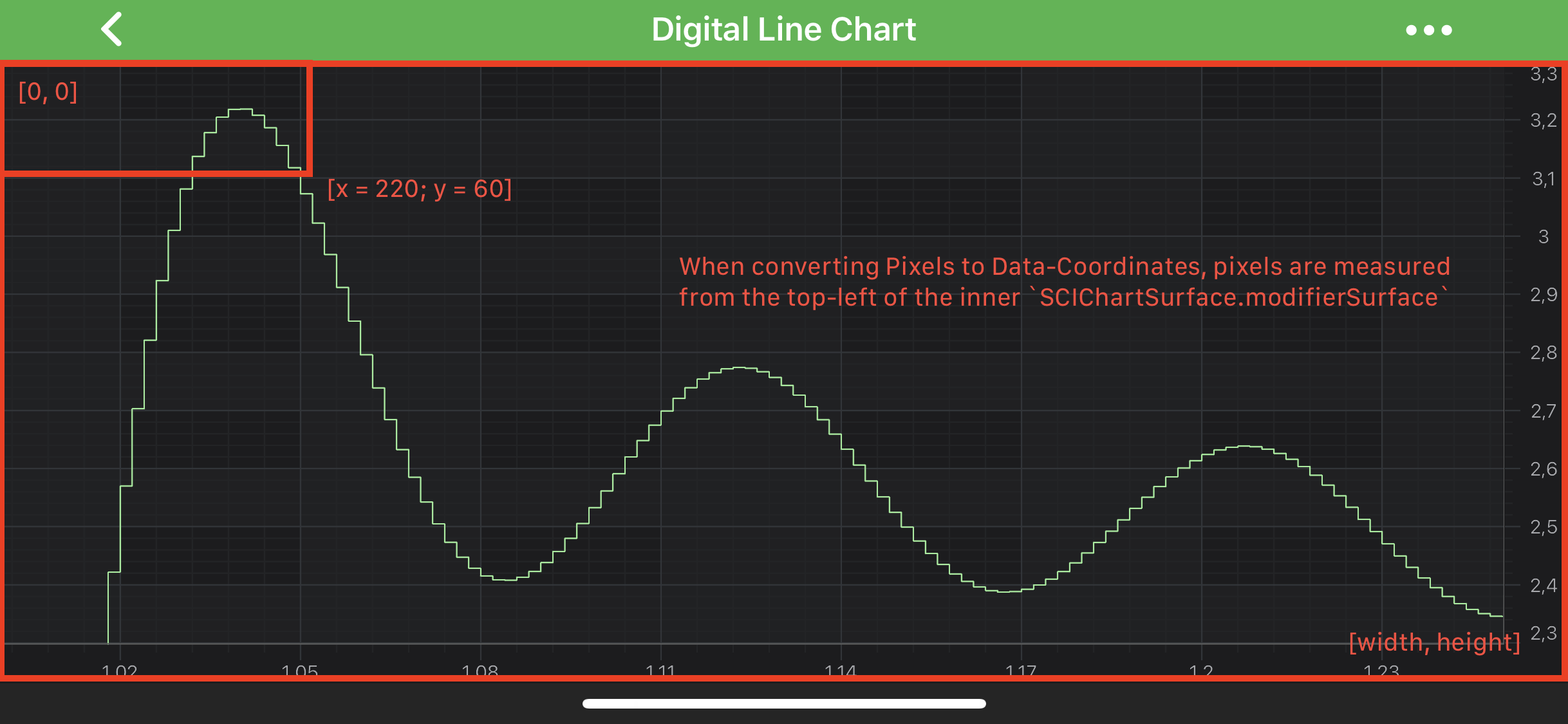
Converting between Pixels and Data Coordinates
As mentioned above - data-values are converted to pixel coordinates via the getCoordinate(Comparable value) method. Also, Coordinates in pixels are converted back to chart data-values via the getDataValue(float pixelCoordinate) method.
You can find simple examples how to do the conversions below.
NumericAxis conversions
float coordinate = xAxis.getCoordinate(1.2);

// Convert back:
Comparable dataValue = xAxis.getDataValue(coordinate);
DateAxis conversions
final DateAxis xAxis = new DateAxis(getContext());

final Calendar calendarDate = Calendar.getInstance();
calendarDate.set(2011, Calendar.MAY, 1);
final Date date = calendarDate.getTime();

float coordinate = xAxis.getCoordinate(date);
// Convert back:
Comparable dataValue = xAxis.getDataValue(coordinate);
CategoryDateAxis conversions
final CategoryDateAxis xAxis = new CategoryDateAxis(getContext());

final Calendar calendarDate = Calendar.getInstance();
calendarDate.set(2011, Calendar.OCTOBER, 5);
final Date date = calendarDate.getTime();

float coordinate = xAxis.getCoordinate(date);

// Convert back:
Comparable dataValue = xAxis.getDataValue(coordinate);
Getting a CoordinateCalculator instance
There is a currentCoordinateCalculator property, which is readonly, and which provides a coordinate calculator instance which is valid for the current render pass.
Note
If the getVisibleRange() changes, the data changes, or the viewport size changes - then the ICoordinateCalculator will be recreated under the hood.
ICoordinateCalculator API
Like IAxisCore, ICoordinateCalculator has the following methods:
- getCoordinate(Comparable value) - expects a double representation of
data-valueand returns the corresponding pixel coordinate. - getDataValue(float pixelCoordinate) - expects a
coordinate in pixelsand returns the closest data value to that coordinate (represented in double).
But in addition to the above, coordinate calculators API, provides methods, to perform conversions in batches via the following:
- getCoordinates(double[] dataValues, float[] coordinates, int count)
- getDataValues(float[] coordinates, double[] dataValues, int count)
As you might guess, converting Pixels to Data-Coordinates and vise versa slightly differs for different axis types due to difference in underlying data-types. In particular the following ones:
Read on to get better understanding of such conversions.
NumericAxis conversions
The simplest case is the NumericAxis. ICoordinateCalculator for NumericAxis works the data-value as double. So let's take our Digital Line Chart example, and try do some conversions
final NumericAxis xAxis = new NumericAxis(getContext());

final ICoordinateCalculator calculator = xAxis.getCurrentCoordinateCalculator();
float coordinate = calculator.getCoordinate(1.2);

// Convert back:
double dataValue = calculator.getDataValue(coordinate);
Note
The exact data-values and coordinates might differ depending on your visibleRange, viewport etc...
DateAxis conversions
Similarly to NumericAxis - the DateAxis is quite simple with one difference - it's ICoordinateCalculator works with long representation of Date, which is getTime(). So let's take our Mountain Line Chart as an example, and try do some conversions.
Note
Since the ICoordinateCalculator works with long representation of Date in getTime(), you will need to do all the needed conversions on your own. See the code below:
final DateAxis xAxis = new DateAxis(getContext());

final ICoordinateCalculator calculator = xAxis.getCurrentCoordinateCalculator();

final Calendar calendarDate = Calendar.getInstance();
calendarDate.set(2011, Calendar.MAY, 5);
final Date date = calendarDate.getTime();

float coordinate = calculator.getCoordinate(date.getTime());

// Convert back:
double dateInMillis = calculator.getDataValue(coordinate);
Date dateValue = new Date((long) dateInMillis);
Note
The exact data-values and coordinates might differ depending on your visibleRange, viewport etc...
CategoryDateAxis conversions
CategoryDateAxis is slightly different. It's ICoordinateCalculator conversion methods works with an integers, which is the index of a data points inside an appropriate IDataSeries<TX,TY>. You can convert Date to index and vice versa through the ICategoryLabelProvider. So let's work with our Candlestick Chart as an example, since is has CategoryDateAxis.
Note
Conversion from Date to Index and vice versa can be performed using the ICategoryLabelProvider. See the code below:
final CategoryDateAxis xAxis = new CategoryDateAxis(getContext());
final ICoordinateCalculator calculator = xAxis.getCurrentCoordinateCalculator();

// get ICategoryLabelProvider to convert Date value to Index
final ICategoryLabelProvider labelProvider = (ICategoryLabelProvider) xAxis.getLabelProvider();

final Calendar calendarDate = Calendar.getInstance();
calendarDate.set(2011, Calendar.OCTOBER, 5);
Date date = calendarDate.getTime();

double index = (double) labelProvider.transformDataToIndex(date.getTime());
double coordinate = calculator.getCoordinate(index);

// Convert back:
index = (int) calculator.getDataValue((float) coordinate);
// use the ICategoryLabelProvider instance to convert index to Date value
date = new Date((long) labelProvider.transformIndexToData((int)index));
Note
The exact data-values and coordinates might differ depending on your visibleRange, viewport etc...
Transforming Pixels to the Inner Viewport
If you subscribe to listen to touch events on a SciChartSurface, the touch coordinates you will receive will be relative to the SciChartSurface itself. Before the Coordinate Transformation API can be used, it's important to ensure that such coordinates are transformed relative to the viewport (the central area).
The view to translate relative to can be obtained calling either the getModifierSurface() or getRenderableSeriesArea(), depending on the context. By default, both occupy the same area, but this can be changed if a custom LayoutManager is provided:
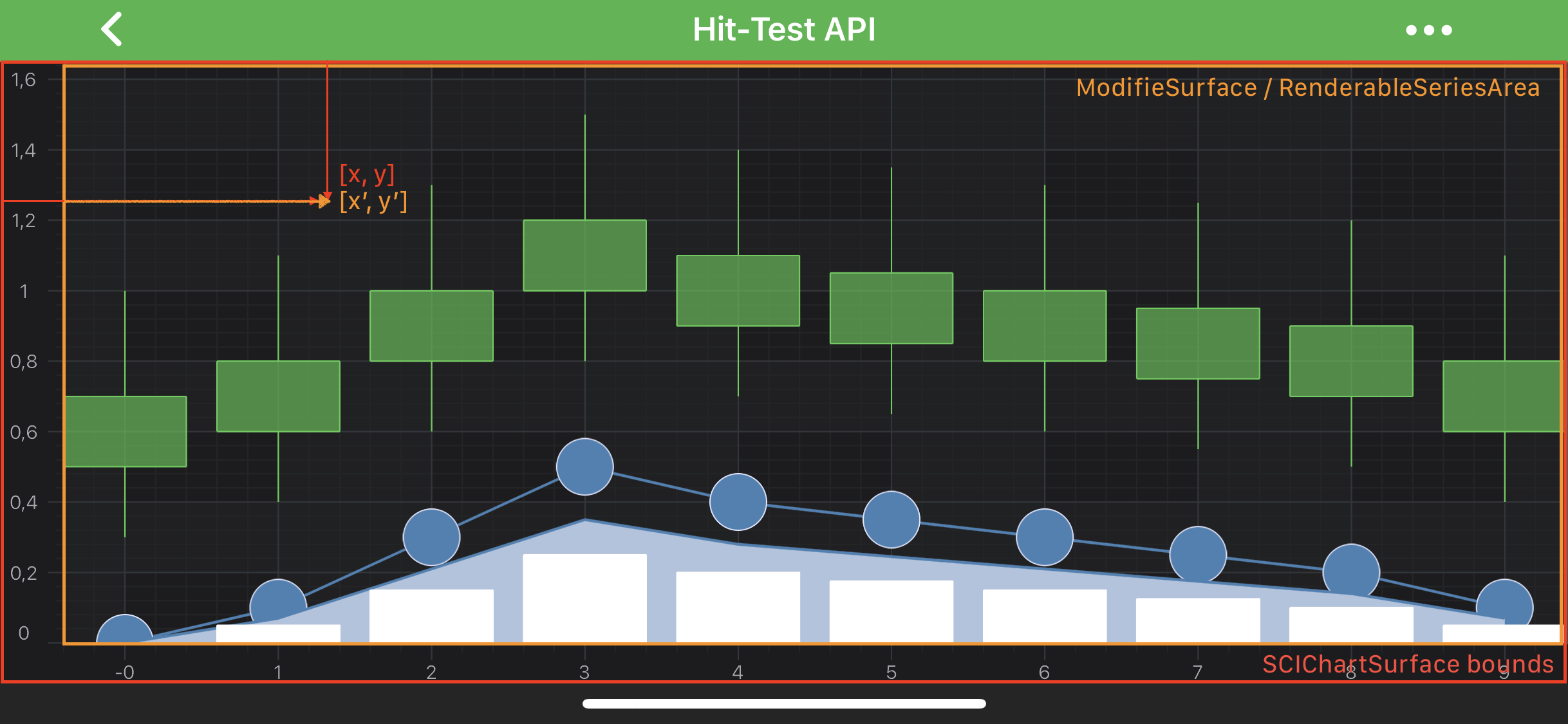
The transformation can be done via the translatePoint(PointF point, IHitTestable hitTestable) method of your SciChartSurface instance. For instance let's take a look at the code snippet from our Hit-Test API example:
SciChartSurface surface = new SciChartSurface(getActivity());
surface.setOnTouchListener(new View.OnTouchListener() {
    @Override
    public boolean onTouch(View v, MotionEvent event) {
        // the touch point relative to the SciChartSurface
        PointF touchPoint = new PointF(event.getX(), event.getY());

        // translate the touch point relative to RenderableSeriesArea or ModifierSurface
        surface.translatePoint(touchPoint, surface.getRenderableSeriesArea());

        //OR surface.translatePoint(touchPoint, surface.getModifierSurface());
        // the translated point can be used for looking for data values
        double dataValue = (Double)xAxis.getDataValue(touchPoint.x);

        return true;
    }
});