Search Results for

    Show / Hide Table of Contents

    Axis Layout - Stack Axes Vertically or Horizontally

    It is possible to make axes to stack up vertically or horizontally with Chart. It requires customization of the default chart layout process. Please refer to the Central Axis article to learn more about the layout processes and ways to customize them.
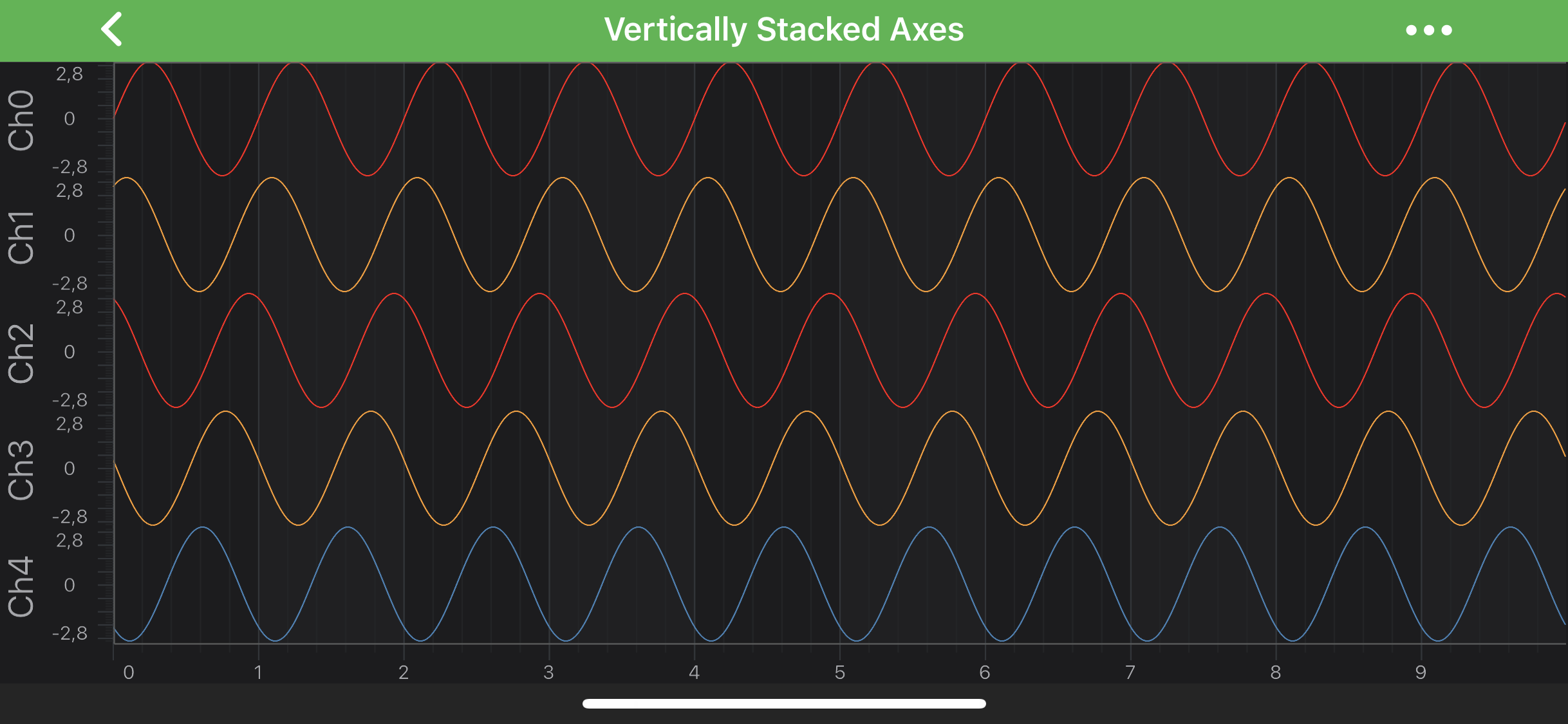
    Default

    Stacking Axes Vertically

    In the code snippet below, a custom IAxisLayoutStrategy is created for all the left-aligned axes that belong to a chart. Let's discuss the methods which needs to be implemented:

    • measureAxes(int availableWidth, int availableHeight, layoutManagers.ChartLayoutState chartLayoutState): override the size of the left axes area is calculated, setting the corresponding field of the AxisLayoutState object. It provides a value feedback to the ILayoutManager after the measure pass ends.

    • layoutAxes(int left, int top, int right, int bottom): override every axis is given a position at the top of the previous one.

    Let's try implement that and apply newly created layout strategy to a leftOuterAxesLayoutStrategy and then - to the SciChartSurface:

    • Java
    • Java with Builders API
    • Kotlin
    class LeftAlignedOuterVerticallyStackedYAxisLayoutStrategy extends VerticalAxisLayoutStrategy {
        @Override
        public void measureAxes(int availableWidth, int availableHeight, ChartLayoutState chartLayoutState) {
            for (int i = 0, size = axes.size(); i < size; i++) {
                final IAxis axis = axes.get(i);
                axis.updateAxisMeasurements();
    
                final AxisLayoutState axisLayoutState = axis.getAxisLayoutState();
                chartLayoutState.leftOuterAreaSize = Math.max(getRequiredAxisSize(axisLayoutState), chartLayoutState.leftOuterAreaSize);
            }
        }
    
        @Override
        public void layoutAxes(int left, int top, int right, int bottom) {
            final int size = axes.size();
            final int height = bottom - top;
            final int axisSize = height / size;
    
            int topPlacement = top;
            for (int i = 0; i < size; i++) {
                final IAxis axis = axes.get(i);
                final AxisLayoutState axisLayoutState = axis.getAxisLayoutState();
    
                final int bottomPlacement = topPlacement + axisSize;
                axis.layoutArea(right - getRequiredAxisSize(axisLayoutState), topPlacement, right, bottomPlacement);
                topPlacement = bottomPlacement;
            }
        }
    }
    
    // Create and set new Layout Strategy
    DefaultLayoutManager layoutManager = new DefaultLayoutManager.Builder()
            .setLeftOuterAxesLayoutStrategy(new LeftAlignedOuterVerticallyStackedYAxisLayoutStrategy())
            .build();
    surface.setLayoutManager(layoutManager);
    
    class LeftAlignedOuterVerticallyStackedYAxisLayoutStrategy extends VerticalAxisLayoutStrategy {
        @Override
        public void measureAxes(int availableWidth, int availableHeight, ChartLayoutState chartLayoutState) {
            for (int i = 0, size = axes.size(); i < size; i++) {
                final IAxis axis = axes.get(i);
                axis.updateAxisMeasurements();
    
                final AxisLayoutState axisLayoutState = axis.getAxisLayoutState();
                chartLayoutState.leftOuterAreaSize = Math.max(getRequiredAxisSize(axisLayoutState), chartLayoutState.leftOuterAreaSize);
            }
        }
    
        @Override
        public void layoutAxes(int left, int top, int right, int bottom) {
            final int size = axes.size();
            final int height = bottom - top;
            final int axisSize = height / size;
    
            int topPlacement = top;
            for (int i = 0; i < size; i++) {
                final IAxis axis = axes.get(i);
                final AxisLayoutState axisLayoutState = axis.getAxisLayoutState();
    
                final int bottomPlacement = topPlacement + axisSize;
                axis.layoutArea(right - getRequiredAxisSize(axisLayoutState), topPlacement, right, bottomPlacement);
                topPlacement = bottomPlacement;
            }
        }
    }
    
    // Create and set new Layout Strategy
    DefaultLayoutManager layoutManager = new DefaultLayoutManager.Builder()
            .setLeftOuterAxesLayoutStrategy(new LeftAlignedOuterVerticallyStackedYAxisLayoutStrategy())
            .build();
    surface.setLayoutManager(layoutManager);
    
    class LeftAlignedOuterVerticallyStackedYAxisLayoutStrategy :
        VerticalAxisLayoutStrategy() {
        override fun measureAxes(
            availableWidth: Int,
            availableHeight: Int,
            chartLayoutState: ChartLayoutState
        ) {
            var i = 0
            val size = axes.size
            while (i < size) {
                val axis = axes[i]
                axis.updateAxisMeasurements()
                val axisLayoutState = axis.axisLayoutState
                chartLayoutState.leftOuterAreaSize = Math.max(
                    getRequiredAxisSize(axisLayoutState),
                    chartLayoutState.leftOuterAreaSize
                )
                i++
            }
        }
    
        override fun layoutAxes(left: Int, top: Int, right: Int, bottom: Int) {
            val size = axes.size
            val height = bottom - top
            val axisSize = height / size
            var topPlacement = top
            for (i in 0 until size) {
                val axis = axes[i]
                val axisLayoutState = axis.axisLayoutState
                val bottomPlacement = topPlacement + axisSize
                axis.layoutArea(
                    right - getRequiredAxisSize(axisLayoutState),
                    topPlacement,
                    right,
                    bottomPlacement
                )
                topPlacement = bottomPlacement
            }
        }
    }
    
    // Create and set new Layout Strategy
    val layoutManager = DefaultLayoutManager.Builder()
        .setLeftOuterAxesLayoutStrategy(LeftAlignedOuterVerticallyStackedYAxisLayoutStrategy())
        .build()
    surface.layoutManager = layoutManager
    

    Please refer to the Vertically Stacked Y Axes to find the complete code sample.

    For more examples of custom axes layouts, please refer to the Central Axis article.

    Back to top © 2011-2025 SciChart. All rights reserved. | sitemap.xml