The FreehandDrawingAnnotation
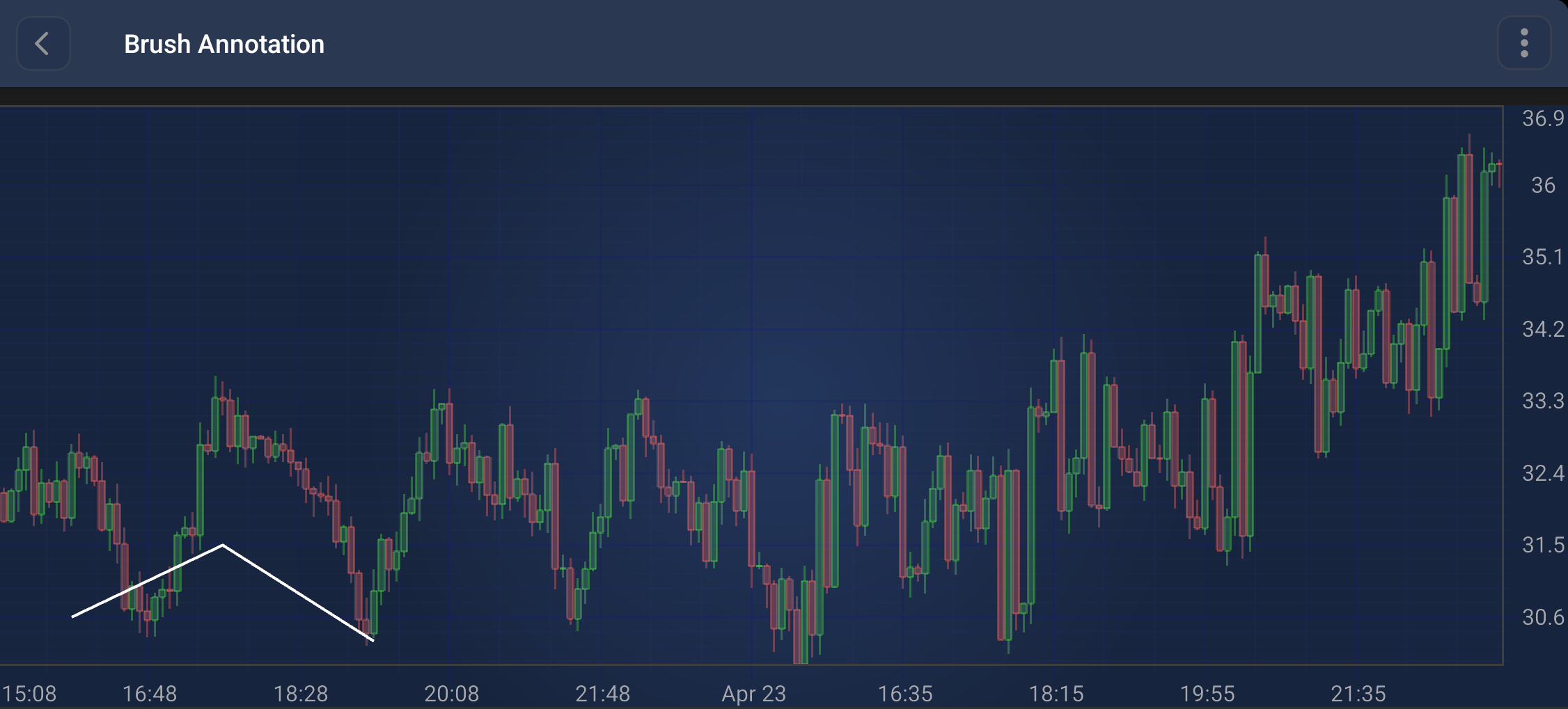
The FreehandDrawingAnnotation allows for freehand drawing on the chart:
Note
Examples of the Annotations usage can be found in the SciChart Android Examples Suite as well as on GitHub:
A FreehandDrawingAnnotation is a multi-point annotation that stores a collection of points to form a freehand stroke. It provides properties to customize its appearance:
- brushColor: Sets the color of the brush stroke.
- brushThickness: Sets the thickness of the brush stroke.
Points can be added or updated using the following methods:
- [setBasePoint(Comparable x, Comparable y)](xref:com.scichart.charting.visuals.annotations.tradingAnnotations.FreehandDrawingAnnotation.setBasePoint(java.lang.Comparable, java.lang.Comparable)): Adds a new point to the annotation.
- [updateBasePoint(int index, Comparable x, Comparable y)](xref:com.scichart.charting.visuals.annotations.tradingAnnotations.FreehandDrawingAnnotation.updateBasePoint(int, java.lang.Comparable, java.lang.Comparable)): Updates an existing point at the specified index.
Note
The xAxisId and yAxisId must be supplied if you have axis with non-default Axis Ids, e.g. in multi-axis scenario.
Create a FreehandDrawingAnnotation
A FreehandDrawingAnnotation can be added onto a chart using the following code:
// Assume a surface has been created and configured somewhere
// Create a FreehandDrawingAnnotation
final FreehandDrawingAnnotation freehandAnnotation = new FreehandDrawingAnnotation(getContext());

// Allow to interact with the annotation in run-time
freehandAnnotation.setIsEditable(true);

// Specify the brush color and thickness
freehandAnnotation.setBrushColor(Color.WHITE);
freehandAnnotation.setBrushThickness(4f);

// Add points to the FreehandDrawingAnnotation
freehandAnnotation.setBasePoint(10, 30.6);
freehandAnnotation.setBasePoint(30, 31.5);
freehandAnnotation.setBasePoint(50, 30.3);

// Add the annotation to the AnnotationsCollection of a surface
surface.getAnnotations().add(freehandAnnotation);
Note
For interactive creation of the FreehandDrawingAnnotation, use the FreehandDrawingAnnotationCreationModifier.
Note
To learn more about other Annotation Types, available out of the box in SciChart, please find the comprehensive list in the Annotation APIs article.