Search Results for

    Show / Hide Table of Contents

    The Stacked Column Series Type

    The Stacked Column series can be created by using StackedColumnRenderableSeries and one of the provided collections, which are used to stack columns Horizontally or Vertically. Stacked Column series shares most of its properties with the regular Column Series, in addition the columns are automatically vertically stacked (the Y-Values are aggregated) or horizontally grouped.

    There are 2 available collections to work with StackedColumnRenderableSeries:

    • VerticallyStackedColumnsCollection - allows to stack columns vertically;
    • HorizontallyStackedColumnsCollection - allows to stack (group) columns horizontally.
    Note

    In multi axis scenarios, a series has to be assigned to particular X and Y axes. This can be done by passing the axes IDs to the xAxisId, yAxisId properties.
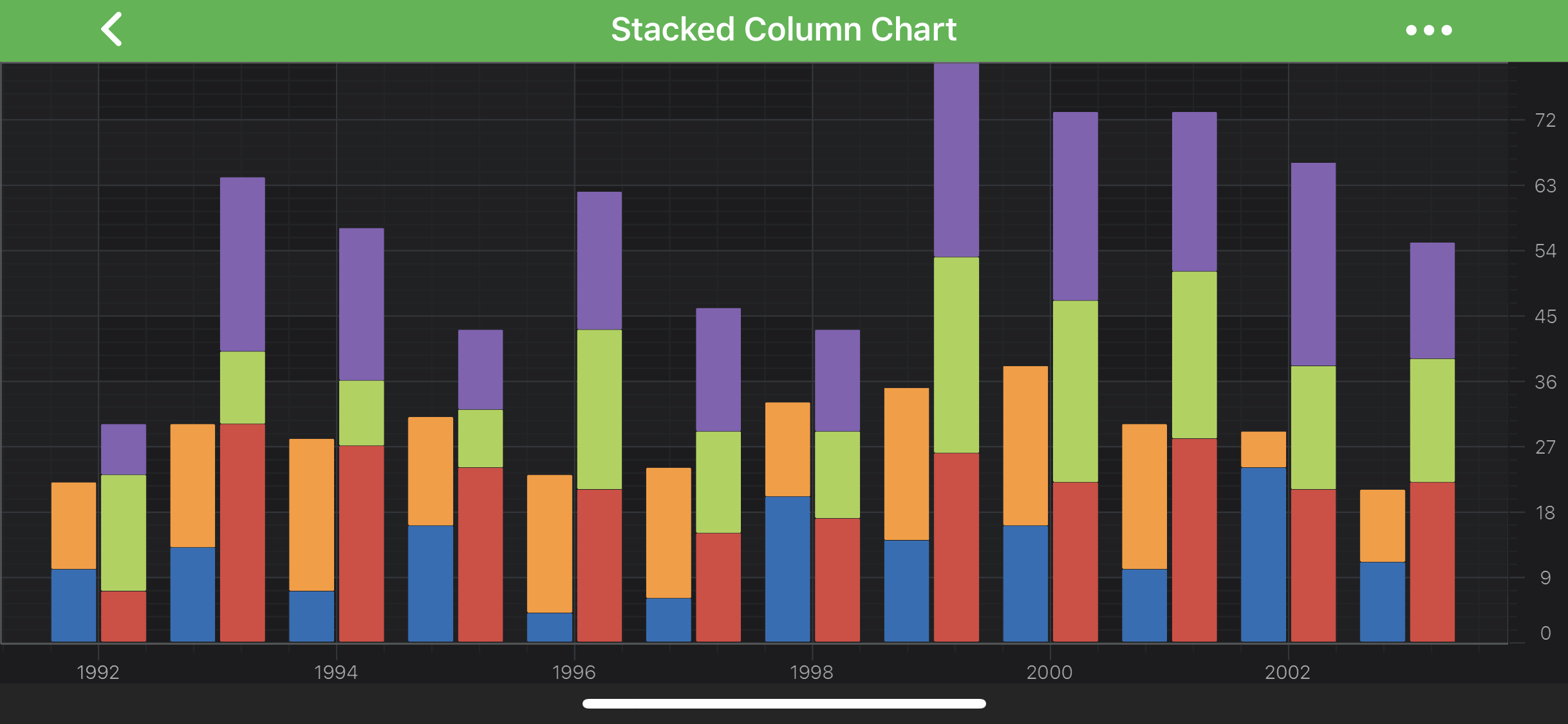
    Stacked Column Series Type

    Note

    Examples of the Stacked Column Series can be found in the SciChart Android Examples Suite as well as on GitHub:

    • Native Example
    • Xamarin Example

    How the Stacking Works for Column Series

    For Stacked Column Series, it's possible to perform either Vertical or Horizontal stacking, or even both at the same time.

    Vertical Stacking

    Vertical Stacking of IStackedColumnRenderableSeries is handled by special renderableSeries - VerticallyStackedColumnsCollection.

    Basically, it's a simple ObservableCollection<E> of Stacked Column Series, where the order of items in it determines how series should be stacked and drawn - the first item will be drawn as regular column series and the rest will be stacked on top of each other.

    If you want to have several sets of Stacked Column Series which should be stacked independently, all you need to do is to create the corresponding amount of VerticallyStackedColumnsCollection which will hold appropriate IStackedColumnRenderableSeries.

    Horizontal Stacking (Grouping)

    Horizontal Stacking of Stacked Column Series is very similar to the Vertical one. The only difference is that it stacks (groups) its items horizontally. By default it supports stacking of any IStackedColumnRenderableSeries implementor.

    For horizontal Stacking, you can define spacing, which depends on spacingMode, as well as whole group dataPointWidth using the following properties:

    • spacing - if you use Absolute mode then it accepts value in pixels, and if you use Relative mode - it expects value from 0 to 1, which tells how much of the available space it should use relatively to each column size;
    • spacingMode - Absolute or Relative modes are available through SpacingMode;
    • dataPointWidth - specifies how much space the whole stacked group occupies, varying from 0 to 1 (when columns are conjoined).

    If you need to have both vertical and horizontal stacking at the same time, just use VerticallyStackedColumnsCollection (which conforms to IStackedColumnRenderableSeries) inside your HorizontallyStackedColumnsCollection.

    Create a Stacked Column Series

    To create a Stacked Column Series, use the following code:

    • Java
    • Java with Builders API
    • Kotlin
    @Override
    protected void initExample(@NonNull SciChartSurface surface) {
        // declare arrays with data to append
        final double[] porkData = new double[]{10, 13, 7, 16, 4, 6, 20, 14, 16, 10, 24, 11};
        final double[] vealData = new double[]{12, 17, 21, 15, 19, 18, 13, 21, 22, 20, 5, 10};
        final double[] tomatoesData = new double[]{7, 30, 27, 24, 21, 15, 17, 26, 22, 28, 21, 22};
        final double[] cucumberData = new double[]{16, 10, 9, 8, 22, 14, 12, 27, 25, 23, 17, 17};
        final double[] pepperData = new double[]{7, 24, 21, 11, 19, 17, 14, 27, 26, 22, 28, 16};
    
        // declare and append data into data series
        final IXyDataSeries<Double, Double> ds1 = new XyDataSeries<>(Double.class, Double.class);
        final IXyDataSeries<Double, Double> ds2 = new XyDataSeries<>(Double.class, Double.class);
        final IXyDataSeries<Double, Double> ds3 = new XyDataSeries<>(Double.class, Double.class);
        final IXyDataSeries<Double, Double> ds4 = new XyDataSeries<>(Double.class, Double.class);
        final IXyDataSeries<Double, Double> ds5 = new XyDataSeries<>(Double.class, Double.class);
        final int data = 1992;
        for (int i = 0; i < porkData.length; i++) {
            double xValue = data + i;
            ds1.append(xValue, porkData[i]);
            ds2.append(xValue, vealData[i]);
            ds3.append(xValue, tomatoesData[i]);
            ds4.append(xValue, cucumberData[i]);
            ds5.append(xValue, pepperData[i]);
        }
    
        // declare few StackedColumnRenderableSeries and assign data series to draw
        final StackedColumnRenderableSeries porkSeries = createStackedColumn(ds1, 0xff226fb7);
        final StackedColumnRenderableSeries vealSeries = createStackedColumn(ds2, 0xffff9a2e);
        final StackedColumnRenderableSeries tomatoSeries = createStackedColumn(ds3, 0xffdc443f);
        final StackedColumnRenderableSeries cucumberSeries = createStackedColumn(ds4, 0xffaad34f);
        final StackedColumnRenderableSeries pepperSeries = createStackedColumn(ds5, 0xff8562b4);
    
        // wrap porkSeries and vealSeries into VerticallyStackedColumnCollection to stack them vertically
        final VerticallyStackedColumnsCollection verticalCollection1 = new VerticallyStackedColumnsCollection();
        verticalCollection1.add(porkSeries);
        verticalCollection1.add(vealSeries);
    
        // wrap cucumberSeries, cucumberSeries and pepperSeriesinto VerticallyStackedColumnCollection to stack them vertically
        final VerticallyStackedColumnsCollection verticalCollection2 = new VerticallyStackedColumnsCollection();
        verticalCollection2.add(tomatoSeries);
        verticalCollection2.add(cucumberSeries);
        verticalCollection2.add(pepperSeries);
    
        // wrap previously created VerticallyStackedColumnCollection into HorizontallyStackedColumnsCollection to stack resulting series horizontally
        final HorizontallyStackedColumnsCollection columnsCollection = new HorizontallyStackedColumnsCollection();
        columnsCollection.setSpacing(0f);
        columnsCollection.add(verticalCollection1);
        columnsCollection.add(verticalCollection2);
    
        UpdateSuspender.using(surface, () -> {
            Collections.addAll(surface.getXAxes(), new NumericAxis(requireContext()));
            Collections.addAll(surface.getYAxes(), new NumericAxis(requireContext()));
    
            Collections.addAll(surface.getRenderableSeries(), columnsCollection);
        });
    }
    
    private StackedColumnRenderableSeries createStackedColumn(IXyDataSeries<Double, Double> dataSeries, int fill) {
        final StackedColumnRenderableSeries stackedColumnSeries = new StackedColumnRenderableSeries();
    
        stackedColumnSeries.setDataSeries(dataSeries);
        stackedColumnSeries.setFillBrushStyle(new SolidBrushStyle(fill));
        stackedColumnSeries.setStrokeStyle(new SolidPenStyle(Color.TRANSPARENT, true, 0f, null));
    
        return stackedColumnSeries;
    }
    
    @Override
    protected void initExample(@NonNull SciChartSurface surface) {
        // declare arrays with data to append
        final double[] porkData = new double[]{10, 13, 7, 16, 4, 6, 20, 14, 16, 10, 24, 11};
        final double[] vealData = new double[]{12, 17, 21, 15, 19, 18, 13, 21, 22, 20, 5, 10};
        final double[] tomatoesData = new double[]{7, 30, 27, 24, 21, 15, 17, 26, 22, 28, 21, 22};
        final double[] cucumberData = new double[]{16, 10, 9, 8, 22, 14, 12, 27, 25, 23, 17, 17};
        final double[] pepperData = new double[]{7, 24, 21, 11, 19, 17, 14, 27, 26, 22, 28, 16};
    
        // declare and append data into data series
        final IXyDataSeries<Double, Double> ds1 = sciChartBuilder.newXyDataSeries(Double.class, Double.class).build();
        final IXyDataSeries<Double, Double> ds2 = sciChartBuilder.newXyDataSeries(Double.class, Double.class).build();
        final IXyDataSeries<Double, Double> ds3 = sciChartBuilder.newXyDataSeries(Double.class, Double.class).build();
        final IXyDataSeries<Double, Double> ds4 = sciChartBuilder.newXyDataSeries(Double.class, Double.class).build();
        final IXyDataSeries<Double, Double> ds5 = sciChartBuilder.newXyDataSeries(Double.class, Double.class).build();
        final int data = 1992;
        for (int i = 0; i < porkData.length; i++) {
            double xValue = data + i;
            ds1.append(xValue, porkData[i]);
            ds2.append(xValue, vealData[i]);
            ds3.append(xValue, tomatoesData[i]);
            ds4.append(xValue, cucumberData[i]);
            ds5.append(xValue, pepperData[i]);
        }
    
        // declare few StackedColumnRenderableSeries and assign data series to draw
        final StackedColumnRenderableSeries porkSeries = sciChartBuilder.newStackedColumn().withDataSeries(ds1).withFillColor(0xff226fb7).withStrokeStyle(0xff22579D, 0f).build();
        final StackedColumnRenderableSeries vealSeries = sciChartBuilder.newStackedColumn().withDataSeries(ds2).withFillColor(0xffff9a2e).withStrokeStyle(0xffBE642D, 0f).build();
        final StackedColumnRenderableSeries tomatoSeries = sciChartBuilder.newStackedColumn().withDataSeries(ds3).withFillColor(0xffdc443f).withStrokeStyle(0xffA33631, 0f).build();
        final StackedColumnRenderableSeries cucumberSeries = sciChartBuilder.newStackedColumn().withDataSeries(ds4).withFillColor(0xffaad34f).withStrokeStyle(0xff73953D, 0f).build();
        final StackedColumnRenderableSeries pepperSeries = sciChartBuilder.newStackedColumn().withDataSeries(ds5).withFillColor(0xff8562b4).withStrokeStyle(0xff64458A, 0f).build();
    
        // wrap porkSeries and vealSeries into VerticallyStackedColumnCollection to stack them vertically
        final VerticallyStackedColumnsCollection verticalCollection1 = new VerticallyStackedColumnsCollection();
        verticalCollection1.add(porkSeries);
        verticalCollection1.add(vealSeries);
    
        // wrap cucumberSeries, cucumberSeries and pepperSeriesinto VerticallyStackedColumnCollection to stack them vertically
        final VerticallyStackedColumnsCollection verticalCollection2 = new VerticallyStackedColumnsCollection();
        verticalCollection2.add(tomatoSeries);
        verticalCollection2.add(cucumberSeries);
        verticalCollection2.add(pepperSeries);
    
        // wrap previously created VerticallyStackedColumnCollection into HorizontallyStackedColumnsCollection to stack resulting series horizontally
        final HorizontallyStackedColumnsCollection columnsCollection = new HorizontallyStackedColumnsCollection();
        columnsCollection.setSpacing(0f);
        columnsCollection.add(verticalCollection1);
        columnsCollection.add(verticalCollection2);
    
        UpdateSuspender.using(surface, () -> {
            Collections.addAll(surface.getXAxes(), sciChartBuilder.newNumericAxis().build());
            Collections.addAll(surface.getYAxes(), sciChartBuilder.newNumericAxis().build());
    
            Collections.addAll(surface.getRenderableSeries(), columnsCollection);
        });
    }
    
    override fun initExample(surface: SciChartSurface) {
        // declare arrays with data to append
        val porkData = doubleArrayOf(10.0, 13.0, 7.0, 16.0, 4.0, 6.0, 20.0, 14.0, 16.0, 10.0, 24.0, 11.0)
        val vealData = doubleArrayOf(12.0, 17.0, 21.0, 15.0, 19.0, 18.0, 13.0, 21.0, 22.0, 20.0, 5.0, 10.0)
        val tomatoesData = doubleArrayOf(7.0, 30.0, 27.0, 24.0, 21.0, 15.0, 17.0, 26.0, 22.0, 28.0, 21.0, 22.0)
        val cucumberData = doubleArrayOf(16.0, 10.0, 9.0, 8.0, 22.0, 14.0, 12.0, 27.0, 25.0, 23.0, 17.0, 17.0)
        val pepperData = doubleArrayOf(7.0, 24.0, 21.0, 11.0, 19.0, 17.0, 14.0, 27.0, 26.0, 22.0, 28.0, 16.0)
    
        val data = 1992.0
        // declare and append data into data series
        val ds1: IXyDataSeries<Double, Double> = XyDataSeries(
            Double::class.javaObjectType,
            Double::class.javaObjectType
        ).apply {
            porkData.forEachIndexed {i, value -> append(data + i, value)}
        }
        val ds2: IXyDataSeries<Double, Double> = XyDataSeries(
            Double::class.javaObjectType,
            Double::class.javaObjectType
        ).apply {
            vealData.forEachIndexed {i, value -> append(data + i, value)}
        }
        val ds3: IXyDataSeries<Double, Double> = XyDataSeries(
            Double::class.javaObjectType,
            Double::class.javaObjectType
        ).apply {
            tomatoesData.forEachIndexed {i, value -> append(data + i, value)}
        }
        val ds4: IXyDataSeries<Double, Double> = XyDataSeries(
            Double::class.javaObjectType,
            Double::class.javaObjectType
        ).apply {
            cucumberData.forEachIndexed {i, value -> append(data + i, value)}
        }
        val ds5: IXyDataSeries<Double, Double> = XyDataSeries(
            Double::class.javaObjectType,
            Double::class.javaObjectType
        ).apply {
            pepperData.forEachIndexed {i, value -> append(data + i, value)}
        }
    
        // declare few StackedColumnRenderableSeries and assign data series to draw
        val porkSeries = createStackedColumn(ds1, -0xdd9049)
        val vealSeries = createStackedColumn(ds2, -0x65d2)
        val tomatoSeries = createStackedColumn(ds3, -0x23bbc1)
        val cucumberSeries = createStackedColumn(ds4, -0x552cb1)
        val pepperSeries = createStackedColumn(ds5, -0x7a9d4c)
    
        // wrap porkSeries and vealSeries into VerticallyStackedColumnCollection to stack them vertically
        val verticalCollection1 = VerticallyStackedColumnsCollection().apply {
            add(porkSeries)
            add(vealSeries)
        }
    
        // wrap cucumberSeries, cucumberSeries and pepperSeriesinto VerticallyStackedColumnCollection to stack them vertically
        val verticalCollection2 = VerticallyStackedColumnsCollection().apply {
            add(tomatoSeries)
            add(cucumberSeries)
            add(pepperSeries)
        }
    
        // wrap previously created VerticallyStackedColumnCollection into HorizontallyStackedColumnsCollection to stack resulting series horizontally
        val columnsCollection = HorizontallyStackedColumnsCollection().apply {
            add(verticalCollection1)
            add(verticalCollection2)
    
            spacing = 0.0
        }
    
        UpdateSuspender.using(surface) {
            Collections.addAll(surface.xAxes, NumericAxis(context))
            Collections.addAll(surface.yAxes, NumericAxis(context))
    
            Collections.addAll(surface.renderableSeries, columnsCollection)
        }
    }
    
    private fun createStackedColumn(
        ds: IXyDataSeries<Double, Double>,
        fill: Int
    ): StackedColumnRenderableSeries? {
        return StackedColumnRenderableSeries().apply {
            dataSeries = ds
            fillBrushStyle = SolidBrushStyle(fill)
            strokeStyle = SolidPenStyle(Color.TRANSPARENT, true, 0f, null)
        }
    }
    

    100% Stacked Columns

    Similarly to Stacked Mountain Series in SciChart - it is possible to have Stacked Columns, that fills in all available vertical space. This mode is called 100% Stacked Columns.

    To use it on your VerticallyStackedColumnsCollection, just change the corresponding property of your collection to isOneHundredPercent
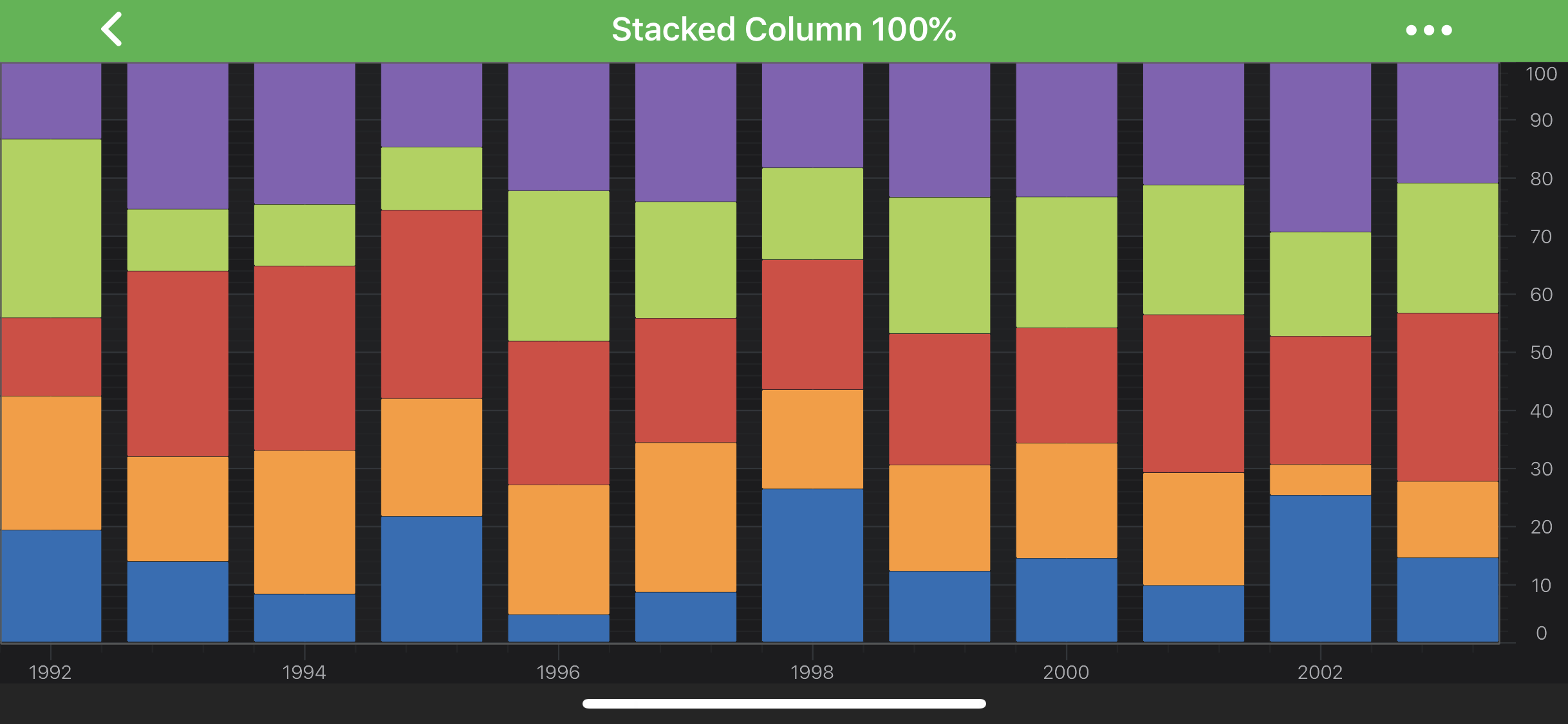
    100% Stacked Column Series

    Back to top © 2011-2025 SciChart. All rights reserved. | sitemap.xml