The Uniform Heatmap Series Type
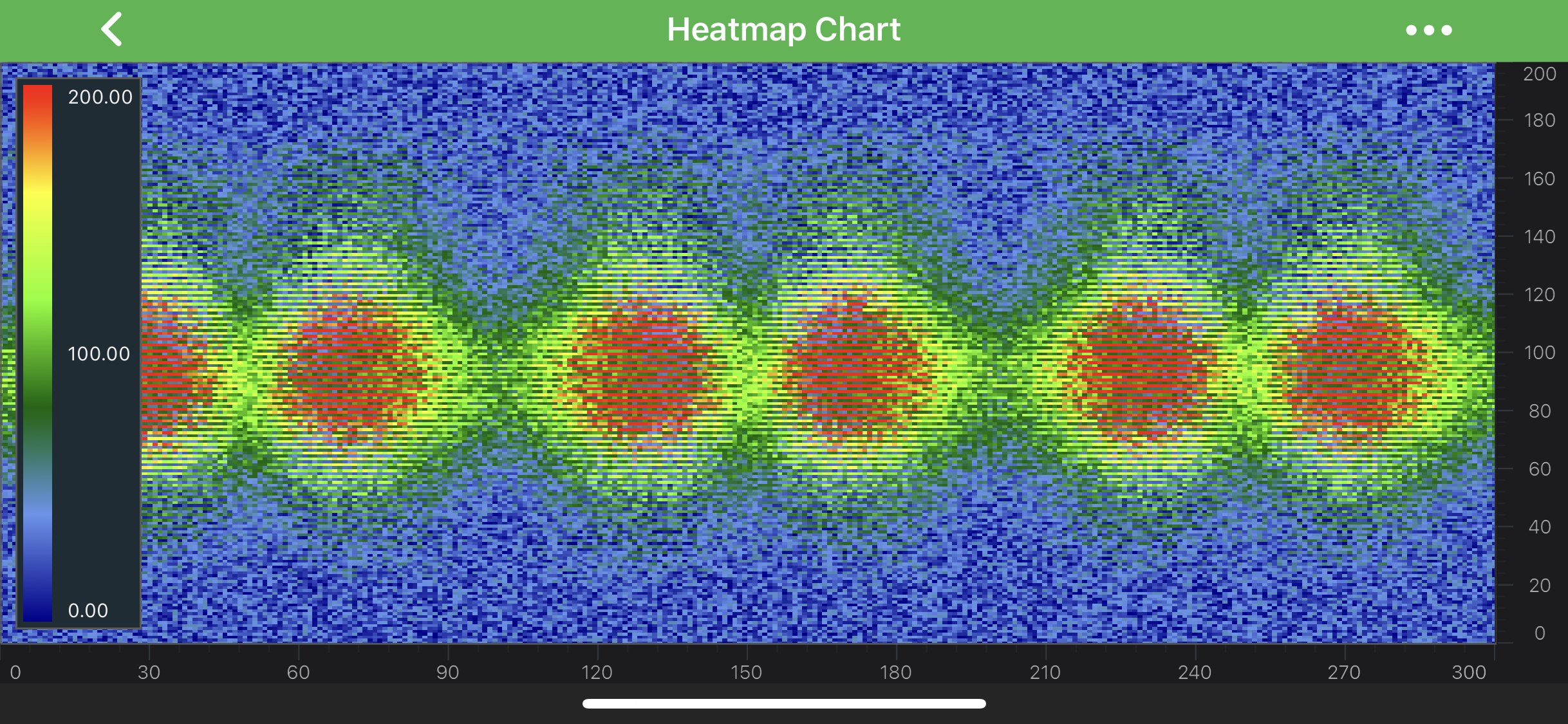
Heatmaps are provided by the FastUniformHeatmapRenderableSeries, which consumes data from a UniformHeatmapDataSeries<TX,TY,TZ>.
This is designed to display 2D array of data with real values. Every item in the 2D array is represented as a colored rectangle - cell. The color depends on corresponding item’s Z-Value.
Note
For more info about UniformHeatmapDataSeries<TX,TY,TZ>, as well as other DataSeries types in SciChart, see the DataSeries API article.
Note
Examples for the Uniform Heatmap Series can be found in the SciChart Android Examples Suite as well as on GitHub:
Uniform heatmaps are extremely fast, lightweight series types for rendering two dimensional data as a heatmap or spectrogram. As mentioned above - the FastUniformHeatmapRenderableSeries type should be used in conjunction with a UniformHeatmapDataSeries<TX,TY,TZ>, when you simply want to specify a Step in the X, Y direction (each cell is the same size).
All Z-Values should fall into the range determined by the Minimum, Maximum values (they may go beyond it though), which are available via the following properties:
Also, Uniform Heatmap Series requires a ColorMap to be set. The ColorMap determines how a gradient color transition occurs and can be applied via the colorMap property.
Add a Legend onto a Heatmap Chart
There is a special view designed to be used in tandem with FastUniformHeatmapRenderableSeries called SciChartHeatmapColourMap. It is not required by a Heatmap and is fully optional. It can be placed anywhere on the layout.
Similarly to the FastUniformHeatmapRenderableSeries, the SciChartHeatmapColourMap type allows to set the Minimum, Maximum values and apply a ColorMap. All these can be assigned via the corresponding properties:
The numeric labels can be formatted by apply TextFormatting to them via the textFormat property.
Finally, there is the orientation property to specify whether the legend appears Horizontally or Vertically.
Create a Heatmap Series
To create a Uniform Heatmap Chart, use the following code:
protected void initExample(@NonNull SciChartSurface surface) {
    final NumericAxis xAxis = new NumericAxis(requireContext());
    final NumericAxis yAxis = new NumericAxis(requireContext());

    final UniformHeatmapDataSeries<Integer, Integer, Double> dataSeries = new UniformHeatmapDataSeries<>(Integer.class, Integer.class, Double.class, WIDTH, HEIGHT);

    final FastUniformHeatmapRenderableSeries heatmapRenderableSeries = new FastUniformHeatmapRenderableSeries();
    heatmapRenderableSeries.setColorMap(
            new ColorMap(
                    new int[]{DarkBlue, CornflowerBlue, DarkGreen, Chartreuse, Yellow, Red},
                    new float[]{0f, 0.2f, 0.4f, 0.6f, 0.8f, 1}
            )
    );

    heatmapRenderableSeries.setMinimum(0);
    heatmapRenderableSeries.setMaximum(200);
    heatmapRenderableSeries.setDataSeries(dataSeries);

    final SciChartHeatmapColourMap colourMap = binding.heatmapColourMap;
    colourMap.setMinimum(heatmapRenderableSeries.getMinimum());
    colourMap.setMaximum(heatmapRenderableSeries.getMaximum());
    colourMap.setColorMap(heatmapRenderableSeries.getColorMap());

    Collections.addAll(surface.getXAxes(), xAxis);
    Collections.addAll(surface.getYAxes(), yAxis);
    Collections.addAll(surface.getRenderableSeries(), heatmapRenderableSeries);

    final CursorModifier cursor = new CursorModifier();
    cursor.setShowTooltip(true);
    cursor.setReceiveHandledEvents(true);

    ModifierGroup modifiers = createDefaultModifiers();
    modifiers.getChildModifiers().add(cursor);

    Collections.addAll(surface.getChartModifiers(), modifiers);
}
The code above creates a Heatmap with a ColorMap that has gradient transitions between five colors and a SciChartHeatmapColourMap Legend to it.
Note
In multi axis scenarios, a series has to be assigned to particular X and Y axes. This can be done passing the axes IDs to the xAxisId, yAxisId properties.
Updating Data in the Heatmap
The UniformHeatmapDataSeries<TX,TY,TZ> does not support Append, Insert, Update, Remove like the other DataSeries do. You can, however, update the data by simply updating the array passed in. There are a bunch of methods provided to update Heatmap data:
- updateRangeZAt(int xIndex, int yIndex, TZ[] values) - updates the range of Z values for this series;
- updateRangeZAt(int xIndex, int yIndex, IValues<TZ> values) - updates the range of Z values for this series;
- updateRangeZAt(int xIndex, int yIndex, List<TZ> values) - updates the range of Z values for this series;
- updateZAt(int xIndex, int yIndex, TZ value) - updates Z Value at specified xIndex and yIndex;
- updateZValues(TZ[] values) - updates all Z values for this series;
- updateZValues(IValues<TZ> values) - updates all Z values for this series;
- updateZValues(List<TZ> values) - updates all Z values for this series;
Note
It is highly recommended to update UniformHeatmapDataSeries<TX,TY,TZ> using our <com.scichart.core.model.IValues> which allows to omit the boxing/unboxing of values, to make sure you get the most out of performance during your updates.