Search Results for

    Show / Hide Table of Contents

    The BoxAnnotation

    The BoxAnnotation draws a rectangle at specific X1, X2, Y1, Y2 coordinates:
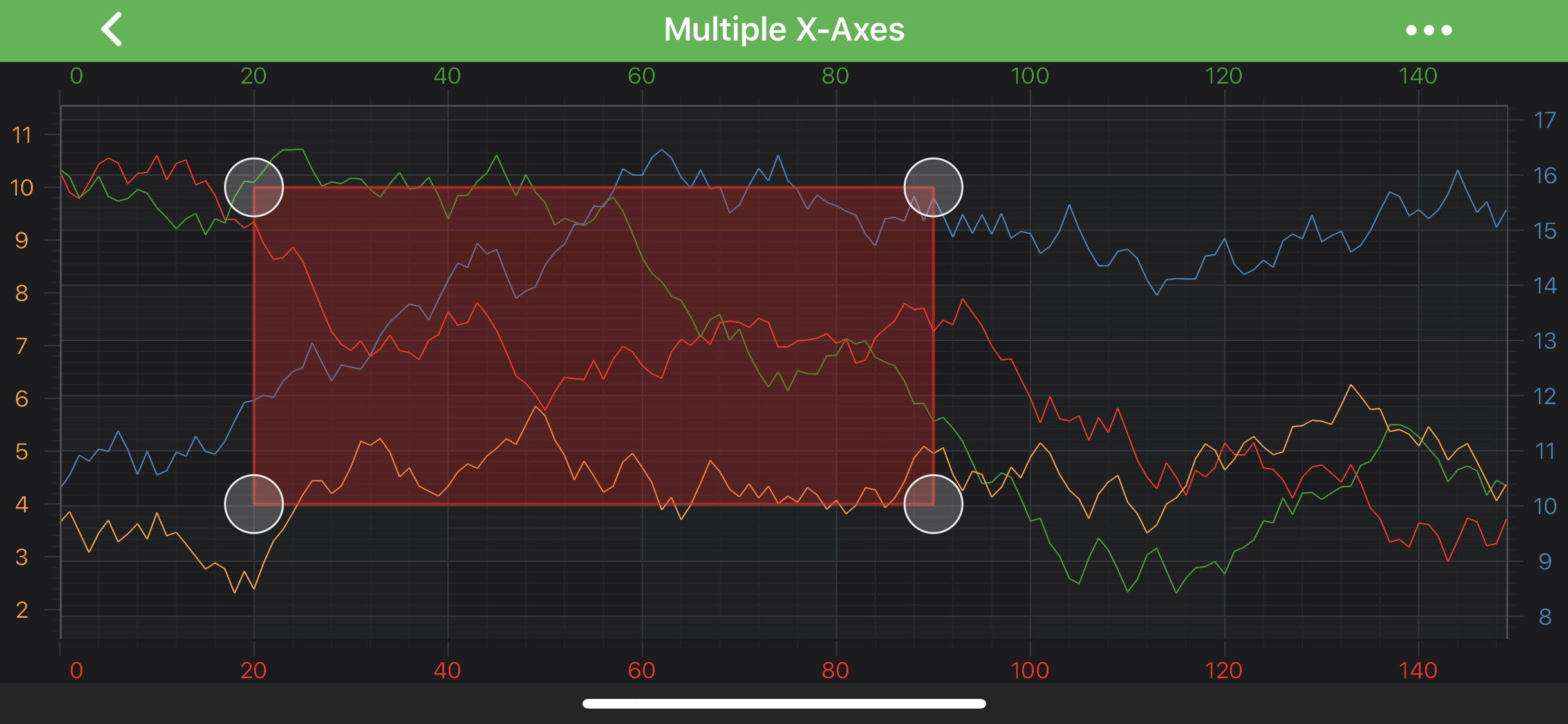
    Box Annotation

    Note

    Examples of the Annotations usage can be found in the SciChart Android Examples Suite as well as on GitHub:

    • Native Android Chart Annotations Example

    • Native Android Chart Interactive Annotations Example

    • Xamarin Android Chart Annotations Example

    • Xamarin Android Chart Interactive Annotations Example

    A BoxAnnotation is placed on a chart at the position determined by its [X1, Y1] and [X2, Y2] coordinates, which correspond to the top-left and bottom-right corners of the drawn rectangle. Those can be accessed via the following properties: x1, y1, x2, y2

    Note

    The xAxisId and yAxisId must be supplied if you have axis with non-default Axis Ids, e.g. in multi-axis scenario.

    Create a BoxAnnotation

    A BoxAnnotation can be added onto a chart using the following code:

    • Java
    • Java with Builders API
    • Kotlin
    // Assume a surface has been created and configured somewhere
    // Create a BoxAnnotation
    final BoxAnnotation boxAnnotation = new BoxAnnotation(getContext());
    
    // Allow to interact with the annotation in run-time
    boxAnnotation.setIsEditable(true);
    
    // in a multi-axis scenario, specify the XAxisId and YAxisId
    boxAnnotation.setXAxisId("TopAxisId");
    boxAnnotation.setYAxisId("LeftAxisId");
    
    // Specify a desired position by setting coordinates
    boxAnnotation.setX(20.0f);
    boxAnnotation.setY1(10.0f);
    boxAnnotation.setX2(90.0f);
    boxAnnotation.setY2(4.0f);
    
    // Specify the background resource
    boxAnnotation.setBackgroundResource(R.drawable.example_box_annotation_background);
    
    // Add the annotation to the AnnotationsCollection of a surface
    surface.getAnnotations().add(boxAnnotation);
    
    // Assume a surface has been created and configured somewhere
    // Create a BoxAnnotation
    BoxAnnotation boxAnnotation = sciChartBuilder.newBoxAnnotation()
            // Allow to interact with the annotation in run-time
            .withIsEditable(true)
            // in a multi-axis scenario, specify the XAxisId and YAxisId
            .withXAxisId("TopAxisId")
            .withYAxisId("LeftAxisId")
            // Specify a desired position by setting coordinates
            .withPosition(20.0f, 10.0f, 90.0f, 4.0f)
            // Specify the background resource
            .withBackgroundDrawableId(R.drawable.example_box_annotation_background)
            .build();
    
    // Add the annotation to the AnnotationsCollection of a surface
    surface.getAnnotations().add(boxAnnotation);
    
    // Assume a surface has been created and configured somewhere
    // Create a BoxAnnotation
    val boxAnnotation = BoxAnnotation(context)
    
    // Allow to interact with the annotation in run-time
    boxAnnotation.setIsEditable(true)
    
    // in a multi-axis scenario, specify the XAxisId and YAxisId
    boxAnnotation.xAxisId = "TopAxisId"
    boxAnnotation.yAxisId = "LeftAxisId"
    
    // Specify a desired position by setting coordinates
    boxAnnotation.x = 20.0f
    boxAnnotation.y1 = 10.0f
    boxAnnotation.x2 = 90.0f
    boxAnnotation.y2 = 4.0f
    
    // Specify the background resource
    boxAnnotation.setBackgroundResource(R.drawable.example_box_annotation_background)
    
    // Add the annotation to the AnnotationsCollection of a surface
    surface.annotations.add(boxAnnotation)
    
    Note

    To learn more about other Annotation Types, available out of the box in SciChart, please find the comprehensive list in the Annotation APIs article.

    Back to top © 2011-2025 SciChart. All rights reserved. | sitemap.xml