The XabcdAnnotation
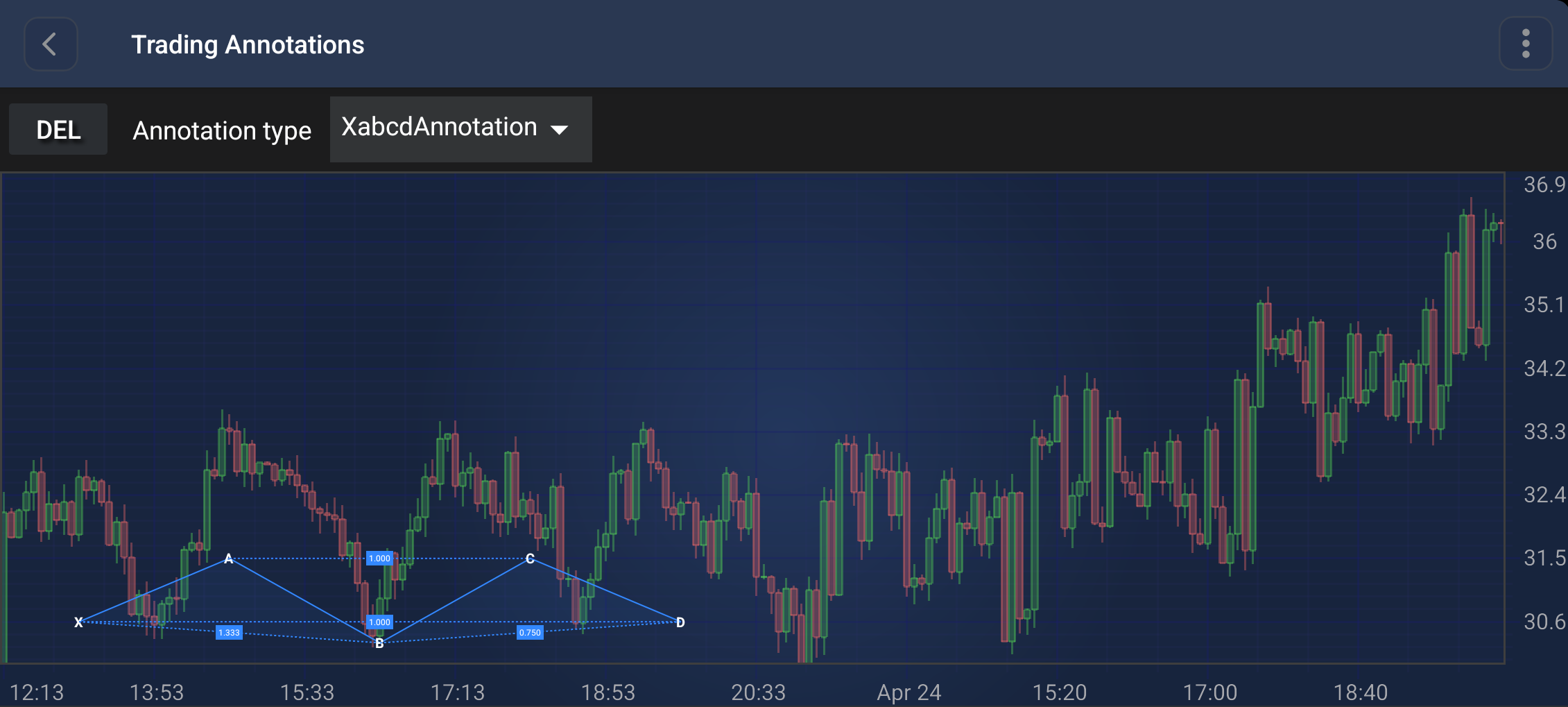
The XabcdAnnotation is a specialized multi-point annotation used for drawing harmonic patterns (such as Gartley, Butterfly, Bat, and Crab patterns) which consist of 5 points: X, A, B, C, and D.
Note
Examples of the Annotations usage can be found in the SciChart Android Examples Suite as well as on GitHub:
Points and Ratios
The XabcdAnnotation requires 5 points to be placed. Once all points are set, it automatically calculates and displays the following Fibonacci-style ratios:
- XB Ratio: Calculated as
|B - A| / |A - X| - AC Ratio: Calculated as
|C - B| / |B - A| - BD Ratio: Calculated as
|D - C| / |C - B| - XD Ratio: Calculated as
|D - A| / |A - X|
These ratios are calculated based on the values on the specified ratioAxisId. If no axis ID is specified, the primary Y-Axis is used.
Appearance Properties
The following properties can be used to customize the appearance of the XabcdAnnotation:
- stroke: Sets the pen style for the primary lines (XA, AB, BC, CD) and the secondary dashed lines (XB, AC, BD, XD).
- fill: Sets the brush style for the two filled triangular areas (XAB and BCD).
Create an XabcdAnnotation
An XabcdAnnotation can be added onto a chart using the following code:
// Assume a surface has been created and configured somewhere
// Create an XabcdAnnotation
final XabcdAnnotation xabcdAnnotation = new XabcdAnnotation(getContext());

// Allow to interact with the annotation in run-time
xabcdAnnotation.setIsEditable(true);

// Specify the stroke and fill
xabcdAnnotation.setStroke(new SolidPenStyle(Color.YELLOW, true, 2f, null));
xabcdAnnotation.setFill(new SolidBrushStyle(Color.BLUE));

// Add 5 points (X, A, B, C, D)
xabcdAnnotation.setBasePoint(10, 30.6); // X
xabcdAnnotation.setBasePoint(30, 31.5); // A
xabcdAnnotation.setBasePoint(50, 30.3); // B
xabcdAnnotation.setBasePoint(70, 31.5); // C
xabcdAnnotation.setBasePoint(90, 30.6); // D

// Add the annotation to the AnnotationsCollection of a surface
surface.getAnnotations().add(xabcdAnnotation);
Note
For interactive creation of the XabcdAnnotation, use the XabcdAnnotationCreationModifier.
Note
To learn more about other Annotation Types, available out of the box in SciChart, please find the comprehensive list in the Annotation APIs article.