The SciChartSurface Camera
The property SciChart3DSurface.Camera📘 defines an ICameraController📘 instance. By default this interface is implemented in CameraController📘 class.
By default, the SciChart3DSurface.Camera📘 is set to a new CameraController📘 instance which defines the position📘, target📘 (in world coordinates) of the camera, and whether the camera is in Perspective or Orthogonal projection modes.
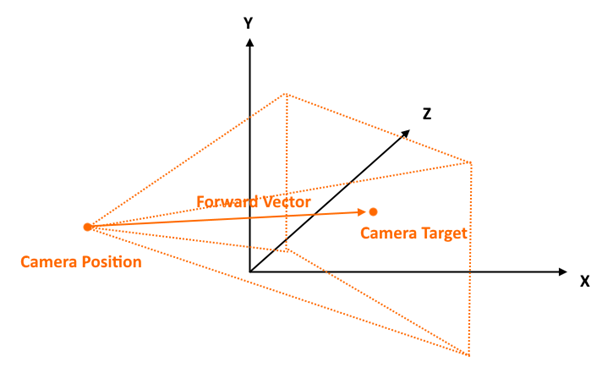
Above: the representation of a Camera in 3D Space. The camera is attached to the SciChart3DSurface.Camera📘 property and is defined by a position📘, target📘, plus other properties which define the properties of the viewport.
Camera Position, Target and other Properties
The camera is defined by a position📘, target📘 which are XYZ vectors in World Coordinates. These can be set in the create() function of SciChart3DSurface or after creation of the chart.
Other properties which define the viewport as seen by the camera include:
| Property | Description | Default |
|---|---|---|
| position📘 | The position of the camera as a 3-component vector in World coordinates | - |
| target📘 | The target (look-at) of the camera as a 3-component vector in World coordinates | - |
| orbitalPitch📘 | The pitch (vertical rotation angle) above or below the target in degrees | - |
| orbitalYaw📘 | The yaw (horizontal rotation angle) around the target in degrees | - |
| projectionMode📘 | Defines if the camera is perspective or orthogonal | Perspective |
| fieldOfView📘 | When projectionMode=Perspective, defines the field of view in degrees | 60 |
| radius📘 | When projectionMode=Perspective, get or set the distance of the camera position to target in World units | - |
| orthoWidth📘 | Defines the width of the projected viewport when in projectionMode=Orthogonal | 600 |
| orthoHeight📘 | Defines the height of the projected viewport when in projectionMode=Orthogonal (Note: Fixed typo from "Perspective" to "Orthogonal") | 400 |
| nearClip📘 | Objects closer than nearClip will be hidden | 1 |
| farClip📘 | Objects further than farClip will be hidden | 4000 |
A full list of properties, methods can be seen at the CameraController📘 Typedoc page.
Debugging Camera Properties
You can be notified if any property on the camera is updated by subscribing to camera.propertyChanged📘. Note that this event will fire for properties set in code, or user input such as rotating, zooming or panning the chart.
It's also possible to debug the camera position & properties by calling camera.debugOutput()📘. This logs properties to the console window. The same function also returns an array of strings, which you can use to update the UI.
Putting these together you can create the following example:
- TS
- HTML
- CSS
import {
    SciChart3DSurface,
    NumericAxis3D,
    Vector3,
    SciChartJsNavyTheme,
    CameraController,
    MouseWheelZoomModifier3D,
    OrbitModifier3D,
    ResetCamera3DModifier
} from "scichart";

async function cameraProperties(divElementId) {
    const { wasmContext, sciChart3DSurface } = await SciChart3DSurface.create(divElementId, {
        theme: new SciChartJsNavyTheme(),
        // Optional camera options passed into create Method
        cameraOptions: {
            position: new Vector3(300, 300, 300),
            target: new Vector3(0, 50, 0)
        }
    });

    // A camera may be attached to a chart after creation
    sciChart3DSurface.camera = new CameraController(wasmContext, {
        id: "Primary Camera",
        position: new Vector3(300, 300, 300),
        target: new Vector3(0, 50, 0)
    });

    const camera = sciChart3DSurface.camera;

    // propertyChanged is raised each time any property changes on the camera
    camera.propertyChanged.subscribe(args => {
        // Log current properties to console. debugOutput returns array of strings
        const cameraDebug = camera.debugOutput();

        // Output the same information to a div on the page
        // @ts-ignore
        document.getElementById("debug-camera").innerHTML = cameraDebug.map(line => `<p>${line}</p>`).join("");
    });

    // trigger a property change for the example
    camera.target = new Vector3(0, 60, 0);

    // SciChart.js 3D supports only a single x,y,z axis. Declare your axis like this
    sciChart3DSurface.xAxis = new NumericAxis3D(wasmContext, { axisTitle: "X Axis" });
    sciChart3DSurface.yAxis = new NumericAxis3D(wasmContext, { axisTitle: "Y Axis" });
    sciChart3DSurface.zAxis = new NumericAxis3D(wasmContext, { axisTitle: "Z Axis" });

    sciChart3DSurface.chartModifiers.add(
        new MouseWheelZoomModifier3D(), // provides camera zoom on mouse wheel
        new OrbitModifier3D(), // provides 3d rotation on left mouse drag
        new ResetCamera3DModifier()
    ); // resets camera position on double-click
}

cameraProperties("scichart-root");
<div class="wrapper">
    <div id="scichart-root" ></div>
    <div class="titleWrapper">
        <p class="title">SciChart.js 3D Chart Example</p>
        <p class="subTitle">Drag the mouse to view camera properties change</p>
    </div>
    <div id="debug-camera">
        <!-- Debug output from camera will be put here -->
    </div>
</div>
body {
    margin: 0;
    font-family: Arial;
}
.wrapper {
    width: 100%;
    height: 100vh;
    position: relative;
}
#scichart-root {
    width: 100%;
    height: 100%;
    position: relative;
}
.titleWrapper {
    position: absolute;
    width: 100%;
    top: 35%;
    text-align: center;
    pointer-events: none;
    color: #ffffff77;
}
.title {
    font-size: 20px;
}
.subTitle {
    font-size: 16px;
}
#debug-camera {
    pointer-events: none;
    position: absolute;
    left: 10px;
    top: 10px;
    color: #ffffff;
    background: #00000077;
    padding: 10px;
    font-size: 13px;
}
Camera Perspective vs. Orthogonal Mode
SciChart.js 3D also has an orthogonal mode. In this mode, there is no perspective effect of lines converging or diverging and all lines in the same X,Y or Z plane are parallel.
In Perspective Mode
Camera.position📘 and camera.target📘 are obeyed. Camera.radius📘 can be get/set to adjust the distance between position & target. Camera.fieldOfView📘 is obeyed.
In Orthogonal Mode
Apparent distance to target is defined by camera.orthoWidth📘 and orthoHeight property📘. Camera.radius is ignored.
when projectionMode = ECameraProjectionMode.Orthogonal📘, instead of a pyramid shape for the camera view, imagine a box with parallel sides. The orthoWidth📘 and orthoHeight📘 specify the width and height of the view in 3D world coordinates. Camera.radius📘 makes no difference to apparent closeness to target as there is no persective (closer objects are not larger).
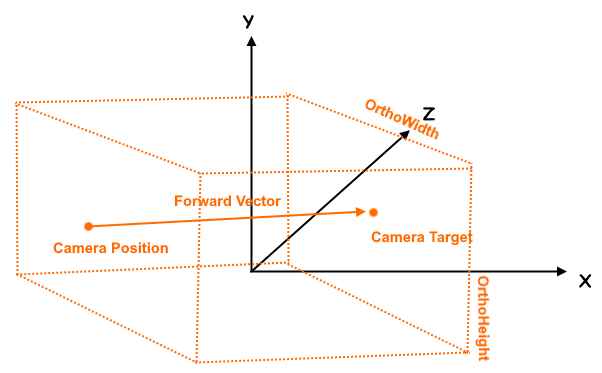
In this mode, radius and fieldOfView are ignored. Update the orthoWidth and orthoHeight property to modify apparent zoom. Camera position, target as well as orbitalPitch, orbitalYaw can be set to define camera orientation.
Find an example demonstrating camera orthogonal projection below.
- TS
- HTML
- CSS
import {
    SciChart3DSurface,
    NumericAxis3D,
    Vector3,
    SciChartJsNavyTheme,
    ECameraProjectionMode,
    MouseWheelZoomModifier3D,
    OrbitModifier3D,
    ResetCamera3DModifier,
} from "scichart";

async function orthogonalProjection(divElementId) {
  const { wasmContext, sciChart3DSurface } = await SciChart3DSurface.create(divElementId, {
    theme: new SciChartJsNavyTheme(),
    cameraOptions: {
      id: "Primary Camera",
      position: new Vector3(400, 400, 400),
      target: new Vector3(0, 100, 0),
    }
  });

  // Start off with the default camera
  const camera = sciChart3DSurface.camera;

  // Debug log as before
  camera.propertyChanged.subscribe((args) => {
    const cameraDebug = camera.debugOutput();
    // @ts-ignore
    document.getElementById("debug-camera").innerHTML = cameraDebug.map(line => `<p>${line}</p>`).join("");
  });

  // Switch to orthogonal projection
  // In orthogonal projection mode, the camera is positioned by position,target
  // however the viewing 'cone' no longer obeys perspective but is parallel
  //
  // orthoWidth/orthoHeight must be set to the desired width/height of the camera's view in world dimensions
  // larger numbers means more 'zoomed out'
  // aspectRatio is the ratio of orthoWidth/orthoHeight
  camera.projectionMode = ECameraProjectionMode.Orthogonal;
  camera.orthoWidth = 800;
  camera.orthoHeight = 550;

  // Also note: SciChart.js has camera.toPersective() and camera.toOrthogonal() methods to quickly switch back/forth

  // SciChart.js 3D supports only a single x,y,z axis. Declare your axis like this
  sciChart3DSurface.xAxis = new NumericAxis3D(wasmContext, { axisTitle: "X Axis" });
  sciChart3DSurface.yAxis = new NumericAxis3D(wasmContext, { axisTitle: "Y Axis" })
  sciChart3DSurface.zAxis = new NumericAxis3D(wasmContext, { axisTitle: "Z Axis" });

  sciChart3DSurface.chartModifiers.add(
    new MouseWheelZoomModifier3D(), // provides camera zoom on mouse wheel
    new OrbitModifier3D(), // provides 3d rotation on left mouse drag
    new ResetCamera3DModifier()); // resets camera position on double-click
};

orthogonalProjection("scichart-root");
<div class="wrapper">
    <div id="scichart-root" ></div>
    <div class="titleWrapper">
        <p class="title">SciChart.js 3D Chart Example</p>
        <p class="subTitle">Drag the mouse to view camera properties change</p>
    </div>
    <div id="debug-camera">
        <!-- Debug output from camera will be put here -->
    </div>
</div>
body {
    margin: 0;
    font-family: Arial;
}
.wrapper {
    width: 100%;
    height: 100vh;
    position: relative;
}
#scichart-root {
    width: 100%;
    height: 100%;
    position: relative;
}
.titleWrapper {
    position: absolute;
    width: 100%;
    top: 35%;
    text-align: center;
    pointer-events: none;
    color: #ffffff77;
}
.title {
    font-size: 20px;
}
.subTitle {
    font-size: 16px;
}
#debug-camera {
    pointer-events: none;
    position: absolute;
    left: 10px;
    top: 10px;
    color: #ffffff;
    background: #00000077;
    padding: 10px;
    font-size: 13px;
}