Native Text Api
The Native Text api uses industry standard font libraries compiled into webassembly to render text directly using webGL / webGPU, supporting all types of fonts including right to left text, shaped fonts such as Arabic and Chinese.
All 2D native text now renders with Slug (GPU Bezier) text. The Signed Distance Field texture atlas that backed native text in v3 - v5.2 is gone from the 2D path. 3D charts are unchanged and still render their text through the SDF atlas.
Nothing in the public 2D api changed - useNativeText, registerFont, NativeTextAnnotation, data labels and axis labels all work exactly as before - but a few low-level parameters described on this page are now ignored. See How native text is rendered below.
How native text is rendered
Slug (GPU Bezier) text in 2D
Slug evaluates the glyph outlines - quadratic Bezier curves - directly in the fragment shader, rather than sampling a pre-rasterized texture. The practical consequences:
- Glyphs are mathematically exact at any size, scale and rotation. There is no atlas resolution to outgrow and no distance-field blur at large sizes, so there is no longer any reason to ask for a special "advanced" font before rotating or scaling text.
- The expensive per-face work happens once. Slug preprocesses a face's outlines into curve and band textures, cached per face (family + style), not per face and size. Changing font sizes at runtime therefore rebuilds nothing - a size change that previously cost a fresh SDF atlas build (~200 ms in our test scene) is now roughly the cost of a plain re-render (~20 ms).
- The default face is preloaded during
SciChartSurface.create(), so the first frame does not pay for it.
SDF atlas text in 3D
SciChart3DSurface acquires its fonts through the 3D rendering pipeline, which still requests a Signed Distance Field atlas: FreeType rasterizes the glyph set into a texture per face and size, which is then sampled when drawing. Axis labels, axis titles, cursor labels and the XYZ gizmo in 3D all use this path.
This means that in 3D, unlike 2D, changing a font size at runtime still triggers an atlas build for the new size, and very large text is still limited by the distance field's resolution. SciChart3DSurface.registerFont behaves the same as its 2D counterpart.
Font Resolution
The way font resolution works for native and canvas text is as following:
- There is a constructor option on the Axis to set whether to use native or canvas text. It defaults to native text which is more performant.
const xAxis = new NumericAxis(wasmContext, {useNativeText: true});
- If the font family is not provided
SciChartDefaults.autoFontName("auto") will be used. - If
SciChartDefaults.autoFontNamefont family is used the actual font family will beSciChartDefaults.nativeFontFamilyfor native text andSciChartDefaults.canvasFontFamilyfor canvas text. - All these values can be changed
// Useful if you need to replace all font family occurrences with a default fontSciChartDefaults.autoFontName = 'SomeFontFamily'// Font family for default native textSciChartDefaults.nativeFontFamily = 'NativeFontFamilyForAutoFont'// Font family for default canvas textSciChartDefaults.canvasFontFamily = 'CanvasFontFamilyForAutoFont'
- In addition you may want to set from where to load the native font. This setting applies for all native fonts including the default one.
sciChartSurface.registerFont("MyCustomNativeFont","https://fontUrl.com/path/to/font/fontName.ttf");
Font Loading
The default native face is packaged inside the webassembly binary, so it costs no network request. SciChartDefaults.nativeFontFamily defaults to the sentinel "default", which the engine resolves to the bundled Arimo-Regular, a font metrically compatible with Arial. (Arimo replaced Arial as the packaged face in v5. On the web the name "Arial" resolves to Arimo-Regular too - webassembly has no access to the system fonts of the machine, so to use real Arial you must register or host the file under a different name.)
Every other font must either be hosted on your server, or registered if coming from a remote location. In either case, fonts are only downloaded once, and are then cached in the browser (in indexdb).
There are no system fonts. Naming a desktop font such as fontFamily: "Courier New" without registering it does not fail loudly - SciChart requests /Courier New.ttf, gets a 404, logs a console warning and silently falls back to the packaged face. Register or host every font you name.
Hosting fonts on your server
If you simply specify a font other than the default for native axis labels, dataLabels or NativeTextAnnotation, SciChart will look for a file with that name .ttf on your server. For example, the following annotation will cause SciChart to request /jokerman.ttf
// Hosted font

const nativeTextHostedFont = new NativeTextAnnotation({
        x1: 1,
        y1: 1,
        font: "jokerman",
        text: "This text uses a hosted font",
        fontSize: 18
     });
To serve fonts using webpack dev server you need a rule for .ttf files which specifies the correct mimetype, and you need to copy the font file itself to the root of the output location:
// webpack.config.js

const path = require("path");
const CopyPlugin = require("copy-webpack-plugin");
const webpack = require("webpack");
module.exports = {
    mode: "development",
    entry: "./src/index.js",
    module: {
        rules: [
            // Serve .ttf files
            {
                test: /\.ttf$/,
                use: {
                    loader: "url-loader",
                    options: { mimetype: "application/font-ttf" }
                }
            }
        ]
    },
    resolve: {
        extensions: [".js"]
    },
    output: {
        filename: "bundle.js",
        path: path.resolve(__dirname, "build")
    },
    plugins: [
        new CopyPlugin({
            patterns: [
                { from: "src/index.html", to: "" },
                // Copy the font to the root of the output location
                { from: "src/jokerman.ttf", to: "" },
                // v6 ships one modular wasm build - copy the whole _wasm directory
                { from: "node_modules/scichart/_wasm/", to: "" }
            ]
        }),
    ]
};
Registering Remote Fonts
Use sciChartSurface.registerFont to provide a remote url to load a font file from. Note that this requires a sciChartSurface instance - it is not a static method. The method returns a promise which resolves once the file is downloaded. If you do not await this method, the text will render using the default face until the font is available. There is a timeout (set by SciChartDefaults.nativeFontTimeout, default 2000ms) after which SciChart will fall back to the default face and stop trying to load the custom font. You might need to increase this if you need to load fonts over a slow connection, but in general it is better to await the registerFont method.
There is currently a limitation in that the font fetching from webassembly will not follow a http 302 redirection, so you need to pass the url to the actual file. For instance, when downloading from github, https://github.com/google/fonts/blob/main/ofl/braahone/BraahOne-Regular.ttf redirects to https://raw.githubusercontent.com/google/fonts/main/ofl/braahone/BraahOne-Regular.ttf so you need to use the githubusercontent.com link.
// Registering a font

await sciChartSurface.registerFont(
      "braahone",
      "https://raw.githubusercontent.com/google/fonts/main/ofl/braahone/BraahOne-Regular.ttf"
);
const nativeTextRemote = new NativeTextAnnotation({
        x1: 3,
        y1: 7,
        text: "This text uses a font from the internet",
        fontFamily: "braahone",
        fontSize: 24
});
registerFont persists the file into the browser's fetch cache, not into the engine's virtual filesystem. The first use of a newly registered face still takes the asynchronous load path, so one frame may paint before the text appears.
Native Text API
The following sections describe some of the native text api methods and concepts which you may need if you want to develop custom annotations, dataLabels or series using native text. In summary, using the native text api goes like this:
- Call renderContext.getFont to get a font instance. Fonts are cached and shared within webassembly, so there is no need to cache them in JS.
- If necessary call getTextBounds and pass it to font.CalculateStringBounds to get information on the size of your text so you can adjust drawing coordinates.
- Call font.DrawString, or font.DrawStringAdvanced
getFont
getFont is a method on webGLRenderContext2D which is passed to the drawing methods (eg to RenderContextAnnotationBase.drawWithContext) as renderContext.
const font = renderContext.getFont(labelStyle);
There is no need to call font.Begin() - this is done by getFont.
Do not call nativeContext.AquireFont directly. There is no need to delete the font to free memory.
getFont(labelStyle, advanced, drawEarly) still accepts its second and third parameters, but both are now ignored - the font key is always a Slug key, and one Slug font serves every rotation and transform of a face.
advanced: trueused to request a Signed Distance Field font for better rotated and scaled text. Slug is exact in all cases, so this is no longer needed. Passing it is harmless.drawEarly: trueused to hand you a separate font instance so that callingfont.End()early would not flush text batched by other elements. All calls for the same family and size now return the same instance, so an earlyfont.End()flushes everything queued on that font.
getSlugFontKey() and WebGlRenderContext2D.drawSlugText() remain exported as deprecated aliases of getFontKey() and drawNativeText() - there is no separate "slug" path to opt into any more.
TextBounds
Call getTextBounds from scichart/Charting/Visuals/Helpers/NativeObject, to get a TSRTextBounds instance. Each call to this method returns the same cached instance. Do not call delete on it.
Call font.CalculateStringBounds which populates the TSRTextBounds with the size of your desired text. The image below shows how the properties on textBounds relate to the text. Text is anchored at the left on the baseline. The origin is top, left (for consistency with canvas coordinates) so to have the text anchored at the top, you need to add textBounds.GetLineBounds(0).m_fHeight to your y coordinate.
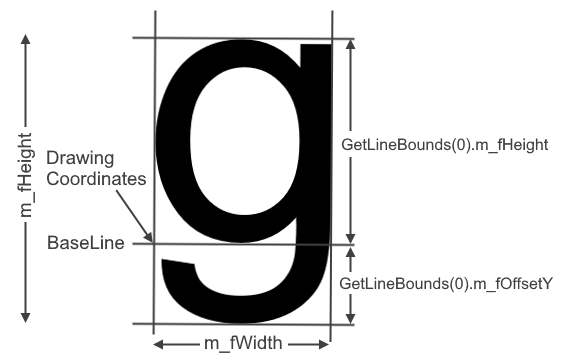
For multi line text, m_fHeight is the height of the entire text block, but text is still anchored at the baseline of the first line.
Measurement comes from the same Slug outline data that is used to draw, so bounds and rendered glyphs agree exactly. If you are drawing scaled text, call font.SetScale before measuring - bounds are measured at the current scale.
Drawing Text
Call font.DrawString, or font.DrawStringAdvanced. DrawString is just text, colour, x, y whereas DrawStringAdvanced also allows you to specify rotation, multiline alignment and spacing. The only difference is the options available - both go through the same Slug renderer, so rotated text is crisp either way.
Note that text is not actually drawn immediately. This happens when font.End() is called.
SciChart automatically calls font.End on all fonts at the end of the render cycle. If you want the native text to draw earlier so other chart elements can draw over it, you can call font.End yourself, but for optimum performance you want to do this as little as possible. Bear in mind that fonts are now shared across call sites (see getFont above), so an early font.End() also flushes text queued by other elements using the same family and size.
Rotation
To get a rotation vector use the following code:
// Rotation vector

import { getVector4 } from "scichart"

const rotationVector = getVector4(
    webAssemblyContext2D,
    rotationCenterX,
    rotationCenterY,
    rotationInRadians,
    0
);
Like textBounds this returns a single shared instance so you do not need to delete it.
Scaling
You can adjust the size of text by calling font.SetScale, which will multiply the font size by the value you set. This only applies to subsequent DrawString/DrawStringAdvanced calls, and to any CalculateStringBounds call made after it.
Rasterizing text to a texture
TextureManager.createTextTextureNative rasterizes native text into a bitmap texture rather than drawing it. This is the one remaining consumer of the legacy atlas in the 2D engine - the CPU blit it performs is not something a Slug font implements - so it requests an atlas font key internally. This is transparent to callers, and is the only place a 2D atlas is still built.
See Also
Axis Labels
Performance Considerations - Native Text Axis Labels
Annotations API
DataLabels API
Adding DataLabels to a Chart Series