
OHLC charts are provided by the FastOhlcRenderableSeries type. This accepts data from an OhlcDataSeries (Open, High, Low, Close, Date) and renders candlesticks with optional up/down wick and up/down fill brushes.
Examples for the OHLC Series can be found in the SciChart WPF Examples Suite which can be downloaded from the SciChart Website or our SciChart.WPF.Examples Github Repository.
NOTE: For info about OhlcDataSeries, as well as other DataSeries types in SciChart, see DataSeries API
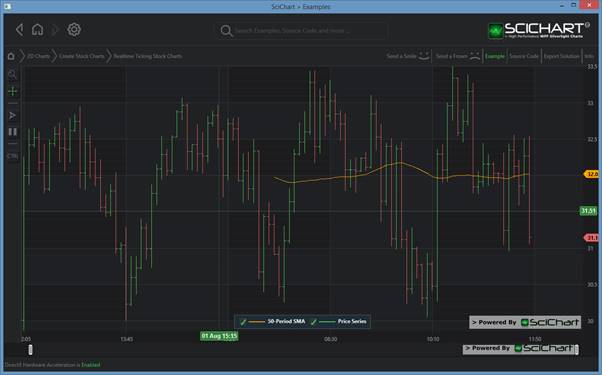
To declare a FastOhlcRenderableSeries, use the following code:
Declare a FastOhlcRenderableSeries in Xaml / Code Behind
| Declare a FastOhlcRenderableSeries |
Copy Code |
|---|---|
<!-- where xmlns:s="http://schemas.abtsoftware.co.uk/scichart" --> <s:SciChartSurface> <s:SciChartSurface.RenderableSeries> <s:FastOhlcRenderableSeries x:Name="rSeries" StrokeUp="GreenYellow" StrokeDown="Red" StrokeThickness="1" AntiAliasing="False" DataPointWidth="0.8"/> </s:SciChartSurface.RenderableSeries> <s:SciChartSurface.XAxis> <s:CategoryDateTimeAxis/> </s:SciChartSurface.XAxis> <s:SciChartSurface.YAxis> <s:NumericAxis/> </s:SciChartSurface.YAxis> </s:SciChartSurface> // Code Behind, e.g. in OnLoaded event handler, set the DataSeries var ohlcDataSeries = new OhlcDataSeries<DateTime, double>(); // FastCandlestickRenderableSeries expects data in the formal Date, Open, High, Low, Close ohlcDataSeries.Append(new DateTime(2015, 10, 1), 6061.60, 6172.80, 6053.30, 6072.50); ohlcDataSeries.Append(new DateTime(2015, 10, 2), 6072.50, 6176.20, 6051.60, 6130.00); ohlcDataSeries.Append(new DateTime(2015, 10, 5), 6130.00, 6301.10, 6130.00, 6298.90); ohlcDataSeries.Append(new DateTime(2015, 10, 6), 6298.90, 6343.70, 6255.10, 6326.20); ohlcDataSeries.Append(new DateTime(2015, 10, 7), 6326.20, 6396.30, 6319.80, 6336.40); ohlcDataSeries.Append(new DateTime(2015, 10, 8), 6336.40, 6380.30, 6303.50, 6374.80); ohlcDataSeries.Append(new DateTime(2015, 10, 9), 6374.80, 6453.20, 6374.80, 6416.20); ohlcDataSeries.Append(new DateTime(2015, 10, 12), 6416.20, 6416.20, 6351.30, 6371.20); ohlcDataSeries.Append(new DateTime(2015, 10, 13), 6371.20, 6371.20, 6303.00, 6342.30); ohlcDataSeries.Append(new DateTime(2015, 10, 14), 6342.30, 6342.30, 6268.30, 6269.60); ohlcDataSeries.Append(new DateTime(2015, 10, 15), 6269.60, 6351.40, 6269.60, 6338.70); ohlcDataSeries.Append(new DateTime(2015, 10, 16), 6338.70, 6398.20, 6338.70, 6378.00); ohlcDataSeries.Append(new DateTime(2015, 10, 17), 6378.00, 6408.10, 6336.30, 6352.30); rSeries.DataSeries = ohlcDataSeries; | |
Declare a FastOhlcRenderableSeries in Pure Code
| Declare a FastOhlcRenderableSeries |
Copy Code |
|---|---|
// Declare the scichartsurface var sciChartSurface = new SciChartSurface(); sciChartSurface.XAxis = new CategoryDateTimeAxis(); sciChartSurface.YAxis = new NumericAxis(); // ... // Declare and add a Ohlc Series var ohlcSeries = new FastOhlcRenderableSeries() { StrokeUp = Colors.GreenYellow, StrokeDown = Colors.Red, AntiAliasing = false, DataPointWidth = 0.8, StrokeThickness = 1, }; sciChartSurface.RenderableSeries.Add(ohlcSeries); // Set some data // FastOhlcRenderableSeries expects data in the formal Date, Open, High, Low, Close var ohlcDataSeries = new OhlcDataSeries<DateTime, double>(); ohlcDataSeries.Append(new DateTime(2015, 10, 1), 6061.60, 6172.80, 6053.30, 6072.50); ohlcDataSeries.Append(new DateTime(2015, 10, 2), 6072.50, 6176.20, 6051.60, 6130.00); ohlcDataSeries.Append(new DateTime(2015, 10, 5), 6130.00, 6301.10, 6130.00, 6298.90); ohlcDataSeries.Append(new DateTime(2015, 10, 6), 6298.90, 6343.70, 6255.10, 6326.20); ohlcDataSeries.Append(new DateTime(2015, 10, 7), 6326.20, 6396.30, 6319.80, 6336.40); ohlcDataSeries.Append(new DateTime(2015, 10, 8), 6336.40, 6380.30, 6303.50, 6374.80); ohlcDataSeries.Append(new DateTime(2015, 10, 9), 6374.80, 6453.20, 6374.80, 6416.20); ohlcDataSeries.Append(new DateTime(2015, 10, 12), 6416.20, 6416.20, 6351.30, 6371.20); ohlcDataSeries.Append(new DateTime(2015, 10, 13), 6371.20, 6371.20, 6303.00, 6342.30); ohlcDataSeries.Append(new DateTime(2015, 10, 14), 6342.30, 6342.30, 6268.30, 6269.60); ohlcDataSeries.Append(new DateTime(2015, 10, 15), 6269.60, 6351.40, 6269.60, 6338.70); ohlcDataSeries.Append(new DateTime(2015, 10, 16), 6338.70, 6398.20, 6338.70, 6378.00); ohlcDataSeries.Append(new DateTime(2015, 10, 17), 6378.00, 6408.10, 6336.30, 6352.30); ohlcSeries.DataSeries = ohlcDataSeries; | |
Automatic Tick Simplification
When displaying a large number of OHLC bars in the viewport, the Open and Close ticks can become visually dense and overlap, reducing chart readability. SciChart provides automatic tick simplification to reduce visual clutter when the chart is zoomed out.
This behavior is controlled by the AutoSimplify, SimplifyOpenThresholdPx, and SimplifyCloseThresholdPx properties. When AutoSimplify is enabled, SciChart evaluates the available horizontal space per bar in pixels and selectively skips rendering the Open and Close ticks if the space is below the specified threshold. This allows the chart to progressively simplify as more bars become visible, improving clarity and rendering performance.
Each threshold defines the minimum number of pixels per bar required for the corresponding tick to be drawn.
Default values:
- AutoSimplify = true
- SimplifyOpenThresholdPx = 6
- SimplifyCloseThresholdPx = 4
Special threshold values behave as follows:
- 0 — the tick is always rendered
- < 0 or NaN — the tick is never rendered
- > 0 — the tick is rendered only when the available horizontal space per bar meets or exceeds the specified value
If AutoSimplify is set to false, the threshold values are ignored and all ticks are rendered regardless of zoom level.
Example
The following example enables automatic simplification and defines thresholds for the Open and Close ticks:
| Enabling automatic ticks simplification |
Copy Code |
|---|---|
var ohlcSeries = new FastOhlcRenderableSeries { DataSeries = ohlcDataSeries, // Enable automatic tick simplification AutoSimplify = true, // Draw Open ticks only when there is at least 4 px per bar SimplifyOpenThresholdPx = 4, // Draw Close ticks only when there is at least 2 px per bar SimplifyCloseThresholdPx = 2 }; | |
With this configuration:
- When the chart is zoomed in, both Open and Close ticks are rendered.
- As the chart zooms out and bars become visually dense, the Open ticks disappear first.
- When the available space per bar becomes even smaller, Close ticks are also skipped, leaving only the High–Low range.
This gradual simplification helps maintain visual clarity while exploring large datasets.