Minimum Browser Requirements
Are you new to SciChart? Check out our most popular pages to get started below:
SciChart.js is a cutting-edge next-generation JavaScript Chart Library. As a result, we are using the latest technologies to draw our fast, real-time and interactive JavaScript charts.
Minimum requirement for deployment of an application with SciChart.js is your browser must support WebAssembly (wasm) and WebGL 1 (preferably WebGL 2).
A full table of which browsers are supported can be found at the caniuse.com website.
WebAssembly (wasm) Minimum Browser Support
According to caniuse.com, 95.79% of web modern browsers worldwide can use WebAssembly. This includes all major browsers: Chrome, Edge, Firefox, Safari, Opera on Windows, macOS, Linux as well as Android, iOS devices.
This compatibility % is set to increase as wasm becomes a standard across browsers, led by Google Chrome and adopted by others.
Minimum versions are found below:

WebAssembly is supported on
- Chrome v57 or later
- IE Edge v16 or later
- Firefox v52 or later
- Safari v11 or later
- Opera v44 or later.
- Almost all modern mobile and desktop browsers support WebAssembly.
WebAssembly can be enabled in some earlier browsers can by adjusting settings. See caniuse.com for more information.
Note: WebAssembly support is not available on Internet Explorer 11, but is available on IE Edge 16 or later, Google Chrome, FireFox and Safari
WebGL 1 Minimum Browser Support
According to caniuse.com, 96.56% of web browsers worldwide support WebGL 1. SciChart achieves the best performance with a WebGL 2 browser support, but all features are available on WebGL 1.
Minimum versions can be found below
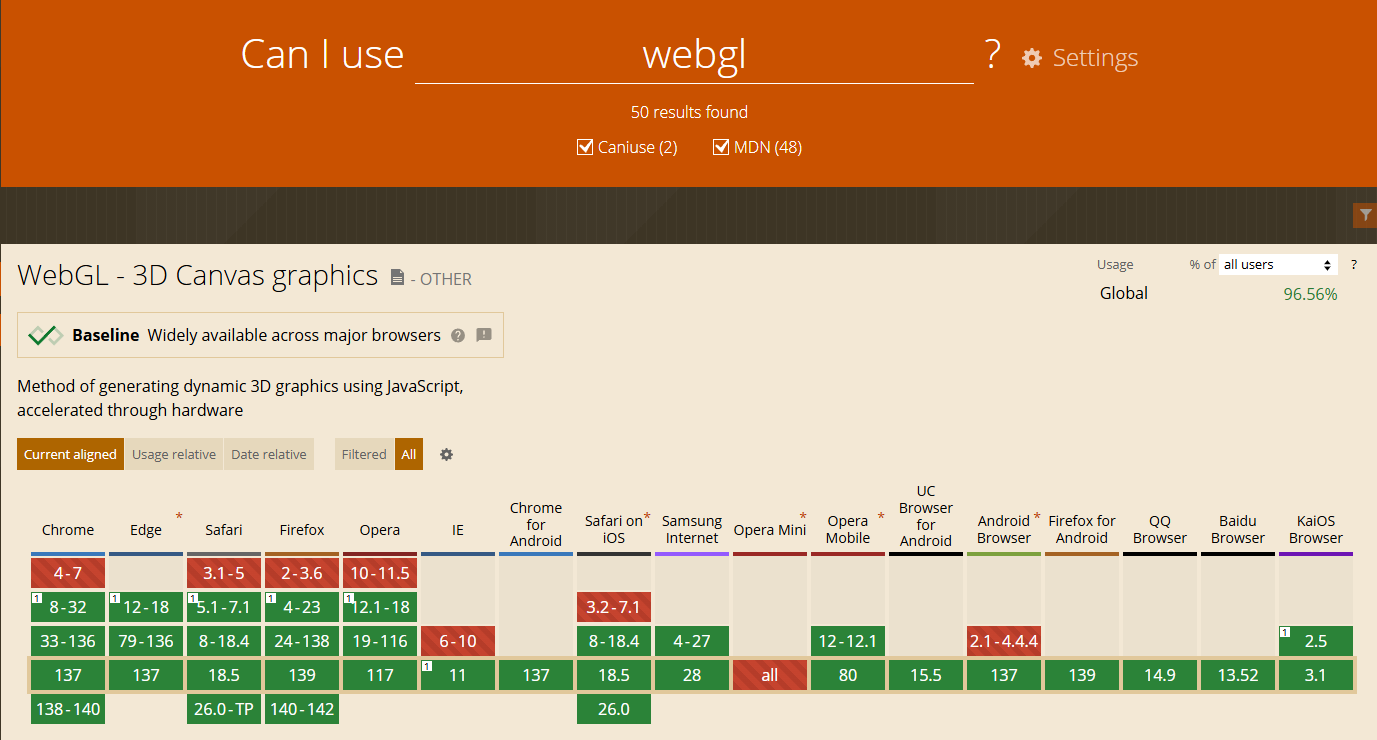
WebGL 1 is supported on
- Chrome v8 or later
- IE Edge v12 or later
- Firefox v4 or later
- Safari v5 or later
- Opera v12 or later.
- Almost all modern mobile and desktop browsers support WebGL 1
WebGL 2 Minimum Browser Support
According to caniuse.com, 95.1% of web browsers worldwide now support WebGL 2. SciChart achieves superior performance with WebGL 2, but will automatically drop down to WebGL 1 where this latest API is not available.

WebGL 2 is supported on
- Chrome v56 or later
- IE Edge v79 or later
- Firefox v51 or later
- Safari iOS v 15 or later
- Safari mac v15 or later
- Firefox for Android v107
- Android Browser v108
- Opera mobile v72
Note: WebGL 2 support is not available on earlier versions of Safari (Desktop or mobile), but in cases where WebGL 2 is not available SciChart.js will automatically downgrade to WebGL 1.
FAQs
Q: What ECMAScript (ES5, ES6) versions does SciChart.js Support?
SciChart.js targets ES5 and supports JavaScript standard ECMAScript 5 (JavaScript 2009 edition). That means if your browser or a WebView support ES5 or higher, SciChart.js will run properly.
Q: Do I need a GPU to run SciChart.js?
SciChart.js uses WebGL for rendering of 2D and 3D charts. You generally need a GPU to run WebGL, however specific requirements depend on the task and hardware. WebGL relies on the GPU for rendering, and most modern computers have integrated graphics like Intel Iris that are sufficient for most basic WebGL tasks, such as 2D Graphics or 3D scenes.
If the system lacks a GPU or has limited graphics capabilities, software rendering can still be used. For example, Google Chrome can use the SwiftShader software renderer, which emulates GPU functionality in software.
Q: How can I check if my system supports WebGL?
If your browser supports WebGL, then SciChart.js will run. You can check WebGL compatibility by visiting https://get.webgl.org/ in your web browser. If your system supports WebGL, you will see a spinning cube.
You can also check chrome://gpu in Chromium based browsers to see a report on whether WebGL is hardware accelerated, software emulated or not supported.
Q: Does SciChart.js run on the Client or the Server?
At the moment, SciChart.js is a client-side library which renders on the client browser. Most clients machines (mobile devices, iPhone, Android phone, Raspberri Pi, Windows Desktop, macOS Desktop, Linux Desktop) will have at least a basic GPU and will support WebGL and therefore SciChart.js
Q: Can SciChart.js run on ARM based embedded hardware or single-board computer (SBC) devices such as a Raspberry Pi?
Yes, SciChart.js can run on any device which supports WebGL and WebAssembly, including ARM based devices such as the Raspberry Pi 4 and 5.
A list of Single-board computers (SBC's) which support WebGL can be found below:
- Raspberry Pi 4/5 - capable of OpenGL and WebGL with it's VideoCore VI GPU and updated Mesa drivers
- Orange Pi 5 - capable of OpenGL and WebGL due to the Rockchip RK3588(S) SoC and Mali-G610 GPU
- Asus Tinker Board - with a Rockchip RK3288 SoC offers strong graphics capabilities for WebGL
- Rock Pi 4 - With a Rockchip RK3399 SoC provides GPU capable of WebGL content
- Udoo Bolt - features an integrated GPU capable of OpenGL / WebGL
- ODROID N2+ - an industrial-grade SBC which offers robust performance for WebGL applications
- Libre Computer Project - support OpenGL ES 1.1/2.0 and WebGL however performance varies by model
To confirm an embedded device supports WebGL and hence SciChart.js, check the SBC's SoC (System on Chip) supports OpenGL, OpenGL ES and ensure
a compatible Linux distribution with up to date Mesa drivers to run WebGL. WebGL support can then be checked in the browser by visiting chrome://gpu or https://get.webgl.org/
in your browser.
See this blog post how to setup Raspberry Pi OS on VMWare which details how to ensure Mesa drivers are installed for the Chromium browser on a Linux subsystem by using Raspberry Pi OS and VMWare as an example.