The Band Series type
A Band Series, or High-Low Fill between two lines can be created using the FastBandRenderableSeries📘 type.
The JavaScript Band Chart Example can be found in the SciChart.Js Examples Suite > Band Series on Github, or our live demo at scichart.com/demo.
Create a Band Series
To create a Javascript Band Chart with SciChart.js, use the following code:
- TS
- Builder API (JSON Config)
    // Demonstrates how to create a band chart using SciChart.js
    const { SciChartSurface, NumericAxis, FastBandRenderableSeries, XyyDataSeries, SciChartJsNavyTheme } = SciChart;
    // or, for npm, import { SciChartSurface, ... } from "scichart"

    const { wasmContext, sciChartSurface } = await SciChartSurface.create(divElementId, {
        theme: new SciChartJsNavyTheme()
    });

    sciChartSurface.xAxes.add(new NumericAxis(wasmContext));
    sciChartSurface.yAxes.add(new NumericAxis(wasmContext));

    // Generate some Xyy data for the band series
    const xValues = [];
    const yValues = [];
    const y1Values = [];
    const POINTS = 1000;
    const STEP = (3 * Math.PI) / POINTS;
    for (let i = 0; i <= POINTS; i++) {
        const k = 1 - i / 2000;
        xValues.push(i);
        yValues.push(Math.sin(i * STEP) * k * 0.7);
        y1Values.push(Math.cos(i * STEP) * k);
    }

    // Create & configure the band series
    const bandSeries1 = new FastBandRenderableSeries(wasmContext, {
        dataSeries: new XyyDataSeries(wasmContext, {
            xValues,
            yValues,
            y1Values
        }),
        stroke: "#F48420",
        strokeY1: "#50C7E0",
        fill: "#F4842033",   // the Fill for a data slice where `yVal < y1Val`
        fillY1: "#50C7E033", // the Fill for a data slice where `yVal > y1Val`
        strokeThickness: 2
    });
    sciChartSurface.renderableSeries.add(bandSeries1);
    // Demonstrates how to create a band chart with SciChart.js using the Builder API
    const { chartBuilder, ESeriesType, EThemeProviderType } = SciChart;
    // or, for npm, import { chartBuilder, ... } from "scichart"

    const xValues = [];
    const yValues = [];
    const y1Values = [];
    const POINTS = 1000;
    const STEP = (3 * Math.PI) / POINTS;
    for (let i = 0; i <= 1000; i++) {
        const k = 1 - i / 2000;
        xValues.push(i);
        yValues.push(Math.sin(i * STEP) * k * 0.7);
        y1Values.push(Math.cos(i * STEP) * k);
    }

    const { wasmContext, sciChartSurface } = await chartBuilder.build2DChart(divElementId, {
        surface: { theme: { type: EThemeProviderType.Dark } },
        series: [
            {
                type: ESeriesType.BandSeries,
                xyyData: {
                    xValues,
                    yValues,
                    y1Values
                },
                options: {
                    stroke: "#FF1919FF",
                    strokeY1: "#279B27FF",
                    fill: "#279B2733",   // the Fill for a data slice where `yVal < y1Val`
                    fillY1: "#FF191933", // the Fill for a data slice where `yVal > y1Val`
                    strokeThickness: 2
                }
            }
        ]
    });
In the code above:
- A Band Series instance is created and added to the SciChartSurface.renderableSeries📘 collection.
- We set the stroke, fill properties for when Y1 > Y2 and vice versa (more info over at FastBandRenderableSeries📘 in TypeDoc).
- We assign a DataSeries📘 - in this case an XyyDataSeries📘 which stores X, Y1, Y2 data.
Gradient Fills in Band Series
New to SciChart.js v3.4, the Band Series chart type now supports gradient fills as well as solid color fills.
To use this, you need to set the FastBandRenderableSeries.fillLinearGradient📘 & fillLinearGradientY1📘 properties with a GradientParams📘 object: a type which defines gradients by a number of gradient stops, with a start and end point.
Here's a code example:
- TS
- Builder API (JSON Config)
    const bandSeries = new FastBandRenderableSeries(wasmContext, {
        dataSeries: new XyyDataSeries(wasmContext, { xValues, yValues, y1Values }),
        stroke: "#F48420",
        strokeY1: "#50C7E0",

        // use fillLinearGradient and fillLinearGradientY1 to set a gradient fill
        fillLinearGradient: new GradientParams(new Point(0, 0.6), new Point(0, 0.9), [
            { color: "#F48420ff", offset: 0 },
            { color: "#F4842033", offset: 1 }
        ]),
        // instead of fill and fillY1
        fillLinearGradientY1: new GradientParams(new Point(0, 0.6), new Point(0, 0.9), [
            { color: "#50C7E033", offset: 0 },
            { color: "#50C7E0ff", offset: 1 }
        ]),
        strokeThickness: 4
    });

    sciChartSurface.renderableSeries.add(bandSeries);
const { wasmContext, sciChartSurface } = await chartBuilder.build2DChart(divElementId, {
    series: [
        {
            type: ESeriesType.BandSeries,
            xyyData: {
                xValues,
                yValues,
                y1Values
            },
            options: {
                stroke: "#FF1919FF",
                strokeY1: "#279B27FF",
                // use fillLinearGradient and fillLinearGradientY1 to set a gradient fill
                fillLinearGradient: new GradientParams(new Point(0, 0.6), new Point(0, 0.9), [
                    { color: "#F48420ff", offset: 0 },
                    { color: "#F4842033", offset: 1 }
                ]),
                // instead of fill and fillY1
                fillLinearGradientY1: new GradientParams(new Point(0, 0.6), new Point(0, 0.9), [
                    { color: "#50C7E033", offset: 0 },
                    { color: "#50C7E0ff", offset: 1 }
                ]),
                strokeThickness: 4
            }
        }
    ]
});
Try adjusting the CodePen above with the code to set a fillLinearGradient and see the result!
Render a Gap in a Band Series
It is possible to have null points or gaps in a Band Series by passing a data point with a NaN value as the Y value. Please refer to the Common Series Features - Draw Gaps in Series article for more details.
Add Point Markers onto a Band Series
It is possible to put scatter point markers of varying type (Ellipse, Square, Triangle, Cross, Custom) onto a Band Series via the PointMarker API. To learn more, see the documentation page Drawing PointMarkers on Series.
To learn more about the types of Point Marker in SciChart.js, see the Point Markers API documentation.
There is also a dedicated Scatter Series type and a Bubble Series type with some more options.
Painting Band Segments with Different Colors
It is possible to define the colour of line segments individually using the PaletteProvider API
For more info on how to do this, see the PaletteProvider - Per-point colouring of Band Charts documentation page.
Use Cases
Displaying horizontal thresholds
The Band Series Chart can be used to display a mountain or area with a horizontal threshold. For example, if you want to see a series which has a green mountain above zero and red below, to track PnL or profit and loss, you can also use a band series.
For instance, the following code:
- TS
- Builder API (JSON Config)
    // Use a Band series to render a mountain chart with horizontal threshold.
    const xValues = [];
    const yValues = [];
    const y1Values = [];
    const POINTS = 1000;
    const threshold = 0.4;
    const STEP = (3 * Math.PI) / POINTS;
    for (let i = 0; i <= 1000; i++) {
        const k = 1 - i / 2000;
        xValues.push(i);
        yValues.push(threshold); // constant value for Y
        y1Values.push(Math.cos(i * STEP) * k);
    }

    const bandSeries = new FastBandRenderableSeries(wasmContext, {
        dataSeries: new XyyDataSeries(wasmContext, { xValues, yValues, y1Values }),
        stroke: "Transparent", // render Y stroke as transparent
        strokeY1: "#50C7E0", // render Y1 transparent as blue
        fill: "#FF191933", // have different fills above/below the threshold. This is fill above
        fillY1: "#50C7E033", // fill below
        strokeThickness: 2
    });

    sciChartSurface.renderableSeries.add(bandSeries);
    // Demonstrates how to create a band chart with SciChart.js using the Builder API
    const { chartBuilder, ESeriesType, EThemeProviderType } = SciChart;

    // or, for npm, import { chartBuilder, ... } from "scichart"

    const xValues = [];
    const yValues = [];
    const y1Values = [];
    const POINTS = 1000;
    const threshold = 0.4;
    const STEP = (3 * Math.PI) / POINTS;
    for (let i = 0; i <= 1000; i++) {
        const k = 1 - i / 2000;
        xValues.push(i);
        yValues.push(threshold); // constant value for Y
        y1Values.push(Math.cos(i * STEP) * k);
    }

    const { wasmContext, sciChartSurface } = await chartBuilder.build2DChart(divElementId, {
        surface: { theme: { type: EThemeProviderType.Dark } },
        series: [
            {
                type: ESeriesType.BandSeries,
                xyyData: {
                    xValues,
                    yValues,
                    y1Values
                },
                options: {
                    stroke: "Transparent", // render Y stroke as transparent
                    strokeY1: "#50C7E0", // render Y1 transparent as blue
                    fill: "#FF191933", // have different fills above/below the threshold. This is fill above
                    fillY1: "#50C7E033", // fill below
                    strokeThickness: 2
                }
            }
        ]
    });
Resulting in this:
Bollinger Bands & MACD Indicators
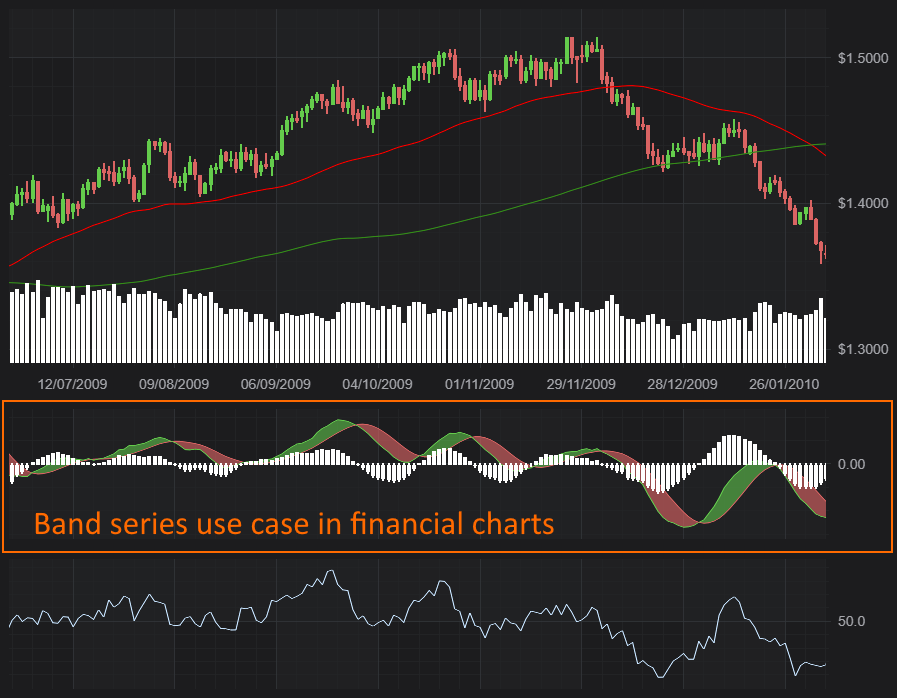
The Band Series chart primary use is in financial markets, when you want to display things like Bollinger Bands, MACD. For example, our Create Multi Pane Stock Charts demo has a band series for the MACD indicator, which you can see below.
Bollinger Bands & MACD Indicators
A complex visualisation using Band Series
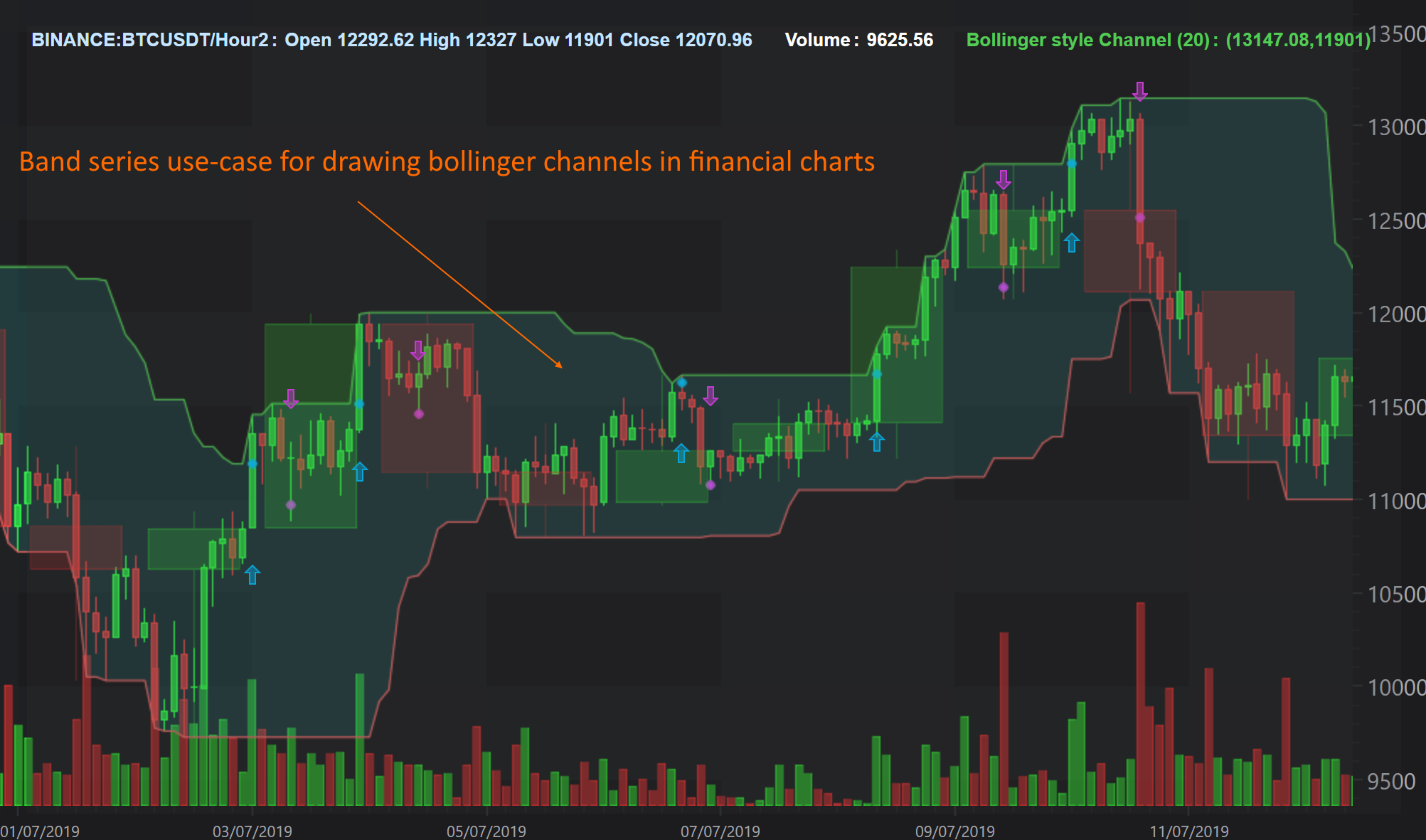
Above: a complex visualisation using Band Series. This image is taken from a SciChart WPF sample but all the features are available in SciChart.js as well.