Search Results for

    Show / Hide Table of Contents

    The VerticalLineAnnotation

    The VerticalLineAnnotation draws the vertical line between Y1 and Y2 coordinates at X1:

    Note

    You might also be interested in learning about the HorizontalLineAnnotation since it's very similar with the Horizontal one.
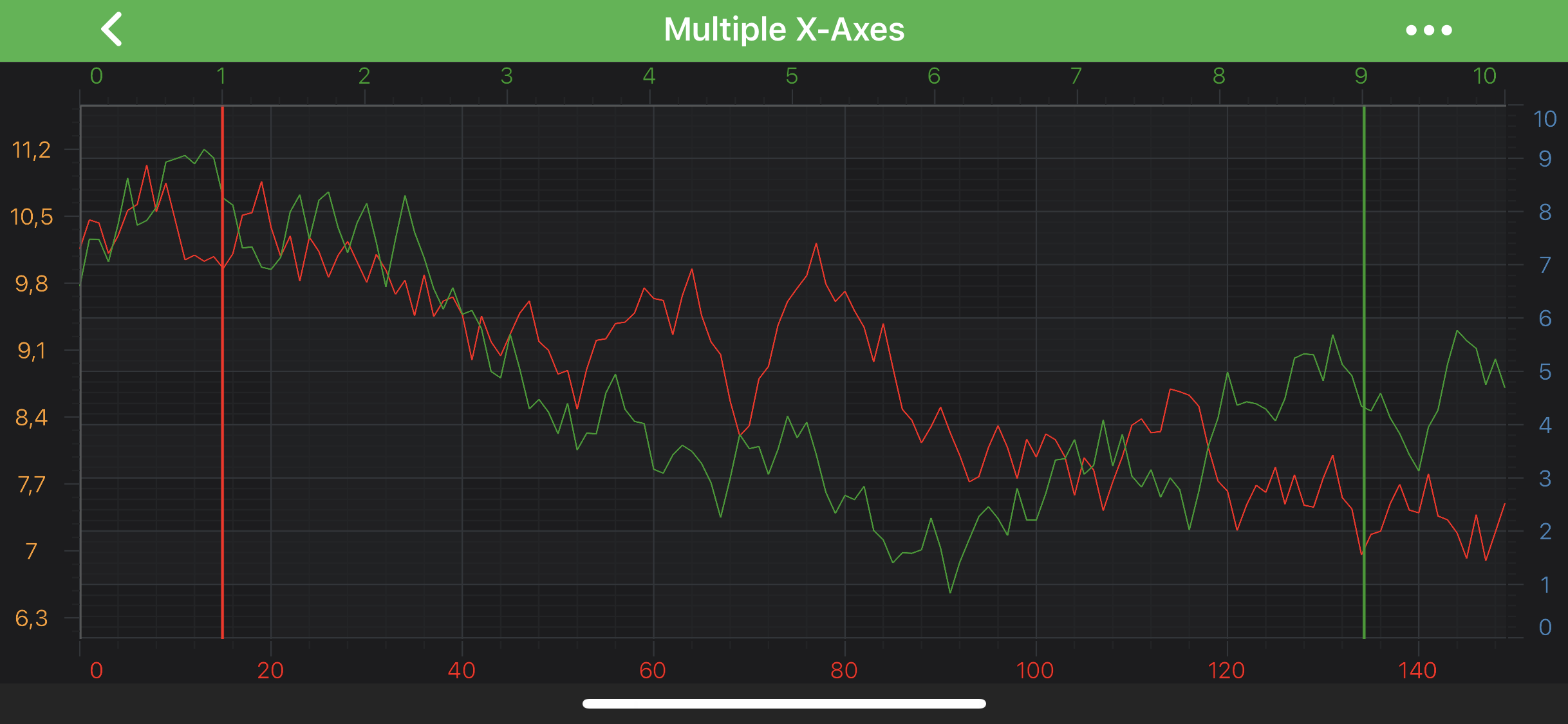
    Vertical Line Annotation

    Note

    Examples of the Annotations usage can be found in the SciChart Android Examples Suite as well as on GitHub:

    • Native Android Chart Annotations Example

    • Native Android Chart Interactive Annotations Example

    • Xamarin Android Chart Annotations Example

    • Xamarin Android Chart Interactive Annotations Example

    The VerticalLineAnnotation class is inherited from LineAnnotation, and hence, provides the stroke property which is used to define the line annotation color. It expects a PenStyle object. To learn more about Pens and Brushes and how to utilize them, please refer to the PenStyle, BrushStyle and FontStyle article.

    Note

    To learn more about Annotations in general - please see the Common Annotation Features article.

    In general case, the position of an VerticalLineAnnotation can only be defined by the x1 value, which will lead to full-height vertical line at X1 coordinate.

    Despite the above, it is possible to specify Y1 and Y2 coordinates for the line ends, but it will work differently while combined with different Gravity. verticalGravity property can consume the following values:

    • Gravity.TOP - the Y1 coordinate will be applied to the bottom end of a line. The line appears pinned to the top side.
    • Gravity.BOTTOM - the Y1 coordinate will be applied to the top end of a line. The line appears pinned to the bottom side.
    • Gravity.CENTER_VERTICAL - both Y1 and Y2 coordinates will be applied.
    • Gravity.FILL_VERTICAL - both Y1 and Y2 coordinates are ignored. The line appears vertically stretched. This is the default value.

    The Y1 and Y2 values can be accessed via the y1 and y2 properties.

    Note

    The xAxisId and yAxisId must be supplied if you have axis with non-default Axis Ids, e.g. in multi-axis scenario.

    Create a VerticalLine Annotation

    A VerticalLineAnnotation can be added onto a chart using the following code:

    • Java
    • Java with Builders API
    • Kotlin
    // Assume a surface has been created and configured somewhere
    // Create a VerticalLine Annotation
    final VerticalLineAnnotation verticalLine = new VerticalLineAnnotation(getContext());
    
    // Allow to interact with the annotation in run-time
    verticalLine.setIsEditable(true);
    
    // In a multi-axis scenario, specify the XAxisId and YAxisId
    verticalLine.setXAxisId("BottomAxisId");
    verticalLine.setYAxisId("RightAxisId");
    
    // Specify a desired position by setting coordinates and mode
    verticalLine.setCoordinateMode(AnnotationCoordinateMode.RelativeX);
    verticalLine.setY1(0.1);
    
    // Specify the border color for the annotation
    verticalLine.setStroke(new SolidPenStyle(0xFFFF1919, true, 2f, null));
    
    // Add the annotation to the Annotations collection of the surface
    surface.getAnnotations().add(verticalLine);
    
    // Assume a surface has been created and configured somewhere
    // Create a VerticalLine Annotation
    final VerticalLineAnnotation verticalLine1 = sciChartBuilder.newVerticalLineAnnotation()
            // Allow to interact with the annotation in run-time
            .withIsEditable(true)
            // In a multi-axis scenario, specify the XAxisId and YAxisId
            .withXAxisId("BottomAxisId")
            .withYAxisId("RightAxisId")
            // Specify a desired position by setting coordinates and mode
            .withCoordinateMode(AnnotationCoordinateMode.RelativeY)
            .withX1(0.1)
            // Specify the border color for the annotation
            .withStroke(2f, 0xFFFF1919)
            .build();
    
    final VerticalLineAnnotation verticalLine2 = sciChartBuilder.newVerticalLineAnnotation()
            .withIsEditable(true)
            .withXAxisId("BottomAxisId")
            .withYAxisId("RightAxisId")
            .withCoordinateMode(AnnotationCoordinateMode.RelativeY)
            .withX1(0.9)
            .withStroke(2f, 0xFF279B27)
            .build();
    
    // Add the annotation to the Annotations collection of the surface
    Collections.addAll(surface.getAnnotations(), verticalLine1, verticalLine2);
    
    // Assume a surface has been created and configured somewhere
    // Create a VerticalLine Annotation
    val verticalLine = VerticalLineAnnotation(context)
    
    // Allow to interact with the annotation in run-time
    verticalLine.setIsEditable(true)
    
    // In a multi-axis scenario, specify the XAxisId and YAxisId
    verticalLine.xAxisId = "BottomAxisId"
    verticalLine.yAxisId = "RightAxisId"
    
    // Specify a desired position by setting coordinates and mode
    verticalLine.coordinateMode = AnnotationCoordinateMode.RelativeY
    verticalLine.y1 = 0.1
    
    // Specify the border color for the annotation
    verticalLine.stroke = SolidPenStyle(-0xe6e7, true, 2f, null)
    
    // Add the annotation to the Annotations collection of the surface
    surface.annotations.add(verticalLine)
    
    Note

    To learn more about other Annotation Types, available out of the box in SciChart, please find the comprehensive list in the Annotation APIs article.

    The AnnotationLabels collection

    By default, the VerticalLineAnnotation does not show any labels. You can show a label by adding a AnnotationLabel to the annotationLabels collection, like below:

    • Java
    • Java with Builders API
    • Kotlin
    final AnnotationLabel annotationLabel = new AnnotationLabel(getContext());
    annotationLabel.setText("Label text");
    annotationLabel.setLabelPlacement(LabelPlacement.Axis);
    verticalLine.annotationLabels.add(annotationLabel);
    
    final VerticalLineAnnotation horizontalLineWithLabel = sciChartBuilder.newVerticalLineAnnotation()
            .withAnnotationLabel(LabelPlacement.Axis, "Label text")
            .build();
    
    val annotationLabel = AnnotationLabel(context)
    annotationLabel.text = "Label text"
    annotationLabel.labelPlacement = LabelPlacement.Axis
    verticalLine.annotationLabels.add(annotationLabel)
    

    The Label position can be changed by setting the labelPlacement property which expects one of the LabelPlacement enumeration.

    Note

    Everything about AnnotationLabels collection and AnnotationLabel can be also applied to the HorizontalLineAnnotation

    The AnnotationLabel Type

    You can change appearance, position, custom value, etcetera for any annotation label which are listed below:

    • setLabelStyle - applies style for AnnotationLabel.
    • rotationAngle - allows to rotate annotation label text, expects degrees
    • text - you can set custom text for your label.
    • fontStyle - applies the FontStyle object onto the text.
    Note

    By default, AnnotationLabel uses its associated axis Y-value to display a label. To learn more about Pens and Brushes and how to utilize them, please refer to the PenStyle, BrushStyle and FontStyle article.

    Also, you can have more than one AnnotationLabel associated with HorizontalLineAnnotation by adding more than one to the annotationLabels collection.

    Please see the code below, which showcases the utilization of the above settings:

    • Java
    • Java with Builders API
    • Kotlin
    AnnotationLabel axisAnnotationLabel = new AnnotationLabel(getContext());
    axisAnnotationLabel.setLabelPlacement(LabelPlacement.Axis);
    axisAnnotationLabel.setPadding(0, 10, 0, 0);
    
    AnnotationLabel annotationLabel = new AnnotationLabel(getContext());
    annotationLabel.setLabelPlacement(LabelPlacement.TopRight);
    annotationLabel.setText("Rotated Label");
    annotationLabel.setRotationAngle(-90);
    
    final VerticalLineAnnotation verticalLine = new VerticalLineAnnotation(getContext());
    verticalLine.setY1(8);
    verticalLine.setVerticalGravity(Gravity.BOTTOM);
    
    Collections.addAll(verticalLine.annotationLabels, annotationLabel, axisAnnotationLabel);
    
    AnnotationLabel axisAnnotationLabel = new AnnotationLabel(getContext());
    axisAnnotationLabel.setLabelPlacement(LabelPlacement.Axis);
    axisAnnotationLabel.setPadding(0, 10, 0, 0);
    
    AnnotationLabel annotationLabel = new AnnotationLabel(getContext());
    annotationLabel.setLabelPlacement(LabelPlacement.TopRight);
    annotationLabel.setText("Rotated Label");
    annotationLabel.setRotationAngle(-90);
    
    final VerticalLineAnnotation verticalLine = sciChartBuilder.newVerticalLineAnnotation()
            .withY1(8)
            .withVerticalGravity(Gravity.BOTTOM)
            .build();
    
    Collections.addAll(verticalLine.annotationLabels, annotationLabel, axisAnnotationLabel);
    
    val axisAnnotationLabel = AnnotationLabel(context)
    axisAnnotationLabel.labelPlacement = LabelPlacement.Axis
    axisAnnotationLabel.setPadding(0, 10, 0, 0)
    
    val annotationLabel = AnnotationLabel(context)
    annotationLabel.labelPlacement = LabelPlacement.TopRight
    annotationLabel.text = "Rotated Label"
    annotationLabel.rotationAngle = -90f
    
    val verticalLine = VerticalLineAnnotation(context)
    verticalLine.y1 = 8
    verticalLine.verticalGravity = Gravity.BOTTOM
    
    Collections.addAll(verticalLine.annotationLabels, annotationLabel, axisAnnotationLabel)
    

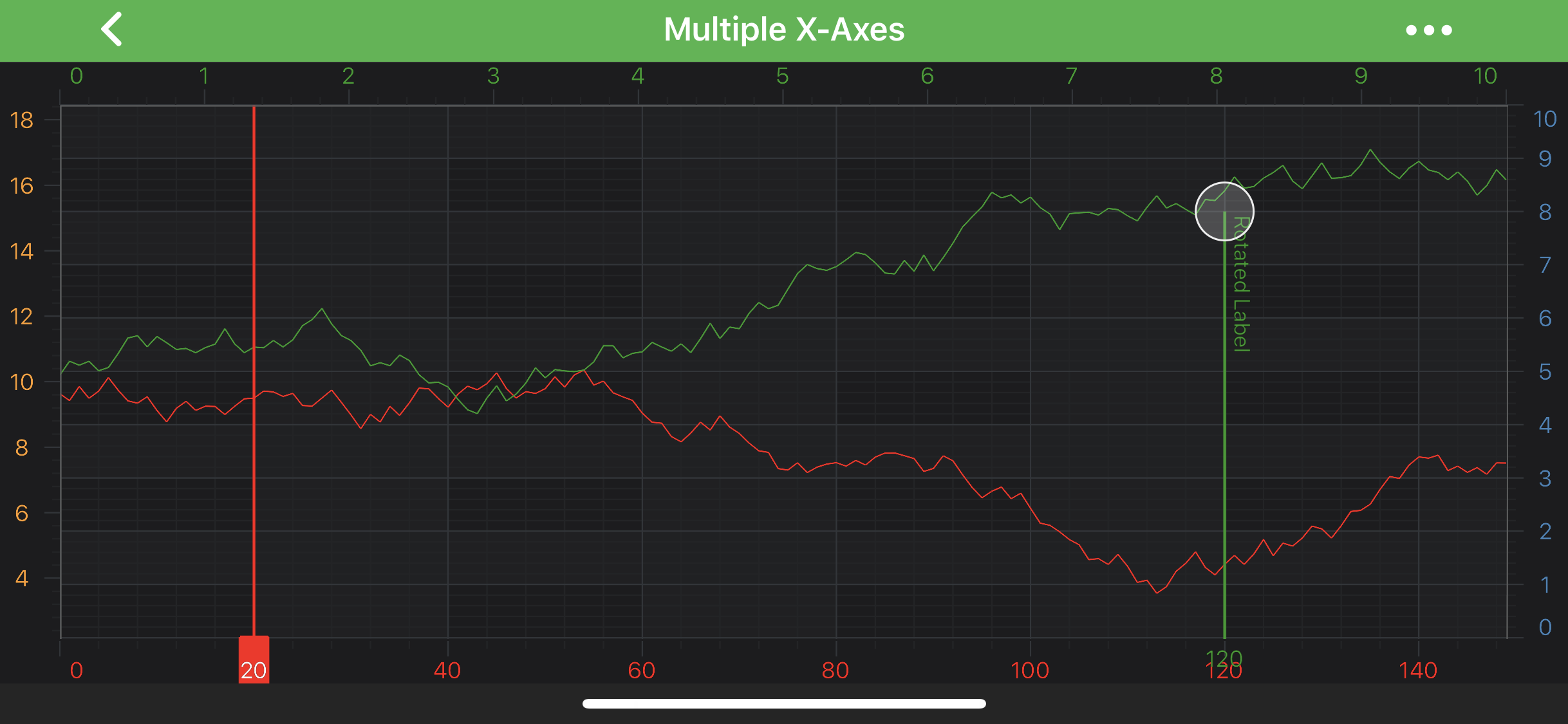
    This will result in the following:

    Vertical Line Annotation With Labels

    Annotation Label Value and TextFormatting

    By default, the label text is formatted by the textFormatting property. For more information, refer to the Axis Labels - TextFormatting and CursorTextFormatting article.

    But you can also override the default behaviour by providing a custom IFormattedValueProvider for your VerticalLineAnnotation corresponding property.

    Let's see a short example which shows how to use the above:

    • Java
    • Java with Builders API
    • Kotlin
    class AnnotationValueProvider implements IFormattedValueProvider {
        @Override
        public CharSequence formatValue(AxisInfo axisInfo) {
            return axisInfo != null ? String.format("[ --- %s --- ]", axisInfo.axisFormattedDataValue) : null;
        }
    }
    
    final VerticalLineAnnotation verticalLine = new VerticalLineAnnotation(getContext());
    verticalLine.setXAxisId("BottomAxisId");
    verticalLine.setYAxisId("RightAxisId");
    verticalLine.setX1(65);
    verticalLine.setStroke(new SolidPenStyle(0xFFFF1919, true, 4f, null));
    // Provide custom IFormattedValueProvider for the annotation
    verticalLine.setFormattedLabelValueProvider(new AnnotationValueProvider());
    
    AnnotationLabel axisAnnotationLabel = new AnnotationLabel(getContext());
    axisAnnotationLabel.setLabelPlacement(LabelPlacement.Axis);
    
    verticalLine.annotationLabels.add(axisAnnotationLabel);
    
    class AnnotationValueProvider implements IFormattedValueProvider {
        @Override
        public CharSequence formatValue(AxisInfo axisInfo) {
            return axisInfo != null ? String.format("[ --- %s --- ]", axisInfo.axisFormattedDataValue) : null;
        }
    }
    
    final VerticalLineAnnotation verticalLine = sciChartBuilder.newVerticalLineAnnotation()
            .withXAxisId("BottomAxisId")
            .withYAxisId("RightAxisId")
            .withX1(65)
            .withStroke(4f, 0xFFFF1919)
            .build();
    
    // Provide custom IFormattedValueProvider for the annotation
    verticalLine.setFormattedLabelValueProvider(new AnnotationValueProvider());
    
    AnnotationLabel axisAnnotationLabel = new AnnotationLabel(getContext());
    axisAnnotationLabel.setLabelPlacement(LabelPlacement.Axis);
    
    verticalLine.annotationLabels.add(axisAnnotationLabel);
    
    class AnnotationValueProvider : IFormattedValueProvider {
        override fun formatValue(axisInfo: AxisInfo): CharSequence? {
            return if (axisInfo != null) String.format(
                "[ --- %s --- ]",
                axisInfo.axisFormattedDataValue
            ) else null
        }
    }
    
    val verticalLine = VerticalLineAnnotation(context)
    verticalLine.xAxisId = "BottomAxisId"
    verticalLine.yAxisId = "RightAxisId"
    verticalLine.x1 = 65
    verticalLine.stroke = SolidPenStyle(-0xe6e7, true, 4f, null)
    
    // Provide custom IFormattedValueProvider for the annotation
    verticalLine.formattedLabelValueProvider = AnnotationValueProvider()
    
    val axisAnnotationLabel = AnnotationLabel(context)
    axisAnnotationLabel.labelPlacement = LabelPlacement.Axis
    
    verticalLine.annotationLabels.add(axisAnnotationLabel)
    

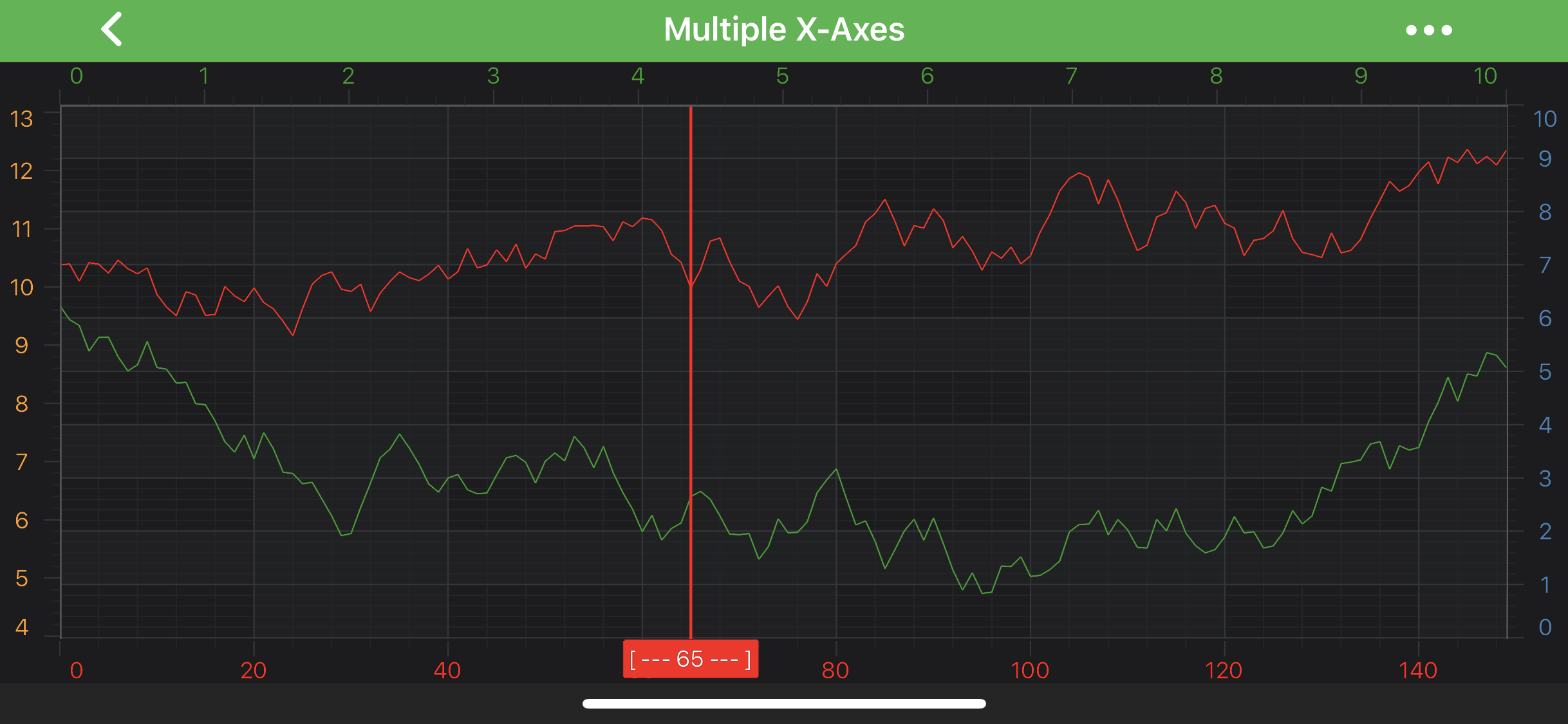
    This will result in the following:

    Vertical Line Annotation Label Formatting

    Note

    To learn more about other Annotation Types, available out of the box in SciChart, please find the comprehensive list in the Annotation APIs article.

    Back to top © 2011-2025 SciChart. All rights reserved. | sitemap.xml