Market Depth
MarketDepthPanel shows the live book as a price ladder: asks above the spread, bids below, each rung with its amount and the running total, and a depth bar behind it. It is drawn with SciChart, so it keeps up with a fast book. The header has the symbol and a ± stepper for the price grouping, and pointing at a rung shows what sweeping the book to that price would cost (see Slippage Readout).
The panel reads the book from an IOrderBookSource: an object that gives it a snapshot of the book and a live stream of updates for a symbol. The examples below implement a small one for Coinbase's public order book, which needs no API key. To feed it from your own server or exchange, implement the same interface; see Order Book Data.
TypeScript Example: Market Depth with Coinbase Order Book Data
A one-minute chart of BTC-USD, with the live Coinbase order book in a MarketDepthPanel beside it. CoinbaseOrderBookSource, in the code, connects to Coinbase's public WebSocket feed, keeps the book in memory, and sends the panel the top of the book four times a second. Use the ± stepper in the panel's header to change the price grouping, and point at a rung to see what sweeping the book to it would cost.
The code for this example is found below.
- TS
import "scichart-scitrader/scitrader.css";
import { EMPTY, firstValueFrom, Observable } from "rxjs";
import {
    CandleInterval,
    CoinbaseExchange,
    defaultExchangeProvider,
    IBookSnapshot,
    IBookUpdate,
    IDepthColumn,
    IHeatmapAvailability,
    IHeatmapTile,
    idbPriceStore,
    IOrderBookSource,
    MarketDepthPanel,
    OHLCStudy,
    SciFinanceChartPanel,
    VolumeStudy,
} from "scichart-scitrader";

// This example expects this HTML:
// <div style="display: flex; height: 100%">
//     <div id="chart" style="flex: 1; min-width: 0"></div>
//     <div id="depth" style="width: 340px"></div>
// </div>

// Register a data source for the chart's candles, once, at app startup
defaultExchangeProvider.registerExchange(CoinbaseExchange, idbPriceStore);

// An IOrderBookSource for Coinbase's public order book, which the depth panel reads.
// Coinbase's "level2_batch" WebSocket channel needs no API key. It sends the whole book once, then
// batches of changes. This source keeps the book in memory and sends the panel the top levels four
// times a second, as the IOrderBookSource contract asks: the panel has no use for every change
class CoinbaseOrderBookSource implements IOrderBookSource {
    readonly exchangeName = CoinbaseExchange.name;

    getBookStream(symbol: string, depth = 50): Observable<IBookUpdate> {
        return new Observable<IBookUpdate>((subscriber) => {
            // price -> quantity, for each side of the book
            const bids = new Map<number, number>();
            const asks = new Map<number, number>();
            const socket = new WebSocket("wss://ws-feed.exchange.coinbase.com");

            socket.onopen = () =>
                socket.send(JSON.stringify({ type: "subscribe", product_ids: [symbol], channels: ["level2_batch"] }));

            socket.onmessage = (event) => {
                const message = JSON.parse(event.data);
                if (message.type === "snapshot") {
                    // The whole book: [price, size] pairs as strings
                    for (const [price, size] of message.bids) bids.set(Number(price), Number(size));
                    for (const [price, size] of message.asks) asks.set(Number(price), Number(size));
                } else if (message.type === "l2update") {
                    // Changes: [side, price, size]. A size of 0 removes the level
                    for (const [side, price, size] of message.changes) {
                        const book = side === "buy" ? bids : asks;
                        if (Number(size) === 0) book.delete(Number(price));
                        else book.set(Number(price), Number(size));
                    }
                }
            };
            socket.onerror = () => subscriber.error(new Error("Coinbase order-book connection failed"));

            // Four times a second, send the top of the book. isSnapshot: true replaces the ladder
            const timer = setInterval(() => {
                if (bids.size === 0 || asks.size === 0) return;
                subscriber.next({
                    symbol,
                    timestamp: Date.now(),
                    isSnapshot: true,
                    bids: topLevels(bids, depth, (a, b) => b - a), // highest bid first
                    asks: topLevels(asks, depth, (a, b) => a - b), // lowest ask first
                });
            }, 250);

            // Called when the panel unsubscribes: stop the timer and close the connection
            return () => {
                clearInterval(timer);
                socket.close();
            };
        });
    }

    // The current top of the book: the stream's first frame
    getBookSnapshot(symbol: string, depth?: number): Promise<IBookSnapshot | null> {
        return firstValueFrom(this.getBookStream(symbol, depth));
    }

    // No liquidity heatmap here: the depth panel only needs the book
    async getHeatmapAvailability(): Promise<IHeatmapAvailability> {
        return { enabled: false, tileColumns: 0, tiers: [] };
    }
    async getHeatmapTile(): Promise<IHeatmapTile | null> {
        return null;
    }
    getDepthStream(): Observable<IDepthColumn> {
        return EMPTY;
    }
}

// The best `depth` levels of one side of the book, as { price, qty }
function topLevels(book: Map<number, number>, depth: number, order: (a: number, b: number) => number) {
    return [...book.keys()]
        .sort(order)
        .slice(0, depth)
        .map((price) => ({ price, qty: book.get(price) }));
}

async function createChartAndDepth() {
    // MarketDepthPanel: the order book as a price ladder, asks above the spread and bids below.
    // It reads the book from an IOrderBookSource, here the Coinbase one above. Create it first:
    // it doesn't need the chart, so the book shows while the chart loads
    const depth = MarketDepthPanel.create(document.getElementById("depth"), {
        source: new CoinbaseOrderBookSource(),
        symbol: "BTC-USD", // Coinbase's symbol format
    });

    // One-minute candles over the last hour: the first load is a single request of at most
    // 300 candles, Coinbase's limit per request
    const financeChartPanel = await SciFinanceChartPanel.create(document.getElementById("chart"), {
        exchangeName: CoinbaseExchange.name, // name="Coinbase" matches the built-in CoinbaseExchange
        symbol: "BTC-USD",
        interval: CandleInterval.ONE_MINUTE,
        period: "1H",
        studies: [new OHLCStudy(), new VolumeStudy()],
    });

    // When the page goes away: depth.destroy(); financeChartPanel.cleanup();
    return { financeChartPanel, depth };
}

createChartAndDepth();
React Example: Market Depth with Coinbase Order Book Data
The same in React, with MarketDepthView from scichart-scitrader-react. It keeps the panel's settings in React state, so the grouping chosen with the ± stepper can be saved.
The code for this example is found below.
- React
import "scichart-scitrader/scitrader.css";
import * as React from "react";
import { EMPTY, firstValueFrom, Observable } from "rxjs";
import {
    CandleInterval,
    CoinbaseExchange,
    DEFAULT_MARKET_DEPTH_SETTINGS,
    defaultExchangeProvider,
    IBookSnapshot,
    IBookUpdate,
    IDepthColumn,
    IHeatmapAvailability,
    IHeatmapTile,
    idbPriceStore,
    IOrderBookSource,
    ISciFinanceChartPanelConfig,
    OHLCStudy,
    TMarketDepthSettings,
    VolumeStudy,
} from "scichart-scitrader";
import { MarketDepthView, SciFinanceChartView } from "scichart-scitrader-react";

// Register a data source for the chart's candles, once, at app startup
defaultExchangeProvider.registerExchange(CoinbaseExchange, idbPriceStore);

// An IOrderBookSource for Coinbase's public order book, which the depth panel reads.
// Coinbase's "level2_batch" WebSocket channel needs no API key. It sends the whole book once, then
// batches of changes. This source keeps the book in memory and sends the panel the top levels four
// times a second, as the IOrderBookSource contract asks: the panel has no use for every change
class CoinbaseOrderBookSource implements IOrderBookSource {
    readonly exchangeName = CoinbaseExchange.name;

    getBookStream(symbol: string, depth = 50): Observable<IBookUpdate> {
        return new Observable<IBookUpdate>((subscriber) => {
            // price -> quantity, for each side of the book
            const bids = new Map<number, number>();
            const asks = new Map<number, number>();
            const socket = new WebSocket("wss://ws-feed.exchange.coinbase.com");

            socket.onopen = () =>
                socket.send(JSON.stringify({ type: "subscribe", product_ids: [symbol], channels: ["level2_batch"] }));

            socket.onmessage = (event) => {
                const message = JSON.parse(event.data);
                if (message.type === "snapshot") {
                    // The whole book: [price, size] pairs as strings
                    for (const [price, size] of message.bids) bids.set(Number(price), Number(size));
                    for (const [price, size] of message.asks) asks.set(Number(price), Number(size));
                } else if (message.type === "l2update") {
                    // Changes: [side, price, size]. A size of 0 removes the level
                    for (const [side, price, size] of message.changes) {
                        const book = side === "buy" ? bids : asks;
                        if (Number(size) === 0) book.delete(Number(price));
                        else book.set(Number(price), Number(size));
                    }
                }
            };
            socket.onerror = () => subscriber.error(new Error("Coinbase order-book connection failed"));

            // Four times a second, send the top of the book. isSnapshot: true replaces the ladder
            const timer = setInterval(() => {
                if (bids.size === 0 || asks.size === 0) return;
                subscriber.next({
                    symbol,
                    timestamp: Date.now(),
                    isSnapshot: true,
                    bids: topLevels(bids, depth, (a, b) => b - a), // highest bid first
                    asks: topLevels(asks, depth, (a, b) => a - b), // lowest ask first
                });
            }, 250);

            // Called when the panel unsubscribes: stop the timer and close the connection
            return () => {
                clearInterval(timer);
                socket.close();
            };
        });
    }

    // The current top of the book: the stream's first frame
    getBookSnapshot(symbol: string, depth?: number): Promise<IBookSnapshot | null> {
        return firstValueFrom(this.getBookStream(symbol, depth));
    }

    // No liquidity heatmap here: the depth panel only needs the book
    async getHeatmapAvailability(): Promise<IHeatmapAvailability> {
        return { enabled: false, tileColumns: 0, tiers: [] };
    }
    async getHeatmapTile(): Promise<IHeatmapTile | null> {
        return null;
    }
    getDepthStream(): Observable<IDepthColumn> {
        return EMPTY;
    }
}

// The best `depth` levels of one side of the book, as { price, qty }
function topLevels(book: Map<number, number>, depth: number, order: (a: number, b: number) => number) {
    return [...book.keys()]
        .sort(order)
        .slice(0, depth)
        .map((price) => ({ price, qty: book.get(price) }));
}

export function ChartWithMarketDepth() {
    // One source for the lifetime of the component: changing `source` creates a new panel
    const source = React.useMemo(() => new CoinbaseOrderBookSource(), []);
    // The panel's settings, e.g. the price grouping its ± stepper changes. Persist them if you like
    const [settings, setSettings] = React.useState<TMarketDepthSettings>(DEFAULT_MARKET_DEPTH_SETTINGS);

    // One-minute candles over the last hour: the first load is a single request of at most
    // 300 candles, Coinbase's limit per request
    const config = React.useMemo<ISciFinanceChartPanelConfig>(
        () => ({
            exchangeName: CoinbaseExchange.name, // name="Coinbase" matches the built-in CoinbaseExchange
            symbol: "BTC-USD",
            interval: CandleInterval.ONE_MINUTE,
            period: "1H",
            studies: [new OHLCStudy(), new VolumeStudy()],
        }),
        []
    );

    // Fills its parent, so give the parent a height
    return (
        <div style={{ display: "flex", height: "100%" }}>
            <div style={{ flex: 1, minWidth: 0 }}>
                <SciFinanceChartView config={config} />
            </div>
            <div style={{ width: 340 }}>
                <MarketDepthView
                    source={source}
                    symbol="BTC-USD" // Coinbase's symbol format
                    settings={settings}
                    onSettingsChange={setSettings}
                />
            </div>
        </div>
    );
}
MarketDepthPanel and MarketDepthView
import { MarketDepthPanel, SCITRADER_LIGHT_THEME } from "scichart-scitrader";

const panel = MarketDepthPanel.create(document.getElementById("depth"), {
    source: new CoinbaseOrderBookSource(), // any IOrderBookSource
    symbol: "BTC-USD",
    settings: loadSavedSettings(), // optional; DEFAULT_MARKET_DEPTH_SETTINGS otherwise
    onSettingsChange: saveSettings, // the stepper changed the grouping
});

panel.setSymbol("ETH-USD"); // re-points the book; nothing is rebuilt
panel.setTheme(SCITRADER_LIGHT_THEME); // restyles the panel
panel.destroy(); // when the page goes away
In React, MarketDepthView from scichart-scitrader-react mounts it, with the same options as props and the theme from SciTraderThemeProvider:
<MarketDepthView source={source} symbol={symbol} settings={settings} onSettingsChange={setSettings} />
- Settings (
TMarketDepthSettings) cover the refresh rate, the pulled-wall rule, the grouping, the row height, fonts, flash duration and colours. Model settings apply to the running book; a change to how the ladder is drawn rebuilds its surface. Settings are theme-neutral, so they are safe to persist; see Styling → Market depth. - No settings dialog ships. Pass
onSettingsClickand the header shows a cog that calls it. The SciTrader app opens its own dialog there, readingpanel.themedSettingsandpanel.availableGroupings(), with aColorPickerfor each colour; see Recolouring the Ladder. - Rows. By default the row count follows the panel's height and the row height. Pass
rowsfor a fixed count.
The MarketDepthPanel class and IMarketDepthPanelOptions, with their TSDoc
class MarketDepthPanel {
    /** The panel element, inside the container passed to {@link create}. */
    readonly element: HTMLDivElement;
    /** The headless model, for a host that wants the rows themselves. */
    readonly ladder: MarketDepthLadder;
    static create(container: HTMLElement, options: IMarketDepthPanelOptions): MarketDepthPanel;
    /** The settings as the host should persist them: colours at their defaults follow the theme. */
    get settings(): TMarketDepthSettings;
    /** The settings as drawn under the current theme — what a settings dialog should show. */
    get themedSettings(): TMarketDepthSettings;
    /** The symbol the panel shows. */
    get symbol(): string;
    /** Every grouping the current instrument can be read at, finest first, for a settings dialog. */
    availableGroupings(): Array<{
        step: number;
        binSize: number;
    }>;
    /**
     * The grouping step the ladder is actually using. Differs from `settings.groupingStep` when
     * the stored preference is out of range on this instrument.
     */
    get groupingStep(): number;
    /**
     * Applies theme-neutral settings. Model settings apply in place; a change to how the surface
     * is drawn rebuilds it, keeping the book.
     */
    setSettings(settings: TMarketDepthSettings): void;
    /** Restyles the panel: its CSS variables, and every colour the settings leave to the theme. */
    setTheme(theme: ISciTraderTheme): void;
    /** Re-points the panel at another instrument. Nothing is rebuilt. */
    setSymbol(symbol: string): Promise<void>;
    /** Turns the slippage readout on or off. Rebuilds the surface. */
    setSweepReadout(enabled: boolean): void;
    destroy(): void;
}

interface IMarketDepthPanelOptions {
    source: IOrderBookSource;
    symbol: string;
    /** Levels per side to request from the source. */
    depth?: number;
    /**
     * Rows per side. Left unset, the count follows from the panel's height and the row height
     * setting, so a taller panel shows more of the book.
     */
    rows?: number;
    /** Theme-neutral settings, e.g. as the host persisted them. Default {@link DEFAULT_MARKET_DEPTH_SETTINGS}. */
    settings?: TMarketDepthSettings;
    /** Default `SCITRADER_DARK_THEME`. */
    theme?: ISciTraderTheme;
    /**
     * Show what sweeping the book to the hovered rung would cost. Default true. A mouse raises
     * it by hovering; a finger by a long press, and it goes when the finger lifts.
     */
    sweepReadout?: boolean;
    /**
     * Called when the panel changes the settings itself — the ± stepper moves the grouping —
     * with the new theme-neutral settings, for the host to persist.
     */
    onSettingsChange?: (settings: TMarketDepthSettings) => void;
    /** When set, the header shows a settings cog that calls this. */
    onSettingsClick?: () => void;
}
The React MarketDepthView and its props, with their TSDoc
/** Props for {@link MarketDepthView}. */
interface IMarketDepthViewProps extends Omit<IMarketDepthPanelOptions, "theme"> {
    /** Called once the panel is created, with the vanilla `MarketDepthPanel`. */
    onInit?: (panel: MarketDepthPanel) => void;
    className?: string;
    /** Styles for the host element, which fills its parent by default. */
    style?: React.CSSProperties;
}

/**
 * The SDK's market-depth panel in React: the vanilla `MarketDepthPanel`, mounted into a `<div>`
 * and cleaned up on unmount. It follows the theme from `SciTraderThemeProvider`.
 *
 * `symbol`, `settings` and `sweepReadout` update the panel in place. Changing `source`, `depth`
 * or `rows`, or whether `onSettingsClick` is set, creates a new one.
 *
 * ```tsx
 * const [settings, setSettings] = React.useState(DEFAULT_MARKET_DEPTH_SETTINGS);
 *
 * <MarketDepthView
 *     source={getOrderBookSource("Binance")}
 *     symbol="BTCUSDT"
 *     settings={settings}
 *     onSettingsChange={setSettings}
 * />
 * ```
 */
function MarketDepthView({ source, symbol, depth, rows, settings, sweepReadout, onSettingsChange, onSettingsClick, onInit, className, style, }: IMarketDepthViewProps): JSX.Element;
The market-depth settings types, with their TSDoc
/** Settings the running ladder model can take without being rebuilt. */
interface IDepthModelSettings {
    /**
     * How often the ladder republishes, in Hz.
     *
     * A ceiling, not a target: the book is published by the server at its own rate and this
     * drops frames above the limit. It cannot raise the rate past what the server sends.
     */
    refreshHz: number;
    /**
     * How large a level must have been, as a quantile of its own side, to count as a wall.
     *
     * Raising it marks fewer, larger events. Lowering it past about 0.9 starts catching ordinary
     * top-of-book churn, which is what made the highlight useless before it was measured.
     */
    wallPercentile: number;
    /** How much of itself a wall must lose to count as pulled. 0.1 means "at least 90% gone". */
    pulledFraction: number;
    /**
     * Price grouping, as notches from the instrument's own tick — the ± stepper's position.
     *
     * Stored as an OFFSET rather than as a price, because a price is meaningless on another
     * instrument: 0.01 is the finest possible grouping on BTC-USD and absurdly coarse on a pair
     * quoted in millionths. A notch offset means the same thing on both, so one stored preference
     * carries across every symbol.
     */
    groupingStep: number;
}

/** Settings that describe how the surface is built. Changing one rebuilds it. */
interface IDepthViewSettings {
    /**
     * Height of one rung in CSS pixels.
     *
     * The row COUNT follows from this and the panel's height rather than being set directly —
     * which is what makes a taller drawer show more of the book instead of the same rungs
     * stretched further apart.
     */
    rowHeightPx: number;
    /** Cell text size in points. */
    cellFontSize: number;
    /** Column-heading text size in points. */
    headerFontSize: number;
    /** How long a pulled rung takes to fade out, in ms. */
    flashMs: number;
    colours: IDepthColours;
}

interface IDepthColours {
    /** Bid and ask price text. */
    bid: string;
    ask: string;
    /** The depth bars behind each side. Alpha is part of the value — they sit under the text. */
    bidBar: string;
    askBar: string;
    /** A rung whose wall was just pulled. */
    flash: string;
    /** Cell text, and the quieter text used for the totals column and headings. */
    text: string;
    muted: string;
    /** Rules between rungs. */
    gridLine: string;
    /** Wash over the rungs the pointer would sweep, and the edge line at its far end. */
    highlight: string;
    highlightEdge: string;
}

type TMarketDepthSettings = IDepthModelSettings & IDepthViewSettings;

const DEFAULT_MARKET_DEPTH_SETTINGS: TMarketDepthSettings;
Slippage Readout
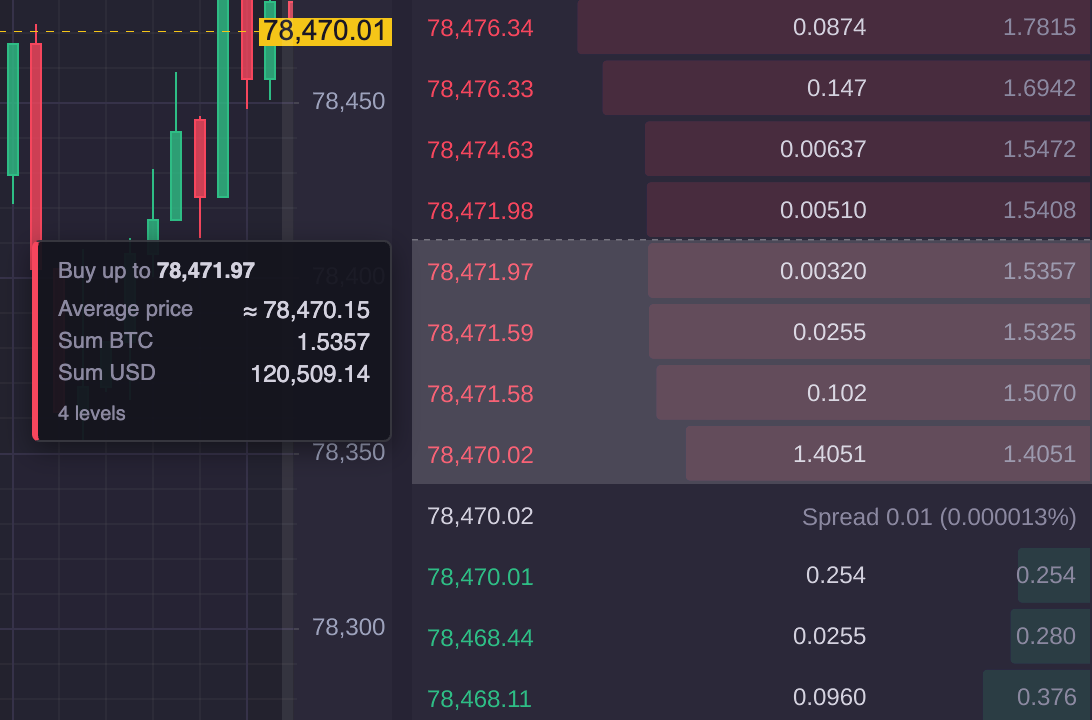
The slippage readout: what buying up to the hovered ask price would cost
The slippage readout shows what sweeping the book to the hovered price would cost. It is on by default; turn it off with sweepReadout: false or panel.setSweepReadout(false). It follows the input device, so the page doesn't need to detect phones or tablets:
- Mouse or pen: hovering a rung shows it, and it goes when the pointer leaves the ladder.
- Touch: hold a finger on a rung for 450 ms. The device vibrates briefly where the browser supports it (not iOS). Drag to move between rungs, and lift the finger to hide it. A finger that moves more than 10 px before the hold completes is treated as a scroll or swipe, and a second finger cancels it.
- Placement: beside the panel on its left when there is room; otherwise, as on a phone, inside the panel on the half away from the finger, and kept on screen.
- The ladder sets
touch-action: noneand turns off the iOS long-press text selection and callout, so the hold isn't taken by the browser.
Customising the Slippage Readout
You can change how the readout looks, but not yet what it says.
What you can customise:
-
The readout's look, with CSS. The readout is an HTML element, so its fonts, colours, borders, padding, spacing and shadow are all yours to restyle. Its parts have these classes:
Part Class The box st-, plusmarket- depth_ _ sweep st-when buying ormarket- depth_ _ sweep- - ask -when selling, and a- bid data-attributeside The headline: "Buy up to 78,471.97" st-; the price is itsmarket- depth_ _ sweep- head <strong> The rows: Average price, Sum BTC, Sum USD st-, amarket- depth_ _ sweep- rows <grid ofdl> <labels anddt> <valuesdd> The footer: "4 levels" st-market- depth_ _ sweep- foot CSS can also hide a part, such as one row with
:nth-of-type, and add fixed text with::beforeor::after. The readout is attached todocument.body, outside your own containers, so write the rules with its own classes. Start each withbody, as inbody .st-market-depth__sweep: it always matches the readout, and makes your rule win overscitrader.csswhichever loads first. -
The shading on the ladder. The wash over the rungs an order would consume, and the dashed line at its edge, are drawn on the ladder's canvas. Their colours are the panel settings
colours.highlightandcolours.highlightEdge. -
Turning it off:
sweepReadout: false, orpanel.setSweepReadout(false).
What you can't customise yet: the readout's content. Its labels ("Buy up to", "Average price", "Sum BTC", "Sum USD", "4 levels") and its number formatting are fixed, and the panel has no option to add rows, change the wording, translate it or format the numbers differently. Options for that are planned. Until then, to show a readout of your own, build the ladder from MarketDepthGrid: its onSweep(sweep) option receives every number below as an IDepthSweep, or undefined when the pointer leaves, for you to render as you like. You then build the panel's header and layout yourself.
The IDepthSweep interface, with its TSDoc
/** What sweeping the book up to the hovered rung would cost. */
interface IDepthSweep {
    /** Which side would be consumed — buying lifts asks, selling hits bids. */
    side: "bid" | "ask";
    /** Rungs consumed, from the touch outward. */
    levels: number;
    /** Total base-asset quantity the order would fill. */
    sumBase: number;
    /** What it would cost in the quote asset. */
    sumQuote: number;
    /** `sumQuote / sumBase` — the price actually paid, not the price displayed. */
    averagePrice: number;
    /** The worst price reached: the rung being hovered. */
    limitPrice: number;
    /** Decimals the ladder is currently formatting prices to. */
    priceDecimals: number;
    /**
     * The selection's outer boundary as a VIEWPORT y, the same place the dashed rule is drawn.
     *
     * Resolved here rather than handed out as a fraction for the host to convert. A fraction
     * looks more robust and is not: the ladder occupies the series view rect, which is shorter
     * than the panel by whatever the axes take, so a host converting against its own box lands a
     * row out — which it did. The axis's own coordinate calculator is the only thing that knows
     * the mapping, and it lives here.
     */
    clientY: number;
    /** The pointer's viewport x, so a host can keep the readout clear of a finger. */
    pointerClientX: number;
    /** True when a finger raised the readout (a long press) rather than a hovering mouse. */
    touch: boolean;
}
The default slippage readout CSS (.st-market-depth__sweep), from scitrader.css
.st-market-depth__sweep {
    z-index: 1400;
    min-width: 156px;
    padding: 8px 10px;
    border-radius: 4px;
    border: 1px solid rgb(var(--st-ui-overlay-rgb, 255 255 255) / 0.14);
    background: var(--st-ui-menu-background, rgba(20,20,30,0.95));
    color: var(--st-market-text, #d3d1de);
    font-size: 12px;
    font-variant-numeric: tabular-nums;
    box-shadow: 0 4px 14px rgba(0, 0, 0, 0.45);
}

.st-market-depth__sweep--ask {
    border-left: 3px solid var(--st-market-ask, #f6465d);
}

.st-market-depth__sweep--bid {
    border-left: 3px solid var(--st-market-bid, #2ebd85);
}

.st-market-depth__sweep-head {
    margin-bottom: 6px;
    color: var(--st-market-text-muted, #8b88a0);
    font-size: 11px;
}

.st-market-depth__sweep-head strong {
    color: var(--st-market-text, #d3d1de);
    font-weight: 600;
}

.st-market-depth__sweep-rows {
    gap: 2px 10px;
    margin: 0;
}

.st-market-depth__sweep-rows dt {
    color: var(--st-market-text-muted, #8b88a0);
    font-size: 11px;
}

.st-market-depth__sweep-rows dd {
    margin: 0;
    text-align: right;
}

.st-market-depth__sweep-foot {
    margin-top: 6px;
    color: var(--st-market-text-muted, #8b88a0);
    font-size: 10px;
}
TypeScript Example: Restyling the Slippage Readout
The market-depth example, with the readout restyled using CSS. The box is larger and rounder, with a thicker side stripe, the price is coloured by side, the values use a monospaced font, the "Sum USD" row is hidden, and the footer gains the text "indicative, before fees". The ladder's shading and edge line are amber, from the highlight and highlightEdge settings. Point at a rung in the ladder to see the readout.
The code for this example is found below.
- TS
import "scichart-scitrader/scitrader.css";
import { EMPTY, firstValueFrom, Observable } from "rxjs";
import {
    CandleInterval,
    CoinbaseExchange,
    DEFAULT_MARKET_DEPTH_SETTINGS,
    defaultExchangeProvider,
    IBookSnapshot,
    IBookUpdate,
    IDepthColumn,
    IHeatmapAvailability,
    IHeatmapTile,
    idbPriceStore,
    IOrderBookSource,
    MarketDepthPanel,
    OHLCStudy,
    SciFinanceChartPanel,
    VolumeStudy,
} from "scichart-scitrader";

// This example expects this HTML:
// <div style="display: flex; height: 100%">
//     <div id="chart" style="flex: 1; min-width: 0"></div>
//     <div id="depth" style="width: 340px"></div>
// </div>

// Register a data source for the chart's candles, once, at app startup
defaultExchangeProvider.registerExchange(CoinbaseExchange, idbPriceStore);

// An IOrderBookSource for Coinbase's public order book, which the depth panel reads.
// Coinbase's "level2_batch" WebSocket channel needs no API key. It sends the whole book once, then
// batches of changes. This source keeps the book in memory and sends the panel the top levels four
// times a second, as the IOrderBookSource contract asks: the panel has no use for every change
class CoinbaseOrderBookSource implements IOrderBookSource {
    readonly exchangeName = CoinbaseExchange.name;

    getBookStream(symbol: string, depth = 50): Observable<IBookUpdate> {
        return new Observable<IBookUpdate>((subscriber) => {
            // price -> quantity, for each side of the book
            const bids = new Map<number, number>();
            const asks = new Map<number, number>();
            const socket = new WebSocket("wss://ws-feed.exchange.coinbase.com");

            socket.onopen = () =>
                socket.send(JSON.stringify({ type: "subscribe", product_ids: [symbol], channels: ["level2_batch"] }));

            socket.onmessage = (event) => {
                const message = JSON.parse(event.data);
                if (message.type === "snapshot") {
                    // The whole book: [price, size] pairs as strings
                    for (const [price, size] of message.bids) bids.set(Number(price), Number(size));
                    for (const [price, size] of message.asks) asks.set(Number(price), Number(size));
                } else if (message.type === "l2update") {
                    // Changes: [side, price, size]. A size of 0 removes the level
                    for (const [side, price, size] of message.changes) {
                        const book = side === "buy" ? bids : asks;
                        if (Number(size) === 0) book.delete(Number(price));
                        else book.set(Number(price), Number(size));
                    }
                }
            };
            socket.onerror = () => subscriber.error(new Error("Coinbase order-book connection failed"));

            // Four times a second, send the top of the book. isSnapshot: true replaces the ladder
            const timer = setInterval(() => {
                if (bids.size === 0 || asks.size === 0) return;
                subscriber.next({
                    symbol,
                    timestamp: Date.now(),
                    isSnapshot: true,
                    bids: topLevels(bids, depth, (a, b) => b - a), // highest bid first
                    asks: topLevels(asks, depth, (a, b) => a - b), // lowest ask first
                });
            }, 250);

            // Called when the panel unsubscribes: stop the timer and close the connection
            return () => {
                clearInterval(timer);
                socket.close();
            };
        });
    }

    // The current top of the book: the stream's first frame
    getBookSnapshot(symbol: string, depth?: number): Promise<IBookSnapshot | null> {
        return firstValueFrom(this.getBookStream(symbol, depth));
    }

    // No liquidity heatmap here: the depth panel only needs the book
    async getHeatmapAvailability(): Promise<IHeatmapAvailability> {
        return { enabled: false, tileColumns: 0, tiers: [] };
    }
    async getHeatmapTile(): Promise<IHeatmapTile | null> {
        return null;
    }
    getDepthStream(): Observable<IDepthColumn> {
        return EMPTY;
    }
}

// The best `depth` levels of one side of the book, as { price, qty }
function topLevels(book: Map<number, number>, depth: number, order: (a: number, b: number) => number) {
    return [...book.keys()]
        .sort(order)
        .slice(0, depth)
        .map((price) => ({ price, qty: book.get(price) }));
}

async function createChartAndDepth() {
    // 1. Restyle the slippage readout with CSS: see READOUT_CSS below
    const style = document.createElement("style");
    style.textContent = READOUT_CSS;
    document.head.appendChild(style);

    // 2. The shading over the rungs an order would consume, and the dashed line at its edge, are
    // drawn on the ladder's canvas, so they are settings rather than CSS: colours.highlight and
    // colours.highlightEdge
    const depth = MarketDepthPanel.create(document.getElementById("depth"), {
        source: new CoinbaseOrderBookSource(),
        symbol: "BTC-USD", // Coinbase's symbol format
        settings: {
            ...DEFAULT_MARKET_DEPTH_SETTINGS,
            colours: {
                ...DEFAULT_MARKET_DEPTH_SETTINGS.colours,
                highlight: "rgba(255, 193, 7, 0.18)", // an amber wash over the swept rungs
                highlightEdge: "#ffc107", // and an amber edge line
            },
        },
    });

    // The chart, so the readout has room to show to the left of the panel
    const financeChartPanel = await SciFinanceChartPanel.create(document.getElementById("chart"), {
        exchangeName: CoinbaseExchange.name, // name="Coinbase" matches the built-in CoinbaseExchange
        symbol: "BTC-USD",
        interval: CandleInterval.ONE_MINUTE,
        period: "1H",
        studies: [new OHLCStudy(), new VolumeStudy()],
    });

    // When the page goes away: depth.destroy(); financeChartPanel.cleanup(); style.remove();
    return { financeChartPanel, depth };
}

// The readout is attached to document.body, outside your page's containers, so these rules use
// the readout's own classes. Each starts with "body", which always matches the readout and makes
// the rule more specific than scitrader.css's, so it wins whichever stylesheet loads first.
// Point at a rung in the ladder to see them
const READOUT_CSS = `
    /* The box: larger, rounder, with a stronger shadow and a sans-serif font */
    body .st-market-depth__sweep {
        min-width: 200px;
        padding: 12px 14px;
        border-radius: 10px;
        border: 1px solid rgba(255, 193, 7, 0.35);
        background: rgba(18, 16, 28, 0.97);
        box-shadow: 0 8px 28px rgba(0, 0, 0, 0.6);
        font-family: var(--st-font-family, "DM Sans", sans-serif);
        font-size: 13px;
    }

    /* Each side has its own modifier class: --ask (buying) and --bid (selling) */
    body .st-market-depth__sweep--ask {
        border-left: 5px solid #f6465d;
    }
    body .st-market-depth__sweep--bid {
        border-left: 5px solid #2ebd85;
    }

    /* The headline, "Buy up to 78,471.97": the price, coloured by side */
    body .st-market-depth__sweep-head {
        font-size: 12px;
        text-transform: uppercase;
        letter-spacing: 0.04em;
    }
    body .st-market-depth__sweep--ask .st-market-depth__sweep-head strong {
        color: #f6465d;
        font-size: 14px;
    }
    body .st-market-depth__sweep--bid .st-market-depth__sweep-head strong {
        color: #2ebd85;
        font-size: 14px;
    }

    /* The rows: labels (dt) and values (dd), in a two-column grid */
    body .st-market-depth__sweep-rows {
        gap: 4px 16px;
    }
    body .st-market-depth__sweep-rows dd {
        font-family: "SF Mono", Menlo, Consolas, monospace;
        color: #ffffff;
    }

    /* Hide one row: the third pair of dt / dd is "Sum USD" */
    body .st-market-depth__sweep-rows dt:nth-of-type(3),
    body .st-market-depth__sweep-rows dd:nth-of-type(3) {
        display: none;
    }

    /* Add fixed text after the footer ("4 levels") with ::after */
    body .st-market-depth__sweep-foot::after {
        content: " · indicative, before fees";
    }
`;

createChartAndDepth();
Recolouring the Ladder
The settings' colours follow the theme while they are at their defaults. To let the user change them, show panel.themedSettings (the colours as drawn) in a ColorPicker, and store an edit theme-neutral again with unthemeMarketDepthSettings:
import { themeMarketDepthSettings, unthemeMarketDepthSettings } from "scichart-scitrader";
import { ColorPicker, MarketDepthView } from "scichart-scitrader-react";

// Saved settings are theme-neutral: a colour left at its default follows the theme. Show the
// colours as drawn under the current theme, and store an edit theme-neutral again
const shown = themeMarketDepthSettings(depthSettings, theme);
const setColour = (key: "bid" | "ask", value: string) =>
    setDepthSettings(unthemeMarketDepthSettings({ ...shown, colours: { ...shown.colours, [key]: value } }, theme));

<ColorPicker label="Bid" value={shown.colours.bid} onChange={(v) => setColour("bid", v)} />
<ColorPicker label="Ask" value={shown.colours.ask} onChange={(v) => setColour("ask", v)} />
<MarketDepthView source={source} symbol={symbol} settings={depthSettings} />
The Headless Ladder: MarketDepthLadder
MarketDepthLadder is the headless model underneath, for a host that wants to render the rows itself: subscribe delivers IDepthLadder (bids, asks, mid, spread, grouping) on every book update.
The Order-Book Source: IOrderBookSource
The panel needs two of the source's methods: getBookSnapshot and getBookStream. The other three serve the order-book heatmap, and a source without one can answer { enabled: false }, null and an empty stream, as CoinbaseOrderBookSource does. getBookStream should be throttled by the source: the panel redraws a few times a second, and has no use for every change on the exchange.
IOrderBookSource, IBookSnapshot, IBookUpdate and IBookLevel, with their TSDoc
interface IOrderBookSource {
    readonly exchangeName: string;
    /** Current top-N, or null when no synced book exists for the instrument. */
    getBookSnapshot(symbol: string, depth?: number): Promise<IBookSnapshot | null>;
    /**
     * Live ladder: one snapshot, then merges. Throttled by the source — the depth panel redraws
     * at a few hertz and has no use for raw exchange cadence.
     */
    getBookStream(symbol: string, depth?: number): Observable<IBookUpdate>;
    /**
     * Which heatmap tiers exist for an instrument, and from when. A source with no heatmap
     * answers `{ enabled: false }`, which the study shows as such rather than as an empty chart.
     */
    getHeatmapAvailability(symbol: string): Promise<IHeatmapAvailability>;
    /**
     * One tile of one tier. Null when that tier is not recorded for the instrument, or the
     * heatmap is switched off, which the study draws as nothing rather than as an error.
     */
    getHeatmapTile(symbol: string, bucket: string, tile: number): Promise<IHeatmapTile | null>;
    /** New columns at one tier: each bucket as it closes, and the open one as it fills. */
    getDepthStream(symbol: string, bucket: string): Observable<IDepthColumn>;
}

/** Top-N of both sides at a moment in time. Bids descend, asks ascend. */
interface IBookSnapshot {
    symbol: string;
    timestamp: number;
    bids: IBookLevel[];
    asks: IBookLevel[];
}

/**
 * An incremental ladder change. Levels with `qty === 0` are removals — including levels that
 * merely fell out of the requested depth, which from a ladder's point of view is the same event.
 */
interface IBookUpdate extends IBookSnapshot {
    /** True when this frame replaces the ladder rather than merging into it. */
    isSnapshot: boolean;
}

interface IBookLevel {
    price: number;
    /** Zero means the level is gone. Never a level of size zero. */
    qty: number;
}
Order Book Data covers the whole interface, including the recorded book the heatmap studies read.
Styling the Market Depth Panel
The panel's header and slippage readout are HTML. The ladder itself is drawn with SciChart, so its colours, fonts and row height are settings, not CSS; see Styling and Themes.
| Element | Class |
|---|---|
| The panel | st- |
| The header: symbol, grouping stepper and settings cog | _, _, _, _, _, _ |
| The ladder area | _ |
| The slippage readout | _ (- / -), _, _, _ |
These are the stylesheet's rules for them, as a starting point for your own. Override them in your own CSS, loaded after scitrader.css:
The default .st-market-depth CSS, from scitrader.css
.st-market-depth {
    background: var(--st-ui-background, #2b2839);
    color: var(--st-market-text, #d3d1de);
    font-size: 12px;
    /* Prices and sizes are read as columns of digits; proportional figures make them ragged. */
    font-variant-numeric: tabular-nums;
}

.st-market-depth__header {
    gap: 8px;
    padding: 10px 12px 6px;
}

.st-market-depth__title {
    font-size: 13px;
    font-weight: 600;
}

.st-market-depth__grouping {
    gap: 2px;
}

.st-market-depth__step {
    width: 22px;
    height: 22px;
    padding: 0;
    border: 1px solid rgb(var(--st-ui-overlay-rgb, 255 255 255) / 0.12);
    border-radius: 4px;
    background: rgb(var(--st-ui-overlay-rgb, 255 255 255) / 0.04);
    color: var(--st-market-text, #d3d1de);
    font-size: 13px;
    line-height: 1;
    cursor: pointer;
}

.st-market-depth__step:hover:not(:disabled) {
    background: rgb(var(--st-ui-overlay-rgb, 255 255 255) / 0.1);
}

.st-market-depth__step:disabled {
    opacity: 0.35;
    cursor: default;
}

.st-market-depth__settings {
    display: inline-flex;
    align-items: center;
    justify-content: center;
    width: 22px;
    height: 22px;
    margin-right: 6px;
    padding: 0;
    border: none;
    background: transparent;
    color: var(--st-market-text-muted, #8b88a0);
    cursor: pointer;
}

.st-market-depth__settings:hover {
    color: var(--st-ui-text-muted, #9da2bc);
}

.st-market-depth__grouping-value {
    min-width: 66px;
    text-align: center;
    color: var(--st-market-text-muted, #8b88a0);
}

.st-market-depth__sweep {
    z-index: 1400;
    min-width: 156px;
    padding: 8px 10px;
    border-radius: 4px;
    border: 1px solid rgb(var(--st-ui-overlay-rgb, 255 255 255) / 0.14);
    background: var(--st-ui-menu-background, rgba(20,20,30,0.95));
    color: var(--st-market-text, #d3d1de);
    font-size: 12px;
    font-variant-numeric: tabular-nums;
    box-shadow: 0 4px 14px rgba(0, 0, 0, 0.45);
}

.st-market-depth__sweep--ask {
    border-left: 3px solid var(--st-market-ask, #f6465d);
}

.st-market-depth__sweep--bid {
    border-left: 3px solid var(--st-market-bid, #2ebd85);
}

.st-market-depth__sweep-head {
    margin-bottom: 6px;
    color: var(--st-market-text-muted, #8b88a0);
    font-size: 11px;
}

.st-market-depth__sweep-head strong {
    color: var(--st-market-text, #d3d1de);
    font-weight: 600;
}

.st-market-depth__sweep-rows {
    gap: 2px 10px;
    margin: 0;
}

.st-market-depth__sweep-rows dt {
    color: var(--st-market-text-muted, #8b88a0);
    font-size: 11px;
}

.st-market-depth__sweep-rows dd {
    margin: 0;
    text-align: right;
}

.st-market-depth__sweep-foot {
    margin-top: 6px;
    color: var(--st-market-text-muted, #8b88a0);
    font-size: 10px;
}
/* A larger symbol in the header, and a sans-serif font for the panel */
.st-market-depth {
    font-family: var(--st-font-family, "DM Sans", sans-serif);
}
.st-market-depth__title {
    font-size: 15px;
}