Advanced Options - Custom Layout Managers
In SciChart.js, all positioning and layout of axis are done with Layout Strategies. A list of default built-in strategies can be found below.
| Layout Strategy | Use On | Apply To | Behavior |
|---|---|---|---|
| BottomAlignedOuterAxisLayoutStrategy📘 | X Axis | Bottom side | Default behavior |
| BottomAlignedOuterHorizontallyStackedAxisLayoutStrategy📘 | X Axis | Bottom side | Horizontal stacking behavior |
| LeftAlignedOuterAxisLayoutStrategy📘 | Y Axis | Left side | Default behavior |
| RightAlignedOuterAxisLayoutStrategy📘 | Y Axis | Right side | Default behavior |
| TopAlignedOuterAxisLayoutStrategy📘 | X Axis | Top side | Default behavior |
| LeftAlignedOuterVerticallyStackedAxisLayoutStrategy📘 | Y Axis | Left side | Vertical stacking behavior |
| RightAlignedOuterVerticallyStackedAxisLayoutStrategy📘 | Y Axis | Right side | Vertical stacking behavior |
| TopAlignedOuterHorizontallyStackedAxisLayoutStrategy📘 | X Axis | Top side | Horizontal stacking behavior |
By applying these strategies to the SciChartSurface you can achieve various layouts, such as Central Axis Layout or Vertically Stacked Axis Layout.
However, you can also create your own layout managers for custom or complex axis layouts.
Here's a worked example:
Example: Custom Stacked and Normal Axis Layout
A user on the SciChart Forums asked us how to combine Horizontally Stacked Axis behaviour with default behaviour, to achieve a layout like this:
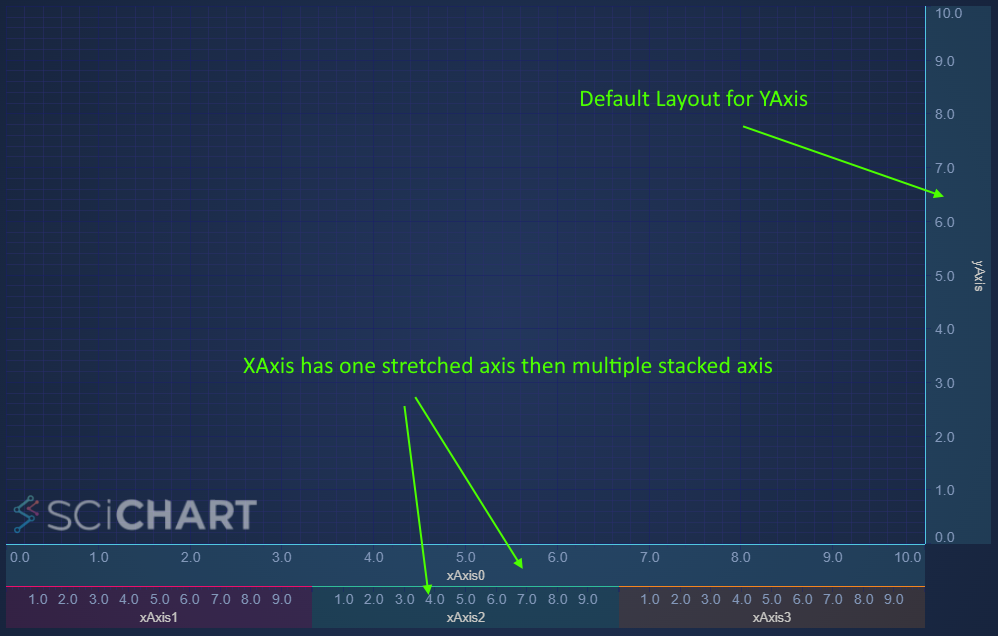
This is possible by creating a custom layout strategy.
Step 1: create a class which inherits one of our default layout strategies. For this, we chose BottomAlignedOuterHorizontallyStackedAxisLayoutStrategy📘 as the base class.
- TS
// Example of creating a custom layout manager. First requested here https://www.scichart.com/questions/js/is-it-possible-to-create-two-xaxis-where-one-is-normal-and-the-other-one-is-horizontally-stacked-axis-layout
//
// Axis rendering  happens in 2 phases: measure & layout.
// Axis size and positioning is calculated by an axis layout strategy accordingly to the axisAlignment and isInner properties
// This custom Layout Strategy applies normal layout strategy to the first axis and the stacked strategy to the rest of bottom-aligned outer axes
class CustomAxisLayoutStrategy extends BottomAlignedOuterHorizontallyStackedAxisLayoutStrategy {
    private defaultBottomOuterAxisLayoutStrategy: BottomAlignedOuterAxisLayoutStrategy;
    constructor() {
        super();

        /** The strategy used for normal (non-stacked) layout */
        this.defaultBottomOuterAxisLayoutStrategy = new BottomAlignedOuterAxisLayoutStrategy();
    }

    // override measureAxes from the base class
    public measureAxes(sciChartSurface, chartLayoutState, axes) {
        const [firstAxis, ...stackedAxes] = axes;
        // measure stacked axes and max height (stackedAreaSize) required by them
        super.measureAxes(sciChartSurface, chartLayoutState, stackedAxes);

        // measure first axis with the regular logic
        const stackedAreaSize = this.defaultBottomOuterAxisLayoutStrategy.measureAxes(
            sciChartSurface,
            chartLayoutState,
            [firstAxis]
        );

        // calculate height required by the first axis and then the total height
        const firstAxisSize = getHorizontalAxisRequiredSize(firstAxis.axisLayoutState);
        return firstAxisSize + stackedAreaSize;
    }

    // Override layoutAxes from the base class
    public layoutAxes(left, top, right, bottom, axes) {
        const [firstAxis, ...stackedAxes] = axes;
        // layout first axis with the regular logic
        this.defaultBottomOuterAxisLayoutStrategy.layoutAxes(left, top, right, bottom, [firstAxis]);

        // after the layout phase we get axis.viewRect which specifies size and position of an axis
        // and then we can layout rest of the axes with stacked strategy beneath it.
        super.layoutAxes(left, firstAxis.viewRect.bottom, right, bottom, stackedAxes);
    }
}
Breaking this code down:
- The BottomAlignedOuterHorizontallyStackedAxisLayoutStrategy📘 is designed to layout axis on the bottom of the chart (x-Axis) horizontally stacked.
- We override measureAxes📘 and use the default super.measureAxes() function to measure the last three axis. We use a BottomAlignedOuterAxisLayoutStrategy📘 member variable to measure the final axis.
- We override layoutAxes📘 and do the same, combining the result of two strategies.
Applying the strategy like this to a chart:
- TS
    const { wasmContext, sciChartSurface } = await SciChartSurface.create(divElementId, {
        theme: new SciChartJsNavyTheme()
    });

    // Apply your layout manager
    sciChartSurface.layoutManager.bottomOuterAxesLayoutStrategy = new CustomAxisLayoutStrategy();

    // Create some X Axis
    const options = { drawMajorBands: false, drawMajorGridLines: false, drawMinorGridLines: false };
    const xAxis0 = new NumericAxis(wasmContext, {
        axisTitle: "xAxis0",
        drawMajorBands: true,
        drawMajorGridLines: true,
        drawMinorGridLines: true
    });
    const xAxis1 = new NumericAxis(wasmContext, {
        axisTitle: "xAxis1",
        ...options
    });
    const xAxis2 = new NumericAxis(wasmContext, {
        axisTitle: "xAxis2",
        ...options
    });
    const xAxis3 = new NumericAxis(wasmContext, {
        axisTitle: "xAxis3",
        ...options
    });
    const yAxis1 = new NumericAxis(wasmContext, {
        axisTitle: "yAxis",
        backgroundColor: "#50C7E022",
        axisBorder: { color: "#50C7E0", borderLeft: 1 },
        axisTitleStyle: { fontSize: 13 }
    });

    // Add the axis to the chart
    sciChartSurface.xAxes.add(xAxis0, xAxis1, xAxis2, xAxis3);
    sciChartSurface.yAxes.add(yAxis1);

    // To make it clearer what's happening, colour the axis backgrounds & borders
    const axisColors = ["#50C7E0", "#EC0F6C", "#30BC9A", "#F48420"];
    sciChartSurface.xAxes.asArray().forEach((xAxis, index) => {
        xAxis.backgroundColor = axisColors[index] + "22";
        xAxis.axisBorder = { color: axisColors[index], borderTop: 1 };
        xAxis.axisTitleStyle.fontSize = 13;
    });
You can now get the following output.
Reversing the Order of Stacked & Stretched Axis
What if you wanted to swap the order of the stretched xAxis and the stacked xAxis?
This is really simple, just modify the layoutAxes function like this.
- TS
    // Use the base horizontal stacked layout first, before default layout to switch the order of axis
    layoutAxes(left, top, right, bottom, axes) {
        const [firstAxis, ...stackedAxes] = axes;
        // layout stacked axes first
        super.layoutAxes(left, top, right, bottom, stackedAxes);

        // then get the top offset for the normalAxis with stackedAxis.viewRect.bottom
        const stackedAxis = stackedAxes[0];
        this.defaultBottomOuterAxisLayoutStrategy.layoutAxes(
            left,
            stackedAxis.viewRect.bottom,
            right,
            bottom,
            [firstAxis] // normal axis
        );
    }
Now the axis order are swapped, resulting in this output.