Search Results for

    Show / Hide Table of Contents

    The Impulse Series 3D

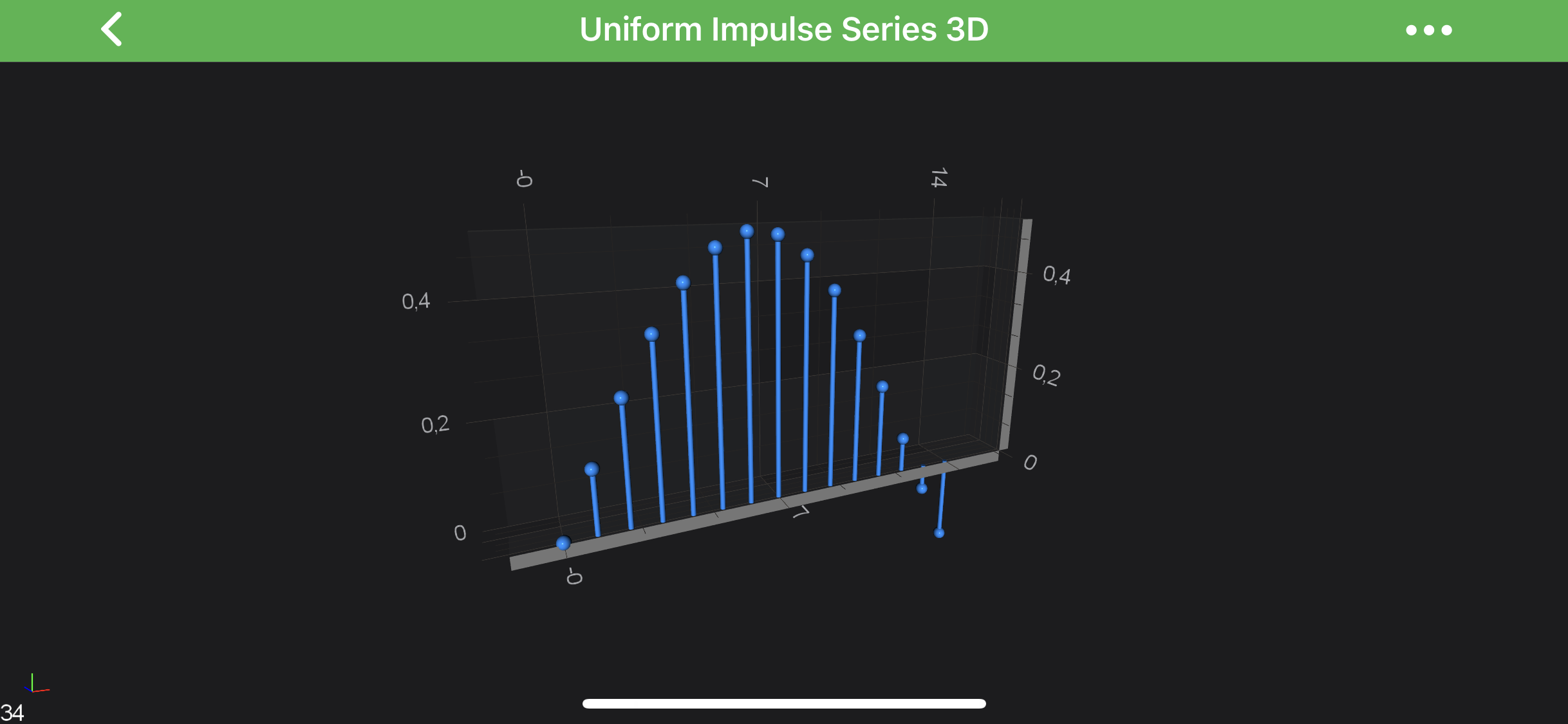
    The 3D Impulse (Stem) Charts are provided by the ImpulseRenderableSeries3D class.

    A stem chart is visualized by small stems pointing up or down to a value with a sphere or marker at the top.
    Impulse Chart 3D

    Note

    Examples for the Impulse Series 3D can be found in the SciChart Android Examples Suite as well as on GitHub:

    • Native Example
    • Xamarin Example

    Create a Impulse Series 3D

    In SciChart you can have either Uniform or Non-Uniform Impulse Series 3D. Both are provided by the ImpulseRenderableSeries3D but underlying IDataSeries3D<TX,TY,TZ> is different.

    ImpulseRenderableSeries3D allow you to specify the stroke color of the lines(stems) as well as it's thickness via the corresponding properties:

    • stroke
    • strokeThickness

    In addition, in the same manner as a Scatter Series 3D - Impulse Series 3D requires a shape to be specified using one of the BasePointMarker3D and assigning it to the pointMarker property. There are number of PointMarkers available out of the box:

    Flat-Texture PointMarkers Mesh (Volumetric) PointMarkers
    TrianglePointerMarker3D PyramidPointMarker3D
    QuadPointMarker3D CubePointMarker3D
    EllipsePointMarker3D SpherePointMarker3D
    PixelPointMarker3D CylinderPointMarker3D
    CustomPointMarker3D

    It is also possible to define custom texture for the Point Markers via the CustomPointMarker3D. Please refer to the PointMarkers 3D API article to learn more.

    Note

    Same way as with other 3D Chart Types you can use The MetadataProvider API.

    Uniform Impulse Series 3D

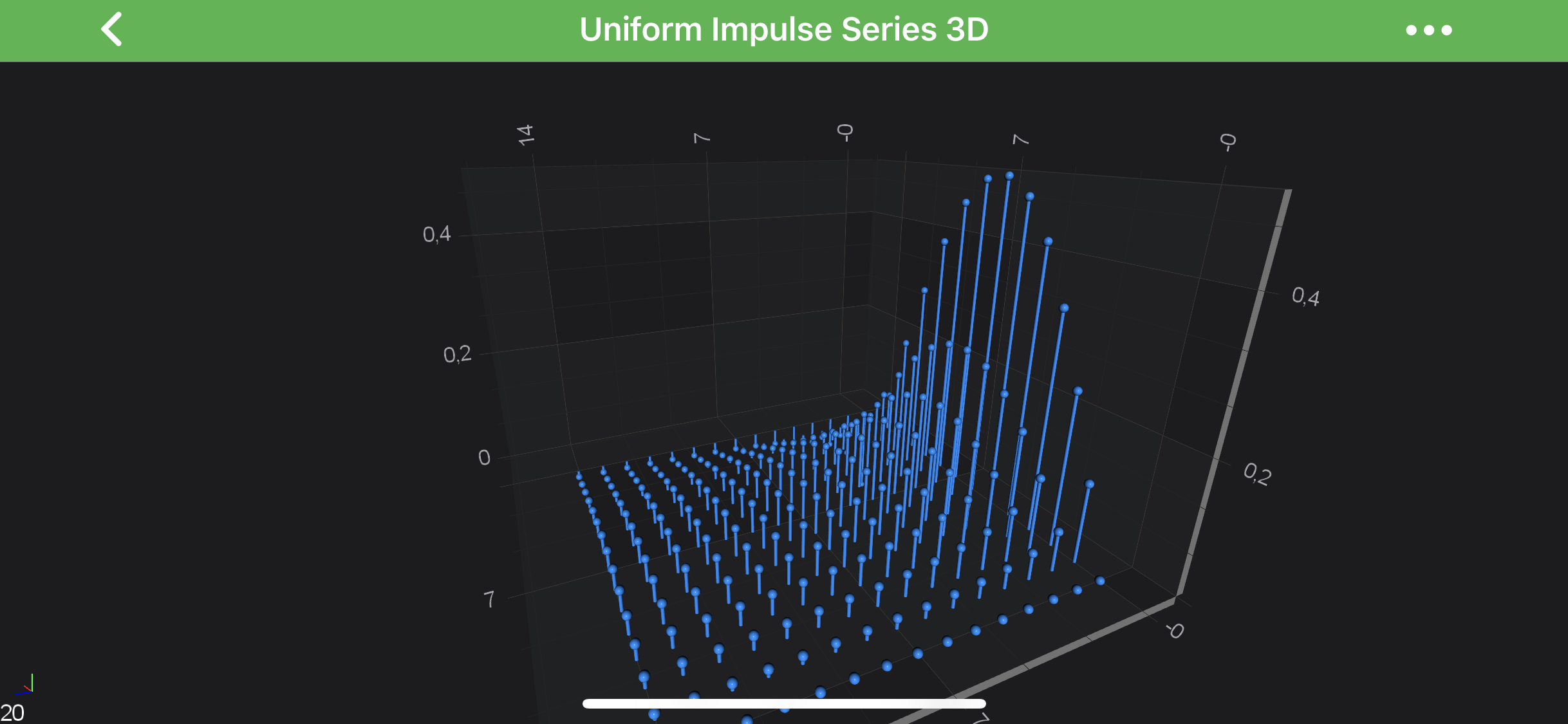
    In order to create Uniform Impulse Series 3D - you will need to provide the UniformGridDataSeries3D<TX,TY,TZ> with N x M array of points.

    The above graph is rendered with the following code:

    • Java
    • Java with Builders API
    • Kotlin
    final NumericAxis3D xAxis = new NumericAxis3D();
    xAxis.setGrowBy(new DoubleRange(.1, .1));
    
    final NumericAxis3D yAxis = new NumericAxis3D();
    yAxis.setVisibleRange(new DoubleRange(0.0, .5));
    yAxis.setGrowBy(new DoubleRange(.1, .1));
    
    final NumericAxis3D zAxis = new NumericAxis3D();
    zAxis.setGrowBy(new DoubleRange(.1, .1));
    
    final UniformGridDataSeries3D<Double, Double, Double> ds = new UniformGridDataSeries3D<>(Double.class, Double.class, Double.class, COUNT, COUNT);
    
    for (int x = 0; x < COUNT; x++) {
        for (int z = 0; z < COUNT; z++) {
            final double y = Math.sin(x * .25) / ((z + 1) * 2);
    
            ds.updateYAt(x, z, y);
        }
    }
    
    final SpherePointMarker3D pointMarker = new SpherePointMarker3D();
    pointMarker.setSize(5);
    pointMarker.setFill(0xFF1E90FF);
    
    final ImpulseRenderableSeries3D rs = new ImpulseRenderableSeries3D();
    rs.setDataSeries(ds);
    rs.setStroke(0xFF1E90FF);
    rs.setStrokeThickness(convertValueToDp(2f));
    rs.setPointMarker(pointMarker);
    
    UpdateSuspender.using(surface, () -> {
        surface.setXAxis(xAxis);
        surface.setYAxis(yAxis);
        surface.setZAxis(zAxis);
        surface.getRenderableSeries().add(rs);
        surface.getChartModifiers().add(createDefaultModifiers3D());
    });
    
    final NumericAxis3D xAxis = sciChart3DBuilder.newNumericAxis3D().withGrowBy(.1, .1).build();
    final NumericAxis3D yAxis = sciChart3DBuilder.newNumericAxis3D().withVisibleRange(0, .5).withGrowBy(.1, .1).build();
    final NumericAxis3D zAxis = sciChart3DBuilder.newNumericAxis3D().withGrowBy(.1, .1).build();
    
    final UniformGridDataSeries3D<Double, Double, Double> ds = new UniformGridDataSeries3D<>(Double.class, Double.class, Double.class, COUNT, COUNT);
    
    for (int x = 0; x < COUNT; x++) {
        for (int z = 0; z < COUNT; z++) {
            final double y = Math.sin(x * .25) / ((z + 1) * 2);
    
            ds.updateYAt(x, z, y);
        }
    }
    
    final SpherePointMarker3D pointMarker = sciChart3DBuilder.newSpherePointMarker3D()
            .withSize(5)
            .withFill(0xFF1E90FF)
            .build();
    
    final ImpulseRenderableSeries3D rs = sciChart3DBuilder.newImpulseSeries3D()
            .withDataSeries(ds)
            .withStroke(0xFF1E90FF)
            .withStrokeThicknes(2f)
            .withPointMarker(pointMarker)
            .build();
    
    UpdateSuspender.using(surface, () -> {
        surface.setXAxis(xAxis);
        surface.setYAxis(yAxis);
        surface.setZAxis(zAxis);
        surface.getRenderableSeries().add(rs);
        surface.getChartModifiers().add(createDefaultModifiers3D());
    });
    
    val xAxis = NumericAxis3D()
    xAxis.growBy = DoubleRange(.1, .1)
    
    val yAxis = NumericAxis3D()
    yAxis.setVisibleRange(DoubleRange(0.0, .5))
    yAxis.growBy = DoubleRange(.1, .1)
    
    val zAxis = NumericAxis3D()
    zAxis.growBy = DoubleRange(.1, .1)
    
    val ds = UniformGridDataSeries3D(Double::class.java, Double::class.java, Double::class.java, COUNT, COUNT)
    
    for (x in 0 until COUNT) {
        for (z in 0 until COUNT) {
            val y = Math.sin(x * .25) / ((z + 1) * 2)
            ds.updateYAt(x, z, y)
        }
    }
    val pointMarker = SpherePointMarker3D()
    pointMarker.size = 5f
    pointMarker.fill = 0xFF1E90FF.toInt()
    
    val rs = ImpulseRenderableSeries3D()
    rs.dataSeries = ds
    rs.stroke = 0xFF1E90FF.toInt()
    rs.strokeThickness = convertValueToDp(2f)
    rs.pointMarker = pointMarker
    
    UpdateSuspender.using(surface) {
        surface.xAxis = xAxis
        surface.yAxis = yAxis
        surface.zAxis = zAxis
        surface.renderableSeries.add(rs)
        surface.chartModifiers.add(createDefaultModifiers3D())
    }
    

    Single Row Impulse 3D Charts

    You might also want to create a Single-Row of 3D Impulses. It's easily achievable via providing UniformGridDataSeries3D<TX,TY,TZ> with size of 1 in Z-Direction and update the worldDimensions like below:

    • Java
    • Java with Builders API
    • Kotlin
    final UniformGridDataSeries3D<Double, Double, Double> ds = new UniformGridDataSeries3D<>(Double.class, Double.class, Double.class, COUNT, COUNT);
    
    for (int x = 0; x < COUNT; x++) {
        for (int z = 0; z < COUNT; z++) {
            final double y = Math.sin(x * .25) / ((z + 1) * 2);
    
            ds.updateYAt(x, z, y);
        }
    }
    
    surface.getWorldDimensions().assign(200, 100, 20);
    
    final UniformGridDataSeries3D<Double, Double, Double> ds = new UniformGridDataSeries3D<>(Double.class, Double.class, Double.class, COUNT, COUNT);
    
    for (int x = 0; x < COUNT; x++) {
        for (int z = 0; z < COUNT; z++) {
            final double y = Math.sin(x * .25) / ((z + 1) * 2);
    
            ds.updateYAt(x, z, y);
        }
    }
    
    surface.getWorldDimensions().assign(200, 100, 20);
    
    val ds = UniformGridDataSeries3D(
        Double::class.java,
        Double::class.java,
        Double::class.java, COUNT, COUNT
    )
    for (x in 0 until COUNT) {
        for (z in 0 until COUNT) {
            val y = Math.sin(x * .25) / ((z + 1) * 2)
            ds.updateYAt(x, z, y)
        }
    }
    
    surface.worldDimensions.assign(200f, 100f, 20f)
    

    and results in the following chart:

    Single Row Impulse Chart 3D

    Non-Uniform Impulse Series 3D

    In order to create Non-Uniform Impulse Series 3D - you will need to provide the XyzDataSeries3D with points.

    • Java
    • Java with Builders API
    • Kotlin
    final XyzDataSeries3D<Double, Double, Double> ds = new XyzDataSeries3D<>(Double.class, Double.class, Double.class);
    final PointMetadataProvider3D metadataProvider = new PointMetadataProvider3D();
    
    for (double i = 1; i < COUNT; i++) {
        for (double j = 1; j <= COUNT; j++) {
            if (i != j && i % 2 == 0 && j % 2 == 0) {
                final double y = dataManager.getGaussianRandomNumber(15, 1.5);
                ds.append(i, y, j);
    
                final PointMetadataProvider3D.PointMetadata3D metadata = new PointMetadataProvider3D.PointMetadata3D(dataManager.getRandomColor());
                metadataProvider.metadata.add(metadata);
            }
        }
    }
    
    final ImpulseRenderableSeries3D rs = new ImpulseRenderableSeries3D();
    rs.setDataSeries(ds);
    rs.setMetadataProvider(metadataProvider);
    
    final XyzDataSeries3D<Double, Double, Double> ds = new XyzDataSeries3D<>(Double.class, Double.class, Double.class);
    final PointMetadataProvider3D metadataProvider = new PointMetadataProvider3D();
    
    for (double i = 1; i < COUNT; i++) {
        for (double j = 1; j <= COUNT; j++) {
            if (i != j && i % 2 == 0 && j % 2 == 0) {
                final double y = dataManager.getGaussianRandomNumber(15, 1.5);
                ds.append(i, y, j);
    
                final PointMetadataProvider3D.PointMetadata3D metadata = new PointMetadataProvider3D.PointMetadata3D(dataManager.getRandomColor());
                metadataProvider.metadata.add(metadata);
            }
        }
    }
    
    final ImpulseRenderableSeries3D rs = sciChart3DBuilder.newImpulseSeries3D()
            .withDataSeries(ds)
            .withMetadataProvider(metadataProvider)
            .build();
    
    val ds = XyzDataSeries3D(
        Double::class.java,
        Double::class.java,
        Double::class.java
    )
    
    val metadataProvider = PointMetadataProvider3D()
    
    for (i in 1 until COUNT) {
        for (j in 1..COUNT) {
            if (i != j && i % 2.0 == 0.0 && j % 2.0 == 0.0) {
                val y = dataManager.getGaussianRandomNumber(15.0, 1.5)
                ds.append(i.toDouble(), y, j.toDouble())
                val metadata = PointMetadata3D(dataManager.randomColor)
                metadataProvider.metadata.add(metadata)
            }
        }
    }
    
    val rs = ImpulseRenderableSeries3D()
    rs.dataSeries = ds
    rs.metadataProvider = metadataProvider
    

    which will result in the following chart:
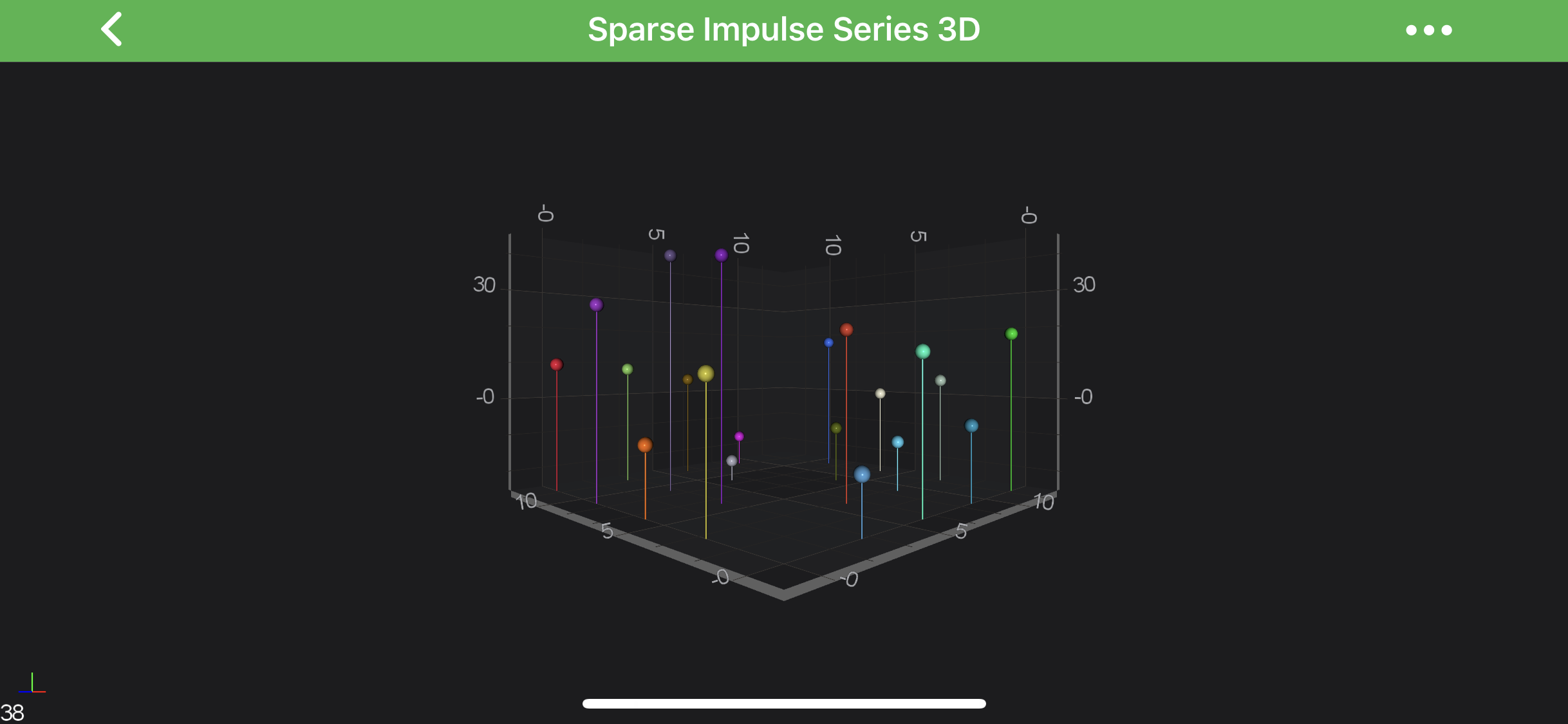
    Non-Uniform Impulse Chart 3D

    Note

    Full example code for the Impulse Column Series 3D can be found in the SciChart Android Examples Suite as well as on GitHub:

    • Native Example
    • Xamarin Example
    Back to top © 2011-2025 SciChart. All rights reserved. | sitemap.xml