Deploying SciChart.js with Advanced Licensing (OEM)
To allow deployment of SciChart.js to OEM applications, apps where the runtime domain is unknown or localhost without a watermark and to comply with the terms for commercial use,
you will need to setup an advanced license for your app.
Products purchased from our store that enable SciChart.js advanced licensing include:
- SciChart Bundle 2D Pro
- SciChart Bundle 2D/3D Pro
- SciChart Bundle 2D/3D Source
For to enable Advanced Licensing, you will need to talk to technical sales and for licensing support post-sales please contact technical support.
Standard scichart.js licenses allow for production deployment to a fixed host name, which is not localhost.
If you are building an application that will be deployed by third parties to hosts you do not know or control (ie OEM scenarios)
or if you are building an embedded system that has to run on localhost, then you will need one of our Advanced Licensing solutions.
Advanced licensing requires a Bundle license and a commitment to maintain an active license for the lifetime of the project. For full details please see the knowlegebase article SciChart Advanced Licensing.
Once the necessary license type and agreement is in place, Advanced Licensing will be enabled for your license. This adds new functionality to the Licenses section of the scichart.com/my-account page which will enable you to generate the key pairs needed.
Before trying to implement any of these solutions we recommend submitting a support request with details of your intended deployment, including the host requirement, the client and server tech stack and the target platform and architecture (eg windows/linux, x86/x64/arm/arm64), and we will make sure you get the correct solution.
How Advanced Licensing Works
You will host a license key in the server of your application, and a client key set on the client.
These will communicate to unlock SciChart.js for every domain, including localhost. The advanced licensing works offline and does not require an internet connection.
Once deployed, an advanced license will work in perpetuity, however our advanced licensing agreement requires you maintain least one active developer subscription during the lifetime of the application. This is a really low fee, and ensures ongoing maintenance of our systems & technical support for OEM use-cases.
Generating an advanced license client key / server key pair
- Head over to scichart.com/my-account to administer your license keys (Need help? See location and management of license keys)
- In the section Orders & Keys - Manage Licenses - Hostnames set a server assembly name or app name, with the drop-down value "OEM or Embedded License"
For dotnet server, this must be the actual assembly name of your .net server application. Else, it can be any application name or ID

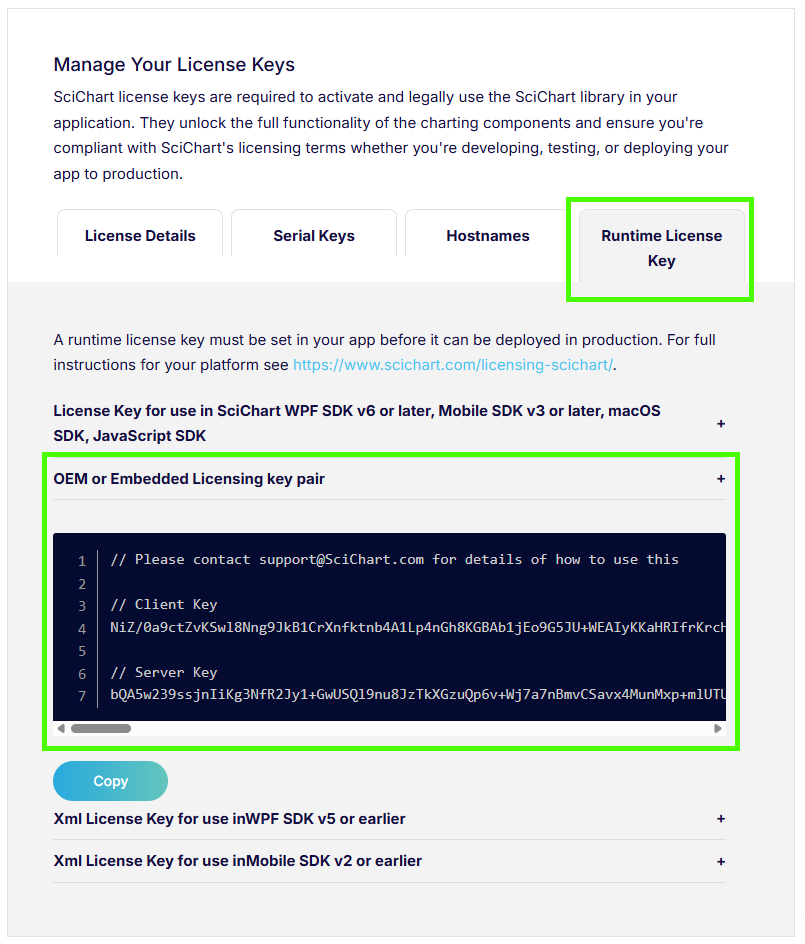
- In the section Orders & Keys - Manage Licenses - Runtime License Key you can now generate a client/server key pair for your app.
Including advanced license keys in your app
The actual implementation depends on your tech stack, however we have helpful examples for dotnet server, nodejs server or a self-hosted licensing server over at our Github
The git repo github.com/ABTSoftware/SciChart.JS.Examples/tree/master/AdvancedLicensing contains the code you need to setup and enable an advanced license in your system
Advanced licensing for .net (dotnet) server
We have a folder in our Github Repository here called dotnet-server-licensing with a detailed Readme.md and example test app that you can use to test out your Advanced Licensing keys.
For the dotnet server example, the client/server key pair must be generated using the server entry assembly name as an OEM or Embedded License App name. For this demo that would be DotnetServerLicensing.
Advanced licensing for nodejs server
We have a folder in our Github Repository here called nodejs-server-licensing with a detailed Readme.md and example test app that you can use to test out your Advanced Licensing keys.
For the nodejs example, the client/server key pair must be generated using the APP_NAME, e.g. in this demo that would be scichart-nodejs-server-licensing.
Advanced licensing for any server environment
We have a folder in our Github Repository here called SciChartLicenseServer with a detailed Readme.md and C++ assemblies that you can include in any server environment, e.g. Java, Python, PhP etc.
For the C++ License server assemblies, set any desired App Name as an OEM or Embedded License App name when generating client/server key pairs in My-Account.
After that, call SetAssemblyName() on the server with the same string, call SetRuntimeLicenseKey() on the server passing the server key.
The first time a chart is created on the client, a validation challenge is generated using the client key and this is sent to the server (by default to /api/license?orderid={orderId}&challenge={challenge}).
The server needs to pass the challenge to the SciChart native library which has the server key set, and return the response to the client. The result is the application can be deployed to any domain, including localhost.
Note, for advanced licensing the communication is only between the client and its originating server. It does not require outside internet access. The validation result is stored in a cookie on the client, so this validation only needs to occur once per week per client.