
Best Cross-Platform Charting Libraries for Enterprise Apps
Compare the top cross-platform visualization tools for enterprise applications to ensure native performance, deep customization, and seamless data scalability.
The best scientific charting libraries in 2026 are SciChart, Chart.js, Plotly, VTK and D3.js, but for laboratory instrumentation software the choice is a platform decision, not a widget choice. Instrument makers rarely ship a single application. They ship a suite: acquisition and control software at the instrument, analysis tools on the workstation, and increasingly a browser view so colleagues can review results from another lab, or another country.
The chart library underneath sets how every one of those products looks, behaves and gets validated for years. A scientist analyzing a chromatogram, an IR spectrum or a mass spectrum should be able to zoom, compare and annotate the same way in every tool you ship.
This scientific charting library comparison covers the five scientific data visualization libraries that research labs and instrument teams shortlist most in 2026: SciChart, Chart.js, Plotly, VTK and D3.js. It is written for the product owners and project managers who write the requirements, as well as the developers who build them. We built SciChart, so for every other library we have relied on its own documentation rather than our opinion of it.
Table of Contents:
- What Are the Best Scientific Charting Libraries for JavaScript and WPF in 2026?
- What Do Scientific Instrument Teams Actually Need From a Charting Library?
- Which Charting Library Handles Large Scientific Datasets With Annotations and Overlays?
- How Do You Choose a Cross-Platform Charting Library for JavaScript, WPF, and Mobile Lab Software?
- Which Chart Types Do Chromatography, Spectroscopy and Mass Spectrometry Software Need?
- Why Does Supportability Matter for Regulated Lab and Diagnostic Software?
- What Should Product Owners Put in a Charting Library Requirements Spec?
- What Should Developers Check When Evaluating a Scientific Charting Library?
- Which Instrument Makers and Research Teams Use SciChart?
The strongest options in 2026 are SciChart, Chart.js, Plotly, VTK and D3.js. They differ most in how they draw pixels and where they run, and those two facts decide whether one library can cover an entire instrument suite.
| Library | Rendering Architecture | Platforms Supported | Best Fit |
| SciChart | Visual Xccelerator™ C++ engine: WebGL and WebAssembly in the browser, DirectX on Windows, Metal on iOS and macOS, OpenGL on Android | JavaScript (React, Angular, Vue, TypeScript), WPF, iOS and macOS, Android, Avalonia XPF (Windows and Linux) | Instrument suites that need the same charts and interactions on desktop and web, with large datasets and rich annotation |
| Chart.js | HTML Canvas | Web | Standard charts and reporting dashboards with modest datasets |
| Plotly | SVG by default, WebGL for accelerated traces | Web, plus Python and R tooling | Exploratory and statistical analysis |
| VTK | C++ toolkit; vtk.js renders through WebGL and WebGPU | Desktop and web | 3D meshes, volumes and medical imaging |
| D3.js | SVG, Canvas and HTML primitives | Web | Bespoke visuals built from scratch |
For instrumentation teams that need scientific charting libraries for JavaScript and WPF from one vendor, the platforms column matters most. Chart.js and D3.js live in the browser, so a WPF or native desktop application needs a second chart layer with its own behavior, bugs and look. Plotly suits analysts working in Python and R, but it is not a component you embed in a WPF acquisition app.
The best fit column shows how far each library goes before your team starts building features itself. D3.js gives you drawing primitives rather than finished charts. VTK is the specialist for volumetric rendering such as CT and MRI stacks. SciChart is a GPU-accelerated charting library for JavaScript, React, WPF, iOS and Android, built as charting components for laboratory instrumentation, real-time data and large scientific datasets.
Instrument software teams need three things from a charting library: consistency across their product suite, depth of analysis, and freedom to customize. Performance matters, but only once those three are in place.
Instrument makers typically ship a family of products, and their customers expect that family to feel like one system. The same zoom, the same selection, the same branding, wherever the scientist sits. It works the same way as a family of medical devices: once people learn one, they can use the rest faster and with fewer mistakes.
Lab buyers make this explicit when they choose software. When Waters launched its Empower 3 chromatography data system, it named reduced training and support effort, plus easier software validation as the benefits of standardizing on one platform. Agilent makes the same case: a single data system saves time managing software, training staff and meeting regulations.
The pain is real on the bench: scientists can end up juggling four vendor software tools to complete a single QC run. UX research explains why consistency matters: Nielsen Norman Group defines internal consistency as applying across a family or suite of applications, and links it to learnability and reduced confusion. A chart library with one API across JavaScript, WPF and mobile lets an instrument maker deliver that consistency without writing three chart layers.
In most labs the hard part is not the size of the dataset. Plenty of scientific work, such as chromatography or IR spectroscopy, comes from a single detector. The hard part is what scientists need to do with the data once it is on screen:
Instrument makers are building exactly these interactions into their own tools: Waters’ browser-based Empower Data Viewer lets users view chromatograms, zoom into peaks, and overlay and compare data. When software cannot support the analysis, scientists export the data and continue somewhere else. A UX study of scientific instrument software found file export is the universal handoff point between tools, a pattern facilities call the workflow seam. Every feature missing from the chart layer widens that seam.
Scientists investigate data in their own ways, and instrument makers need their software to look like their brand. A charting library for this market should support:
In SciChart, resampling is on by default and designed to be visually lossless, and it can be switched off per series when data must be shown exactly as acquired, at some cost to performance on very large datasets.
GPU-accelerated libraries such as SciChart handle large scientific datasets with annotations and overlays best, because rendering architecture, not point count alone, decides whether a library survives a real workflow. Every annotation, overlay, extra series, extra axis and piece of metadata adds work to each frame. A library that copes with one clean line can stall once a scientist overlays ten samples and marks up the peaks.
The reason is how each approach draws. SVG creates a separate page element for every mark, so the browser slows as marks multiply. Canvas avoids that overhead but still draws on the CPU. GPU engines built on WebGL and WebAssembly hand the drawing to the graphics card, which is why they scale into millions of points and beyond. At 60 FPS, each frame gets about 16.7 milliseconds to take in new data, draw it and respond to the user.
| Renderer | Documented Limit or Guidance | Source |
| Plotly SVG traces | Slows above roughly 15,000 points | Plotly Dash documentation |
| Plotly WebGL traces | Up to around 1 million points | Plotly documentation |
| Plotly WebGL figures per page | Generally 4 to 8 before hitting browser context limits | Plotly documentation |
| Chart.js Canvas | No published ceiling; decimation recommended for large datasets | Chart.js documentation |
| SciChart.js (JavaScript and React) | Up to 1 billion points with the 64-bit WebAssembly mode (Chrome, Edge and Firefox); about 250 million with the standard build | SciChart |
| SciChart WPF | Billions of points per dataset | SciChart |
Figures, ours included, come from each vendor’s own documentation and test setups. The Chart.js performance guide suggests decimating data before it reaches the chart and rendering in a web worker with OffscreenCanvas.
Scientific dashboards often show many linked views at once. Plotly’s documentation says you will generally fit 4 to 8 WebGL figures on one page before hitting browser context limits. A twelve-panel view needs a workaround such as virtual WebGL, which Plotly notes runs slower. SciChart.js avoids that limit because, by default, it uses a single shared WebGL context for all charts, and its SubCharts API draws large grids of charts in one pass. SciChart publishes a figure of 64+ charts refreshed in under one second.
Instrument software often runs for hours or days. SciChart lists continuous 24/7 operation and zero memory growth among its published performance metrics, so long analyses and overnight acquisitions do not degrade. In the browser, SciChart.js holds chart data in WebAssembly memory rather than JavaScript arrays: up to 4 GB in the standard build, and up to 16 GB in 64-bit WebAssembly (wasm64) mode. The same rendering technology now supports most Formula One telemetry, simulation and engineering workflows, directly or indirectly.
Efficient rendering also lowers hardware requirements. That matters when an instrument ships with an embedded PC, or when field teams use low-cost tablets. PerkinElmer found SciChart’s lower hardware requirements kept production costs down across its chromatography product range (see the case studies below).
The most useful benchmark is one that turns on the features your workflow needs. SciChart’s open-source JavaScript chart performance test suite compares libraries across scenarios such as multi-series and multi-axis charts.
Start with where each product in your suite runs, then pick a cross-platform charting library that covers all of it with the same API. For many instrument makers that means a desktop application at the instrument plus a browser view for review, with mobile for field or portable work.
| Where it Runs | Framework | Typical Lab Use | Libraries That Fit |
| Instrument workstation | WPF (.NET) | Instrument control, data acquisition, analysis | SciChart WPF |
| Browser | JavaScript, React | Remote review, shared dashboards, results sign-off | SciChart.js, Plotly, Chart.js, D3.js, vtk.js |
| Embedded or custom hardware | Native C++, Android, single-board computer | Instrument UIs, 3D processing pipelines | VTK, SciChart Android, SciChart.js |
| Phones and tablets | iOS (Swift), Android (Kotlin) | Field analysis, portable instruments | SciChart iOS and Android |
Modern science rarely happens in one lab. Teams share data across sites and review results from wherever they are. A typical pattern is an installable desktop application at the instrument, with a web view so a colleague can analyze mass spectrometry data from another location.
Instrument makers are building for this. Anton Paar’s AP Connect lab execution system lets users work with data from any connected client without returning to the lab bench, with multiple users reviewing data at the same time. Field work follows the same logic: a chromatography analysis run on a mobile device can be uploaded and reviewed elsewhere in exactly the same form.
SciChart supports this with SciChart WPF as the WPF scientific charting library on the desktop, SciChart.js in the browser, native iOS and Android SDKs, and Avalonia XPF for Windows and Linux, all sharing one engine and a consistent API. SciChart.js can also run anywhere a modern browser does, including desktop shells such as Electron, so teams can start with JavaScript everywhere and go native where they need to. For embedded instruments, SciChart Android runs on custom hardware as well as phones and tablets, and SciChart.js v5 was optimized for single-board computers in industrial and IoT environments.
A shared engine removes all three. A fix or feature written once reaches desktop, web and mobile together, and your users get the same interactions, branding and workflows on every screen.
Each analytical technique has its own standard views, and chromatography and mass spectrometry chart software, like spectroscopy tools, should handle them without custom drawing code. Use this list to check each candidate against the techniques your instruments cover, including the ones on your roadmap.
| Technique | Typical Visualizations |
| Chromatography | Chromatograms for HPLC, GC and LC, peak integration, run overlays, calibration curves |
| Mass spectrometry | Mass spectra from GC-MS and LC-MS, TIC and XIC traces, compound comparisons, MS peak integration |
| IR, FTIR, and Raman spectroscopy | Spectra with peak analysis, overlays, spectrograms |
| NMR | NMR spectra, overlays, peak picking |
| Proteomics | Peptide plots, spectra, compound comparisons |
| qPCR | Amplification curves, melt curves |
| Flow cytometry | Scatter plots, density scatter plots, histograms |
| Particle analysis | Size distributions, histograms |
| Thermal analysis | Temperature sweeps, time-resolved data |
| Electrochemistry | Voltage, charge and discharge curves, impedance plots |
| X-ray diffraction (XRD) | Diffraction profiles |
| Kinetics and stability studies | Time-resolved curves, overlays |
Across these techniques, the building blocks repeat: XY line and scatter charts, logarithmic axes in scientific notation, multiple axes, contour plots, dense heatmaps, spectrograms, 3D surfaces and waterfalls.
General-purpose libraries leave much of this to you. Chart.js focuses on standard business charts, and D3.js gives you primitives to build from. Plotly and VTK each cover parts of the list. SciChart provides these chart types out of the box, and its API is extensible, so when a customer needs a visualization that does not exist yet, you can build it on the same engine rather than starting over.
In regulated settings, the chart library is a component someone has to qualify, so supportability becomes a selection criterion alongside features and speed.
Medical device software is the clearest example. Under IEC 62304, a third-party library is treated as SOUP (software of unknown provenance). Manufacturers must review its known anomalies against the device’s intended use and keep monitoring for new ones. Pharma and analytical labs carry a similar burden: Waters cites easier software validation as a key reason labs standardize on one platform.
That makes some library qualities worth checking before features:
As an example of a documented limitation: in SciChart WPF, annotations are not rendered by the GPU engine, so we recommend keeping to around 1,000 annotations per chart and drawing large marker sets as a series instead.
SciChart is trusted in rigorously assessed environments, from cancer diagnostics research with the Mayo Clinic to clinical neurotechnology at NeuroRestore. A commercial component with direct support, versioned releases and documented behavior is easier to qualify than one with no accountable vendor.
A good requirements spec tests a charting library against your whole product suite and its next few years, not just today’s demo. A 2026 library selection guide warns that teams who treat charting as an isolated front-end choice choose well for the demo but poorly for year three. Cover these points:
Developers building instruments and lab software should test a charting library in their real stack: how it fits their framework, how it handles streaming data and many charts, and how quickly they can get unstuck. A demo with one clean chart answers none of those questions.
Browsers allow only a handful of WebGL contexts per page, which is why Plotly’s documentation caps most pages at 4 to 8 WebGL figures. SciChart.js shares one WebGL context across all charts by default, and the SubCharts API handles large dashboard grids.
Check the documentation depth, examples and support model before you commit. SciChart offers over 350 chart examples, public forums with thousands of answered questions, an AI assistant trained on its docs, and direct technical support.
Four published SciChart stories show what consistency, analysis depth and stability mean in practice, from chromatography and protein analysis to cancer diagnostics and spinal cord injury research.
PerkinElmer’s GC series chromatography platform competes in a crowded sector where usability and flexibility are the differentiators. SciChart’s lower hardware requirements also kept production costs down across the product range. For an instrument maker, that is the suite argument in one sentence: the same capable charts on every product, without raising the hardware bill. SciChart’s customizable charts were used to build PerkinElmer’s SimplicityChrom CDS software, where deep configuration and complex annotation overlays let users tailor report outputs to their needs while keeping the software intuitive.
NanoTemper builds instruments for biophysical characterization of proteins, including protein stability analysis. NanoTemper needed to display multi-parameter information on conformational and colloidal stability from its Prometheus device, so users could spot liabilities or stability enhancements that other technologies missed. SciChart was selected to present the high-resolution data with consistent reliability, backed by 64-bit, double-precision charting.
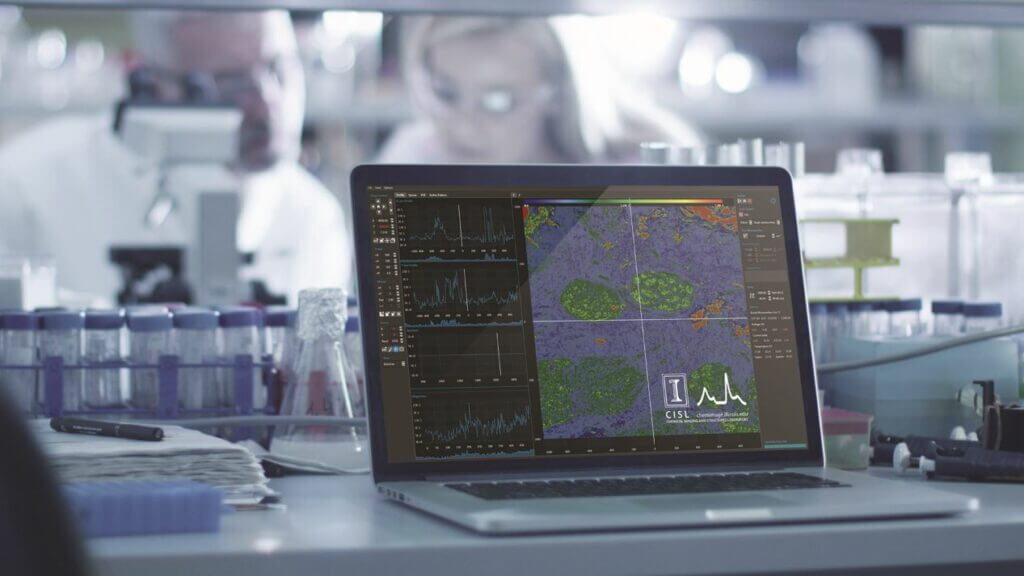
The University of Illinois and the Mayo Clinic built the first laser-scanned confocal microscope for infrared spectroscopy, using SciChart heatmaps for real-time imaging. The project helped cut tumor biopsy times from weeks to hours. Dense, constantly refreshing heatmaps are where Canvas and SVG tend to buckle first, so the rendering engine carried real weight.
NeuroRestore is a Swiss treatment center built on research by neuroscientists Grégoire Courtine and Jocelyne Bloch, aiming to help paralyzed patients walk again. The clinical team needed to watch up to 16 EMG sensors at once, alongside the epidural stimulation being delivered. The stimulation hardware updated frequency, amplitude and timing across up to 10 waveforms in real time, and researchers had to see the waveforms and muscle responses together, with no lag, to tune programs on the spot. EPFL reported that participants took up to 300 independent steps on the first day of stimulation. The real-time display was built on SciChart WPF.
Match the shortlist to your product suite, your techniques and your data.
Rankings of the best data visualization tools for scientific research in 2026 tend to compare feature lists, and demos flatter every library. Test each candidate with data close to what your instruments actually produce, with the overlays, annotations and multiple axes your scientists will use, over a full working day.
The free SciChart.js community license lets you test JavaScript and React performance on real data, for non-commercial use or a commercial evaluation. It carries a watermark, which a paid license removes.
Try SciChart with your own data, explore our scientific chart examples, or browse the React chart demos to see GPU rendering running live in the browser. If you would like help matching SciChart to your platforms and instruments, our team is happy to talk it through.
It depends on your platforms and data. For suites that need the same interactive charts on desktop, web and mobile, with large datasets and rich annotation, SciChart is built for the job. For browser-only reporting, Chart.js is a simpler option.
Yes. SciChart offers SciChart.js for JavaScript and React, SciChart WPF for Windows desktop applications, and native SDKs for iOS and Android, all built on the same engine.
Yes. SciChart supports HPLC and GC chromatograms, run overlays, peak integration views and calibration curves, and is used in PerkinElmer’s GC chromatography platform.
Yes. SciChart handles mass spectra, TIC and XIC traces and compound comparisons, with zooming, overlays and annotations for peak analysis.
Yes. Spectra, overlays, logarithmic axes in scientific notation and spectrograms are supported. SciChart heatmaps powered real-time infrared spectroscopy imaging at the University of Illinois and the Mayo Clinic.
Yes. Amplification and melt curves are XY line charts with multiple series, overlays and annotations, all supported out of the box.
Yes. SciChart supports scatter and density scatter plots, histograms and size distributions.
SciChart is used across analytical and life sciences instrumentation, including chromatography (HPLC, GC, LC), mass spectrometry (GC-MS, LC-MS), IR, FTIR, Raman and NMR spectroscopy, proteomics, qPCR, DNA sequencing, flow cytometry, particle analysis, X-ray diffraction, thermal analysis, electrochemistry, birefringence imaging and protein stability analysis. See SciChart for diagnostics and life sciences.
Yes. SciChart supports peptide plots, spectra, overlays and compound comparisons, and is used for protein stability analysis. NanoTemper uses SciChart to present protein stability data from its Prometheus instruments.
Yes. SciChart plots diffraction profiles, temperature sweeps, time-resolved data, voltage and charge-discharge curves and impedance plots, with multiple axes and overlays.
Yes. SciChart lists DNA sequencing and birefringence imaging among its diagnostics and life sciences applications, alongside mass spectrometry, gas chromatography, qPCR and spectroscopy.
Yes. SciChart displays frequency spectra, spectrograms and heatmaps, so teams can analyze spectral frequencies in real time alongside the raw signal.
Yes. Zooming and panning, peak isolation, cursors, logarithmic axes in scientific notation and multiple axes work on large datasets out of the box.
Yes. Teams typically use SciChart WPF in the desktop application at the instrument and SciChart.js for remote viewing in the browser, with consistent chart behavior in both.
Yes. SciChart is a true 64-bit library: its charts, series and API functions can use double-precision floating point, with scientific notation and logarithmic scales for demanding analytical work.
Yes. Its optional 64-bit WebAssembly mode gives charts up to 16 GB of browser memory, enough for around 1 billion data points, so full-resolution scientific data can be reviewed without server-side downsampling. It runs in Chrome, Edge and Firefox; other browsers use the standard engine, which holds around 250 million points.
The best charting components for scientific applications combine GPU rendering, scientific chart types, rich annotation and a consistent API across platforms. SciChart offers these for JavaScript, React, WPF, iOS and Android; Plotly, Chart.js, VTK and D3.js each cover narrower use cases.
Yes. Resampling is on by default and designed to be visually lossless, but you can switch it off per series to present data exactly as acquired, with some performance cost on very large datasets.
Yes. Themes, colors, fonts, dark and light modes and user-configurable palettes let you white-label the charts across your suite.
Yes. SciChart offers 3D charts such as surfaces, waterfalls and scatter plots, built on the same GPU-accelerated engine as its 2D charts.
Plotly suits exploratory analysis in Python, R and the browser. SciChart suits shipped instrument software that needs GPU-rendered charts across JavaScript, WPF and mobile, with large datasets and more charts per screen than Plotly’s documented 4 to 8 WebGL figures per page.
SciChart WPF is built for scientific instrument software, rendering billions of points per dataset on a DirectX engine, with an API consistent with SciChart.js for browser-based review tools.
For large or real-time scientific datasets, a WebGL and WebAssembly library such as SciChart.js scales furthest; it can render up to 1 billion points in browsers that support 64-bit WebAssembly. For small datasets and standard charts, Chart.js is simpler.
Yes. The SciChart.js community license is free for non-commercial use and commercial evaluation. It carries a watermark, which a paid license removes.
No. SciChart does not offer a Python library. Teams working in Python notebooks often use Plotly or Matplotlib for analysis and SciChart in the shipped instrument application.
For shipped scientific applications with large or real-time datasets, GPU-accelerated charting libraries such as SciChart lead on performance and analysis tooling. Plotly suits exploratory analysis, VTK suits 3D volumes, Chart.js suits small web datasets, and D3.js suits bespoke graphics.
Research labs typically combine analysis tools such as Python with Plotly or Matplotlib, instrument software from vendors like Waters, Thermo Fisher and Agilent, and custom applications built on charting libraries such as SciChart for real-time and large-dataset work.
Use an impulse (stem) series with data labels. SciChart.js data labels can hide overlapping labels, skip points, or appear only when there is room, and a custom label layout manager can resolve overlaps across several overlaid spectra.
Use the hit-test API on the chromatogram series to find the data point under the click, then load that scan into the spectrum chart’s data series. Linked charts keep zoom and cursors in step, so analysts can move between the TIC, XICs and spectra without losing their place.
Set flippedCoordinates on the X axis. Zoom, pan, annotations and hit-testing all follow the reversed axis, so you do not need to transform the data.
Plot the matrix as a uniform heatmap with a color map, then overlay a contours series on the same data. Use the non-uniform heatmap when wavelength or time steps are uneven.
Use editable annotations: vertical line or box annotations with isEditable set can be dragged on the chart at data coordinates. Read their X positions to define the integration window; the integration itself stays in your application code.
Link the charts so they share the X range and cursor. SciChart.js has a dedicated tutorial on linking multiple charts, and SciChart WPF supports the same pattern for stacked panels.
Use a data series in FIFO mode with a fixed capacity, so old points drop off as new ones arrive, and append in batches rather than point by point. Declaring that X is sorted and contains no NaN values lets SciChart skip those checks on every append.
Append a NaN value at the gap so the line breaks instead of joining across missing data.
SciChart is a 64-bit library: data series, axes and API functions use double-precision floating point, so values with many significant figures or large offsets are not rounded the way 32-bit GPU pipelines can round them.
Use the SubCharts API, which places a grid of small charts on one surface sharing a single WebGL context. SciChart’s worked example builds a 10×10 grid, and the same approach scales to plate layouts.
Not directly: one is C# and the other is TypeScript. The concepts (series, axes, modifiers, annotations, themes) mirror each other, so you can match behavior and styling across both, and SciChart.js charts can be serialized to JSON to save and restore chart state.
Pin a specific version, record it in your SOUP list, review the published changelog and known issues against your device’s intended use, and monitor new releases for anomalies. SciChart’s versioned releases and direct support make that evidence easier to gather; the qualification itself remains your responsibility.
SciChart is used in rigorously assessed environments, including cancer diagnostics research with the Mayo Clinic. As a commercial component with versioned releases, documented limitations and direct support, it is easier to qualify than an unsupported library.
Recent Blogs

Queen’s Award for Innovation
Winners of the Queen’s Award for Innovation, recognising SciChart’s high-performance graphics engine.

National Business Awards
Highly Commended at the Lloyds National Business Awards for innovation and customer growth.

National Technology Awards
Awarded Healthcare Tech of the Year at the 2025 National Technology Awards.

Reviews
Hundreds of verified third-party reviews from developers, engineers, and customers worldwide.