
SciChart for Avalonia XPF v3.0 Released!
SciChart is delighted to announce the release of SciChart XPF v3 — a big step forward for the product. v3 brings […]
Some good news! SciChart’s Android, iOS and macOS v4.8 has been released, which includes enhanced annotation support to level up your trading applications for mobile. As always, we’ve included mentions of the latest bug fixes, exciting new features, and links to examples that you can try for yourself.
Find out what’s new below!
From memory leaks to LogBaseNumericLabelFormatter issues, our developer team has been busy investigating and fixing bugs reported by our users. The below three examples of some of the most notable examples we wanted to share with our customers:
SciChartSurface3D chart surfaces simultaneously in a single application layout, activity, or fragment.The Android, iOS, and macOS update is all about annotations. We’ve now included a range of new and exciting options to help you elevate your financial charts. Annotation options include composite, pitchfork, extended line, XABCD, and freehand drawing. See the code samples and links to the examples below.

isExtendStart and isExtendEnd properties.brushColor and brushThickness.// Add freehand drawing modifier
self.freeHandModifier = SCIFreehandDrawingModifier()
self.surface.chartModifiers.add(items:self.freeHandModifier)
// Example setup for trading and freehand annotations and modifiers
val surface = findViewById<SciChartSurface>(R.id.surface)

// Create XABCD Annotation
val xabcdAnnotation = XabcdAnnotation(this).apply {
initialBasePoints.add(ComparablePoint(10, 30.6))
initialBasePoints.add(ComparablePoint(30, 31.5))
initialBasePoints.add(ComparablePoint(50, 30.3))
initialBasePoints.add(ComparablePoint(70, 31.5))
initialBasePoints.add(ComparablePoint(90, 30.6))
setIsEditable(true)
}

// Create Andrews' Pitchfork Annotation
val pitchforkAnnotation = PitchforkAnnotation(this).apply {
initialBasePoints.add(ComparablePoint(100, 30.6))
initialBasePoints.add(ComparablePoint(110, 31.5))
initialBasePoints.add(ComparablePoint(130, 30.7))
setIsEditable(true)
}

// Create Extended Line Annotation
val extendedLineAnnotation = ExtendedLineAnnotation(this).apply {
isExtendStart = true
isExtendEnd = true
x1 = 70
y1 = 33.3
x2 = 90
y2 = 33.7
setIsEditable(true)
}

// Create Freehand Drawing Annotation
val freehandDrawingAnnotation = FreehandDrawingAnnotation(this).apply {
initialBasePoints.add(ComparablePoint(140, 32.5))
initialBasePoints.add(ComparablePoint(150, 32.8))
initialBasePoints.add(ComparablePoint(160, 32.2))
initialBasePoints.add(ComparablePoint(170, 32.6))
brushColor = Color.YELLOW
brushThickness = 8f
setIsEditable(true)
}

// Add annotations to surface
surface.annotations.add(xabcdAnnotation)
surface.annotations.add(pitchforkAnnotation)
surface.annotations.add(extendedLineAnnotation)
surface.annotations.add(freehandDrawingAnnotation)

// Create modifiers
val xabcdModifier = XabcdAnnotationCreationModifier().apply {
setAnnotationCreationListener(listener)
}
val pitchforkModifier = PitchforkAnnotationCreationModifier().apply {
setAnnotationCreationListener(listener)
}
val extendedLineModifier = ExtendedLineAnnotationCreationModifier().apply {
setAnnotationCreationListener(listener)
}
val freehandDrawingModifier = FreehandDrawingModifier().apply {
brushColor = Color.WHITE
brushThickness = 5f
setAnnotationCreationListener(listener)
}

// Add modifiers to surface
surface.chartModifiers.add(xabcdModifier)
surface.chartModifiers.add(pitchforkModifier)
surface.chartModifiers.add(extendedLineModifier)
surface.chartModifiers.add(freehandDrawingModifier)
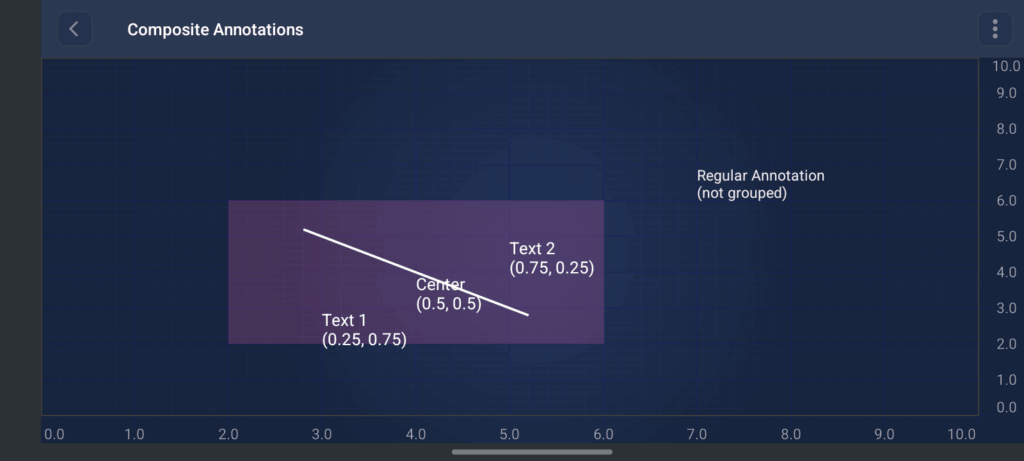
CompositeAnnotation lets you group multiple child annotations into a single container that can be moved, resized, and selected as one unit on the chart. It extends BoxAnnotation, so the composite itself is a rectangular region defined by chart data coordinates (X1, Y1, X2, Y2). Child annotations inside it use relative coordinates (0.0–1.0) within that bounding box, so they stay correctly positioned when the composite is dragged or resized.
This is useful for building reusable annotation templates, such as a label plus connector line, a callout with multiple text blocks, or a custom overlay with several visual elements that should always move together.
CompositeAnnotation is a container annotation that:
It also serves as the base architecture for trading annotations. TradingAnnotationBase extends CompositeAnnotation and composes multiple line/text children to render patterns like XABCD and Pitchfork.
See the code sample below.
SCICompositeAnnotation *compositeAnnotation = [SCICompositeAnnotation new];
compositeAnnotation.x1 = @(185.0);
compositeAnnotation.y1 = @(12300.0);
compositeAnnotation.x2 = @(210.0);
compositeAnnotation.y2 = @(11100.0);
compositeAnnotation.isEditable = YES;
compositeAnnotation.fillBrush = [[SCISolidBrushStyle alloc] initWithColorCode:0x33FF69BD];
// Child Annotation
SCITextAnnotation *textAnnotation = [SCITextAnnotation new];
textAnnotation.x1 = @(0.25);
textAnnotation.y1 = @(0.75);
textAnnotation.text = @"Text 1\n(0.25, 0.75)";
textAnnotation.fontStyle = [[SCIFontStyle alloc] initWithFontSize:14 andTextColor:SCIColor.whiteColor];

// Add child annotations to composite
compositeAnnotation.annotations = [[SCIAnnotationCollection alloc] initWithCollection: @[textAnnotation]];
// Add composite annotation
[self.surface.annotations add:compositeAnnotation];
// Example setup for CompositeAnnotation
SciChartSurface surface = findViewById(R.id.surface);

// Create composite annotation container
CompositeAnnotation compositeAnnotation = new CompositeAnnotation(surface.getContext());
compositeAnnotation.setX1(2.0);
compositeAnnotation.setY1(2.0);
compositeAnnotation.setX2(6.0);
compositeAnnotation.setY2(6.0);
compositeAnnotation.setIsEditable(true);
compositeAnnotation.setBackgroundColor(ColorUtil.argb(0x33, 0xFF, 0x68, 0xBC));

// Child annotations use relative positions (0.0-1.0) within the composite bounds
// 0.0, 0.0 = top-left; 1.0, 1.0 = bottom-right; 0.5, 0.5 = center

IAnnotation textAnnotation1 = sciChartBuilder.newTextAnnotation()
        .withX1(0.25)   // 25% from left
        .withY1(0.75)   // 75% from top
        .withText("Text 1\n(0.25, 0.75)")
        .withFontStyle(14, ColorUtil.White)
        .build();

IAnnotation textAnnotation2 = sciChartBuilder.newTextAnnotation()
        .withX1(0.75)
        .withY1(0.25)
        .withText("Text 2\n(0.75, 0.25)")
        .withFontStyle(14, ColorUtil.White)
        .build();

IAnnotation textAnnotationCenter = sciChartBuilder.newTextAnnotation()
        .withX1(0.5)
        .withY1(0.5)
        .withText("Center\n(0.5, 0.5)")
        .withFontStyle(14, ColorUtil.White)
        .build();

IAnnotation lineAnnotation = sciChartBuilder.newLineAnnotation()
        .withPosition(0.2, 0.2, 0.8, 0.8)  // diagonal line across the composite
        .withStroke(2f, ColorUtil.White)
        .build();

// Add children to the composite
compositeAnnotation.getAnnotations().add(textAnnotation1);
compositeAnnotation.getAnnotations().add(textAnnotation2);
compositeAnnotation.getAnnotations().add(textAnnotationCenter);
compositeAnnotation.getAnnotations().add(lineAnnotation);

// Add composite to surface (not the children individually)
surface.getAnnotations().add(compositeAnnotation);

// Optional: add a standalone annotation for comparison
surface.getAnnotations().add(
        sciChartBuilder.newTextAnnotation()
                .withX1(7.0)
                .withY1(7.0)
                .withText("Regular Annotation\n(not grouped)")
                .build()
);
View iOS Example View Android Example
There’s now support for Extended Line Annotations, which render infinitely beyond their defined start and end points. The example includes an interactive creation modifier for drawing and configuring extended lines directly on the chart.
// Add Extended Line annotation modifier
self.extendedLineCreationModifier = SCIExtendedLineCreationModifier()
self.surface.chartModifiers.add(items: self.extendedLineCreationModifier)
// Create Extended Line Annotation
val extendedLineAnnotation = ExtendedLineAnnotation(this).apply {
isExtendStart = true
isExtendEnd = true
x1 = 70
y1 = 33.3
x2 = 90
y2 = 33.7
setIsEditable(true)

We added support for XABCD Harmonic Pattern Annotations with an interactive creation modifier for creating and editing harmonic trading patterns on charts.
// Add xabcd annotation modifier
self.xabcdCreationModifier = SCIXabcdCreationModifier()
self.surface.chartModifiers.add(items: self.xabcdCreationModifier)
// Create XABCD Annotation
val xabcdAnnotation = XabcdAnnotation(this).apply {
initialBasePoints.add(ComparablePoint(10, 30.6))
initialBasePoints.add(ComparablePoint(30, 31.5))
initialBasePoints.add(ComparablePoint(50, 30.3))
initialBasePoints.add(ComparablePoint(70, 31.5))
initialBasePoints.add(ComparablePoint(90, 30.6))
setIsEditable(true)
}
View iOS Example View Android Example
We added interactive trading annotations, including the Pitchfork Annotation Modifier.
// Add Pitchfork annotation modifier
self.pitchforkCreationModifier = SCIPitchforkCreationModifier()
self.surface.chartModifiers.add(items: self.pitchforkCreationModifier)
// Create Andrews' Pitchfork Annotation
val pitchforkAnnotation = PitchforkAnnotation(this).apply {
initialBasePoints.add(ComparablePoint(100, 30.6))
initialBasePoints.add(ComparablePoint(110, 31.5))
initialBasePoints.add(ComparablePoint(130, 30.7))
setIsEditable(true)
}
View iOS Example View Android Example
Contact Us to Learn More
SciChart is an Android and iOS Chart Library designed for complex, mission-critical applications. If you have a question or would like to learn more about our products and services, please contact us or visit our dedicated chart pages.
Related Posts

Queen’s Award for Innovation
Winners of the Queen’s Award for Innovation, recognising SciChart’s high-performance graphics engine.

National Business Awards
Highly Commended at the Lloyds National Business Awards for innovation and customer growth.

National Technology Awards
Awarded Healthcare Tech of the Year at the 2025 National Technology Awards.

Reviews
Hundreds of verified third-party reviews from developers, engineers, and customers worldwide.