Android Chart - Examples
SciChart Android ships with ~90 Android Chart Examples which you can browse, play with, view the source-code and even export each SciChart Android Chart Example to a stand-alone Android Studio project. All of this is possible with the new and improved SciChart Android Examples Suite, which ships as part of our Android Charts SDK.
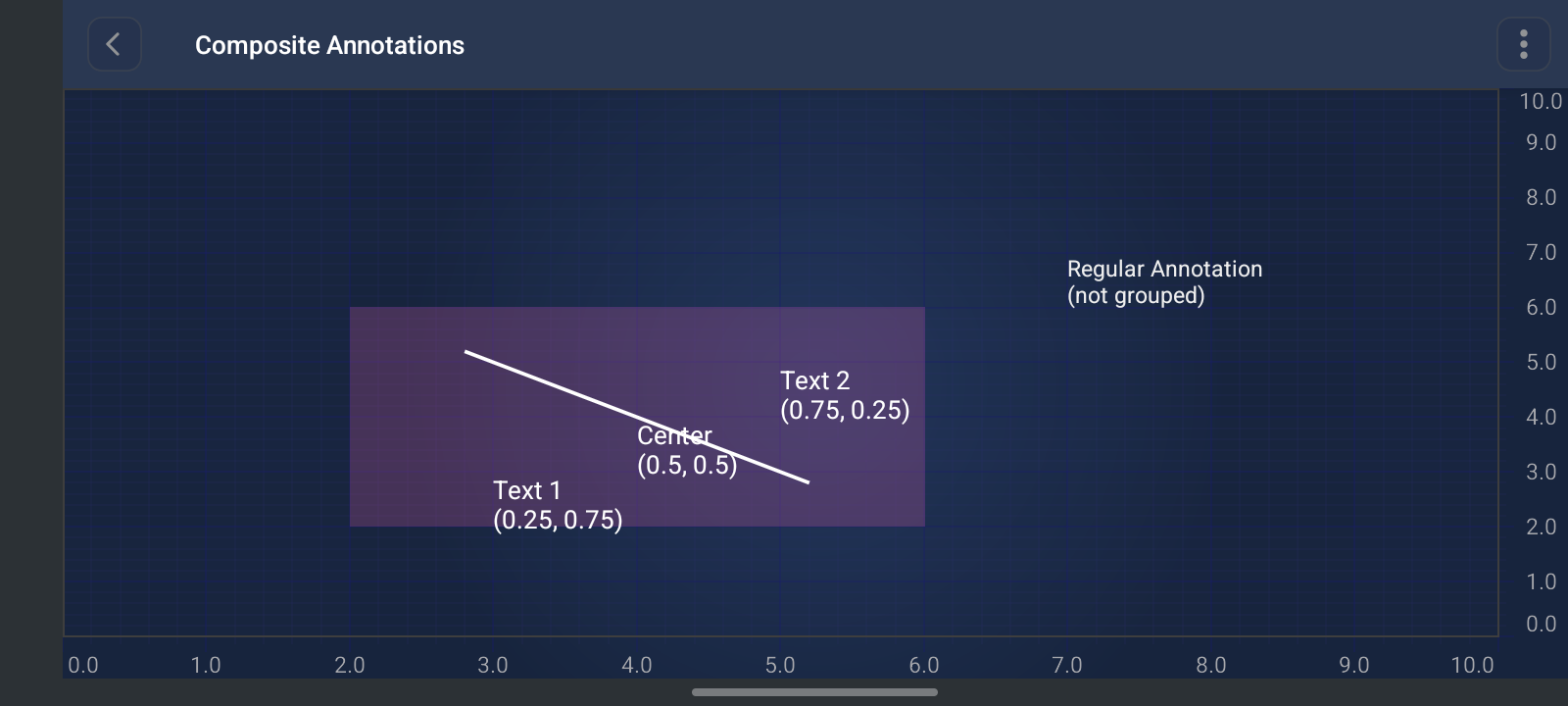
CompositeAnnotation lets you group multiple child annotations into a single container that can be moved, resized, and selected as one unit on the chart. It extends BoxAnnotation, so the composite itself is a rectangular region defined by chart data coordinates (X1, Y1, X2, Y2). Child annotations inside it use relative coordinates (0.0–1.0) within that bounding box, so they stay correctly positioned when the composite is dragged or resized.
This is useful for building reusable annotation templates — for example, a label plus connector line, a callout with multiple text blocks, or a custom overlay with several visual elements that should always move together.
CompositeAnnotation is a container annotation that:
- Groups a collection of child IAnnotation instances via getAnnotations() / annotations
- Defines a bounding box on the chart (inherited from BoxAnnotation)
- Positions children relative to that box (0.0 = top/left edge, 1.0 = bottom/right edge, 0.5 = center)
- Treats the whole group as a single editable annotation on the surface
- Automatically manages child lifecycle (attach/detach, axis IDs, visibility)
It also serves as the base architecture for trading annotations — TradingAnnotationBase extends CompositeAnnotation and composes multiple line/text children to render patterns like XABCD and Pitchfork.
// Example setup for CompositeAnnotation
SciChartSurface surface = findViewById(R.id.surface);

// Create composite annotation container
CompositeAnnotation compositeAnnotation = new CompositeAnnotation(surface.getContext());
compositeAnnotation.setX1(2.0);
compositeAnnotation.setY1(2.0);
compositeAnnotation.setX2(6.0);
compositeAnnotation.setY2(6.0);
compositeAnnotation.setIsEditable(true);
compositeAnnotation.setBackgroundColor(ColorUtil.argb(0x33, 0xFF, 0x68, 0xBC));

// Child annotations use relative positions (0.0-1.0) within the composite bounds
// 0.0, 0.0 = top-left; 1.0, 1.0 = bottom-right; 0.5, 0.5 = center

IAnnotation textAnnotation1 = sciChartBuilder.newTextAnnotation()
        .withX1(0.25)   // 25% from left
        .withY1(0.75)   // 75% from top
        .withText("Text 1\n(0.25, 0.75)")
        .withFontStyle(14, ColorUtil.White)
        .build();

IAnnotation textAnnotation2 = sciChartBuilder.newTextAnnotation()
        .withX1(0.75)
        .withY1(0.25)
        .withText("Text 2\n(0.75, 0.25)")
        .withFontStyle(14, ColorUtil.White)
        .build();

IAnnotation textAnnotationCenter = sciChartBuilder.newTextAnnotation()
        .withX1(0.5)
        .withY1(0.5)
        .withText("Center\n(0.5, 0.5)")
        .withFontStyle(14, ColorUtil.White)
        .build();

IAnnotation lineAnnotation = sciChartBuilder.newLineAnnotation()
        .withPosition(0.2, 0.2, 0.8, 0.8)  // diagonal line across the composite
        .withStroke(2f, ColorUtil.White)
        .build();

// Add children to the composite
compositeAnnotation.getAnnotations().add(textAnnotation1);
compositeAnnotation.getAnnotations().add(textAnnotation2);
compositeAnnotation.getAnnotations().add(textAnnotationCenter);
compositeAnnotation.getAnnotations().add(lineAnnotation);

// Add composite to surface (not the children individually)
surface.getAnnotations().add(compositeAnnotation);

// Optional: add a standalone annotation for comparison
surface.getAnnotations().add(
        sciChartBuilder.newTextAnnotation()
                .withX1(7.0)
                .withY1(7.0)
                .withText("Regular Annotation\n(not grouped)")
                .build()
);
The full source code for the Android Bubble Chart example is included below (Scroll down!).
Did you know you can also view the source code from one of the following sources as well?
- Clone the SciChart.Android.Examples from Github.
- Or, view source and export each example to an Android Studio project of the SciChart Android Examples app.
- Also the SciChart Android Trial contains the full source for the examples (link below).
CompositeAnnotationFragment.java
View source code//******************************************************************************
// SCICHART® Copyright SciChart Ltd. 2011-2026. All rights reserved.
//
// Web: http://www.scichart.com
// Support: support@scichart.com
// Sales: sales@scichart.com
//
// CompositeAnnotationFragment.java is part of SCICHART®, High Performance Scientific Charts
// For full terms and conditions of the license, see http://www.scichart.com/scichart-eula/
//
// This source code is protected by international copyright law. Unauthorized
// reproduction, reverse-engineering, or distribution of all or any portion of
// this source code is strictly prohibited.
//
// This source code contains confidential and proprietary trade secrets of
// SciChart Ltd., and should at no time be copied, transferred, sold,
// distributed or made available without express written permission.
//******************************************************************************
package com.scichart.examples.fragments.examples2d.chartAnnotations;
import androidx.annotation.NonNull;
import com.scichart.charting.visuals.SciChartSurface;
import com.scichart.charting.visuals.annotations.CompositeAnnotation;
import com.scichart.charting.visuals.annotations.IAnnotation;
import com.scichart.charting.visuals.axes.IAxis;
import com.scichart.core.framework.UpdateSuspender;
import com.scichart.drawing.utility.ColorUtil;
import com.scichart.examples.R;
import com.scichart.examples.fragments.base.ExampleSingleChartBaseFragment;
import java.util.Collections;
/**
* Demonstrates the use of {@link CompositeAnnotation} which groups multiple child annotations together
* so they can be manipulated as a single unit.
*/
public class CompositeAnnotationFragment extends ExampleSingleChartBaseFragment {
@Override
public boolean showDefaultModifiersInToolbar() {
return false;
}
@Override
protected void initExample(@NonNull SciChartSurface surface) {
surface.setTheme(R.style.SciChart_NavyBlue);
UpdateSuspender.using(surface, () -> {
final IAxis xAxis = sciChartBuilder.newNumericAxis()
.withVisibleRange(0d, 10d)
.withGrowBy(0.1d, 0.1d)
.withTextFormatting("0.0#")
.build();
final IAxis yAxis = sciChartBuilder.newNumericAxis()
.withVisibleRange(0d, 10d)
.withGrowBy(0.1d, 0.1d)
.withTextFormatting("0.0#")
.build();
Collections.addAll(surface.getXAxes(), xAxis);
Collections.addAll(surface.getYAxes(), yAxis);
// Create a composite annotation that groups multiple annotations together
final CompositeAnnotation compositeAnnotation = new CompositeAnnotation(surface.getContext());
compositeAnnotation.setX1(2.0);
compositeAnnotation.setY1(2.0);
compositeAnnotation.setX2(6.0);
compositeAnnotation.setY2(6.0);
compositeAnnotation.setIsEditable(true);
compositeAnnotation.setBackgroundColor(ColorUtil.argb(0x33, 0xFF, 0x68, 0xBC));
// Create child annotations that will be grouped together
// Child annotations use relative positions (0.0-1.0) relative to the composite annotation
// 0.0, 0.0 = top-left corner, 1.0, 1.0 = bottom-right corner, 0.5, 0.5 = center
final IAnnotation textAnnotation1 = sciChartBuilder.newTextAnnotation()
.withX1(0.25) // 25% from left edge
.withY1(0.75) // 75% from top edge
.withText("Text 1\n(0.25, 0.75)")
.withFontStyle(14, ColorUtil.White)
.build();
final IAnnotation textAnnotation2 = sciChartBuilder.newTextAnnotation()
.withX1(0.75) // 75% from left edge
.withY1(0.25) // 25% from top edge
.withText("Text 2\n(0.75, 0.25)")
.withFontStyle(14, ColorUtil.White)
.build();
final IAnnotation textAnnotationCenter = sciChartBuilder.newTextAnnotation()
.withX1(0.5) // Center horizontally
.withY1(0.5) // Center vertically
.withText("Center\n(0.5, 0.5)")
.withFontStyle(14, ColorUtil.White)
.build();
final IAnnotation lineAnnotation = sciChartBuilder.newLineAnnotation()
.withPosition(0.2, 0.2, 0.8, 0.8) // Line from 20% to 80% of composite bounds
.withStroke(2f, ColorUtil.White)
.build();
// Add child annotations to the composite
compositeAnnotation.getAnnotations().add(textAnnotation1);
compositeAnnotation.getAnnotations().add(textAnnotation2);
compositeAnnotation.getAnnotations().add(textAnnotationCenter);
compositeAnnotation.getAnnotations().add(lineAnnotation);
// Add the composite annotation to the surface
Collections.addAll(surface.getAnnotations(), compositeAnnotation);
// Add a regular annotation for comparison
Collections.addAll(surface.getAnnotations(),
sciChartBuilder.newTextAnnotation()
.withX1(7.0)
.withY1(7.0)
.withText("Regular Annotation\n(not grouped)")
.build());
surface.getChartModifiers().add(sciChartBuilder.newModifierGroupWithDefaultModifiers().build());
});
}
}
CompositeAnnotationFragment.kt
View source code//******************************************************************************
// SCICHART® Copyright SciChart Ltd. 2011-2026. All rights reserved.
//
// Web: http://www.scichart.com
// Support: support@scichart.com
// Sales: sales@scichart.com
//
// CompositeAnnotationFragment.kt is part of SCICHART®, High Performance Scientific Charts
// For full terms and conditions of the license, see http://www.scichart.com/scichart-eula/
//
// This source code is protected by international copyright law. Unauthorized
// reproduction, reverse-engineering, or distribution of all or any portion of
// this source code is strictly prohibited.
//
// This source code contains confidential and proprietary trade secrets of
// SciChart Ltd., and should at no time be copied, transferred, sold,
// distributed or made available without express written permission.
//******************************************************************************
package com.scichart.examples.fragments.examples2d.chartAnnotations.kt
import com.scichart.charting.visuals.SciChartSurface
import com.scichart.charting.visuals.annotations.CompositeAnnotation
import com.scichart.data.model.DoubleRange
import com.scichart.drawing.utility.ColorUtil
import com.scichart.examples.R
import com.scichart.examples.fragments.base.ExampleSingleChartBaseFragment
import com.scichart.examples.utils.scichartExtensions.annotation
import com.scichart.examples.utils.scichartExtensions.annotations
import com.scichart.examples.utils.scichartExtensions.numericAxis
import com.scichart.examples.utils.scichartExtensions.suspendUpdates
import com.scichart.examples.utils.scichartExtensions.textAnnotation
import com.scichart.examples.utils.scichartExtensions.xAxes
import com.scichart.examples.utils.scichartExtensions.yAxes
/**
* Demonstrates the use of {@link CompositeAnnotation} which groups multiple child annotations together
* so they can be manipulated as a single unit.
*/
class CompositeAnnotationFragment : ExampleSingleChartBaseFragment() {
override fun showDefaultModifiersInToolbar(): Boolean = false
override fun initExample(surface: SciChartSurface) {
surface.theme = R.style.SciChart_NavyBlue
surface.suspendUpdates {
xAxes { numericAxis {
visibleRange = DoubleRange(0.0, 10.0)
growBy = DoubleRange(0.1, 0.1)
textFormatting = "0.0#"
}}
yAxes { numericAxis {
visibleRange = DoubleRange(0.0, 10.0)
growBy = DoubleRange(0.1, 0.1)
textFormatting = "0.0#"
}}
// Create a composite annotation that groups multiple annotations together
val compositeAnnotation = CompositeAnnotation(surface.context).apply {
x1 = 2.0
y1 = 2.0
x2 = 6.0
y2 = 6.0
setIsEditable(true)
setBackgroundColor(ColorUtil.argb(0x33, 0xFF, 0x68, 0xBC))
}
// Create child annotations that will be grouped together
// Child annotations use relative positions (0.0-1.0) relative to the composite annotation
// 0.0, 0.0 = top-left corner, 1.0, 1.0 = bottom-right corner, 0.5, 0.5 = center
val textAnnotation1 = sciChartBuilder.newTextAnnotation()
.withX1(0.25) // 25% from left edge
.withY1(0.75) // 75% from top edge
.withText("Text 1\n(0.25, 0.75)")
.withFontStyle(14f, ColorUtil.White)
.build()
val textAnnotation2 = sciChartBuilder.newTextAnnotation()
.withX1(0.75) // 75% from left edge
.withY1(0.25) // 25% from top edge
.withText("Text 2\n(0.75, 0.25)")
.withFontStyle(14f, ColorUtil.White)
.build()
val textAnnotationCenter = sciChartBuilder.newTextAnnotation()
.withX1(0.5) // Center horizontally
.withY1(0.5) // Center vertically
.withText("Center\n(0.5, 0.5)")
.withFontStyle(14f, ColorUtil.White)
.build()
val lineAnnotation = sciChartBuilder.newLineAnnotation()
.withPosition(0.2, 0.2, 0.8, 0.8) // Line from 20% to 80% of composite bounds
.withStroke(2f, ColorUtil.White)
.build()
// Add child annotations to the composite
compositeAnnotation.annotations.add(textAnnotation1)
compositeAnnotation.annotations.add(textAnnotation2)
compositeAnnotation.annotations.add(textAnnotationCenter)
compositeAnnotation.annotations.add(lineAnnotation)
// Add the composite annotation to the surface
annotations {
annotation(compositeAnnotation)
// Add a regular annotation for comparison
textAnnotation {
x1 = 7.0; y1 = 7.0
text = "Regular Annotation\n(not grouped)"
}
}
chartModifiers.add(sciChartBuilder.newModifierGroupWithDefaultModifiers().build())
}
}
}