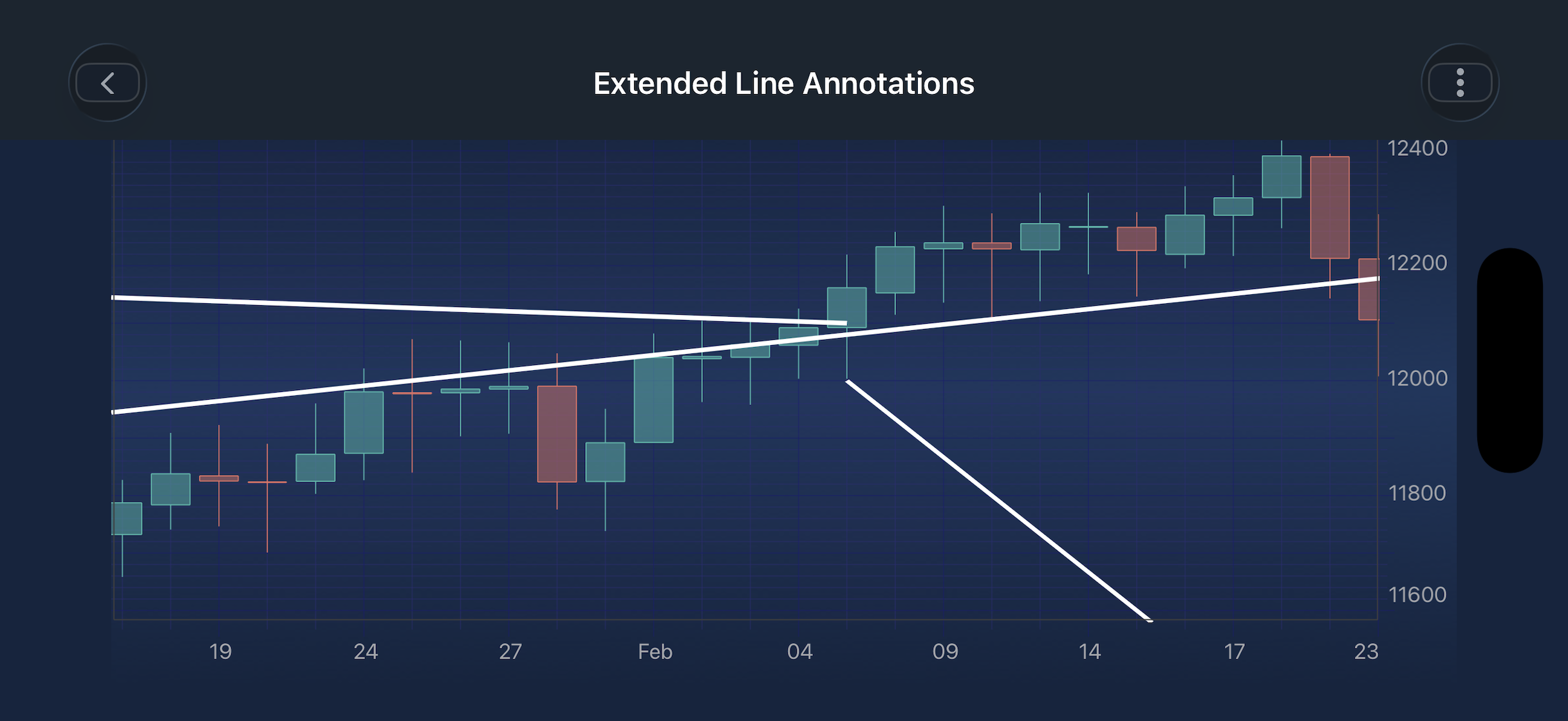
The SCIExtendedLineAnnotation
The SCIExtendedLineAnnotation
NOTE: AnnotationsSciChart iOS Examples Suite as well as on [GitHub]
Structure and Points
The SCIExtendedLineAnnotation is defined by two anchor points:
Point 1 (Start): The starting anchor of the line.
Point 2 (End): The ending anchor of the line.
Behavior
The line is drawn between Point 1 and Point 2.
Depending on the extendStart and extendEnd flags, the line may be projected infinitely beyond either or both anchor points.
The four extension modes are summarized in the table below:
extendStart
extendEnd
Behavior
YES
YES
Line extends infinitely in both directions.
NO
YES
Line extends infinitely forward from the end point only.
YES
NO
Line extends infinitely backward from the start point only.
NO
NO
Line is drawn only between the two anchor points (default line).
The SCIExtendedLineAnnotation can be configured using the properties listed in the table below:
Points for a SCIExtendedLineAnnotation are defined using the set(x1:), set(y1:), set(x2:), set(y2:) methods inherited from SCILineAnnotationBase. The extension direction is then controlled independently via the extendStart and extendEnd flags.
NOTE: Annotations in general - please see the Common Annotation Features article.
Create an ExtendedLineAnnotation
A SCIExtendedLineAnnotation
OBJECTIVE-C
SWIFT
// Assume a surface has been created and configured somewhere
id surface;
// Infinite Line: extends in both directions across the entire chart
SCIExtendedLineAnnotation *extendedLine = [SCIExtendedLineAnnotation new];
[extendedLine setX1:@10];
[extendedLine setY1:@11600];
[extendedLine setX2:@100];
[extendedLine setY2:@12400];
// Extend in both directions
extendedLine.extendStart = YES;
extendedLine.extendEnd = YES;
// Enable interaction
extendedLine.isEditable = YES;
extendedLine.stroke = [[SCISolidPenStyle alloc] initWithColorCode:0xFFFFFFFF thickness:3.0];
// Forward Ray: extends the line beyond the end point only
SCIExtendedLineAnnotation *forwardLine = [SCIExtendedLineAnnotation new];
[forwardLine setX1:@64];
[forwardLine setY1:@12000];
[forwardLine setX2:@70];
[forwardLine setY2:@11600];
// Extend forward beyond x2 only
forwardLine.extendStart = NO;
forwardLine.extendEnd = YES;
// Enable interaction
forwardLine.isEditable = YES;
forwardLine.stroke = [[SCISolidPenStyle alloc] initWithColorCode:0xFFFFFFFF thickness:3.0];
// Backward Ray: extends the line behind the start point only
SCIExtendedLineAnnotation *backwardLine = [SCIExtendedLineAnnotation new];
[backwardLine setX1:@30];
[backwardLine setY1:@12200];
[backwardLine setX2:@64];
[backwardLine setY2:@12100];
// Extend backward behind x1, do not extend forward
backwardLine.extendStart = YES;
backwardLine.extendEnd = NO;
// Enable interaction
backwardLine.isEditable = YES;
backwardLine.stroke = [[SCISolidPenStyle alloc] initWithColorCode:0xFFFFFFFF thickness:3.0];
// Add to chart surface
[self.surface.annotations addAll:extendedLine, backwardLine, forwardLine, nil];
// Assume a surface has been created and configured somewhere
let surface: ISCIChartSurface
// Infinite Line: extends in both directions across the entire chart
let extendedLine = SCIExtendedLineAnnotation()
extendedLine.set(x1: 10)
extendedLine.set(y1: 11600)
extendedLine.set(x2: 100)
extendedLine.set(y2: 12400)
// Extend in both directions
extendedLine.extendStart = true
extendedLine.extendEnd = true
// Enable interaction
extendedLine.isEditable = true
extendedLine.stroke = SCISolidPenStyle(color: 0xFFFFFFFF, thickness: 3)
// Forward Ray: extends the line beyond the end point only
let forwardLine = SCIExtendedLineAnnotation()
forwardLine.set(x1: 64)
forwardLine.set(y1: 12000)
forwardLine.set(x2: 70)
forwardLine.set(y2: 11600)
// Extend forward beyond x2 only
forwardLine.extendStart = false
forwardLine.extendEnd = true
// Enable interaction
forwardLine.isEditable = true
forwardLine.stroke = SCISolidPenStyle(color: 0xFFFFFFFF, thickness: 3)
// Backward Ray: extends the line behind the start point only
let backwardLine = SCIExtendedLineAnnotation()
backwardLine.set(x1: 30)
backwardLine.set(y1: 12200)
backwardLine.set(x2: 64)
backwardLine.set(y2: 12100)
// Extend backward behind x1, do not extend forward
backwardLine.extendStart = true
backwardLine.extendEnd = false
// Enable interaction
backwardLine.isEditable = true
backwardLine.stroke = SCISolidPenStyle(color: 0xFFFFFFFF, thickness: 3)
// Add to chart surface
self.surface.annotations.add(items: extendedLine, backwardLine, forwardLine)
NOTE: SCIExtendedLineAnnotation SCIExtendedLineCreationModifier available in SciChart iOS.
NOTE: Annotation Types , available out of the box in SciChart, please find the comprehensive list in the Annotation APIs article.
 View on GitHub