 View on GitHub

iOS & macOS Charting Documentation - SciChart iOS & macOS Charts SDK v4.x
SCIXabcdCreationModifier
The SCIXabcdCreationModifier is a custom gesture modifier used for interactive creation of XABCD annotations on a SciChart surface.
It enables users to place five key points (X → A → B → C → D) using touch gestures, with real-time visual feedback during placement.
Overview
The modifier handles the full lifecycle of XABCD annotation creation:
- Sequential point placement via touch interaction
- Real-time dragging feedback for each point
- Automatic completion after the final point (D)
- Immediate reset for continuous drawing
Once completed, the annotation remains on the chart and a callback is triggered.
Interaction Behavior
The creation flow follows a structured sequence:
Per Point Interaction (X → A → B → C → D)
| Gesture | Behavior |
|---|---|
| Touch Down | Places the current point at the touch location |
| Drag | Moves the point dynamically in real-time |
| Touch Up | Locks the point and advances to the next one |
Completion
- After placing point D, the annotation is finalized
- The
SCIAnnotationCreationModifierBase.annotationCreationCompletionListenercallback is invoked - The modifier resets immediately, ready for a new annotation
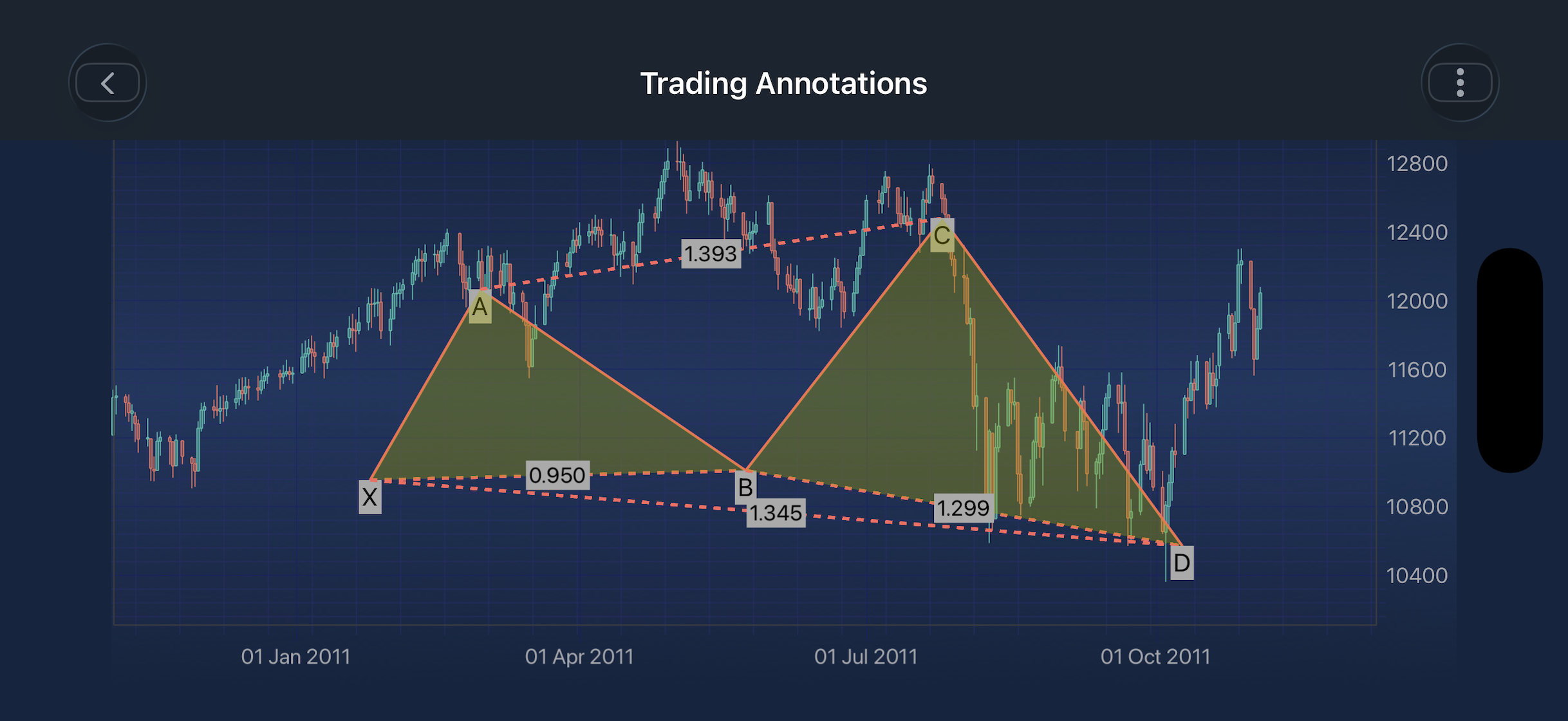
Retrieving Annotation Points After Drawing Completion
After an annotation drawing is completed, you can retrieve its underlying points using:
-[ISCITradingAnnotation getBaseDataValues]
-[ISCITradingAnnotation getBasePoints]
Both methods return the annotation’s defining points, but in different coordinate spaces.
-[ISCITradingAnnotation getBaseDataValues]
- X and Y values correspond to the chart’s actual data coordinates
- Independent of pixel resolution or screen scaling
- Useful for storing, analysis, or reloading annotations
-[ISCITradingAnnotation getBasePoints]
- X and Y values correspond to screen pixels
- Useful for rendering overlays or UI alignment
Usage Example
The SCIXabcdCreationModifier can be configured using the properties and method listed in the table below:
| Field | Description |
|---|---|
SCIXabcdCreationModifier.annotationStroke |
Defines the stroke style for newly created annotations. |
SCIXabcdCreationModifier.annotationFill |
Defines the fill style for newly created annotations. |
SCIXabcdCreationModifier.isDragging |
Indicates whether the user is actively dragging a point. |
SCIXabcdCreationModifier.activePointIndex |
Represents the index of the point currently being placed. |
-[SCIXabcdCreationModifier reset] |
Cancels and removes any in-progress annotation. |
NOTE: The xAxisId and yAxisId must be supplied if you have axis with non-default Axis Ids, e.g. in multi-axis scenario.
Best Practices
- Disable conflicting gesture modifiers during drawing for better UX
- Use CompletionListener to validate or store annotations
- Call
-[SCIXabcdCreationModifier reset]when switching tools or exiting drawing mode - Customize stroke/fill for better visual distinction
- Call cancel when switching tools or modes
Notes
- The modifier automatically resets after completing point D
- Only one annotation is created per interaction cycle
- Designed for real-time financial charting and harmonic pattern visualization