
WPF Chart - Examples
SciChart WPF ships with hundreds of WPF Chart Examples which you can browse, play with, view the source-code and even export each WPF Chart Example to a stand-alone Visual Studio solution. All of this is possible with the new and improved SciChart WPF Examples Suite, which ships as part of the SciChart WPF SDK.
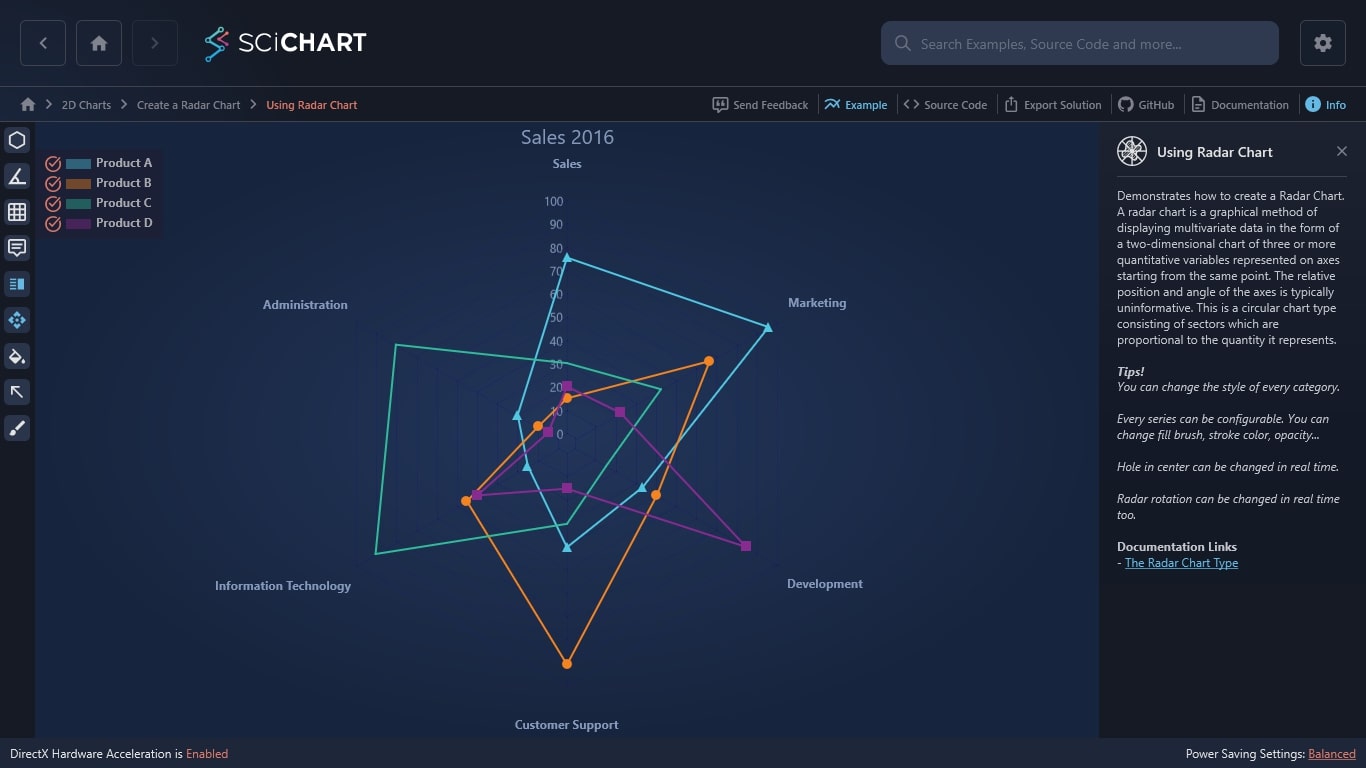
This example demonstrates how to create a WPF Radar Chart. This 2D chart allows you to easily display multivariate data, presenting an overlay of three or more quantitative variables.
The relative position and angle of the axes is typically uninformative. This is a circular chart type consisting of sectors which are proportional to the quantity it represents.
SciChart’s award-winning WPF Chart Library offers fast, native charts with exceptional performance. We support interactive elements, including selection and tooltip. You’ll find our radar charts on enterprise-level web applications across the globe.
Tips!
- You can change the style of every category.
- Every series can be configurable. You can change fill brush, stroke color, opacity…
- Hole in center can be changed in real time.
- Radar rotation can be changed in real time too.
Documentation Links
– The Radar Chart Type
Ready to start creating WPF Radar Charts?
The C#/WPF source code for the WPF Radar Chart Example is included below.
You can also view the source code from one of the following sources:
- Clone the SciChart.WPF.Examples from Github.
- View source in the SciChart WPF Examples suite.
- SciChart WPF Trial contains the full source for the examples.
Download the WPF examples or begin your free trial today.
How to get started:
Start building your high performance data visualization dashboards and web applications with a free 30-day trial of SciChart.WPF. No credit card details are required.
Our Getting Started guide will help with the following:
- Begin your free trial
- Create charts with tutorials
- Compile example source code
- Access documentation
Get Started With Your Free Trial Today
Why Choose SciChart?
We’re leaders in WPF Charts. Since 2012, our software has supported real-world, big-data applications with enhanced performance capabilities. Along with being the quickest WPF Chart Library in the world, we also received the Queen’s Award for Innovation and a 98% customer recommendation rating for our technical help.
- In-house hardware accelerated graphics engine
- Extensive features & customizations
- 5-star rated support for developers
- Winner of the Queen’s Award for Innovation
- 98% of customers recommend SciChart
Frequently Asked Questions
What customizations are available for the WPF Radar Chart?
We support endless configurations and customizations across all our WPF charts, including color alterations and API UI styling.
What makes your WPF Chart Library ‘high-performance’?
Our charts are powered by our in-house GPU accelerated graphics engine and we’re constantly developing the speed and volume of data-points that our software can support.
Is your chart control easy to use?
Absolutely, your developers will find SciChart’s WPF Chart API intuitive and easy to use. It’s just one of the many reasons why 98% of customers recommend us.
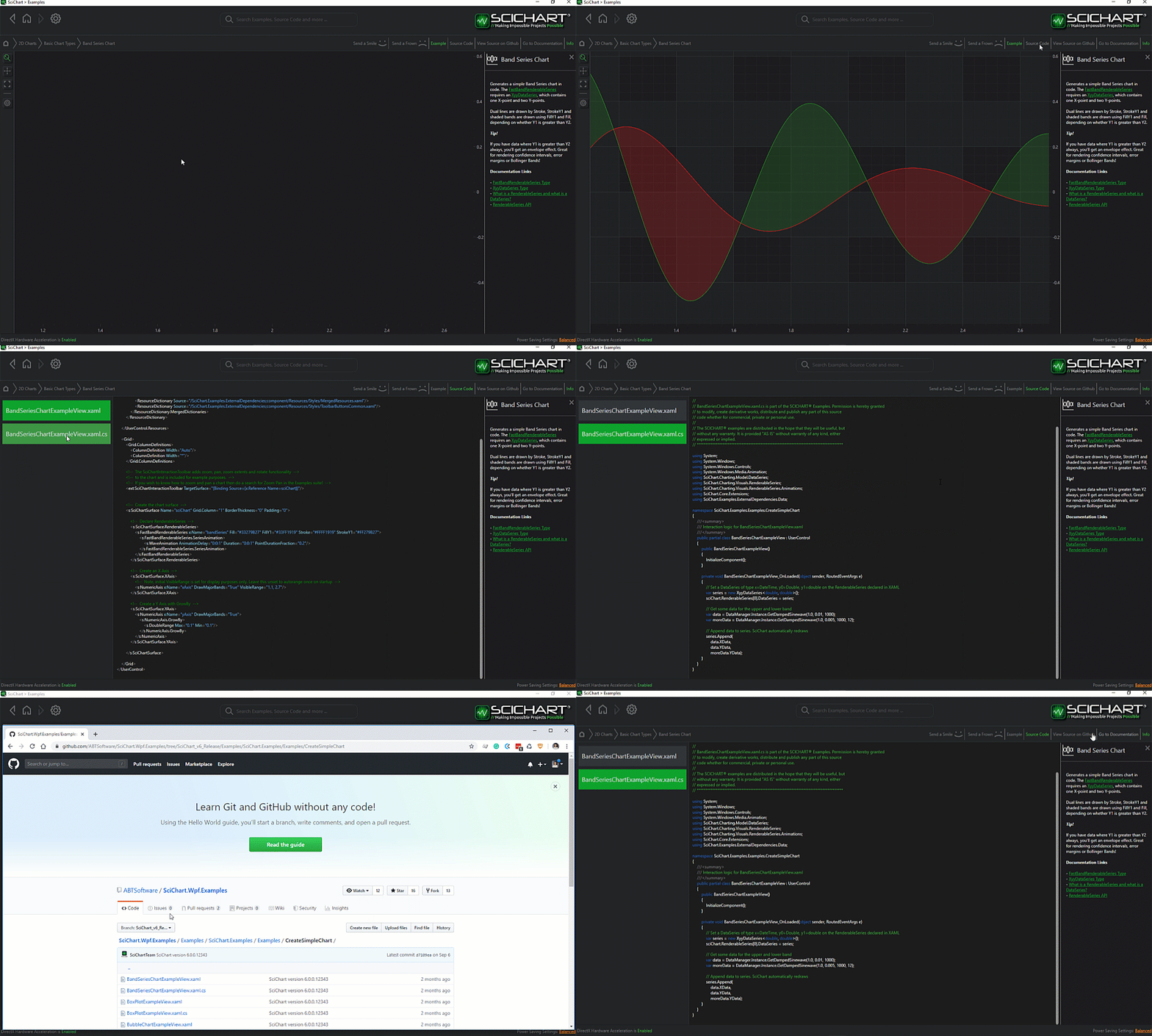
The C#/WPF source code for the WPF Using Radar Chart example is included below (Scroll down!).
Did you know you can also view the source code from one of the following sources as well?
- Clone the SciChart.WPF.Examples from Github.
- Or, view source in the SciChart WPF Examples suite.
- Also the SciChart WPF Trial contains the full source for the examples (link below).
UsingRadarChartExampleView.xaml
View source code<UserControl x:Class="SciChart.Examples.Examples.CreateRadarChart.UsingRadarChartExampleView"
xmlns="http://schemas.microsoft.com/winfx/2006/xaml/presentation"
xmlns:x="http://schemas.microsoft.com/winfx/2006/xaml"
xmlns:d="http://schemas.microsoft.com/expression/blend/2008"
xmlns:ext="http://schemas.abtsoftware.co.uk/scichart/exampleExternals"
xmlns:local="clr-namespace:SciChart.Examples.Examples.CreateRadarChart"
xmlns:mc="http://schemas.openxmlformats.org/markup-compatibility/2006"
xmlns:s="http://schemas.abtsoftware.co.uk/scichart"
d:DesignHeight="400"
d:DesignWidth="600"
mc:Ignorable="d">
<UserControl.Resources>
<ResourceDictionary>
<ResourceDictionary.MergedDictionaries>
<ResourceDictionary
Source="/SciChart.Examples.ExternalDependencies;component/Resources/Styles/MergedResources.xaml" />
<ResourceDictionary
Source="/SciChart.Examples.ExternalDependencies;component/Resources/Styles/ToolbarButtonsCommon.xaml" />
</ResourceDictionary.MergedDictionaries>
<ext:EnumValueToStringConverter x:Key="SelectedEnumValueConverter" />
</ResourceDictionary>
</UserControl.Resources>
<Grid>
<Grid.ColumnDefinitions>
<ColumnDefinition Width="Auto" />
<ColumnDefinition Width="*" />
</Grid.ColumnDefinitions>
<s:SciChartRadarSurface x:Name="radarChart"
Grid.Column="1"
ChartTitle="Sales 2016"
RenderableSeries="{s:SeriesBinding RenderableSeries}"
CentralAxisOffset="{Binding Source={x:Reference HoleValueSlider}, Path=Value, Mode=TwoWay}"
AxisAngleOffset="{Binding Source={x:Reference AngleValueSlider}, Path=Value, Mode=TwoWay}">
<s:SciChartRadarSurface.Resources>
<Style x:Key="RadarSeriesStyle" TargetType="s:RadarPolygonRenderableSeries">
<Setter Property="IsFilled"
Value="{Binding Source={x:Reference FillingEnablingButton}, Path=IsChecked, Mode=TwoWay}" />
</Style>
<Style x:Key="BlueRadarSeriesStyle" BasedOn="{StaticResource RadarSeriesStyle}" TargetType="s:RadarPolygonRenderableSeries">
<Setter Property="SelectedSeriesStyle">
<Setter.Value>
<Style TargetType="s:RadarPolygonRenderableSeries">
<Setter Property="StrokeThickness" Value="3" />
<Setter Property="Fill">
<Setter.Value>
<SolidColorBrush Color="Blue" Opacity="0.8"/>
</Setter.Value>
</Setter>
<Setter Property="PointMarker">
<Setter.Value>
<s:TrianglePointMarker Width="15"
Height="15"
Fill="Blue"
StrokeThickness="0"/>
</Setter.Value>
</Setter>
</Style>
</Setter.Value>
</Setter>
</Style>
<Style x:Key="CoralRadarSeriesStyle" BasedOn="{StaticResource RadarSeriesStyle}" TargetType="s:RadarPolygonRenderableSeries">
<Setter Property="SelectedSeriesStyle">
<Setter.Value>
<Style TargetType="s:RadarPolygonRenderableSeries">
<Setter Property="StrokeThickness" Value="3" />
<Setter Property="Fill">
<Setter.Value>
<SolidColorBrush Color="Coral"
Opacity="0.8"/>
</Setter.Value>
</Setter>
<Setter Property="PointMarker">
<Setter.Value>
<s:EllipsePointMarker Width="15"
Height="15"
Fill="Coral"
StrokeThickness="0"/>
</Setter.Value>
</Setter>
</Style>
</Setter.Value>
</Setter>
</Style>
<Style x:Key="GreenRadarSeriesStyle" BasedOn="{StaticResource RadarSeriesStyle}" TargetType="s:RadarPolygonRenderableSeries">
<Setter Property="SelectedSeriesStyle">
<Setter.Value>
<Style TargetType="s:RadarPolygonRenderableSeries">
<Setter Property="StrokeThickness" Value="3" />
<Setter Property="Fill">
<Setter.Value>
<SolidColorBrush Color="Green"
Opacity="0.8"/>
</Setter.Value>
</Setter>
<Setter Property="PointMarker">
<Setter.Value>
<s:CrossPointMarker Width="15"
Height="15"
Stroke="Green"
StrokeThickness="3"/>
</Setter.Value>
</Setter>
</Style>
</Setter.Value>
</Setter>
</Style>
<Style x:Key="YellowGreenRadarSeriesStyle" BasedOn="{StaticResource RadarSeriesStyle}" TargetType="s:RadarPolygonRenderableSeries">
<Setter Property="SelectedSeriesStyle">
<Setter.Value>
<Style TargetType="s:RadarPolygonRenderableSeries">
<Setter Property="StrokeThickness" Value="3" />
<Setter Property="Fill">
<Setter.Value>
<SolidColorBrush Color="YellowGreen"
Opacity="0.8"/>
</Setter.Value>
</Setter>
<Setter Property="PointMarker">
<Setter.Value>
<s:SquarePointMarker Width="15"
Height="15"
Fill="YellowGreen"
StrokeThickness="0"/>
</Setter.Value>
</Setter>
</Style>
</Setter.Value>
</Setter>
</Style>
</s:SciChartRadarSurface.Resources>
<s:SciChartRadarSurface.RadarAxes>
<s:RadarAxis AxisTitle="Sales"
DrawLabels="True"
DrawMajorGridLines="True"
Id="salesId"
IsLabelCullingEnabled="True"
VisibleRange="0, 100"
GridLinesType="{Binding Source={x:Reference GridLinesTypeSourceCombo}, Path=SelectedItem}" />
<s:RadarAxis AxisTitle="Marketing"
Id="marketingId"
VisibleRange="0, 100" />
<s:RadarAxis AxisTitle="Development"
Id="developmentId"
VisibleRange="0, 100" />
<s:RadarAxis AxisTitle="Customer Support"
Id="customerSupportId"
VisibleRange="0, 100" />
<s:RadarAxis AxisTitle="Information Technology"
Id="informationTechnologyId"
VisibleRange="0, 100" />
<s:RadarAxis AxisTitle="Administration"
Id="administrationId"
VisibleRange="0, 100" />
</s:SciChartRadarSurface.RadarAxes>
<s:SciChartRadarSurface.ChartModifiers>
<s:RadarTooltipModifier
ShowTooltip="{Binding Source={x:Reference TooltipEnablingButton}, Path=IsChecked, Mode=TwoWay}" />
<s:RadarLegendModifier Orientation="Vertical"
ShowLegend="{Binding Source={x:Reference LegendEnablingButton}, Path=IsChecked, Mode=TwoWay}" />
<s:RadarSeriesSelectionModifier
ExecuteWhen="{Binding Source={x:Reference SelectionModeCombo}, Path=SelectedItem}"
AllowsMultiSelection="{Binding Source={x:Reference MultiSelectionEnablingCheckbox}, Path=IsChecked, Mode=TwoWay}"
IsEnabled="{Binding Source={x:Reference SelectionEnablingButton}, Path=IsChecked, Mode=TwoWay}" />
<s:RadarDragDataPointModifier
IsEnabled="{Binding Source={x:Reference DragDataPointButton}, Path=IsChecked, Mode=TwoWay}" />
</s:SciChartRadarSurface.ChartModifiers>
</s:SciChartRadarSurface>
<!-- This toolbar adds tooltip, legend and theme change functionality -->
<Border Panel.ZIndex="9999"
Background="#FF232426"
BorderBrush="#323539"
BorderThickness="0,0,2,0">
<WrapPanel HorizontalAlignment="Left" Orientation="Vertical">
<ext:FlyoutMenuButton Content="Hole"
FontSize="11"
Padding="0"
Style="{StaticResource FlyoutMenuButtonStyle}">
<ext:FlyoutMenuButton.PopupContent>
<StackPanel Orientation="Vertical">
<TextBlock Text="Slide to change Center Hole of Radar Chart" />
<ext:FlyoutSeparator />
<Slider Margin="4"
HorizontalAlignment="Stretch"
Maximum="40"
Minimum="0"
Orientation="Horizontal"
Value="10"
x:Name="HoleValueSlider" />
</StackPanel>
</ext:FlyoutMenuButton.PopupContent>
</ext:FlyoutMenuButton>
<ext:FlyoutMenuButton Content="Ang"
FontSize="12"
Padding="0"
Style="{StaticResource FlyoutMenuButtonStyle}">
<ext:FlyoutMenuButton.PopupContent>
<StackPanel Orientation="Vertical">
<TextBlock Text="Slide to change Start Angle of Radar Chart" />
<ext:FlyoutSeparator />
<Slider Margin="4"
HorizontalAlignment="Stretch"
Maximum="360"
Minimum="0"
Orientation="Horizontal"
x:Name="AngleValueSlider" />
</StackPanel>
</ext:FlyoutMenuButton.PopupContent>
</ext:FlyoutMenuButton>
<ext:FlyoutMenuButton Content="GLine"
FontSize="9"
Padding="0"
Style="{StaticResource FlyoutMenuButtonStyle}">
<ext:FlyoutMenuButton.PopupContent>
<StackPanel Orientation="Vertical">
<TextBlock Text="Change Grid Lines of Radar Chart" />
<ext:FlyoutSeparator />
<ComboBox ItemsSource="{Binding Source={ext:EnumValues {x:Type s:GridLinesType}}}"
SelectedIndex="0"
x:Name="GridLinesTypeSourceCombo" />
</StackPanel>
</ext:FlyoutMenuButton.PopupContent>
</ext:FlyoutMenuButton>
<ToggleButton HorizontalAlignment="Left"
Content="Tooltip"
ContentTemplate="{StaticResource TooltipIconContentTemplate}"
Style="{StaticResource DefaultToggleButtonStyle}"
ToolTipService.ToolTip="Tooltip Radar Modifier"
x:Name="TooltipEnablingButton" />
<ToggleButton HorizontalAlignment="Left"
Content="Leg"
Style="{StaticResource DefaultToggleButtonStyle}"
ToolTipService.ToolTip="Legend Radar Modifier"
IsChecked="True"
x:Name="LegendEnablingButton" />
<ToggleButton HorizontalAlignment="Left"
Content="DrgPnt"
FontSize="10"
Padding="0"
Style="{StaticResource DefaultToggleButtonStyle}"
ToolTipService.ToolTip="Drag Data Point Modifier"
IsChecked="True"
x:Name="DragDataPointButton" />
<ToggleButton HorizontalAlignment="Left"
Content="Fill"
FontSize="12"
Padding="0"
Style="{StaticResource DefaultToggleButtonStyle}"
ToolTipService.ToolTip="Is filled series"
IsChecked="True"
x:Name="FillingEnablingButton" />
<ext:FlyoutMenuToggleButton HorizontalAlignment="Left"
Content="SLCT"
Padding="0"
FontSize="11"
x:Name="SelectionEnablingButton"
Style="{StaticResource FlyoutMenuToggleButtonStyle}"
ToolTipService.ToolTip="Selection Modifier">
<ext:FlyoutMenuToggleButton.PopupContent>
<StackPanel MinWidth="150" Orientation="Vertical">
<TextBlock FontSize="12" Text="Execute when" />
<ComboBox FontSize="12"
ItemsSource="{Binding Source={ext:EnumValues {x:Type s:MouseModifier}}}"
SelectedIndex="0"
x:Name="SelectionModeCombo" />
<ext:FlyoutSeparator />
<CheckBox Margin="3"
VerticalAlignment="Center"
Content="Allow Multi Selection"
x:Name="MultiSelectionEnablingCheckbox" />
</StackPanel>
</ext:FlyoutMenuToggleButton.PopupContent>
</ext:FlyoutMenuToggleButton>
<ext:FlyoutMenuButton HorizontalAlignment="Left"
HorizontalContentAlignment="Center"
Content="THM"
FontSize="10"
Padding="0"
Style="{StaticResource FlyoutMenuButtonStyle}"
ToolTipService.ToolTip="Theme changing">
<ext:FlyoutMenuButton.PopupContent>
<StackPanel MinWidth="150" Orientation="Vertical">
<TextBlock FontSize="12" Text="Update Theme" />
<ext:FlyoutSeparator />
<ComboBox FontSize="12"
ItemsSource="{Binding Source={x:Static s:ThemeManager.AllThemes}}"
SelectedItem="{Binding Source={x:Reference radarChart},
Path=(s:ThemeManager.Theme),
Mode=TwoWay}" />
</StackPanel>
</ext:FlyoutMenuButton.PopupContent>
</ext:FlyoutMenuButton>
</WrapPanel>
</Border>
</Grid>
</UserControl>UsingRadarChartExampleView.xaml.cs
View source codeusing System;
using System.Collections.Generic;
using System.Linq;
using System.Text;
using System.Windows;
using System.Windows.Controls;
using System.Windows.Data;
using System.Windows.Documents;
using System.Windows.Input;
using System.Windows.Media;
using System.Windows.Media.Imaging;
using System.Windows.Navigation;
using System.Windows.Shapes;
namespace SciChart.Examples.Examples.CreateRadarChart
{
/// <summary>
/// Interaction logic for UsingRadarChartExampleView.xaml
/// </summary>
public partial class UsingRadarChartExampleView : UserControl
{
public UsingRadarChartExampleView()
{
InitializeComponent();
}
}
}
UsingRadarChartExampleViewModel.cs
View source codeusing System.Collections.ObjectModel;
using System.Windows.Ink;
using System.Windows.Media;
using SciChart.Charting.Model.ChartSeries;
using SciChart.Charting.Model.DataSeries;
using SciChart.Charting.Visuals.PointMarkers;
using SciChart.Charting.Visuals.RenderableSeries;
using SciChart.Examples.ExternalDependencies.Common;
namespace SciChart.Examples.Examples.CreateRadarChart
{
public class UsingRadarChartExampleViewModel : BaseViewModel
{
private readonly ObservableCollection<IRadarPolygonRenderableSeriesViewModel> _renderableSeries;
public UsingRadarChartExampleViewModel()
{
var productADataSeries = new ObservableCollection<IRadarPointViewModel>
{
new RadarPointViewModel {DataValue = 75, AxisId = "salesId"},
new RadarPointViewModel {DataValue = 95, AxisId = "marketingId"},
new RadarPointViewModel {DataValue = 33, AxisId = "developmentId"},
new RadarPointViewModel {DataValue = 40, AxisId = "customerSupportId"},
new RadarPointViewModel {DataValue = 15, AxisId = "informationTechnologyId"},
new RadarPointViewModel {DataValue = 20, AxisId = "administrationId"},
};
var productBDataSeries = new ObservableCollection<IRadarPointViewModel>
{
new RadarPointViewModel {DataValue = 15, AxisId = "salesId"},
new RadarPointViewModel {DataValue = 66, AxisId = "marketingId"},
new RadarPointViewModel {DataValue = 40, AxisId = "developmentId"},
new RadarPointViewModel {DataValue = 90, AxisId = "customerSupportId"},
new RadarPointViewModel {DataValue = 45, AxisId = "informationTechnologyId"},
new RadarPointViewModel {DataValue = 10, AxisId = "administrationId"},
};
var productCDataSeries = new ObservableCollection<IRadarPointViewModel>
{
new RadarPointViewModel {DataValue = 30, AxisId = "salesId"},
new RadarPointViewModel {DataValue = 42, AxisId = "marketingId"},
new RadarPointViewModel {DataValue = 15, AxisId = "developmentId"},
new RadarPointViewModel {DataValue = 30, AxisId = "customerSupportId"},
new RadarPointViewModel {DataValue = 90, AxisId = "informationTechnologyId"},
new RadarPointViewModel {DataValue = 80, AxisId = "administrationId"},
};
var productDDataSeries = new ObservableCollection<IRadarPointViewModel>
{
new RadarPointViewModel {DataValue = 20, AxisId = "salesId"},
new RadarPointViewModel {DataValue = 22, AxisId = "marketingId"},
new RadarPointViewModel {DataValue = 84, AxisId = "developmentId"},
new RadarPointViewModel {DataValue = 15, AxisId = "customerSupportId"},
new RadarPointViewModel {DataValue = 40, AxisId = "informationTechnologyId"},
new RadarPointViewModel {DataValue = 5, AxisId = "administrationId"},
};
_renderableSeries = new ObservableCollection<IRadarPolygonRenderableSeriesViewModel>()
{
new RadarPolygonRenderableSeriesViewModel()
{
DataSeries = productADataSeries,
SeriesName = "Product A",
Stroke = Colors.Blue,
StrokeThickness = 2,
StyleKey = "BlueRadarSeriesStyle",
Fill = new SolidColorBrush {Color = Colors.Blue, Opacity = 0.4},
PointMarker = new TrianglePointMarker { Width = 10, Height = 10, Fill = Colors.Blue, StrokeThickness = 0}
},
new RadarPolygonRenderableSeriesViewModel()
{
DataSeries = productBDataSeries,
SeriesName = "Product B",
Stroke = Colors.Coral,
StrokeThickness = 2,
StyleKey = "CoralRadarSeriesStyle",
Fill = new SolidColorBrush {Color = Colors.Coral, Opacity = 0.4},
PointMarker = new EllipsePointMarker { Width = 10, Height = 10, Fill = Colors.Coral, StrokeThickness = 0}
},
new RadarPolygonRenderableSeriesViewModel()
{
DataSeries = productCDataSeries,
SeriesName = "Product C",
Stroke = Colors.Green,
StrokeThickness = 2,
StyleKey = "GreenRadarSeriesStyle",
Fill = new SolidColorBrush {Color = Colors.Green, Opacity = 0.4},
PointMarker = new CrossPointMarker { Width = 10, Height = 10, Stroke = Colors.Green, StrokeThickness = 2}
},
new RadarPolygonRenderableSeriesViewModel()
{
DataSeries = productDDataSeries,
SeriesName = "Product D",
Stroke = Colors.YellowGreen,
StrokeThickness = 2,
StyleKey = "YellowGreenRadarSeriesStyle",
Fill = new SolidColorBrush {Color = Colors.YellowGreen, Opacity = 0.4},
PointMarker = new SquarePointMarker { Width = 10, Height = 10, Fill = Colors.YellowGreen, StrokeThickness = 0}
}
};
}
public ObservableCollection<IRadarPolygonRenderableSeriesViewModel> RenderableSeries
{
get { return _renderableSeries; }
}
}
}



