WPF Market Profile Chart
The WPF Market Profile Chart demonstrates Market/Volume Profile series types for financial charting. This example page details the notable features and how to access the source code to try it for yourself.
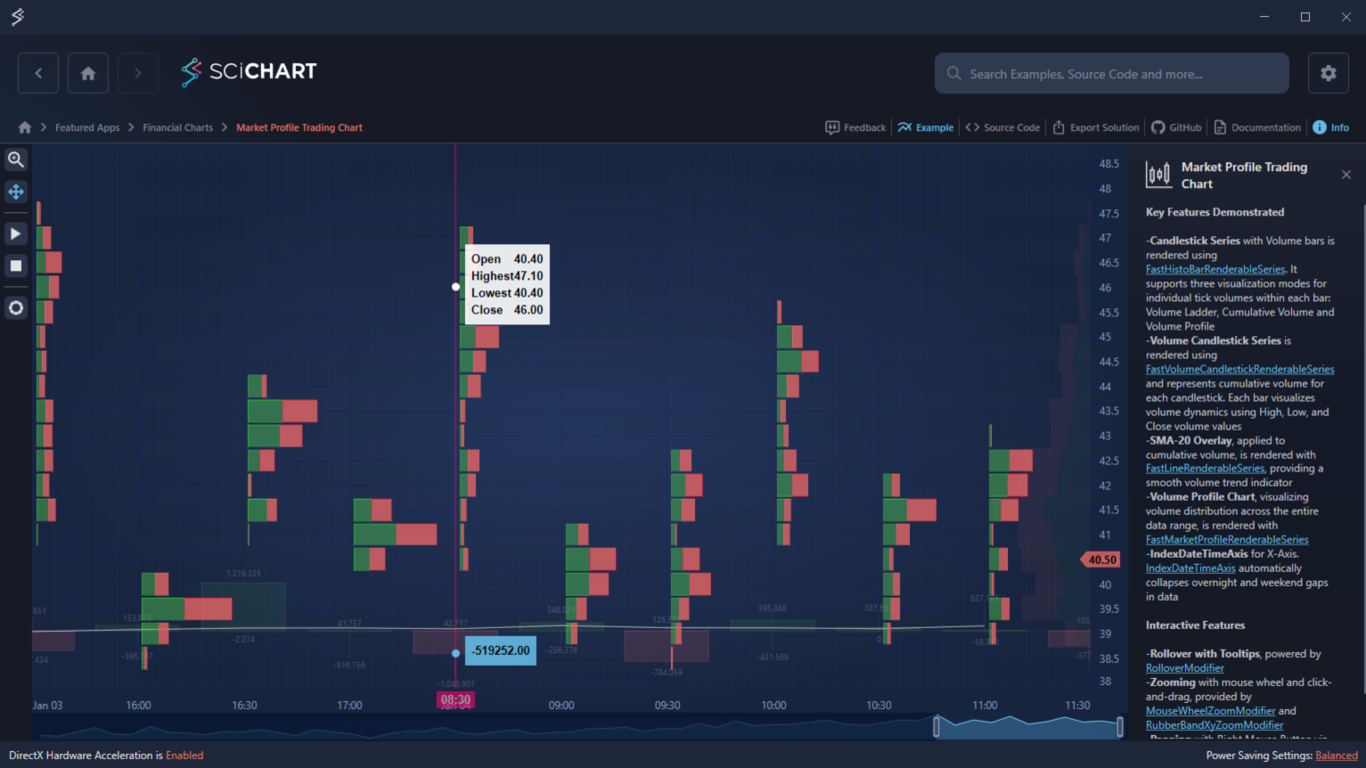
Key Features of SciChart’s Market Profile Trading Chart WPF
- Candlestick Series with Volume Bars
FastHistoBarRenderableSeries supports three modes: Volume Ladder, Cumulative Volume, and Volume Profile.
- Volume Candlestick Series
FastVolumeCandlestickRenderableSeries represents cumulative volume per candlestick with High, Low, Close volume values.
- SMA-20 Overlay
FastLineRenderableSeries provides a smooth volume trend indicator.
- Volume Profile Chart
FastMarketProfileRenderableSeries visualizes volume distribution across the entire data range.
- IndexDateTimeAxis
Automatically collapses overnight and weekend gaps in data.
Interactive Features
- Rollover with tooltips powered by RolloverModifier.
- Zooming with mouse wheel and click-and-drag via MouseWheelZoomModifier and RubberBandXyZoomModifier.
- Panning with Right Mouse Button via click-and-drag, enabled by ZoomPanModifier.
Try the Example for Yourself
Give the C# Market Profile Chart a try for yourself today. You can view the documentation or head straight to GitHub via the source code.
The C#/WPF source code for this example is included below.
Download the Financial Trading Chart WPF example or begin your free trial today to build high-performance WPF charts.
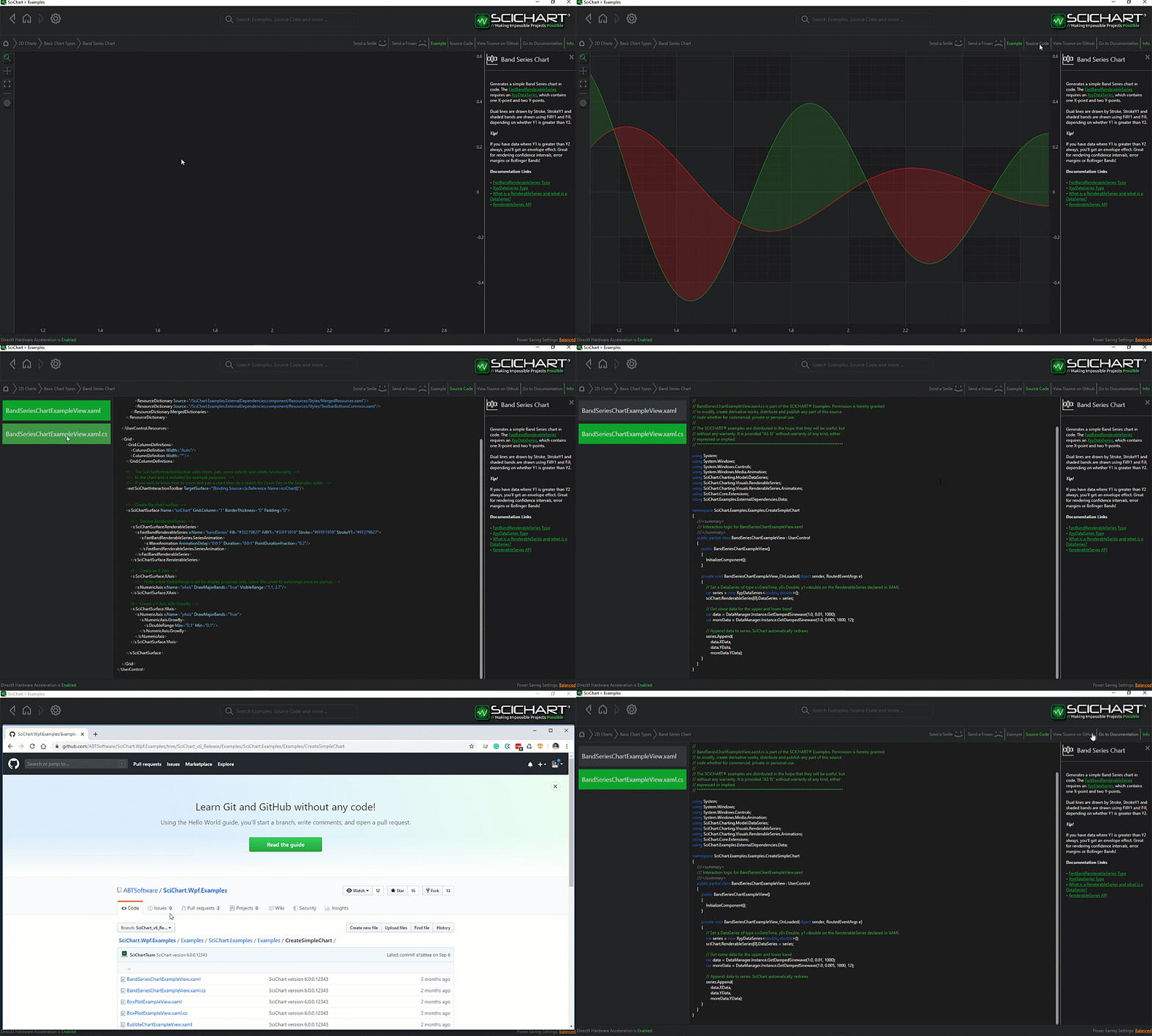
The C#/WPF source code for the WPF Market Profile Chart example is included below (Scroll down!).
Did you know you can also view the source code from one of the following sources as well?
- Clone the SciChart.WPF.Examples from GitHub.
- Or, view source in the SciChart WPF Examples suite.
- Also the SciChart WPF Trial contains the full source for the examples (link below).
MarketProfileTradingChartView.xaml
View source code<UserControl x:Class="SciChart.Examples.Examples.CreateStockCharts.MarketProfileTrading.MarketProfileTradingChartView"
xmlns="http://schemas.microsoft.com/winfx/2006/xaml/presentation"
xmlns:x="http://schemas.microsoft.com/winfx/2006/xaml"
xmlns:d="http://schemas.microsoft.com/expression/blend/2008"
xmlns:ext="http://schemas.abtsoftware.co.uk/scichart/exampleExternals"
xmlns:mc="http://schemas.openxmlformats.org/markup-compatibility/2006"
xmlns:mpt="clr-namespace:SciChart.Examples.Examples.CreateStockCharts.MarketProfileTrading"
xmlns:s="http://schemas.abtsoftware.co.uk/scichart"
d:DataContext="{d:DesignInstance mpt:MarketProfileTradingChartViewModel}"
d:DesignHeight="400"
d:DesignWidth="600"
Background="#FF232426"
mc:Ignorable="d">
<UserControl.Resources>
<ResourceDictionary>
<Style x:Key="AskBarStyle" TargetType="s:HistogramBar">
<Setter Property="Stroke" Value="{Binding AskStroke}" />
<Setter Property="Fill" Value="{Binding AskFill}" />
</Style>
<Style x:Key="BidBarStyle" TargetType="s:HistogramBar">
<Setter Property="Stroke" Value="{Binding BidStroke}" />
<Setter Property="Fill" Value="{Binding BidFill}" />
</Style>
<Style x:Key="OverThresholdAskBarStyle" BasedOn="{StaticResource AskBarStyle}" TargetType="s:HistogramBar">
<Setter Property="Stroke" Value="LimeGreen" />
<Setter Property="StrokeThickness" Value="1" />
<Setter Property="Foreground" Value="#002800" />
<Setter Property="FontSize" Value="15" />
</Style>
<Style x:Key="OverThresholdBidBarStyle" BasedOn="{StaticResource BidBarStyle}" TargetType="s:HistogramBar">
<Setter Property="Stroke" Value="Crimson" />
<Setter Property="StrokeThickness" Value="1" />
<Setter Property="Foreground" Value="#2A0000" />
<Setter Property="FontSize" Value="15" />
</Style>
<!-- PaletteProvider allows to highlight individual bars in histograms -->
<mpt:HistoBarPaletteProvider x:Key="VolumeLadderThresholdPaletteProvider"
OverriddenAskBarStyle="{StaticResource OverThresholdAskBarStyle}"
OverriddenBidBarStyle="{StaticResource OverThresholdBidBarStyle}"
VolumeThreshold="700000" />
<Style x:Key="PriceNumericAxisStyle" TargetType="s:NumericAxis">
<Setter Property="DrawMajorBands" Value="False" />
<Setter Property="DrawMajorGridLines" Value="True" />
<Setter Property="DrawMinorGridLines" Value="False" />
<Setter Property="DrawMinorTicks" Value="False" />
<Setter Property="GrowBy" Value="0, 0.1" />
</Style>
</ResourceDictionary>
</UserControl.Resources>
<Grid>
<Grid.ColumnDefinitions>
<ColumnDefinition Width="Auto" />
<ColumnDefinition Width="*" />
</Grid.ColumnDefinitions>
<Grid.RowDefinitions>
<RowDefinition Height="4*" />
<RowDefinition Height="Auto" />
</Grid.RowDefinitions>
<ext:SciChartInteractionToolbar Grid.RowSpan="3">
<!-- Interactivity Settings -->
<ToggleButton IsChecked="{Binding Source={x:Reference RubberBandXyZoomModifier}, Path=IsEnabled, Mode=TwoWay}" Style="{StaticResource DefaultToggleButtonStyle}" s:ToggleButtonExtensions.GroupName="CreateSciStockChart_ZoomGroup">
<ext:ToolbarIcon Kind="MagnifyPlusOutline" Style="{StaticResource ToolbarButtonIconStyle}"/>
</ToggleButton>
<ToggleButton IsChecked="{Binding Source={x:Reference ZoomPanModifier}, Path=IsEnabled, Mode=TwoWay}" Style="{StaticResource DefaultToggleButtonStyle}" s:ToggleButtonExtensions.GroupName="CreateSciStockChart_ZoomGroup">
<ext:ToolbarIcon Kind="ArrowAll" Style="{StaticResource ToolbarButtonIconStyle}"/>
</ToggleButton>
<ext:FlyoutSeparator />
<!-- Update Service -->
<ToggleButton s:ToggleButtonExtensions.GroupName="StartStop"
Command="{Binding StartUpdatesCommand}"
Style="{StaticResource DefaultUncheckableToggleButtonStyle}">
<ext:ToolbarIcon Width="14"
Height="14"
Kind="Play"
Style="{StaticResource ToolbarButtonIconStyle}" />
</ToggleButton>
<ToggleButton s:ToggleButtonExtensions.GroupName="StartStop"
Command="{Binding StopUpdatesCommand}"
Style="{StaticResource DefaultUncheckableToggleButtonStyle}">
<ext:ToolbarIcon Width="12"
Height="12"
Kind="Stop"
Style="{StaticResource ToolbarButtonIconStyle}" />
</ToggleButton>
<ext:FlyoutSeparator />
<!-- Series Settings -->
<ext:FlyoutMenuButton ToolTipService.ToolTip="Market Profile Settings">
<ext:ToolbarIcon Width="16"
Height="16"
Kind="Tire"
Style="{StaticResource ToolbarButtonIconStyle}" />
<ext:FlyoutMenuButton.PopupContent>
<StackPanel Width="200"
MinWidth="150"
Margin="5"
Orientation="Vertical">
<!-- Show or Hide Candlesticks -->
<CheckBox x:Name="ShowCheckBox" Content="Show Candlesticks?" IsChecked="False" />
<!-- Per-bar Volume Profile -->
<TextBlock Margin="0,10,0,5"
Style="{StaticResource FlyoutMenuHeaderStyle}"
Text="Bar Volume Profile:" />
<ComboBox Height="25"
ItemsSource="{Binding Source={ext:EnumValues {x:Type s:HistogramMode}}}"
SelectedItem="{Binding HistogramBarMode, Mode=TwoWay, Converter={StaticResource SelectedEnumValueConverter}}" />
<!-- Price levels -->
<TextBlock Margin="0,10,0,5"
Style="{StaticResource FlyoutMenuHeaderStyle}"
Text="Slide to change price levels"
TextWrapping="Wrap" />
<Slider HorizontalAlignment="Stretch"
Maximum="1"
AutoToolTipPrecision="3"
Minimum="0.1"
IsSnapToTickEnabled="True"
TickFrequency="0.1"
Orientation="Horizontal"
Value="{Binding PriceLevel, Mode=TwoWay}"
ToolTip="{Binding RelativeSource={RelativeSource Self}, Path=Value}" />
</StackPanel>
</ext:FlyoutMenuButton.PopupContent>
</ext:FlyoutMenuButton>
</ext:SciChartInteractionToolbar>
<!-- Create the chart surface with candlestick and histogram bars around each candlestick BottomAxesPanelTemplate="{StaticResource XAxesPanelTemplate}"-->
<s:SciChartSurface x:Name="sciChart"
Grid.Column="1"
Padding="0"
BorderThickness="0"
ViewportManager="{Binding ViewportManager}">
<s:SciChartSurface.RenderableSeries>
<!-- Total Market Volume Profile Series at the right -->
<s:FastMarketProfileRenderableSeries x:Name="MarketProfileRenderableSeries"
DataSeries="{Binding PriceDataSeries}"
MarketProfileWidth="110"
Opacity="0.1"
StrokeAsk="#7052CC54"
StrokeBid="#D0E26565"
TickSize="{Binding PriceLevel, Mode=TwoWay}"
XAxisId="TimeXAxis"
YAxisId="PriceYAxis"
s:RolloverModifier.IncludeSeries="False"
s:SeriesValueModifier.IncludeSeries="False">
<s:FastMarketProfileRenderableSeries.FillAsk>
<SolidColorBrush Color="#7052CC54" />
</s:FastMarketProfileRenderableSeries.FillAsk>
<s:FastMarketProfileRenderableSeries.FillBid>
<SolidColorBrush Color="#D0E26565" />
</s:FastMarketProfileRenderableSeries.FillBid>
</s:FastMarketProfileRenderableSeries>
<!-- Volume Candlestick Series -->
<s:FastVolumeCandlestickRenderableSeries DataSeries="{Binding VolumeDataSeries, Mode=TwoWay}"
FontSize="9"
Opacity="0.2"
XAxisId="TimeXAxis"
YAxisId="VolumeYAxis"
StrokeThickness="2"
StrokeUp="#7052CC54"
StrokeDown="#D0E26565">
<s:FastVolumeCandlestickRenderableSeries.FillUp>
<SolidColorBrush Color="#7052CC54" />
</s:FastVolumeCandlestickRenderableSeries.FillUp>
<s:FastVolumeCandlestickRenderableSeries.FillDown>
<SolidColorBrush Color="#D0E26565" />
</s:FastVolumeCandlestickRenderableSeries.FillDown>
<s:FastVolumeCandlestickRenderableSeries.ZeroLineStyle>
<Style TargetType="Line">
<Setter Property="Stroke" Value="#FF8C00" />
<Setter Property="StrokeThickness" Value="3" />
</Style>
</s:FastVolumeCandlestickRenderableSeries.ZeroLineStyle>
</s:FastVolumeCandlestickRenderableSeries>
<!-- Volume 20-SMA Line Series -->
<s:FastLineRenderableSeries DataSeries="{Binding MovingAverageVolumeDataSeries}"
Stroke="#DCDCDC"
StrokeThickness="1"
Opacity="0.7"
XAxisId="TimeXAxis"
YAxisId="VolumeYAxis"
s:RolloverModifier.IncludeSeries="False" />
<!-- Hybrid Price and Volume Candlestick Series -->
<s:FastHistoBarRenderableSeries MarketProfileSeriesHelper="{Binding MarketProfileSeriesHelper, Source={x:Reference MarketProfileRenderableSeries}, Mode=OneWay}"
DataSeries="{Binding PriceDataSeries, Mode=TwoWay}"
HistogramMode="{Binding HistogramBarMode, Mode=TwoWay}"
HorizontalBarSpacing="{Binding HorizontalBarSpacing, Mode=TwoWay}"
VerticalBarSpacing="{Binding VerticalBarSpacing, Mode=TwoWay}"
ShowCandlesticks="{Binding IsChecked, Source={x:Reference Name=ShowCheckBox}, Mode=OneWay}"
TickSize="{Binding PriceLevel, Mode=TwoWay}"
PaletteProvider="{StaticResource VolumeLadderThresholdPaletteProvider}"
AskBarStyle="{StaticResource AskBarStyle}"
BidBarStyle="{StaticResource BidBarStyle}"
MaxHistoBarCandles="30"
DataPointWidth="0.9"
StrokeDown="#D0E26565"
StrokeUp="#7052CC54"
XAxisId="TimeXAxis"
YAxisId="PriceYAxis">
<s:FastHistoBarRenderableSeries.FillUp>
<SolidColorBrush Color="#7052CC54" />
</s:FastHistoBarRenderableSeries.FillUp>
<s:FastHistoBarRenderableSeries.FillDown>
<SolidColorBrush Color="#D0E26565" />
</s:FastHistoBarRenderableSeries.FillDown>
</s:FastHistoBarRenderableSeries>
</s:SciChartSurface.RenderableSeries>
<s:SciChartSurface.XAxes>
<!-- Primary X-Axis -->
<s:IndexDateTimeAxis Grid.Column="0"
Id="TimeXAxis"
Visibility="Visible"
VisibleRange="{Binding XVisibleRange, Mode=TwoWay}" />
</s:SciChartSurface.XAxes>
<s:SciChartSurface.YAxes>
<!-- Price Y-Axis -->
<s:NumericAxis Id="PriceYAxis"
Visibility="Visible"
DrawMajorBands="True"
AutoTicks="False"
MinorDelta="0.1"
MajorDelta="{Binding PriceLevel, Mode=OneWay}"
Style="{StaticResource PriceNumericAxisStyle}"
VisibleRange="{Binding YVisibleRange, Mode=TwoWay}" />
<!-- Hidden Volume Y-Axis -->
<s:NumericAxis Id="VolumeYAxis"
Visibility="Hidden"
AutoRange="Always"
Height="150"
VerticalAlignment="Bottom"
DrawMajorGridLines="False"
Style="{StaticResource PriceNumericAxisStyle}"
s:ZoomPanModifier.IncludeAxis="False" />
</s:SciChartSurface.YAxes>
<s:SciChartSurface.ChartModifier>
<s:ModifierGroup s:MouseManager.MouseEventGroup="SciChartGroup">
<s:MouseWheelZoomModifier />
<s:ZoomPanModifier x:Name="ZoomPanModifier"
IsEnabled="True"
ClipModeX="None" />
<s:ZoomExtentsModifier />
<s:RubberBandXyZoomModifier x:Name="RubberBandXyZoomModifier"
IsEnabled="False"
IsXAxisOnly="True"
ZoomExtentsY="True" />
<s:RolloverModifier UseInterpolation="False" />
<s:YAxisDragModifier AxisId="PriceYAxis" />
<s:SeriesValueModifier YAxisId="PriceYAxis" />
<s:XAxisDragModifier AxisId="TimeXAxis" />
</s:ModifierGroup>
</s:SciChartSurface.ChartModifier>
</s:SciChartSurface>
<Grid Grid.Row="1"
Grid.Column="1"
Height="32">
<!-- Define the Overview control, binding to XVisibleRange, which is shared between this and the SciStockChart control -->
<s:SciChartOverview Grid.Column="0"
ParentSurface="{Binding ElementName=sciChart, Mode=OneWay}"
SelectedRange="{Binding XVisibleRange, Mode=TwoWay}"
XAxisId="TimeXAxis" />
</Grid>
</Grid>
</UserControl>MarketProfileTradingChartView.xaml.cs
View source code// *************************************************************************************
// SCICHART® Copyright SciChart Ltd. 2011-2026. All rights reserved.
//
// Web: http://www.scichart.com
// Support: support@scichart.com
// Sales: sales@scichart.com
//
// MarketProfileTradingChartView.xaml.cs is part of the SCICHART® Examples. Permission is hereby granted
// to modify, create derivative works, distribute and publish any part of this source
// code whether for commercial, private or personal use.
//
// The SCICHART® examples are distributed in the hope that they will be useful, but
// without any warranty. It is provided "AS IS" without warranty of any kind, either
// expressed or implied.
// *************************************************************************************
using System.Windows.Controls;
namespace SciChart.Examples.Examples.CreateStockCharts.MarketProfileTrading
{
/// <summary>
/// Interaction logic for MarketProfileTradingChartView.xaml
/// </summary>
public partial class MarketProfileTradingChartView : UserControl
{
public MarketProfileTradingChartView()
{
InitializeComponent();
}
}
}
MarketProfileTradingChartViewModel.cs
View source code// *************************************************************************************
// SCICHART® Copyright SciChart Ltd. 2011-2026. All rights reserved.
//
// Web: http://www.scichart.com
// Support: support@scichart.com
// Sales: sales@scichart.com
//
// MarketProfileTradingChartViewModel.cs is part of the SCICHART® Examples. Permission is hereby granted
// to modify, create derivative works, distribute and publish any part of this source
// code whether for commercial, private or personal use.
//
// The SCICHART® examples are distributed in the hope that they will be useful, but
// without any warranty. It is provided "AS IS" without warranty of any kind, either
// expressed or implied.
// *************************************************************************************
using System;
using System.Diagnostics;
using System.Drawing;
using System.Linq;
using System.Timers;
using System.Windows.Input;
using System.Windows.Media;
using SciChart.Charting.Common.Extensions;
using SciChart.Charting.Common.Helpers;
using SciChart.Charting.Model;
using SciChart.Charting.Model.DataSeries;
using SciChart.Charting.ViewportManagers;
using SciChart.Charting.Visuals.RenderableSeries;
using SciChart.Core.Extensions;
using SciChart.Data.Model;
using SciChart.Examples.ExternalDependencies.Common;
using SciChart.Examples.ExternalDependencies.Data;
using Brush = System.Windows.Media.Brush;
namespace SciChart.Examples.Examples.CreateStockCharts.MarketProfileTrading
{
/// <summary>
/// Represents a single data tick
/// </summary>
public class CandleTick : ITick
{
public double Price { get; set; }
public DateTime TimeStamp { get; set; }
public BidOrAsk BidOrAsk { get; set; }
public long Volume { get; set; }
}
public class MarketProfileTradingChartViewModel : BaseViewModel
{
// Ranges
private IViewportManager _viewportManager;
private IRange _xTimeRange;
private IRange _yPriceRange;
// Price level
private double _priceLevel = 0.5;
// Bar Time Frame in Minutes
private int _barTimeFrame = 30;
private DateTime _startDate = new DateTime(2017, 1, 1);
// Number of ticks
private int _ticksInBarTimeFrame = 250;
private PriceBar _lastPriceTick = new PriceBar();
// Data and Timer
private MovingAverage _movingAverage;
private OhlcDataSeries<DateTime, double> _priceDataSeries;
private OhlcDataSeries<DateTime, double> _volumeDataSeries;
private XyDataSeries<DateTime, double> _smaVolumeDataSeries;
// Auxiliary
private Random _random = new Random();
private double _cumulativeVolume;
private MarketDataService _marketDataService;
// Appearance & Styling
private HistogramMode _histogramBarMode = HistogramMode.MarketProfile;
private double _verticalBarSpacing = 2d;
private double _horizontalBarSpacing = 5d;
private Brush _askStroke = new SolidColorBrush(Colors.White) { Opacity = 0.8 };
private Brush _askFill = new SolidColorBrush(Colors.Gray) { Opacity = 0.6 };
private Brush _bidStroke = new SolidColorBrush(Colors.White) { Opacity = 0.8 };
private Brush _bidFill = new SolidColorBrush(Colors.Gray) { Opacity = 0.6 };
private readonly object _tickLocker = new();
//time\tprice\tvolume\tbidorask
public MarketProfileTradingChartViewModel()
{
_viewportManager = new DefaultViewportManager();
_priceDataSeries = new OhlcDataSeries<DateTime, double>();
_volumeDataSeries = new OhlcDataSeries<DateTime, double>();
_smaVolumeDataSeries = new XyDataSeries<DateTime, double>();
_movingAverage = new MovingAverage(20);
// Generate market data and fill the data series
var initialBarNumber = 60;
FillWithMarketData(initialBarNumber, _ticksInBarTimeFrame);
// Setup X TimeRange to show the last 25 bars
var lastIndex = _priceDataSeries.Count - 1;
var timeRangeMax = _priceDataSeries.XValues[lastIndex];
var timeRangeMin = _priceDataSeries.XValues[lastIndex - 10];
XVisibleRange = new DateRange(timeRangeMin, timeRangeMax);
//
_viewportManager.ZoomExtentsY();
// Init brushes
ChangeBarStyling(_histogramBarMode);
}
public IViewportManager ViewportManager
{
get => _viewportManager;
set
{
_viewportManager = value;
OnPropertyChanged(nameof(ViewportManager));
}
}
public IDataSeries MovingAverageVolumeDataSeries => _smaVolumeDataSeries;
public Brush AskStroke
{
get => _askStroke;
set
{
_askStroke = value;
OnPropertyChanged("AskStroke");
}
}
public Brush AskFill
{
get => _askFill;
set
{
_askFill = value;
OnPropertyChanged("AskFill");
}
}
public Brush BidStroke
{
get => _bidStroke;
set
{
_bidStroke = value;
OnPropertyChanged("BidStroke");
}
}
public Brush BidFill
{
get => _bidFill;
set
{
_bidFill = value;
OnPropertyChanged("BidFill");
}
}
public ICommand StopUpdatesCommand
{
get
{
return new ActionCommand(() =>
{
_marketDataService.ClearSubscriptions();
ViewportManager = new DefaultViewportManager();
});
}
}
public ICommand StartUpdatesCommand
{
get
{
return new ActionCommand(() =>
{
ViewportManager = new HistogramBarViewportManager();
_marketDataService.SubscribePriceUpdate(OnNewPriceTick);
});
}
}
public double PriceLevel
{
get => _priceLevel;
set
{
_priceLevel = value;
OnPropertyChanged(nameof(PriceLevel));
}
}
public double HorizontalBarSpacing
{
get => _horizontalBarSpacing;
set
{
_horizontalBarSpacing = value;
OnPropertyChanged(nameof(HorizontalBarSpacing));
}
}
public double VerticalBarSpacing
{
get => _verticalBarSpacing;
set
{
_verticalBarSpacing = value;
OnPropertyChanged(nameof(VerticalBarSpacing));
}
}
public IRange XVisibleRange
{
get => _xTimeRange;
set
{
if (Equals(_xTimeRange, value))
return;
_xTimeRange = value;
OnPropertyChanged(nameof(XVisibleRange));
}
}
public IRange YVisibleRange
{
get => _yPriceRange;
set
{
if (Equals(_yPriceRange, value))
return;
_yPriceRange = value;
OnPropertyChanged(nameof(YVisibleRange));
}
}
public OhlcDataSeries<DateTime, double> PriceDataSeries
{
get => _priceDataSeries;
set
{
_priceDataSeries = value;
OnPropertyChanged(nameof(PriceDataSeries));
}
}
public OhlcDataSeries<DateTime, double> VolumeDataSeries
{
get => _volumeDataSeries;
set
{
_volumeDataSeries = value;
OnPropertyChanged(nameof(VolumeDataSeries));
}
}
public HistogramMode HistogramBarMode
{
get => _histogramBarMode;
set
{
_histogramBarMode = value;
ChangeBarStyling(_histogramBarMode);
OnPropertyChanged(nameof(HistogramBarMode));
}
}
public void FillWithMarketData(int candlesCount, int ticksPerBar)
{
_marketDataService = new MarketDataService(_startDate, _barTimeFrame, 100, ticksPerBar);
var ticks = candlesCount * ticksPerBar;
Enumerable.Range(0, ticks).ForEachDo(_ => OnNewPriceTick(_marketDataService.GetNextBar()));
}
private void OnNewPriceTick(PriceBar newPriceTick)
{
// Ensure only one update processed at a time from multi-threaded timer
lock (_tickLocker)
{
// Round generated price to match price levels
newPriceTick.Close = Math.Round(newPriceTick.Close, 1, MidpointRounding.AwayFromZero);
// Determine tick type randomly
var tickType = _random.Next(2) % 2 == 0 ? BidOrAsk.Ask : BidOrAsk.Bid;
// Update the last price, or append?
if (_lastPriceTick.DateTime == newPriceTick.DateTime)
{
UpdateLastBar(newPriceTick, tickType);
}
else
{
AddNewBar(newPriceTick, tickType);
// X-range is updated in HistogramBarViewportManager
}
_lastPriceTick = newPriceTick;
}
}
private void UpdateLastBar(PriceBar newTick, BidOrAsk tickType)
{
var lastIndex = _priceDataSeries.Count - 1;
// Update Price DataSeries
var newPrice = newTick.Close;
var high = _priceDataSeries.HighValues[lastIndex];
high = high > newPrice ? high : newPrice;
var low = _priceDataSeries.LowValues[lastIndex];
low = low < newPrice ? low : newPrice;
_priceDataSeries.Update(lastIndex, _priceDataSeries.OpenValues[lastIndex], high, low, newPrice);
var metaData = (CandlestickMetaData)_priceDataSeries.Metadata[lastIndex];
metaData.AddTick(new CandleTick
{
BidOrAsk = tickType,
Price = newTick.Close,
Volume = newTick.Volume,
TimeStamp = newTick.DateTime
});
// Update Volume DataSeries
_cumulativeVolume += tickType.Equals(BidOrAsk.Ask) ? newTick.Volume : -newTick.Volume;
high = _volumeDataSeries.HighValues[lastIndex];
high = high > _cumulativeVolume ? high : _cumulativeVolume;
low = _volumeDataSeries.LowValues[lastIndex];
low = low < _cumulativeVolume ? low : _cumulativeVolume;
_volumeDataSeries.Update(lastIndex, _volumeDataSeries.OpenValues[lastIndex], high, low, _cumulativeVolume);
}
private void AddNewBar(PriceBar newTick, BidOrAsk tickType)
{
// Update Price DataSeries
var barMetadata = new CandlestickMetaData();
barMetadata.AddTick(new CandleTick
{
BidOrAsk = tickType,
Price = newTick.Close,
Volume = newTick.Volume,
TimeStamp = newTick.DateTime
});
_priceDataSeries.Append(newTick.DateTime, newTick.Close, newTick.Close, newTick.Close, newTick.Close, barMetadata);
// Update Volume DataSeries
var volume = tickType.Equals(BidOrAsk.Ask) ? newTick.Volume : -newTick.Volume;
var high = volume > 0 ? volume : 0;
var low = volume < 0 ? volume : 0;
_volumeDataSeries.Append(newTick.DateTime, volume, high, low, volume);
// Update Volume SMA
var lastTickTime = _lastPriceTick.DateTime;
var dateTime = lastTickTime.IsDefined() ? lastTickTime : newTick.DateTime;
_smaVolumeDataSeries.Append(dateTime, _movingAverage.Push(_cumulativeVolume).Current);
// Reset the Cumulative Volume for a new bar
_cumulativeVolume = volume;
}
private void ChangeBarStyling(HistogramMode histogramBarMode)
{
var brushConverter = new BrushConverter();
var askBrush = ((SolidColorBrush)brushConverter.ConvertFrom("#7052CC54"));
var bidBrush = ((SolidColorBrush)brushConverter.ConvertFrom("#D0E26565"));
switch (histogramBarMode)
{
case HistogramMode.CumulativeVolume:
BidStroke = new SolidColorBrush(Colors.Crimson) { Opacity = 0.8 };
BidFill = new SolidColorBrush(Colors.Crimson) { Opacity = 0.6 };
AskStroke = new SolidColorBrush(Colors.LimeGreen) { Opacity = 0.8 };
AskFill = new SolidColorBrush(Colors.LimeGreen) { Opacity = 0.6 };
break;
case HistogramMode.VolumeLadder:
case HistogramMode.MarketProfile:
AskStroke = askBrush;
AskFill = askBrush;
BidStroke = bidBrush;
BidFill = bidBrush;
break;
}
}
}
}HistoBarPaletteProvider.cs
View source code// *************************************************************************************
// SCICHART® Copyright SciChart Ltd. 2011-2026. All rights reserved.
//
// Web: http://www.scichart.com
// Support: support@scichart.com
// Sales: sales@scichart.com
//
// HistoBarPaletteProvider.cs is part of the SCICHART® Examples. Permission is hereby granted
// to modify, create derivative works, distribute and publish any part of this source
// code whether for commercial, private or personal use.
//
// The SCICHART® examples are distributed in the hope that they will be useful, but
// without any warranty. It is provided "AS IS" without warranty of any kind, either
// expressed or implied.
// *************************************************************************************
using SciChart.Charting.Model;
using SciChart.Charting.Visuals.RenderableSeries;
using System.Windows;
namespace SciChart.Examples.Examples.CreateStockCharts.MarketProfileTrading
{
public class HistoBarPaletteProvider : IHistoBarPaletteProvider
{
public Style OverriddenAskBarStyle { get; set; }
public Style OverriddenBidBarStyle { get; set; }
public double VolumeThreshold { get; set; }
public void OnBeginSeriesDraw(IRenderableSeries rSeries) { }
public Style OverrideBarStyle(IRenderableSeries rSeries, double value, BidOrAsk barType, HistogramMode histogramMode)
{
Style barStyle = null;
if (value >= VolumeThreshold)
{
barStyle = barType == BidOrAsk.Ask ? OverriddenAskBarStyle : OverriddenBidBarStyle;
}
return barStyle;
}
}
}
HistogramBarViewportManager.cs
View source code// *************************************************************************************
// SCICHART® Copyright SciChart Ltd. 2011-2026. All rights reserved.
//
// Web: http://www.scichart.com
// Support: support@scichart.com
// Sales: sales@scichart.com
//
// HistogramBarViewportManager.cs is part of the SCICHART® Examples. Permission is hereby granted
// to modify, create derivative works, distribute and publish any part of this source
// code whether for commercial, private or personal use.
//
// The SCICHART® examples are distributed in the hope that they will be useful, but
// without any warranty. It is provided "AS IS" without warranty of any kind, either
// expressed or implied.
// *************************************************************************************
using SciChart.Charting.ViewportManagers;
using SciChart.Charting.Visuals;
using SciChart.Charting.Visuals.Axes;
using SciChart.Data.Model;
using System;
namespace SciChart.Examples.Examples.CreateStockCharts.MarketProfileTrading
{
class HistogramBarViewportManager : DefaultViewportManager
{
private IAxis _priceYAxis;
public override void AttachSciChartSurface(ISciChartSurface scs)
{
base.AttachSciChartSurface(scs);
ParentSurface = scs;
// Set Autorange behavior for the Price Y Axis
_priceYAxis = scs.YAxes.GetAxisById("PriceYAxis");
_priceYAxis.AutoRange = AutoRange.Always;
}
public override void DetachSciChartSurface()
{
// Reset Autorange behavior for the Price Y Axis
_priceYAxis.AutoRange = AutoRange.Once;
_priceYAxis = null;
ParentSurface = null;
base.DetachSciChartSurface();
}
public ISciChartSurface ParentSurface { get; private set; }
protected override IRange OnCalculateNewXRange(IAxis xAxis)
{
var currentVisibleRange = xAxis.VisibleRange;
// Getting X-Range of sorted data is quick,
// so it can be done every frame
var dataXRange = xAxis.DataRange;
return new DateRange((DateTime)currentVisibleRange.Min, (DateTime)dataXRange.Max);
}
}
}