WPF Uniform Vector Field Chart
This example demonstrates a real-time WPF Uniform Vector Field Chart, which is a grid of arrows animated at up to ~50 FPS. The chart uses VectorFieldRenderableSeries and UniformVectorFieldDataSeries. The field is computed from four superimposed radial wave sources across a 70×46 grid. With each frame, the displacement values are rewritten directly into the backing 2D arrays so that no DataSeries reallocation occurs.
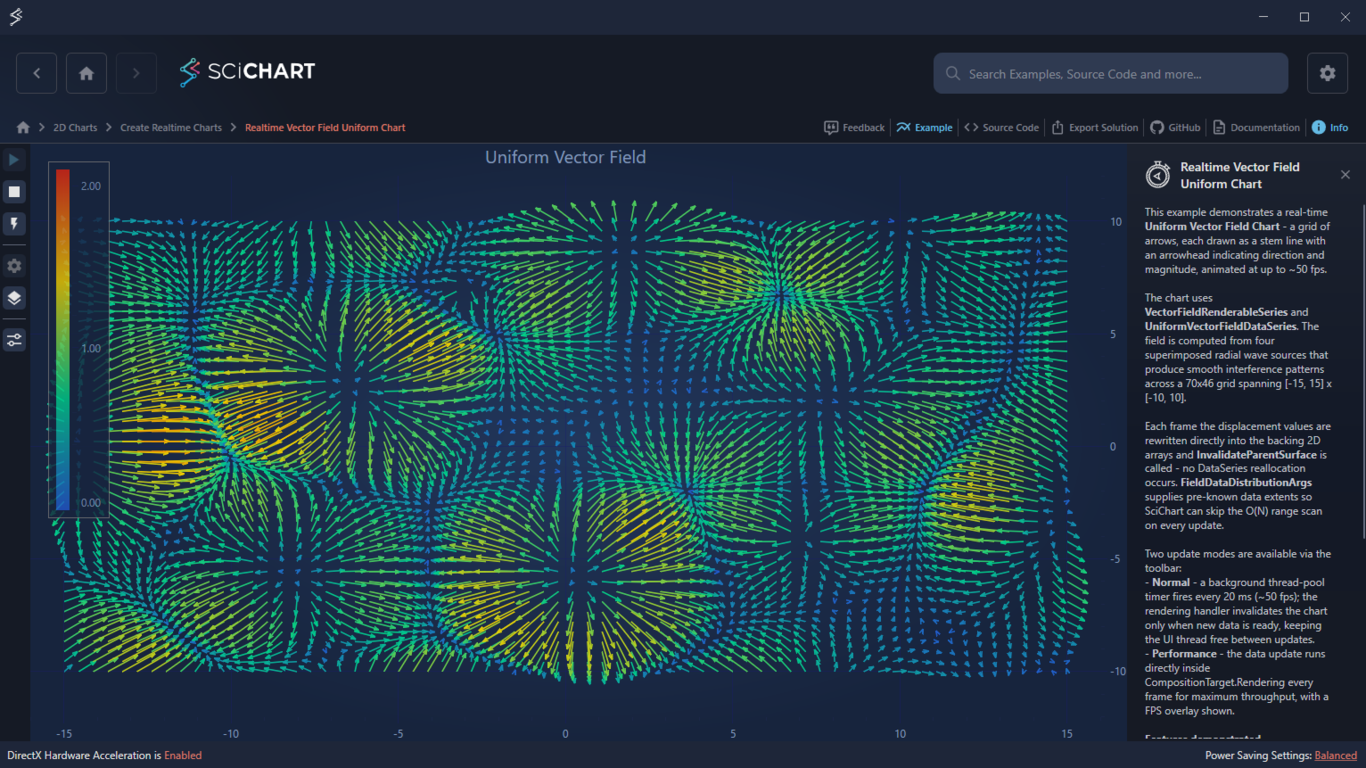
Key Features of SciChart’s WPF Uniform Vector Field Chart
- There are two update modes available via toolbar:
- Normal: a background thread-pool timer fires every 20 ms (~50 FPS).
- Performance: runs directly inside CompositionTarget.Rendering every frame, with FPS overlay.
- UniformVectorFieldDataSeries on a resizable grid
- Real-time in-place DX/DY update without reallocating the DataSeries
- Color mapping by magnitude or by direction via ColorMap API
- Configurable vector length modes: DataUnits, MagnitudePixels, and FixedPixels
Try It for Yourself
Give the WPF Uniform Vector Field Chart a try for yourself today. You can view the documentation or head straight to GitHub via the source code. This chart is ideal for engineering analysis and research in physics and meteorological analysis.
The C#/WPF source code for this example is included below.
Create a Real-Time Uniform Vector Field in C# using our example or begin your free trial today to build high-performance WPF charts for financial applications.
The C#/WPF source code for the WPF Uniform Vector Field Chart example is included below (Scroll down!).
Did you know you can also view the source code from one of the following sources as well?
- Clone the SciChart.WPF.Examples from GitHub.
- Or, view source in the SciChart WPF Examples suite.
- Also the SciChart WPF Trial contains the full source for the examples (link below).
RealtimeVectorFieldChartView.xaml
View source code<UserControl x:Class="SciChart.Examples.Examples.CreateRealtimeChart.RealtimeVectorFieldChartView"
xmlns="http://schemas.microsoft.com/winfx/2006/xaml/presentation"
xmlns:x="http://schemas.microsoft.com/winfx/2006/xaml"
xmlns:d="http://schemas.microsoft.com/expression/blend/2008"
xmlns:ext="http://schemas.abtsoftware.co.uk/scichart/exampleExternals"
xmlns:mc="http://schemas.openxmlformats.org/markup-compatibility/2006"
xmlns:s="http://schemas.abtsoftware.co.uk/scichart"
Loaded="OnExampleLoaded"
Unloaded="OnExampleUnloaded"
d:DesignHeight="400"
d:DesignWidth="600"
mc:Ignorable="d">
<UserControl.Resources>
<!-- Linear palette: cool-blue → teal → yellow → warm-red.
Used for Solid / ByMagnitude colour modes. -->
<s:HeatmapColorPalette x:Key="CoolWarmLinearPalette" Minimum="0" Maximum="1.9">
<GradientStop Color="#FF2255CC" Offset="0.00"/>
<GradientStop Color="#FF00CC88" Offset="0.33"/>
<GradientStop Color="#FFEECC00" Offset="0.67"/>
<GradientStop Color="#FFDD2211" Offset="1.00"/>
</s:HeatmapColorPalette>
<!-- Circular palette: same hues with stops redistributed evenly and the first colour
repeated at offset 1.0 so the palette wraps smoothly for ByDirection mode. -->
<s:HeatmapColorPalette x:Key="CoolWarmCircularPalette" Minimum="0" Maximum="1">
<GradientStop Color="#FF2255CC" Offset="0.00"/>
<GradientStop Color="#FF00CC88" Offset="0.25"/>
<GradientStop Color="#FFEECC00" Offset="0.50"/>
<GradientStop Color="#FFDD2211" Offset="0.75"/>
<GradientStop Color="#FF2255CC" Offset="1.00"/>
</s:HeatmapColorPalette>
</UserControl.Resources>
<Grid>
<Grid.ColumnDefinitions>
<ColumnDefinition Width="Auto" />
<ColumnDefinition Width="*" />
</Grid.ColumnDefinitions>
<!-- Toolbar: start/stop animation and configure vector appearance -->
<ext:SciChartInteractionToolbar Grid.Column="0">
<ToggleButton x:Name="StartButton"
Click="OnStartClick"
Style="{StaticResource DefaultUncheckableToggleButtonStyle}"
ToolTipService.ToolTip="Start animation">
<ext:ToolbarIcon Kind="Play" Height="14" Width="14" Style="{StaticResource ToolbarButtonIconStyle}"/>
</ToggleButton>
<ToggleButton x:Name="StopButton"
IsEnabled="False"
Click="OnStopClick"
Style="{StaticResource DefaultUncheckableToggleButtonStyle}"
ToolTipService.ToolTip="Stop animation">
<ext:ToolbarIcon Kind="Stop" Height="12" Width="12" Style="{StaticResource ToolbarButtonIconStyle}"/>
</ToggleButton>
<!-- Toggles performance mode: on = update runs every composition frame (max FPS);
off = timer drives updates at ~50 fps, keeping the render thread free -->
<ToggleButton x:Name="PerformanceModeButton"
IsChecked="False"
Click="OnPerformanceModeToggled"
Style="{StaticResource DefaultToggleButtonStyle}"
ToolTipService.ToolTip="Performance mode">
<ext:ToolbarIcon Kind="Flash" Height="14" Width="14" Style="{StaticResource ToolbarButtonIconStyle}"/>
</ToggleButton>
<ext:FlyoutSeparator/>
<!-- Grid size must be changed while the simulation is stopped -->
<ext:FlyoutMenuButton x:Name="ChangeGridSizeButton" ToolTipService.ToolTip="Simulation settings">
<ext:ToolbarIcon Kind="Cog" Height="16" Width="16" Style="{StaticResource ToolbarButtonIconStyle}"/>
<ext:FlyoutMenuButton.PopupContent>
<StackPanel Margin="5" MinWidth="180" Orientation="Vertical">
<!-- Grid size: controls the xCount × yCount resolution of the uniform grid -->
<TextBlock Text="Grid Size" Style="{StaticResource FlyoutMenuHeaderStyle}"/>
<StackPanel Orientation="Horizontal">
<Slider x:Name="GridSizeSlider"
Minimum="10" Maximum="120" Value="70"
Width="120" VerticalAlignment="Center"
IsSnapToTickEnabled="True" TickFrequency="10"
ValueChanged="OnGridSizeChanged"/>
<TextBlock x:Name="GridSizeLabel"
Text="70 × 46"
VerticalAlignment="Center"
Margin="6,0,0,0"/>
</StackPanel>
</StackPanel>
</ext:FlyoutMenuButton.PopupContent>
</ext:FlyoutMenuButton>
<!-- Culling options: LOD cell size and density control -->
<ext:FlyoutMenuButton ToolTipService.ToolTip="Culling options">
<ext:ToolbarIcon Kind="Layers" Height="16" Width="16" Style="{StaticResource ToolbarButtonIconStyle}"/>
<ext:FlyoutMenuButton.PopupContent>
<StackPanel Margin="5" MinWidth="180" Orientation="Vertical">
<!-- Cell size: 0 = disabled; higher values reduce draw calls more aggressively -->
<TextBlock Text="Culling Cell Size" Style="{StaticResource FlyoutMenuHeaderStyle}"/>
<StackPanel Orientation="Horizontal">
<Slider x:Name="LodCellSizeSlider"
Minimum="0" Maximum="20"
Value="{Binding Source={x:Reference Name=VectorSeries}, Path=CullingCellSizePx, Mode=TwoWay}"
Width="120" VerticalAlignment="Center"
IsSnapToTickEnabled="True" TickFrequency="0.5"/>
<TextBlock Text="{Binding Source={x:Reference Name=LodCellSizeSlider}, Path=Value, StringFormat={}{0:0.#} px}"
VerticalAlignment="Center"
Margin="6,0,0,0"/>
</StackPanel>
<!-- Max vectors per cell: 1 = single winner; higher values show more in dense regions -->
<TextBlock Text="Max Vectors Per Cell" Margin="0,10,0,4" Style="{StaticResource FlyoutMenuHeaderStyle}"/>
<StackPanel Orientation="Horizontal">
<Slider x:Name="MaxVectorsPerCellSlider"
Minimum="1" Maximum="20"
Value="{Binding Source={x:Reference Name=VectorSeries}, Path=CullingMaxVectorsPerCell, Mode=TwoWay}"
Width="120" VerticalAlignment="Center"
IsSnapToTickEnabled="True" TickFrequency="1"/>
<TextBlock Text="{Binding Source={x:Reference Name=MaxVectorsPerCellSlider}, Path=Value, StringFormat={}{0:0}}"
VerticalAlignment="Center"
Margin="6,0,0,0"/>
</StackPanel>
</StackPanel>
</ext:FlyoutMenuButton.PopupContent>
</ext:FlyoutMenuButton>
<ext:FlyoutSeparator/>
<!-- Vector options: colour mapping, arrow length/width, normalization -->
<ext:FlyoutMenuButton ToolTipService.ToolTip="Vector options">
<ext:ToolbarIcon Kind="TuneVariant" Height="16" Width="16" Style="{StaticResource ToolbarButtonIconStyle}"/>
<ext:FlyoutMenuButton.PopupContent>
<StackPanel Margin="5" MinWidth="180" Orientation="Vertical">
<!-- Color mode: Solid, ByMagnitude or ByDirection -->
<TextBlock Text="Color Mode" Style="{StaticResource FlyoutMenuHeaderStyle}"/>
<ComboBox x:Name="ColorModeCombo"
Margin="0,4,0,0"
SelectionChanged="OnColorModeChanged"/>
<!-- Length mode: DataUnits, FixedPixels or MagnitudePixels -->
<TextBlock Text="Length Mode" Margin="0,10,0,4" Style="{StaticResource FlyoutMenuHeaderStyle}"/>
<ComboBox x:Name="LengthModeCombo"
SelectionChanged="OnLengthModeChanged"/>
<!-- MagnitudeScale: visible only in MagnitudePixels mode -->
<TextBlock x:Name="MagnitudeScaleHeader"
Text="Magnitude Scale"
Margin="0,10,0,4"
Visibility="Collapsed"
Style="{StaticResource FlyoutMenuHeaderStyle}"/>
<StackPanel x:Name="MagnitudeScalePanel" Orientation="Horizontal" Visibility="Collapsed">
<Slider x:Name="MagnitudeScaleSlider"
Minimum="1" Maximum="100"
Value="{Binding Source={x:Reference Name=VectorSeries}, Path=MagnitudeScale, Mode=TwoWay}"
Width="120" VerticalAlignment="Center"/>
<TextBlock Text="{Binding Source={x:Reference Name=MagnitudeScaleSlider}, Path=Value, StringFormat={}{0:F0}}"
VerticalAlignment="Center"
Margin="6,0,0,0"/>
</StackPanel>
<!-- PixelLength: visible only in FixedPixels mode -->
<TextBlock x:Name="PixelLengthHeader"
Text="Pixel Length"
Margin="0,10,0,4"
Visibility="Collapsed"
Style="{StaticResource FlyoutMenuHeaderStyle}"/>
<StackPanel x:Name="PixelLengthPanel" Orientation="Horizontal" Visibility="Collapsed">
<Slider x:Name="PixelLengthSlider"
Minimum="5" Maximum="80"
Value="{Binding Source={x:Reference Name=VectorSeries}, Path=PixelLength, Mode=TwoWay}"
Width="120" VerticalAlignment="Center"/>
<TextBlock Text="{Binding Source={x:Reference Name=PixelLengthSlider}, Path=Value, StringFormat={}{0:F0}}"
VerticalAlignment="Center"
Margin="6,0,0,0"/>
</StackPanel>
</StackPanel>
</ext:FlyoutMenuButton.PopupContent>
</ext:FlyoutMenuButton>
</ext:SciChartInteractionToolbar>
<!-- Main chart surface. DataSeries is assigned from code-behind after loading. -->
<s:SciChartSurface x:Name="SciChartSurface"
Grid.Column="1"
ChartTitle="Uniform Vector Field">
<s:SciChartSurface.RenderableSeries>
<!-- VectorFieldRenderableSeries renders each (X, Y, DX, DY) vector as an arrow.
ColorMap maps magnitude to colour when ColorMode="ByMagnitude". -->
<s:VectorFieldRenderableSeries x:Name="VectorSeries"
Stroke="#4FC3F7"
StrokeThickness="2"
ArrowHeadLength="6"
ArrowHeadWidth="4"
IsArrowHeadFilled="False"
MagnitudeScale="30"
ColorMode="ByMagnitude"
AntiAliasing="True">
<s:VectorFieldRenderableSeries.ColorMap>
<!-- Initial palette (linear); swapped to CoolWarmCircularPalette by code-behind
when ColorMode = ByDirection and restored on any other mode. -->
<s:HeatmapColorPalette Minimum="0" Maximum="1.9">
<GradientStop Color="#FF2255CC" Offset="0.00"/>
<GradientStop Color="#FF00CC88" Offset="0.33"/>
<GradientStop Color="#FFEECC00" Offset="0.67"/>
<GradientStop Color="#FFDD2211" Offset="1.00"/>
</s:HeatmapColorPalette>
</s:VectorFieldRenderableSeries.ColorMap>
</s:VectorFieldRenderableSeries>
</s:SciChartSurface.RenderableSeries>
<s:SciChartSurface.XAxis>
<s:NumericAxis DrawMajorBands="False"
DrawMinorGridLines="False"
VisibleRange="-16, 16"/>
</s:SciChartSurface.XAxis>
<s:SciChartSurface.YAxis>
<s:NumericAxis DrawMajorBands="False"
DrawMinorGridLines="False"
VisibleRange="-12, 12"/>
</s:SciChartSurface.YAxis>
<s:SciChartSurface.ChartModifier>
<s:ModifierGroup>
<s:ZoomPanModifier/>
<s:ZoomExtentsModifier/>
<s:MouseWheelZoomModifier/>
</s:ModifierGroup>
</s:SciChartSurface.ChartModifier>
</s:SciChartSurface>
<!-- Vertical colour legend bound to the VectorSeries colour map -->
<s:HeatmapColorMap Grid.Column="1"
Margin="20,20,0,0"
HorizontalAlignment="Left"
VerticalAlignment="Top"
Height="400"
Background="{StaticResource ThemedSurfaceChartBackground}"
Foreground="{Binding Source={x:Reference Name=SciChartSurface}, Path=Foreground}"
ColorPalette="{Binding Source={x:Reference Name=VectorSeries}, Path=ColorMap}"
Minimum="{Binding Source={x:Reference Name=VectorSeries}, Path=ColorMap.Minimum, Mode=TwoWay}"
Maximum="{Binding Source={x:Reference Name=VectorSeries}, Path=ColorMap.Maximum, Mode=TwoWay}"
TextFormatting="0.00"
Opacity="0.8"
BorderBrush="#777"
BorderThickness="1"
Orientation="Vertical"/>
<!-- Performance overlay: shows render FPS and draw call stats -->
<s:SciChartPerformanceOverlay x:Name="ChartPerformanceOverlay"
Grid.Column="1"
Margin="0,0,50,0"
VerticalAlignment="Top"
Background="#33FFFFFF"
FontWeight="Bold"
Foreground="#FFF"
Padding="10"
IsHitTestVisible="False"
Visibility="Collapsed"
TargetSurface="{Binding ElementName=SciChartSurface}" />
</Grid>
</UserControl>
RealtimeVectorFieldChartView.xaml.cs
View source code// *************************************************************************************
// SCICHART® Copyright SciChart Ltd. 2011-2026. All rights reserved.
//
// Web: http://www.scichart.com
// Support: support@scichart.com
// Sales: sales@scichart.com
//
// RealtimeVectorFieldChartView.xaml.cs is part of the SCICHART® Examples. Permission is hereby granted
// to modify, create derivative works, distribute and publish any part of this source
// code whether for commercial, private or personal use.
//
// The SCICHART® examples are distributed in the hope that they will be useful, but
// without any warranty. It is provided "AS IS" without warranty of any kind, either
// expressed or implied.
// *************************************************************************************
using SciChart.Charting.Model.DataSeries;
using SciChart.Charting.Visuals.RenderableSeries;
using SciChart.Data.Model;
using System;
using System.Threading;
using System.Windows;
using System.Windows.Controls;
using System.Windows.Media;
namespace SciChart.Examples.Examples.CreateRealtimeChart
{
/// <summary>
/// Demonstrates a real-time animated <see cref="VectorFieldRenderableSeries"/> backed by a
/// <see cref="UniformVectorFieldDataSeries"/> on a regular grid.
/// The vector field is computed from four interfering radial wave sources, producing smooth
/// animated flow patterns.
///
/// Two update modes are supported:
/// <list type="bullet">
/// <item><description>
/// <b>Normal</b> — a <see cref="System.Threading.Timer"/> fires every 20 ms on a thread-pool
/// thread to update the data arrays and sets a flag; <see cref="CompositionTarget.Rendering"/>
/// calls <c>InvalidateParentSurface</c> only when the flag is set. This caps updates at ~50 fps
/// while keeping the render thread free between updates.
/// </description></item>
/// <item><description>
/// <b>Performance</b> (<see cref="_enablePerformanceShowMode"/> = true) — the data update runs
/// directly inside the <see cref="CompositionTarget.Rendering"/> handler every frame, giving
/// the maximum achievable throughput with no artificial cap.
/// </description></item>
/// </list>
/// </summary>
public partial class RealtimeVectorFieldChartView : UserControl
{
// Grid layout uses a 3:2 aspect ratio matching the [-15..15] x [-10..10] data domain
private const double MagnitudeMax = 2.1;
// VectorScale converts raw wave amplitude (~1.0 peak) to data-space displacement units
private const double VectorScale = MagnitudeMax / 4.0;
// WaveK: spatial wave number (rad/unit); WaveSpeed: temporal animation rate (rad/s)
private const double WaveK = 0.8;
private const double WaveSpeed = 1.5;
// Interval between data updates in normal (non-performance) mode
private const int UpdateIntervalMs = 20;
// Four point sources at varied positions and initial phases produce interference patterns
private static readonly (double Cx, double Cy, double Phase0)[] WaveSources =
{
(-8.0, -5.0, 0.00),
( 7.0, -4.0, 1.05),
(-3.0, 7.0, 2.09),
( 5.0, 5.5, 3.14),
};
// Pre-built distribution args for InvalidateParentSurface.
// Providing the expected data extents lets SciChart skip a full range scan each frame.
private static readonly FieldDataDistributionArgs DistributionArgs = new FieldDataDistributionArgs
{
XRange = new DoubleRange(-15d - MagnitudeMax, 15d + MagnitudeMax),
YRange = new DoubleRange(-10d - MagnitudeMax, 10d + MagnitudeMax),
MagnitudeRange = new DoubleRange(0, MagnitudeMax),
IsStationary = false
};
// _dXs / _dYs are the backing displacement arrays shared with the data series.
// The background thread writes to them; SciChart reads them during its render pass.
private double[,] _dXs;
private double[,] _dYs;
private double _phase;
private UniformVectorFieldDataSeries _dataSeries;
private Timer _updateTimer;
private bool _isRunning;
private volatile bool _newDataReady;
private bool _enablePerformanceShowMode;
/// <summary>
/// Initializes a new instance of <see cref="RealtimeVectorFieldChartView"/>.
/// </summary>
public RealtimeVectorFieldChartView()
{
InitializeComponent();
// Timer starts suspended; Change() activates it when the animation starts
_updateTimer = new Timer(OnUpdateTimer, null, Timeout.Infinite, Timeout.Infinite);
}
/// <summary>
/// When <c>true</c>, the data update runs directly inside the <see cref="CompositionTarget.Rendering"/>
/// handler on every frame, giving maximum throughput with no rate cap.
/// When <c>false</c>, a <see cref="System.Threading.Timer"/> drives updates at
/// <see cref="UpdateIntervalMs"/> ms intervals, keeping the render thread free between updates.
/// Also controls visibility of the <see cref="ChartPerformanceOverlay"/>.
/// </summary>
private bool EnablePerformanceShowMode
{
get => _enablePerformanceShowMode;
set
{
_enablePerformanceShowMode = value;
ChartPerformanceOverlay.Visibility = _enablePerformanceShowMode ? Visibility.Visible : Visibility.Collapsed;
}
}
private void OnExampleLoaded(object sender, RoutedEventArgs e)
{
_dataSeries = GenerateVectorFieldData(70, 46);
VectorSeries.DataSeries = _dataSeries;
foreach (VectorColorMode mode in Enum.GetValues(typeof(VectorColorMode)))
ColorModeCombo.Items.Add(mode);
ColorModeCombo.SelectedItem = VectorColorMode.ByMagnitude;
foreach (VectorLengthMode mode in Enum.GetValues(typeof(VectorLengthMode)))
LengthModeCombo.Items.Add(mode);
LengthModeCombo.SelectedItem = VectorLengthMode.DataUnits;
OnStartClick(this, null);
}
private void OnExampleUnloaded(object sender, RoutedEventArgs e)
{
OnStopClick(this, null);
_updateTimer?.Dispose();
_dataSeries?.Clear(true);
ColorModeCombo.Items.Clear();
LengthModeCombo.Items.Clear();
}
/// <summary>
/// Creates a new <see cref="UniformVectorFieldDataSeries"/> for the given grid dimensions,
/// allocating backing displacement arrays and evaluating the field at phase 0.
/// </summary>
private UniformVectorFieldDataSeries GenerateVectorFieldData(int xCount, int yCount)
{
const double xMin = -15d, xMax = 15d;
const double yMin = -10d, yMax = 10d;
double xStep = (xMax - xMin) / (xCount - 1);
double yStep = (yMax - yMin) / (yCount - 1);
_dXs = new double[xCount, yCount];
_dYs = new double[xCount, yCount];
for (int xi = 0; xi < xCount; xi++)
{
double x = xMin + xi * xStep;
for (int yi = 0; yi < yCount; yi++)
{
GetFieldVector(x, yMin + yi * yStep, 0, out double fdx, out double fdy);
_dXs[xi, yi] = fdx * VectorScale;
_dYs[xi, yi] = fdy * VectorScale;
}
}
return new UniformVectorFieldDataSeries(xMin, xStep, yMin, yStep, _dXs, _dYs);
}
/// <summary>
/// Computes the superimposed radial wave field at data point (x, y) and time t.
/// Each wave source contributes a radially-directed component with cosine amplitude.
/// </summary>
private static void GetFieldVector(double x, double y, double t, out double vx, out double vy)
{
vx = 0.0;
vy = 0.0;
foreach (var (cx, cy, phi0) in WaveSources)
{
double rx = x - cx;
double ry = y - cy;
double r = Math.Sqrt(rx * rx + ry * ry);
if (r < 0.2) continue;
double c = Math.Cos(WaveK * r - WaveSpeed * t + phi0);
vx += c * rx / r;
vy += c * ry / r;
}
}
/// <summary>
/// Timer callback — fires every 20 ms on a thread-pool thread.
/// Advances the animation phase, rewrites all displacement values, then signals
/// the rendering handler via <see cref="_newDataReady"/>.
/// </summary>
private void OnUpdateTimer(object state)
{
// Snapshot data references so a concurrent grid-size change (UI thread) cannot
// cause index-out-of-bounds mid-write.
var ds = _dataSeries;
var dxs = _dXs;
var dys = _dYs;
if (ds == null || dxs == null || dys == null) return;
_phase += 0.04;
for (int xi = 0; xi < ds.XCount; xi++)
{
double x = ds.XStart + xi * ds.XStep;
for (int yi = 0; yi < ds.YCount; yi++)
{
GetFieldVector(x, ds.YStart + yi * ds.YStep, _phase, out double vx, out double vy);
dxs[xi, yi] = vx * VectorScale;
dys[xi, yi] = vy * VectorScale;
}
}
// All writes complete — signal the rendering handler that fresh data is available
_newDataReady = true;
}
/// <summary>
/// Called every WPF composition frame.
/// In performance mode the data update runs here directly, so the chart redraws every frame
/// with no cap. In normal mode the chart is invalidated only when the timer has set the flag.
/// </summary>
private void OnRenderingTick(object sender, EventArgs e)
{
if (_enablePerformanceShowMode)
{
OnUpdateTimer(null);
_dataSeries?.InvalidateParentSurface(RangeMode.None, DistributionArgs, true);
}
else
{
if (!_newDataReady) return;
_newDataReady = false;
_dataSeries?.InvalidateParentSurface(RangeMode.None, DistributionArgs, true);
}
}
private void OnStartClick(object sender, RoutedEventArgs e)
{
ChangeGridSizeButton.IsEnabled = false;
StartButton.IsEnabled = false;
StartButton.IsChecked = true;
StopButton.IsEnabled = true;
StopButton.IsChecked = false;
if (!_isRunning)
{
_isRunning = true;
CompositionTarget.Rendering -= OnRenderingTick;
CompositionTarget.Rendering += OnRenderingTick;
// In performance mode the rendering handler drives updates itself every frame;
// in normal mode the timer produces data independently at ~50 fps.
if (!_enablePerformanceShowMode)
_updateTimer.Change(0, UpdateIntervalMs);
}
}
private void OnStopClick(object sender, RoutedEventArgs e)
{
if (_isRunning)
{
_isRunning = false;
if (!_enablePerformanceShowMode)
_updateTimer.Change(Timeout.Infinite, Timeout.Infinite);
CompositionTarget.Rendering -= OnRenderingTick;
}
ChangeGridSizeButton.IsEnabled = true;
StartButton.IsEnabled = true;
StartButton.IsChecked = false;
StopButton.IsEnabled = false;
StopButton.IsChecked = true;
}
private void OnPerformanceModeToggled(object sender, RoutedEventArgs e)
{
bool wasRunning = _isRunning;
if (wasRunning) OnStopClick(this, null);
EnablePerformanceShowMode = PerformanceModeButton.IsChecked == true;
if (wasRunning) OnStartClick(this, null);
}
private void OnLengthModeChanged(object sender, SelectionChangedEventArgs e)
{
if (VectorSeries == null || LengthModeCombo.SelectedItem == null) return;
var mode = (VectorLengthMode)LengthModeCombo.SelectedItem;
VectorSeries.LengthMode = mode;
if (MagnitudeScaleHeader != null)
MagnitudeScaleHeader.Visibility = mode == VectorLengthMode.MagnitudePixels ? Visibility.Visible : Visibility.Collapsed;
if (MagnitudeScalePanel != null)
MagnitudeScalePanel.Visibility = mode == VectorLengthMode.MagnitudePixels ? Visibility.Visible : Visibility.Collapsed;
if (PixelLengthHeader != null)
PixelLengthHeader.Visibility = mode == VectorLengthMode.FixedPixels ? Visibility.Visible : Visibility.Collapsed;
if (PixelLengthPanel != null)
PixelLengthPanel.Visibility = mode == VectorLengthMode.FixedPixels ? Visibility.Visible : Visibility.Collapsed;
}
private void OnColorModeChanged(object sender, SelectionChangedEventArgs e)
{
if (VectorSeries == null || ColorModeCombo.SelectedItem == null) return;
var mode = (VectorColorMode)ColorModeCombo.SelectedItem;
VectorSeries.ColorMode = mode;
VectorSeries.ColorMap = mode == VectorColorMode.ByDirection
? (HeatmapColorPalette)Resources["CoolWarmCircularPalette"]
: (HeatmapColorPalette)Resources["CoolWarmLinearPalette"];
switch (mode)
{
case VectorColorMode.ByMagnitude:
VectorSeries.ColorMap.Minimum = 0;
VectorSeries.ColorMap.Maximum = MagnitudeMax;
break;
case VectorColorMode.ByDirection:
VectorSeries.ColorMap.Minimum = 0;
VectorSeries.ColorMap.Maximum = 2 * Math.PI;
break;
}
}
private void OnGridSizeChanged(object sender, RoutedPropertyChangedEventArgs<double> e)
{
if (GridSizeLabel == null) return;
int xCount = (int)Math.Round(e.NewValue);
int yCount = Math.Max(1, xCount * 2 / 3);
GridSizeLabel.Text = $"{xCount} × {yCount}";
// Replace the data series and backing arrays.
// The background thread snapshots data references each iteration, so it safely
// finishes with the old arrays while new writes target the new ones.
_dataSeries = GenerateVectorFieldData(xCount, yCount);
VectorSeries.DataSeries = _dataSeries;
}
}
}