WPF Renko Chart
This example demonstrates a WPF Renko Chart with Bollinger Bands, SMA-20 Overlay, and aggregated Volume Chart, based on EUR/USD daily data spanning over a decade. These charts are simple for users to understand, and can be a less complex option than candlestick charts.
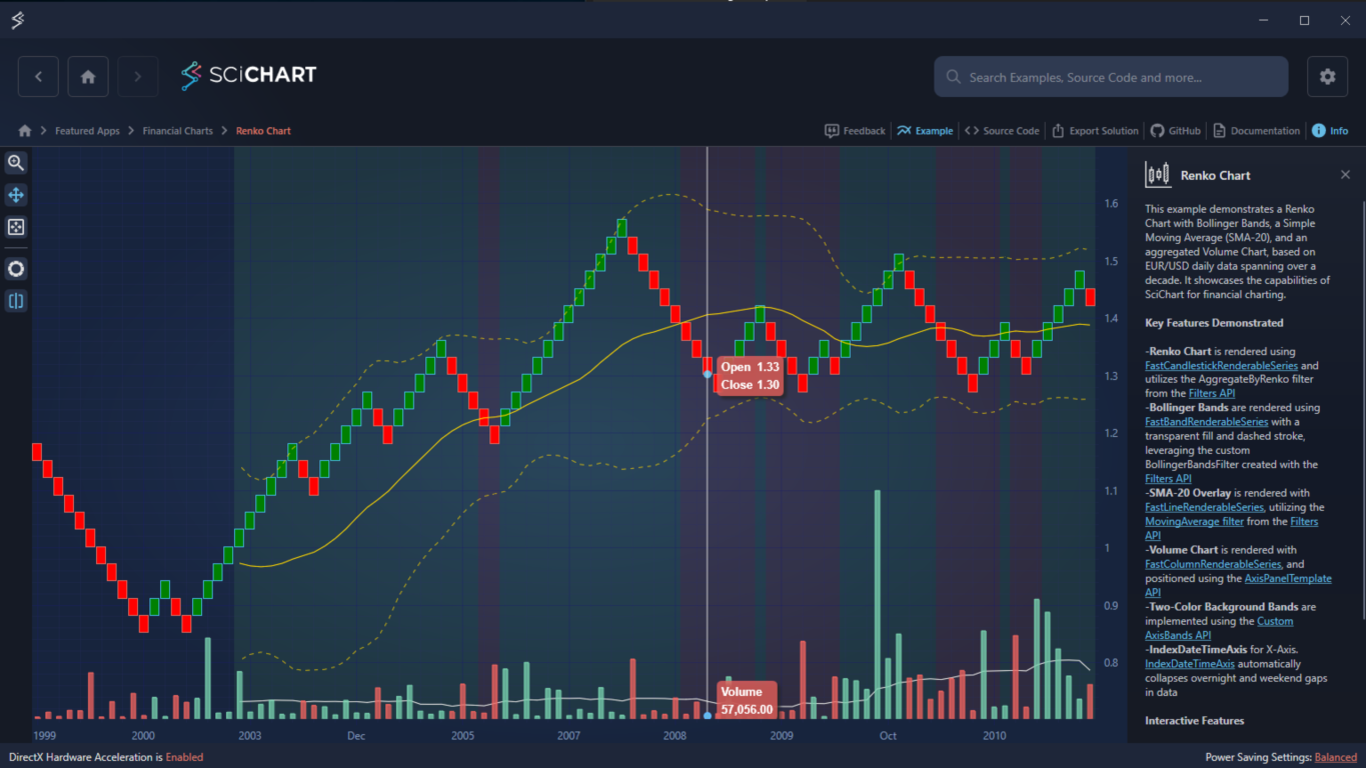
Key Features of SciChart’s WPF Renko Chart
- Renko Chart: FastCandlestickRenderableSeries with AggregateByRenko filter from the Filters API.
- Bollinger Bands: FastBandRenderableSeries with transparent fill and dashed stroke, using a custom BollingerBandsFilter.
- SMA-20 Overlay: FastLineRenderableSeries using the MovingAverage filter from the Filters API.
- Volume Chart: FastColumnRenderableSeries, positioned using the AxisPanelTemplate API.
- Two-Color Background Bands: custom TrendBandsChartModifier (AxisBands API).
- IndexDateTimeAxis: automatically collapses overnight and weekend gaps in data.
Interactive Features
- Rollover with Tooltips powered by RolloverModifier
- Zooming with mouse wheel and click-and-drag in the X-direction
- Panning via click-and-drag in the X-direction
Try It for Yourself
Give the WPF Renko Chart a try for yourself today. You can view the documentation or head straight to GitHub via the source code.
The C#/WPF source code for this example is included below.
Download the Renko Trading Chart in WPF or begin your free trial today to build high-performance WPF charts for financial applications.
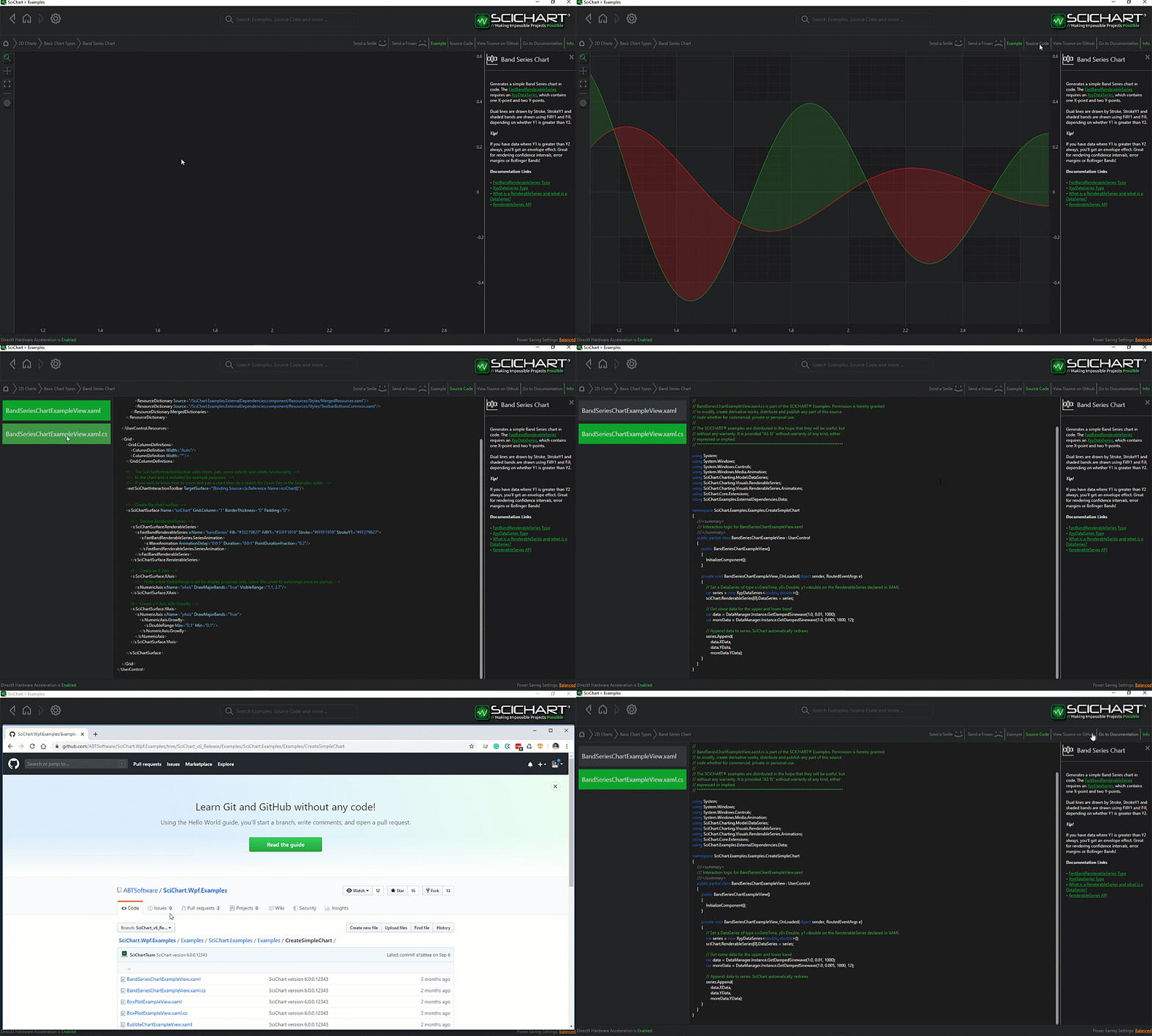
The C#/WPF source code for the WPF Renko Chart example is included below (Scroll down!).
Did you know you can also view the source code from one of the following sources as well?
- Clone the SciChart.WPF.Examples from GitHub.
- Or, view source in the SciChart WPF Examples suite.
- Also the SciChart WPF Trial contains the full source for the examples (link below).
RenkoChartView.xaml
View source code<UserControl x:Class="SciChart.Examples.Examples.CreateStockCharts.RenkoChart.RenkoChartView"
xmlns="http://schemas.microsoft.com/winfx/2006/xaml/presentation"
xmlns:x="http://schemas.microsoft.com/winfx/2006/xaml"
xmlns:s="http://schemas.abtsoftware.co.uk/scichart"
xmlns:ext="http://schemas.abtsoftware.co.uk/scichart/exampleExternals"
xmlns:renkoChart="clr-namespace:SciChart.Examples.Examples.CreateStockCharts.RenkoChart"
Loaded="CandlesticksWithLines_Loaded">
<UserControl.Resources>
<SolidColorBrush x:Key="UpVolumeBrush" Color="#C078D2AF"/>
<SolidColorBrush x:Key="DownVolumeBrush" Color="#C0F0645F"/>
<renkoChart:VolumePaletteProvider x:Key="VolumePaletteProvider"
DownVolumeBrush="{StaticResource DownVolumeBrush}"
UpVolumeBrush="{StaticResource UpVolumeBrush}"/>
<!-- YAxisPanelTemplate allows custom layouts of Y-Axes -->
<!-- In this example it is used to overlay Volume Chart on top of the Renko Chart partially -->
<ItemsPanelTemplate x:Key="YAxesPanelTemplate">
<Grid>
<Grid.RowDefinitions>
<RowDefinition Height="6*"/>
<RowDefinition Height="4*"/>
</Grid.RowDefinitions>
<Grid.ColumnDefinitions>
<ColumnDefinition Width="Auto"/>
<ColumnDefinition Width="Auto"/>
</Grid.ColumnDefinitions>
</Grid>
</ItemsPanelTemplate>
<!-- Rollover Tooltip for Volume Series -->
<DataTemplate x:Key="VolumeTooltipDataTemplate" DataType="s:XySeriesInfo">
<Border CornerRadius="5" Background="Transparent">
<StackPanel Orientation="Vertical" Margin="5">
<TextBlock Foreground="White" Text="Volume" Margin="0,0,0,5"/>
<TextBlock Foreground="White" Text="{Binding Value, Mode=OneWay, StringFormat=N2}"/>
</StackPanel>
</Border>
</DataTemplate>
<!-- Rollover Tooltip for Renko Series -->
<DataTemplate x:Key="RenkoTooltipDataTemplate" DataType="s:OhlcSeriesInfo">
<Border CornerRadius="5" Background="Transparent">
<Grid Margin="5">
<Grid.RowDefinitions>
<RowDefinition Height="Auto"/>
<RowDefinition Height="5"/>
<RowDefinition Height="Auto"/>
</Grid.RowDefinitions>
<Grid.ColumnDefinitions>
<ColumnDefinition Width="40"/>
<ColumnDefinition Width="Auto"/>
</Grid.ColumnDefinitions>
<TextBlock Grid.Row="0" Grid.Column="0" Foreground="White" Text="Open"/>
<TextBlock Grid.Row="0" Grid.Column="1" Foreground="White" Text="{Binding OpenValue, Mode=OneWay, StringFormat=N2}"/>
<TextBlock Grid.Row="2" Grid.Column="0" Foreground="White" Text="Close"/>
<TextBlock Grid.Row="2" Grid.Column="1" Foreground="White" Text="{Binding CloseValue, Mode=OneWay, StringFormat=N2}"/>
</Grid>
</Border>
</DataTemplate>
<!-- Tooltip Background -->
<Style x:Key="TooltipControlStyle" TargetType="s:TooltipControl">
<Setter Property="Template">
<Setter.Value>
<ControlTemplate TargetType="s:TooltipControl">
<Border BorderThickness="0"
CornerRadius="5">
<Border.Style>
<Style TargetType="Border">
<Setter Property="Background" Value="{StaticResource DownVolumeBrush}"/>
<Style.Triggers>
<DataTrigger Binding="{Binding PointMetadata.IsUpBar, Mode=OneWay}" Value="True">
<Setter Property="Background" Value="{StaticResource UpVolumeBrush}"/>
</DataTrigger>
</Style.Triggers>
</Style>
</Border.Style>
<Border.Effect>
<DropShadowEffect BlurRadius="5"
Direction="-45"
ShadowDepth="5"
Color="DimGray"/>
</Border.Effect>
<ContentPresenter Content="{TemplateBinding DataContext}"
ContentTemplate="{TemplateBinding ContentTemplate}"/>
</Border>
</ControlTemplate>
</Setter.Value>
</Setter>
</Style>
<!-- The style for the Rollover line -->
<Style x:Key="RolloverLineStyle" TargetType="Line">
<Setter Property="Stroke" Value="#DCDCDC"/>
<Setter Property="StrokeThickness" Value="1"/>
<Setter Property="IsHitTestVisible" Value="False"/>
<Setter Property="UseLayoutRounding" Value="True"/>
</Style>
</UserControl.Resources>
<Grid>
<Grid.ColumnDefinitions>
<ColumnDefinition Width="Auto" />
<ColumnDefinition Width="*" />
</Grid.ColumnDefinitions>
<!-- The SciChartInteractionToolbar adds zoom, pan, zoom extents and rotate functionality -->
<!-- to the chart and is included for example purposes. -->
<!-- If you wish to know how to zoom and pan a chart then do a search for Zoom Pan in the Examples suite! -->
<ext:SciChartInteractionToolbar TargetSurface="{Binding Source={x:Reference Name=sciChart}}"/>
<s:SciChartSurface x:Name="sciChart" Grid.Column="1" RightAxesPanelTemplate="{StaticResource YAxesPanelTemplate}">
<s:SciChartSurface.RenderableSeries>
<!-- Price Chart Series -->
<!-- All Price Series are associated with Main Y Axis -->
<s:FastCandlestickRenderableSeries x:Name="RenkoSeries"
YAxisId="MainYAxis"
DataPointWidth="1"
FillUp="Green"
FillDown="Red"
s:RolloverModifier.IncludeSeries="True"
s:RolloverModifier.TooltipTemplate="{StaticResource RenkoTooltipDataTemplate}"
s:RolloverModifier.TooltipContainerStyle="{StaticResource TooltipControlStyle}"/>
<!-- Price SMA Series -->
<s:FastLineRenderableSeries x:Name="SmaPriceSeries"
YAxisId="MainYAxis"
Stroke="#F5FFD700"
s:RolloverModifier.IncludeSeries="False"/>
<!-- SMA Bollinger Bands Series -->
<s:FastBandRenderableSeries x:Name="BollingerBandsSeries"
YAxisId="MainYAxis"
Fill="Transparent"
FillY1="Transparent"
StrokeDashArray="5,5"
StrokeDashArrayY1="5,5"
Stroke="#A5FFD700"
StrokeY1="#A5FFD700"
s:RolloverModifier.IncludeSeries="False"/>
<!-- Volume Chart Series -->
<!-- All Volume Series are associated with the Auxiliary Y-Axis -->
<s:FastLineRenderableSeries x:Name="SmaVolumeSeries"
YAxisId="AuxiliaryYAxis"
Stroke="#DCDCDC"
s:RolloverModifier.IncludeSeries="False"/>
<s:FastColumnRenderableSeries x:Name="VolumeSeries"
YAxisId="AuxiliaryYAxis"
DataPointWidth="0.5"
StrokeThickness="2"
PaletteProvider="{StaticResource VolumePaletteProvider}"
s:RolloverModifier.IncludeSeries="True"
s:RolloverModifier.TooltipTemplate="{StaticResource VolumeTooltipDataTemplate}"
s:RolloverModifier.TooltipContainerStyle="{StaticResource TooltipControlStyle}"/>
</s:SciChartSurface.RenderableSeries>
<s:SciChartSurface.XAxis>
<s:IndexDateTimeAxis x:Name="IndexXAxis" DrawMajorBands="False"/>
</s:SciChartSurface.XAxis>
<s:SciChartSurface.YAxes>
<s:NumericAxis Id="MainYAxis"
Grid.RowSpan="2" Grid.Column="0" GrowBy="0.1, 0.1" DrawMajorBands="False"/>
<s:NumericAxis Id="AuxiliaryYAxis"
Grid.Row="1" Grid.Column="1" Visibility="Hidden"/>
</s:SciChartSurface.YAxes>
<!-- Chart interactivity -->
<s:SciChartSurface.ChartModifier>
<s:ModifierGroup>
<s:RolloverModifier UseInterpolation="False"
ShowTooltipOn="MouseHover"
ShowAxisLabels="False"
LineOverlayStyle="{StaticResource RolloverLineStyle}" />
<s:MouseWheelZoomModifier XyDirection="XDirection"/>
<s:ZoomPanModifier XyDirection="XDirection" ZoomExtentsY="False"/>
<s:RubberBandXyZoomModifier IsXAxisOnly="True" ZoomExtentsY="False"/>
<renkoChart:TrendBandsChartModifier x:Name="TrendBandsChartModifier" UpTrendColor="#1A66CC66" DownTrendColor="#1AFF704D"/>
</s:ModifierGroup>
</s:SciChartSurface.ChartModifier>
</s:SciChartSurface>
</Grid>
</UserControl>
RenkoChartView.xaml.cs
View source code// *************************************************************************************
// SCICHART® Copyright SciChart Ltd. 2011-2026. All rights reserved.
//
// Web: http://www.scichart.com
// Support: support@scichart.com
// Sales: sales@scichart.com
//
// RenkoChartView.xaml.cs is part of the SCICHART® Examples. Permission is hereby granted
// to modify, create derivative works, distribute and publish any part of this source
// code whether for commercial, private or personal use.
//
// The SCICHART® examples are distributed in the hope that they will be useful, but
// without any warranty. It is provided "AS IS" without warranty of any kind, either
// expressed or implied.
// *************************************************************************************
using System;
using System.Linq;
using System.Windows;
using System.Windows.Controls;
using System.Windows.Media;
using SciChart.Charting.Model.DataSeries;
using SciChart.Charting.Model.Filters;
using SciChart.Charting.Visuals.Axes.IndexDataProviders;
using SciChart.Examples.ExternalDependencies.Common;
using SciChart.Examples.ExternalDependencies.Data;
namespace SciChart.Examples.Examples.CreateStockCharts.RenkoChart
{
public partial class RenkoChartView : UserControl
{
public RenkoChartView()
{
InitializeComponent();
}
private void CandlesticksWithLines_Loaded(object sender, RoutedEventArgs e)
{
// Prices are in the format Time, Open, High, Low, Close (all IList)
var prices = DataManager.Instance.GetPriceData(Instrument.EurUsd.Value, TimeFrame.Daily);
// Create multiple DataSeries to store OHLC candlestick data, XY moving average data and Volume column data
var priceOhlcData = new OhlcDataSeries<DateTime, double>();
priceOhlcData.Append(prices.TimeData, prices.OpenData, prices.HighData, prices.LowData, prices.CloseData);
// Renko series is rendered as a Candlestick Chart so we append OHLC data
var renkoData = priceOhlcData.AggregateByRenko(0.03, (start, end) =>
{
var aggregatedVolume = 0d;
// Start inclusive, End exclusive
for (int i = start; i < end; i++)
{
aggregatedVolume += prices.VolumeData[i];
}
return new VolumeMetadata(aggregatedVolume, prices.CloseData[end - 1] > prices.OpenData[start]);
}) as IOhlcDataSeries<DateTime, double>;
RenkoSeries.DataSeries = renkoData;
// Volume and Volume SMA series
var volumeData = new XyDataSeries<DateTime, double>();
volumeData.Append(renkoData.XValues, renkoData.Metadata.Select(x => ((VolumeMetadata)x).Volume), renkoData.Metadata);
VolumeSeries.DataSeries = volumeData;
var smaLength = 20;
SmaVolumeSeries.DataSeries = volumeData.ToMovingAverage(smaLength);
// Price SMA series and Bollinger Bands
var smaPriceDataSeries = renkoData.ToMovingAverage(smaLength) as IXyDataSeries<DateTime, double>;
SmaPriceSeries.DataSeries = smaPriceDataSeries;
BollingerBandsSeries.DataSeries = new BollingerBandsFilter(renkoData, smaLength, 2).FilteredDataSeries as XyyDataSeries<DateTime, double>;
// Configure X-Axis index base and background shading
IndexXAxis.IndexDataProvider = new DataSeriesIndexDataProvider(renkoData);
TrendBandsChartModifier.PriceDataSeries = renkoData;
TrendBandsChartModifier.MovingAverageDataSeries = smaPriceDataSeries;
TrendBandsChartModifier.MovingAverageLength = smaLength;
// Zoom to data extents
sciChart.ZoomExtents();
}
}
}
BollingerBandsFilter.cs
View source code// *************************************************************************************
// SCICHART® Copyright SciChart Ltd. 2011-2026. All rights reserved.
//
// Web: http://www.scichart.com
// Support: support@scichart.com
// Sales: sales@scichart.com
//
// BollingerBandsFilter.cs is part of the SCICHART® Examples. Permission is hereby granted
// to modify, create derivative works, distribute and publish any part of this source
// code whether for commercial, private or personal use.
//
// The SCICHART® examples are distributed in the hope that they will be useful, but
// without any warranty. It is provided "AS IS" without warranty of any kind, either
// expressed or implied.
// *************************************************************************************
using System;
using System.Collections.Generic;
using SciChart.Charting.Model.DataSeries;
using SciChart.Charting.Model.Filters;
namespace SciChart.Examples.Examples.CreateStockCharts.RenkoChart
{
public sealed class BollingerBandsFilter : FilterBase
{
private readonly double _stdScale;
private readonly int _smaLength;
private readonly IOhlcDataSeries<DateTime, double> _priceDataSeries;
private readonly XyyDataSeries<DateTime, double> _filteredDataSeries = new XyyDataSeries<DateTime, double>();
public BollingerBandsFilter(IOhlcDataSeries<DateTime, double> priceDataSeries, int smaLength, double stdScale) : base(priceDataSeries)
{
_stdScale = stdScale;
_smaLength = smaLength;
_priceDataSeries = priceDataSeries;
FilteredDataSeries = _filteredDataSeries;
FilterAll();
}
public override void FilterAll()
{
_filteredDataSeries.Clear();
for (int i = 0; i < _priceDataSeries.Count; ++i)
{
CalculateAverageAndStd(_priceDataSeries.CloseValues, i - _smaLength + 1, _smaLength, out double average, out double std);
_filteredDataSeries.Append(_priceDataSeries.XValues[i], average - _stdScale * std, average + _stdScale * std);
}
}
public static void CalculateAverageAndStd(IList<double> values, int startIndex, int length, out double average, out double std)
{
average = std = double.NaN;
var endIndex = startIndex + length;
if (length > 0 &&
values.Count > 0 &&
startIndex >= 0 &&
endIndex <= values.Count &&
startIndex < endIndex)
{
// Find average
var sum = 0d;
for (int i = startIndex; i < endIndex; i++)
{
sum += values[i];
}
average = sum / length;
// Find STD
sum = 0d;
for (int i = startIndex; i < endIndex; i++)
{
sum += Math.Pow(values[i] - average, 2);
}
std = Math.Sqrt(sum / length);
}
}
}
}
TrendBandsChartModifier.cs
View source code// *************************************************************************************
// SCICHART® Copyright SciChart Ltd. 2011-2026. All rights reserved.
//
// Web: http://www.scichart.com
// Support: support@scichart.com
// Sales: sales@scichart.com
//
// TrendBandsChartModifier.cs is part of the SCICHART® Examples. Permission is hereby granted
// to modify, create derivative works, distribute and publish any part of this source
// code whether for commercial, private or personal use.
//
// The SCICHART® examples are distributed in the hope that they will be useful, but
// without any warranty. It is provided "AS IS" without warranty of any kind, either
// expressed or implied.
// *************************************************************************************
using System;
using System.Windows;
using System.Windows.Media;
using SciChart.Charting.ChartModifiers;
using SciChart.Charting.Model.DataSeries;
using SciChart.Charting.Visuals.Axes;
using SciChart.Charting.Visuals.Axes.AxisBandProviders;
using SciChart.Data.Model;
namespace SciChart.Examples.Examples.CreateStockCharts.RenkoChart
{
public class TrendBandsChartModifier : ChartModifierBase
{
private DateTimeAxisBandsProvider _axisBandsProvider;
private IOhlcDataSeries<DateTime, double> _priceDataSeries;
private IXyDataSeries<DateTime, double> _movingAverageDataSeries;
private int _movingAverageLength;
public Color UpTrendColor { get; set; } = Color.FromArgb(30, 0, 250, 0);
public Color DownTrendColor { get; set; } = Color.FromArgb(30, 250, 0, 0);
public IOhlcDataSeries<DateTime, double> PriceDataSeries
{
get => _priceDataSeries;
set
{
_priceDataSeries = value;
CalculateTrendBands();
}
}
public IXyDataSeries<DateTime, double> MovingAverageDataSeries
{
get => _movingAverageDataSeries;
set
{
_movingAverageDataSeries = value;
CalculateTrendBands();
}
}
public int MovingAverageLength
{
get => _movingAverageLength;
set
{
_movingAverageLength = value;
CalculateTrendBands();
}
}
private void CalculateTrendBands()
{
if (PriceDataSeries == null || MovingAverageDataSeries == null || PriceDataSeries.Count <= 1 || MovingAverageLength <= 0) return;
_axisBandsProvider = new DateTimeAxisBandsProvider();
var count = MovingAverageDataSeries.Count;
var maLength = MovingAverageLength;
var startIndex = maLength - 1;
var maYValues = MovingAverageDataSeries.YValues;
var maXValues = MovingAverageDataSeries.XValues;
var priceCloseValues = PriceDataSeries.CloseValues;
var maY = maYValues[startIndex];
var priceY = priceCloseValues[startIndex];
var halfBarSpan = (maXValues[startIndex] - maXValues[startIndex - 1]).TotalDays / 2d;
var rangeStart = maXValues[startIndex].AddDays(-halfBarSpan);
// Look at the MovingAverage data to highlight ranges with up and down trend
var isUpTrend = priceY > maY;
for (int i = startIndex + 1; i < count; ++i)
{
maY = maYValues[i];
priceY = priceCloseValues[i];
var isTrendChange = (priceY <= maY && isUpTrend) || (priceY >= maY && !isUpTrend);
var isLastBar = i == count - 1;
if (isTrendChange || isLastBar)
{
// End the previous interval right before the current bar
halfBarSpan = (maXValues[i] - maXValues[i - 1]).TotalDays / 2d;
var rangeEnd = maXValues[i].AddDays(isLastBar ? halfBarSpan : -halfBarSpan);
var trendBand = new AxisBandInfo<DateRange>(new DateRange(rangeStart, rangeEnd), isUpTrend ? UpTrendColor : DownTrendColor);
// Add a single highlighted interval
_axisBandsProvider.AxisBands.Add(trendBand);
rangeStart = rangeEnd;
isUpTrend = !isUpTrend;
}
}
// Attach the custom AxisBandsProvider to the X-Axis
if (ParentSurface?.XAxis is IndexDateTimeAxis xAxis)
{
xAxis.DrawMajorBands = false;
xAxis.AxisBandsProvider = _axisBandsProvider;
}
}
}
}
VolumeMetadata.cs
View source code// *************************************************************************************
// SCICHART® Copyright SciChart Ltd. 2011-2026. All rights reserved.
//
// Web: http://www.scichart.com
// Support: support@scichart.com
// Sales: sales@scichart.com
//
// VolumeMetadata.cs is part of the SCICHART® Examples. Permission is hereby granted
// to modify, create derivative works, distribute and publish any part of this source
// code whether for commercial, private or personal use.
//
// The SCICHART® examples are distributed in the hope that they will be useful, but
// without any warranty. It is provided "AS IS" without warranty of any kind, either
// expressed or implied.
// *************************************************************************************
using System.ComponentModel;
using SciChart.Charting.Model.DataSeries;
namespace SciChart.Examples.Examples.CreateStockCharts.RenkoChart
{
public class VolumeMetadata : IPointMetadata
{
public double Volume { get; }
public bool IsUpBar { get; }
public bool IsSelected { get; set; }
public VolumeMetadata(double volume, bool isUpBar)
{
Volume = volume;
IsUpBar = isUpBar;
}
public event PropertyChangedEventHandler PropertyChanged;
}
}
VolumePaletteProvider.cs
View source code// *************************************************************************************
// SCICHART® Copyright SciChart Ltd. 2011-2026. All rights reserved.
//
// Web: http://www.scichart.com
// Support: support@scichart.com
// Sales: sales@scichart.com
//
// VolumePaletteProvider.cs is part of the SCICHART® Examples. Permission is hereby granted
// to modify, create derivative works, distribute and publish any part of this source
// code whether for commercial, private or personal use.
//
// The SCICHART® examples are distributed in the hope that they will be useful, but
// without any warranty. It is provided "AS IS" without warranty of any kind, either
// expressed or implied.
// *************************************************************************************
using System.Windows.Media;
using SciChart.Charting.Model.DataSeries;
using SciChart.Charting.Visuals.PaletteProviders;
using SciChart.Charting.Visuals.RenderableSeries;
using SciChart.Core.Extensions;
namespace SciChart.Examples.Examples.CreateStockCharts.RenkoChart
{
public class VolumePaletteProvider : IStrokePaletteProvider, IFillPaletteProvider
{
public Brush UpVolumeBrush { get; set; }
public Brush DownVolumeBrush { get; set; }
public void OnBeginSeriesDraw(IRenderableSeries rSeries)
{
}
public Color? OverrideStrokeColor(IRenderableSeries rSeries, int index, IPointMetadata metadata)
{
var isUpBar = (metadata as VolumeMetadata)?.IsUpBar ?? false;
return isUpBar ? UpVolumeBrush.ExtractColor() : DownVolumeBrush.ExtractColor();
}
public Brush OverrideFillBrush(IRenderableSeries rSeries, int index, IPointMetadata metadata)
{
var isUpBar = (metadata as VolumeMetadata)?.IsUpBar ?? false;
return isUpBar ? UpVolumeBrush : DownVolumeBrush;
}
}
}