WPF Polar Heatmap Chart
This example demonstrates a WPF Polar Heatmap Chart to visualize real-world maximum daily temperature data over multiple years. It is ideal for showing climate and weather changes across regions over time. The PolarXAxis (Angular Axis) represents days of the year divided into sector-like grid lines marking month boundaries, with month labels at the center of each sector. The PolarYAxis (Radial Axis) represents individual years segmented using circular grid lines.
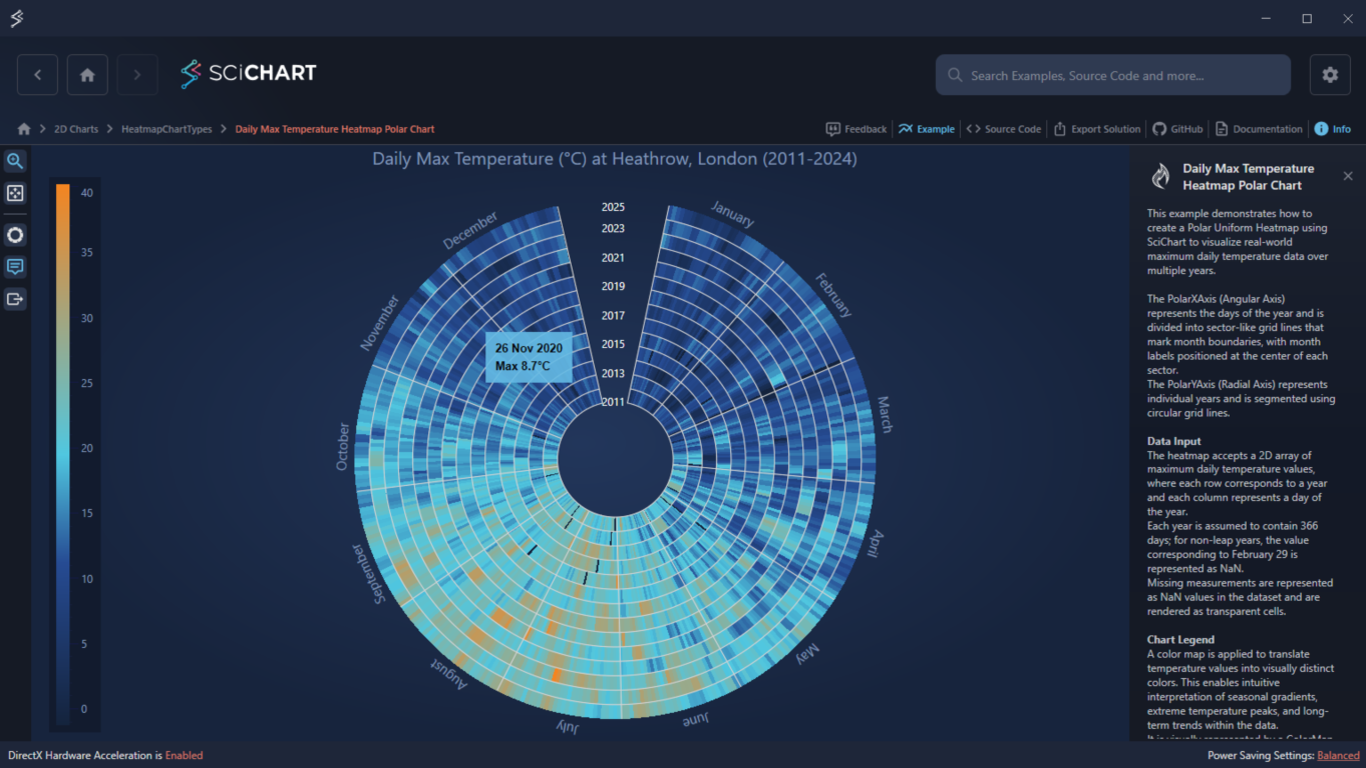
Key Features of SciChart’s Daily Temperature Heatmap Chart
Data Input:
- Accepts a 2D array where each row equals one year and each column equals one day (366 columns).
- For non-leap years, February 29 is represented as NaN (rendered as transparent).
- Missing measurements are also represented as NaNs.
Chart Legend:
- A color map translates temperature values into visually distinct colors.
- Displayed as a ColorMap control used as a chart legend.
Interactivity:
- Tooltips displaying calendar dates and temperature values.
- Rubber-band zooming along angular and radial axes.
- Mouse-wheel zooming.
- Chart export functionality.
Try the Example for Yourself
Give the WPF Polar Heatmap Chart a try today. You can view the documentation or head straight to GitHub via the source code.
The C#/WPF source code for this example is included below.
Download the Temperature Heatmap Chart WPF example or begin your free trial today to build high-performance WPF charts.
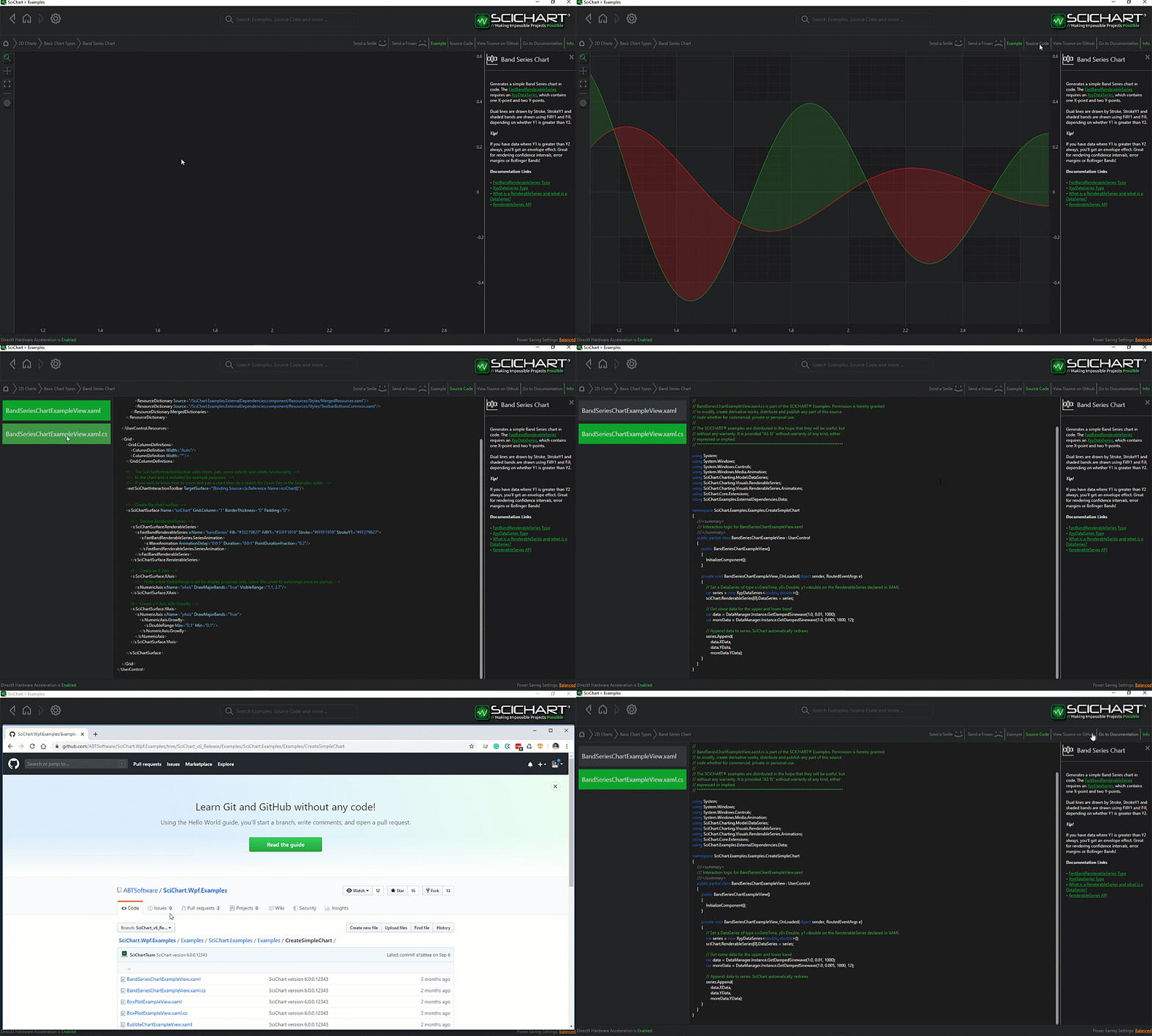
The C#/WPF source code for the WPF Polar Heatmap Chart example is included below (Scroll down!).
Did you know you can also view the source code from one of the following sources as well?
- Clone the SciChart.WPF.Examples from GitHub.
- Or, view source in the SciChart WPF Examples suite.
- Also the SciChart WPF Trial contains the full source for the examples (link below).
DailyMaxTemperatureHeatmapSurface.cs
View source code// *************************************************************************************
// SCICHART® Copyright SciChart Ltd. 2011-2026. All rights reserved.
//
// Web: http://www.scichart.com
// Support: support@scichart.com
// Sales: sales@scichart.com
//
// DailyMaxTemperatureHeatmapSurface.cs is part of the SCICHART® Examples. Permission is hereby granted
// to modify, create derivative works, distribute and publish any part of this source
// code whether for commercial, private or personal use.
//
// The SCICHART® examples are distributed in the hope that they will be useful, but
// without any warranty. It is provided "AS IS" without warranty of any kind, either
// expressed or implied.
// *************************************************************************************
using System.Windows;
using SciChart.Charting.Visuals;
namespace SciChart.Examples.Examples.HeatmapChartTypes.PolarHeatmapCustomization
{
/// <summary>
/// This calls provides an extension to the base SciChartSurface, additional functionality required for exporting the Daily Max Temperature Heatmap to an image
/// </summary>
public class DailyMaxTemperatureHeatmapSurface : SciChartSurface
{
protected override SciChartSurfaceBase CreateCloneOfSurfaceInMemory(Size newSize)
{
var clonedSurface = (SciChartSurface)base.CreateCloneOfSurfaceInMemory(newSize);
// Apply custom Label Providers to the surface that is being cloned for export
clonedSurface.XAxis.LabelProvider = new MonthNameAngularAxisLabelProvider();
clonedSurface.YAxis.LabelProvider = new YearRadialAxisLabelProvider();
return clonedSurface;
}
}
}
DailyMaxTemperatureHeatmapView.xaml
View source code<UserControl x:Class="SciChart.Examples.Examples.HeatmapChartTypes.PolarHeatmapCustomization.DailyMaxTemperatureHeatmapView"
xmlns="http://schemas.microsoft.com/winfx/2006/xaml/presentation"
xmlns:x="http://schemas.microsoft.com/winfx/2006/xaml"
xmlns:ext="http://schemas.abtsoftware.co.uk/scichart/exampleExternals"
xmlns:s="http://schemas.abtsoftware.co.uk/scichart"
xmlns:local="clr-namespace:SciChart.Examples.Examples.HeatmapChartTypes.PolarHeatmapCustomization">
<UserControl.Resources>
<local:DayOfYearToDateConverter x:Key="DayOfYearToDateConverter" />
<local:MaxTemperatureConverter x:Key="MaxTempConverter" NoDataText="No Data" />
<!-- Custom label providers for the angular and radial axis -->
<local:MonthNameAngularAxisLabelProvider x:Key="MonthNameAzimuthalAxisLabelProvider" />
<local:YearRadialAxisLabelProvider x:Key="YearRadialAxisLabelProvider" />
<!-- Custom template for a heatmap tooltip -->
<DataTemplate x:Key="PolarTooltipItemTemplate" DataType="s:HeatmapSeriesInfo">
<StackPanel Margin="4">
<TextBlock>
<TextBlock.Text>
<MultiBinding Converter="{StaticResource DayOfYearToDateConverter}">
<Binding Path="XValue" />
<Binding Path="YValue" />
</MultiBinding>
</TextBlock.Text>
</TextBlock>
<TextBlock Margin="0,5,0,0" Text="{Binding ZValue, Converter={StaticResource MaxTempConverter}}" />
</StackPanel>
</DataTemplate>
<!-- Custom template for the chart legend that includes a Color Map for the Heatmap -->
<ControlTemplate x:Key="ColorMapLegendTemplate" TargetType="s:LegendPlaceholder">
<s:HeatmapColorMap HorizontalAlignment="Left"
VerticalAlignment="Stretch"
Background="{StaticResource ThemedTransparentChartBackground}"
BorderThickness="0"
ColorPalette="{Binding ColorMap, Source={x:Reference HeatmapRenderSeries}}"
EnableAxisDrag="True"
Maximum="{Binding ColorMap.Maximum, Source={x:Reference HeatmapRenderSeries}}"
Minimum="{Binding ColorMap.Minimum, Source={x:Reference HeatmapRenderSeries}}"
Orientation="Vertical"
TextFormatting="0">
<s:HeatmapColorMap.AxisStyle>
<Style TargetType="s:AxisBase">
<Setter Property="DrawMinorTicks" Value="False" />
</Style>
</s:HeatmapColorMap.AxisStyle>
</s:HeatmapColorMap>
</ControlTemplate>
</UserControl.Resources>
<Grid>
<Grid.ColumnDefinitions>
<ColumnDefinition Width="Auto" />
<ColumnDefinition Width="*" />
</Grid.ColumnDefinitions>
<!-- The SciChartInteractionToolbar adds configuration options for zoom, pan, zoom extents functionality. -->
<!-- Included for example purposes. -->
<ext:SciChartInteractionToolbar TargetSurface="{Binding Source={x:Reference Name=SciChartSurface}}" />
<!-- Custom SciChartSurface is used to support printing and export with custom size -->
<local:DailyMaxTemperatureHeatmapSurface x:Name="SciChartSurface"
Grid.Column="1"
ChartTitle="Daily Max Temperature (°C) at Heathrow, London (2011-2024)"
s:ThemeManager.Theme="SciChartv7Navy">
<local:DailyMaxTemperatureHeatmapSurface.RenderableSeries>
<!-- PolarUniformHeatmapRenderableSeries is used to render the heatmap data -->
<s:PolarUniformHeatmapRenderableSeries x:Name="HeatmapRenderSeries"
s:TooltipModifier.TooltipTemplate="{StaticResource PolarTooltipItemTemplate}"
UseLinearTextureFiltering="False">
<s:PolarUniformHeatmapRenderableSeries.ColorMap>
<s:HeatmapColorPalette Maximum="40.2" Minimum="-1.2">
<GradientStop Offset="0.0" Color="{StaticResource ColorMapColor_1}" />
<GradientStop Offset="0.3" Color="{StaticResource ColorMapColor_2}" />
<GradientStop Offset="0.5" Color="{StaticResource ColorMapColor_3}" />
<GradientStop Offset="1.0" Color="{StaticResource ColorMapColor_6}" />
</s:HeatmapColorPalette>
</s:PolarUniformHeatmapRenderableSeries.ColorMap>
</s:PolarUniformHeatmapRenderableSeries>
<!-- Used to render circular grid lines on top of the heatmap -->
<s:FastLineRenderableSeries x:Name="AzimuthalGridLinesRenderSeries"
s:TooltipModifier.IncludeSeries="False"
Stroke="LightGray"
StrokeThickness="1"
DrawNaNAs="Gaps" />
<!-- Used to renders radial grid lines on top of the heatmap -->
<s:FastLineRenderableSeries x:Name="RadialGridLinesRenderSeries"
s:TooltipModifier.IncludeSeries="False"
Stroke="LightGray"
StrokeThickness="1"
DrawNaNAs="Gaps" />
</local:DailyMaxTemperatureHeatmapSurface.RenderableSeries>
<local:DailyMaxTemperatureHeatmapSurface.XAxis>
<!-- Defines the Angular Axis -->
<!-- Default grid lines are turned off -->
<!-- MajorDelta specifies axis labels positions every 15 days -->
<!-- A custom LabelProvider is used to define the axis label text -->
<!-- Specifying VisibleRange allows control over how the heatmap is stretched across the Polar Surface -->
<s:PolarXAxis Name="AngularAxis"
DrawMajorGridLines="False"
DrawMajorTicks="False"
DrawMinorTicks="False"
BorderThickness="0"
FontSize="15"
IsLabelCullingEnabled="False"
AutoTicks="False"
MajorDelta="15"
LabelProvider="{StaticResource MonthNameAzimuthalAxisLabelProvider}"
RotationAngle="90"
VisibleRange="-13, 380"
VisibleRangeLimit="-43, 410"
ZoomExtentsRange="-13, 380" />
</local:DailyMaxTemperatureHeatmapSurface.XAxis>
<!-- Defines the Radial Axis -->
<!-- Default grid lines are turned off -->
<!-- MajorDelta specifies axis labels positions every 2 years -->
<!-- A negative VisibleRange.Min value allows creating a visual gap at the chart center -->
<!-- A custom LabelProvider is used to define the axis label text -->
<local:DailyMaxTemperatureHeatmapSurface.YAxis>
<s:PolarYAxis Name="RadialAxis"
DrawMajorGridLines="False"
DrawMajorTicks="False"
DrawMinorTicks="False"
Foreground="White"
Angle="180"
IsLabelCullingEnabled="False"
AutoTicks="False"
MajorDelta="2"
VisibleRange="-4,14"
ZoomExtentsRange="-4,14"
VisibleRangeLimit="-4,14"
VisibleRangeLimitMode="MinMax"
LabelProvider="{StaticResource YearRadialAxisLabelProvider}">
<s:PolarYAxis.TickLabelStyle>
<Style TargetType="s:NumericTickLabel">
<Setter Property="HorizontalAnchorPoint" Value="Center" />
<Setter Property="VerticalAnchorPoint" Value="Center" />
<Setter Property="RenderTransformOrigin" Value="0.5,0.5" />
<Setter Property="RenderTransform">
<Setter.Value>
<RotateTransform Angle="180" />
</Setter.Value>
</Setter>
</Style>
</s:PolarYAxis.TickLabelStyle>
</s:PolarYAxis>
</local:DailyMaxTemperatureHeatmapSurface.YAxis>
<!-- Chart modifiers define the available interactivity options -->
<local:DailyMaxTemperatureHeatmapSurface.ChartModifier>
<s:ModifierGroup>
<s:TooltipModifier />
<s:RubberBandXyZoomModifier XyDirection="XDirection" ZoomExtentsY="False" />
<s:ZoomExtentsModifier XyDirection="XYDirection" />
<s:MouseWheelZoomModifier XyDirection="XDirection" />
<ext:CustomExportModifier EnableXamlRendererExport="False" />
<!-- Chart Legend is disabled in the Toolbar due to a custom Legend Template -->
<s:LegendModifier Margin="20,0,0,10"
VerticalAlignment="Stretch"
LegendPlacement="Left"
LegendTemplate="{StaticResource ColorMapLegendTemplate}"
ext:SciChartInteractionToolbar.AppearsInToolbar="False" />
</s:ModifierGroup>
</local:DailyMaxTemperatureHeatmapSurface.ChartModifier>
</local:DailyMaxTemperatureHeatmapSurface>
</Grid>
</UserControl>
DailyMaxTemperatureHeatmapView.xaml.cs
View source code// *************************************************************************************
// SCICHART® Copyright SciChart Ltd. 2011-2026. All rights reserved.
//
// Web: http://www.scichart.com
// Support: support@scichart.com
// Sales: sales@scichart.com
//
// DailyMaxTemperatureHeatmapView.xaml.cs is part of the SCICHART® Examples. Permission is hereby granted
// to modify, create derivative works, distribute and publish any part of this source
// code whether for commercial, private or personal use.
//
// The SCICHART® examples are distributed in the hope that they will be useful, but
// without any warranty. It is provided "AS IS" without warranty of any kind, either
// expressed or implied.
// *************************************************************************************
using System;
using System.Windows.Controls;
using SciChart.Charting.Model.DataSeries;
using SciChart.Charting.Model.DataSeries.Heatmap2DArrayDataSeries;
using SciChart.Charting.Visuals.RenderableSeries;
using SciChart.Examples.ExternalDependencies.Data;
namespace SciChart.Examples.Examples.HeatmapChartTypes.PolarHeatmapCustomization
{
/// <summary>
/// Interaction logic for DailyMaxTemperatureHeatmapView.xaml
/// Displays daily maximum temperature data in a polar heatmap format with radial and azimuthal grid lines.
/// </summary>
public partial class DailyMaxTemperatureHeatmapView : UserControl
{
/// <summary>
/// Initializes a new instance of the <see cref="DailyMaxTemperatureHeatmapView"/> class.
/// </summary>
public DailyMaxTemperatureHeatmapView()
{
InitializeComponent();
// Get the data, create a UniformHeatmapDataSeries and
// assign it to the PolarUniformHeatmapRenderableSeries declared in XAML
var heatmapDataSeries = GetHeatmapDataSeries();
HeatmapRenderSeries.DataSeries = heatmapDataSeries;
// Generate data for chart grid on top of the heatmap
// This is achieved by drawing additional FastLineRenderableSeries on the chart
var angleMin = 0;
var angleMax = heatmapDataSeries.ArrayWidth; // 366 days
var radiusMin = 0;
var radiusMax = heatmapDataSeries.ArrayHeight; // years 2011-2024
AzimuthalGridLinesRenderSeries.DataSeries = GenerateAngularGridLines(angleMin, angleMax, radiusMin, radiusMax);
AzimuthalGridLinesRenderSeries.DrawNaNAs = LineDrawMode.Gaps;
RadialGridLinesRenderSeries.DataSeries = GenerateRadialGridLines(radiusMin, radiusMax);
RadialGridLinesRenderSeries.DrawNaNAs = LineDrawMode.Gaps;
}
private IUniformHeatmapDataSeries GetHeatmapDataSeries()
{
// Returns daily temperature heatmap for years 2011-2024
// Every year is considered leap year (366 days)
var data = DataManager.Instance.GetDailyMaxTemperatureHeatmap();
var dataSeries = new UniformHeatmapDataSeries<int, int, double>(data, 0, 1, 0, 1)
{
SeriesName = "Daily Max Temperature"
};
return dataSeries;
}
private IDataSeries GenerateAngularGridLines(int angleMin, int angleMax, int radiusMin, int radiusMax)
{
var dataSeries = new XyDataSeries<double, double>();
dataSeries.AcceptsUnsortedData = true;
for (int radius = radiusMin; radius < radiusMax; radius++)
{
// Sample a full circle at evenly spaced points to draw a circle
for (int azimuth = angleMin; azimuth <= angleMax; azimuth++)
{
dataSeries.Append(azimuth, radius);
}
// Double.NaN indicates the end of a line segment
// Add a NaN to draw disconnected circles
dataSeries.Append(angleMax, double.NaN);
}
return dataSeries;
}
private IDataSeries GenerateRadialGridLines(int radiusMin, int radiusMax)
{
// Creates data for monthly radial grid lines
// They are generated for a leap year because the heatmap data has 366 days
var dataSeries = new XyDataSeries<double, double>();
var leapYear = 2020;
for (int month = 0; month <= 12; month++)
{
// Draw two lines for January, for the first and the last day
var monthEndDayOfYear = month == 0 ? 0 :
new DateTime(leapYear, month, DateTime.DaysInMonth(leapYear, month)).DayOfYear;
// Radial line is defined by 2 points
dataSeries.Append(monthEndDayOfYear, radiusMin);
dataSeries.Append(monthEndDayOfYear, radiusMax);
// Double.NaN indicates the end of a line segment
// Add a NaN to draw disconnected lines
dataSeries.Append(monthEndDayOfYear, double.NaN);
}
return dataSeries;
}
}
}
DayOfYearToDateConverter.cs
View source code// *************************************************************************************
// SCICHART® Copyright SciChart Ltd. 2011-2026. All rights reserved.
//
// Web: http://www.scichart.com
// Support: support@scichart.com
// Sales: sales@scichart.com
//
// DayOfYearToDateConverter.cs is part of the SCICHART® Examples. Permission is hereby granted
// to modify, create derivative works, distribute and publish any part of this source
// code whether for commercial, private or personal use.
//
// The SCICHART® examples are distributed in the hope that they will be useful, but
// without any warranty. It is provided "AS IS" without warranty of any kind, either
// expressed or implied.
// *************************************************************************************
using System;
using System.Globalization;
using System.Linq;
using System.Windows.Data;
namespace SciChart.Examples.Examples.HeatmapChartTypes.PolarHeatmapCustomization
{
/// <summary>
/// Converts a day of year value and year offset to a formatted date string.
/// </summary>
/// <remarks>
/// This converter takes two values: a day of year (1-366) and a year offset (added to 2011 as base year),
/// and returns a formatted date string in the format "d MMM yyyy".
/// </remarks>
public class DayOfYearToDateConverter : IMultiValueConverter
{
/// <summary>
/// Converts day of year and year offset values to a formatted date string.
/// </summary>
/// <param name="values">An array containing two double values: [0] day of year (1-366), [1] year offset from 2011.</param>
/// <param name="targetType">The type of the binding target property.</param>
/// <param name="parameter">The converter parameter to use.</param>
/// <param name="culture">The culture to use in the converter.</param>
/// <returns>A formatted date string in "d MMM yyyy" format, or an empty string if conversion fails.</returns>
public object Convert(object[] values, Type targetType, object parameter, CultureInfo culture)
{
var valuesAsDoubles = values?.OfType<double>().ToList();
if (valuesAsDoubles == null || valuesAsDoubles.Count < 2) return string.Empty;
// Example data starts at year 2011
var startYear = 2011;
// Use a leap year for date conversion
// because the example data assumes every year has 366 days
var leapYear = 2012;
var dayValue = valuesAsDoubles[0];
var yearValue = valuesAsDoubles[1];
var dayOfYear = (int)(dayValue + 1);
var year = (int)yearValue + startYear;
if (dayOfYear < 1 || dayOfYear > 366) return string.Empty;
// Use a leap year for date conversion
// because the example data assumes every year has 366 days
var date = new DateTime(leapYear, 1, 1).AddDays(dayOfYear - 1);
return date.ToString($"d MMM {year}", CultureInfo.InvariantCulture);
}
/// <summary>
/// Converts a formatted date string back to day of year and year offset values.
/// </summary>
/// <param name="value">The value that is produced by the binding target.</param>
/// <param name="targetTypes">The array of types to convert to.</param>
/// <param name="parameter">The converter parameter to use.</param>
/// <param name="culture">The culture to use in the converter.</param>
/// <returns>Not implemented.</returns>
/// <exception cref="NotImplementedException">This method is not implemented.</exception>
public object[] ConvertBack(object value, Type[] targetTypes, object parameter, CultureInfo culture)
{
throw new NotImplementedException();
}
}
}
MaxTemperatureConverter.cs
View source code// *************************************************************************************
// SCICHART® Copyright SciChart Ltd. 2011-2026. All rights reserved.
//
// Web: http://www.scichart.com
// Support: support@scichart.com
// Sales: sales@scichart.com
//
// MaxTemperatureConverter.cs is part of the SCICHART® Examples. Permission is hereby granted
// to modify, create derivative works, distribute and publish any part of this source
// code whether for commercial, private or personal use.
//
// The SCICHART® examples are distributed in the hope that they will be useful, but
// without any warranty. It is provided "AS IS" without warranty of any kind, either
// expressed or implied.
// *************************************************************************************
using System;
using System.Globalization;
using System.Windows.Data;
namespace SciChart.Examples.Examples.HeatmapChartTypes.PolarHeatmapCustomization
{
/// <summary>
/// Converts a temperature value to a formatted string with units, or displays custom text for missing data.
/// </summary>
public class MaxTemperatureConverter : IValueConverter
{
/// <summary>
/// Gets or sets the text to display when no data is available (NaN values).
/// </summary>
public string NoDataText { get; set; }
/// <summary>
/// Converts a temperature value to a formatted string.
/// </summary>
/// <param name="value">The temperature value as a double.</param>
/// <param name="targetType">The type of the binding target property.</param>
/// <param name="parameter">The converter parameter to use.</param>
/// <param name="culture">The culture to use in the converter.</param>
/// <returns>A formatted string "Max {temperature}°C" or the NoDataText if the value is NaN.</returns>
public object Convert(object value, Type targetType, object parameter, CultureInfo culture)
{
if (value is double maxTemp)
{
return double.IsNaN(maxTemp)
? NoDataText
: $"Max {maxTemp:F1}°C";
}
return NoDataText;
}
/// <summary>
/// Converts a formatted temperature string back to a numeric value.
/// </summary>
/// <param name="value">The value that is produced by the binding target.</param>
/// <param name="targetType">The type to convert to.</param>
/// <param name="parameter">The converter parameter to use.</param>
/// <param name="culture">The culture to use in the converter.</param>
/// <returns>Not implemented.</returns>
/// <exception cref="NotSupportedException">This method is not supported.</exception>
public object ConvertBack(object value, Type targetType, object parameter, CultureInfo culture)
{
throw new NotSupportedException();
}
}
}MonthNameAngularAxisLabelProvider.cs
View source code// *************************************************************************************
// SCICHART® Copyright SciChart Ltd. 2011-2026. All rights reserved.
//
// Web: http://www.scichart.com
// Support: support@scichart.com
// Sales: sales@scichart.com
//
// MonthNameAngularAxisLabelProvider.cs is part of the SCICHART® Examples. Permission is hereby granted
// to modify, create derivative works, distribute and publish any part of this source
// code whether for commercial, private or personal use.
//
// The SCICHART® examples are distributed in the hope that they will be useful, but
// without any warranty. It is provided "AS IS" without warranty of any kind, either
// expressed or implied.
// *************************************************************************************
using System;
using SciChart.Charting.Visuals.Axes.LabelProviders;
namespace SciChart.Examples.Examples.HeatmapChartTypes.PolarHeatmapCustomization
{
/// <summary>
/// Provides custom axis labels for day-of-year values, replacing the default labels with month names.
/// </summary>
public class MonthNameAngularAxisLabelProvider : NumericLabelProvider
{
/// <summary>
/// Array of month names used for axis labels.
/// </summary>
private readonly string[] Months =
{
"January",
"February",
"March",
"April",
"May",
"June",
"July",
"August",
"September",
"October",
"November",
"December"
};
/// <summary>
/// Converts a numeric tick value of an Angular Axis to a month name label. Values 0-365 are considered days of a year, others are skipped.
/// </summary>
/// <returns>A month name if the day is between 1-366 and tick is in the middle of the month, otherwise an empty string.</returns>
public override string FormatLabel(IComparable dataValue)
{
var formattedLabel = string.Empty;
// Skip all axis ticks but 0-366
var tickValue = Convert.ToDouble(dataValue);
if (tickValue < 0 || tickValue > 366) return formattedLabel;
// Take only ticks 15,45,75,..
var axisDelta = 15;
if (tickValue % axisDelta == 0 &&
tickValue % 2 != 0)
{
var dayOfYear = tickValue;
var daysInMonth = 30;
var monthIndex = (int)(dayOfYear / daysInMonth);
formattedLabel = Months[monthIndex];
}
return formattedLabel;
}
}
}YearRadialAxisLabelProvider.cs
View source code// *************************************************************************************
// SCICHART® Copyright SciChart Ltd. 2011-2026. All rights reserved.
//
// Web: http://www.scichart.com
// Support: support@scichart.com
// Sales: sales@scichart.com
//
// YearRadialAxisLabelProvider.cs is part of the SCICHART® Examples. Permission is hereby granted
// to modify, create derivative works, distribute and publish any part of this source
// code whether for commercial, private or personal use.
//
// The SCICHART® examples are distributed in the hope that they will be useful, but
// without any warranty. It is provided "AS IS" without warranty of any kind, either
// expressed or implied.
// *************************************************************************************
using System;
using System.Globalization;
using SciChart.Charting.Visuals.Axes.LabelProviders;
namespace SciChart.Examples.Examples.HeatmapChartTypes.PolarHeatmapCustomization
{
/// <summary>
/// Provides custom axis labels for years, converting year offsets to actual year values starting from 2011.
/// </summary>
public class YearRadialAxisLabelProvider : NumericLabelProvider
{
/// <summary>
/// Formats a numeric data value as a year label.
/// </summary>
/// <param name="dataValue">The numeric value representing a year offset from 2011.</param>
/// <returns>A string representing the actual year (offset + 2011), or an empty string for negative values.</returns>
public override string FormatLabel(IComparable dataValue)
{
var year = Convert.ToDouble(dataValue);
if (year < 0)
return string.Empty;
// Example data starts at year 2011
var startYear = 2011;
return (year + startYear).ToString(CultureInfo.InvariantCulture);
}
}
}