WPF Ultrasound Heatmap Chart
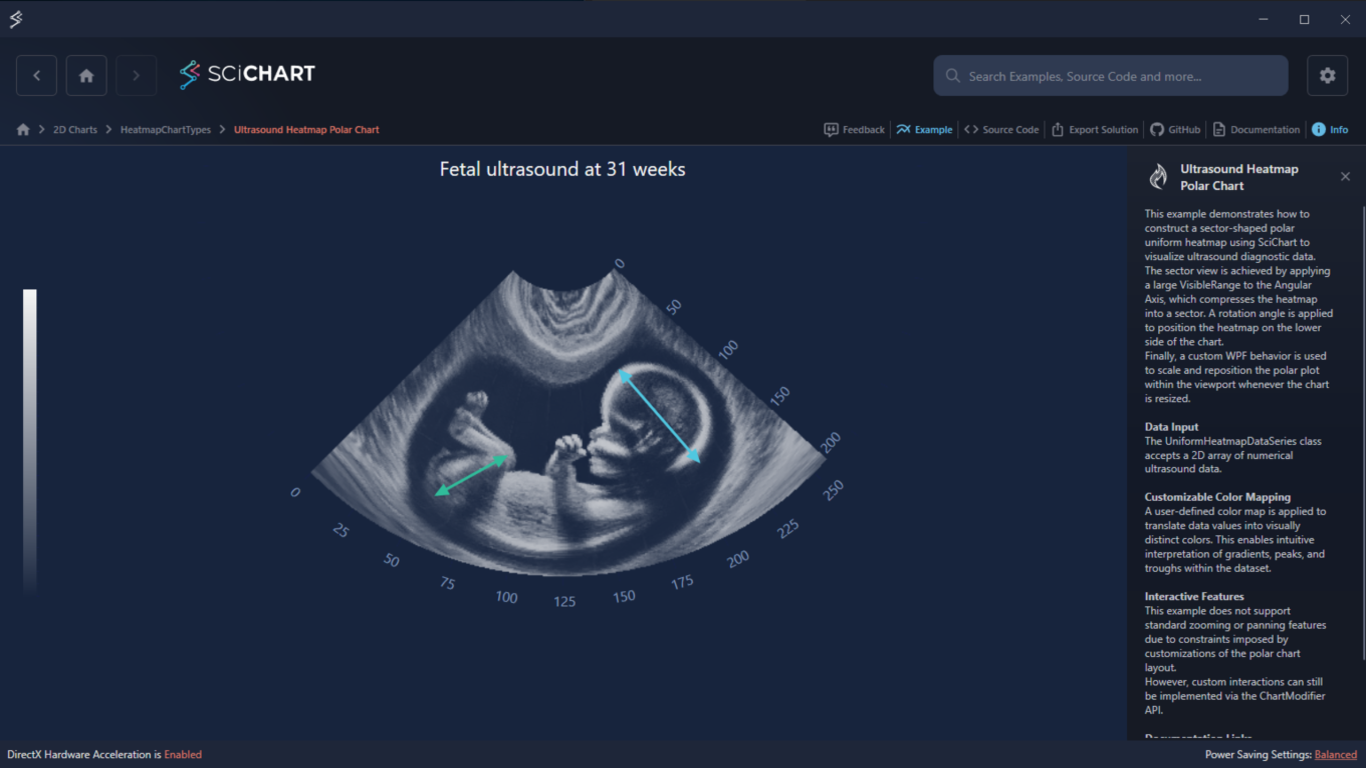
This example demonstrates a sector-shaped WPF Ultrasound Heatmap Chart for visualizing ultrasound diagnostic data. The sector view is achieved by applying a large VisibleRange to the Angular Axis, compressing the heatmap into a sector shape. A rotation angle positions the heatmap on the lower side of the chart. A custom WPF behavior (SciChartSurfaceTransformBehavior) scales and repositions the polar plot within the viewport on resize.
Key Features of SciChart’s Polar Heatmap Ultrasound with WPF
- This example demonstrates how to construct a sector-shaped polar uniform heatmap to visualize a 2D array of numerical ultrasound diagnostic data.
- A user-defined color map translates data values into visually distinct colors, enabling intuitive interpretation of gradients, peaks, and troughs.
- Custom interactions can be implemented via the ChartModifier API.
Try It for Yourself
Give the WPF Ultrasound Heatmap Chart a try for yourself today. You can view the documentation or head straight to GitHub via the source code.
The C#/WPF source code for this example is included below.
Download the Medical Heatmap Chart C# example or begin your free trial today to build high-performance WPF charts for medical applications.
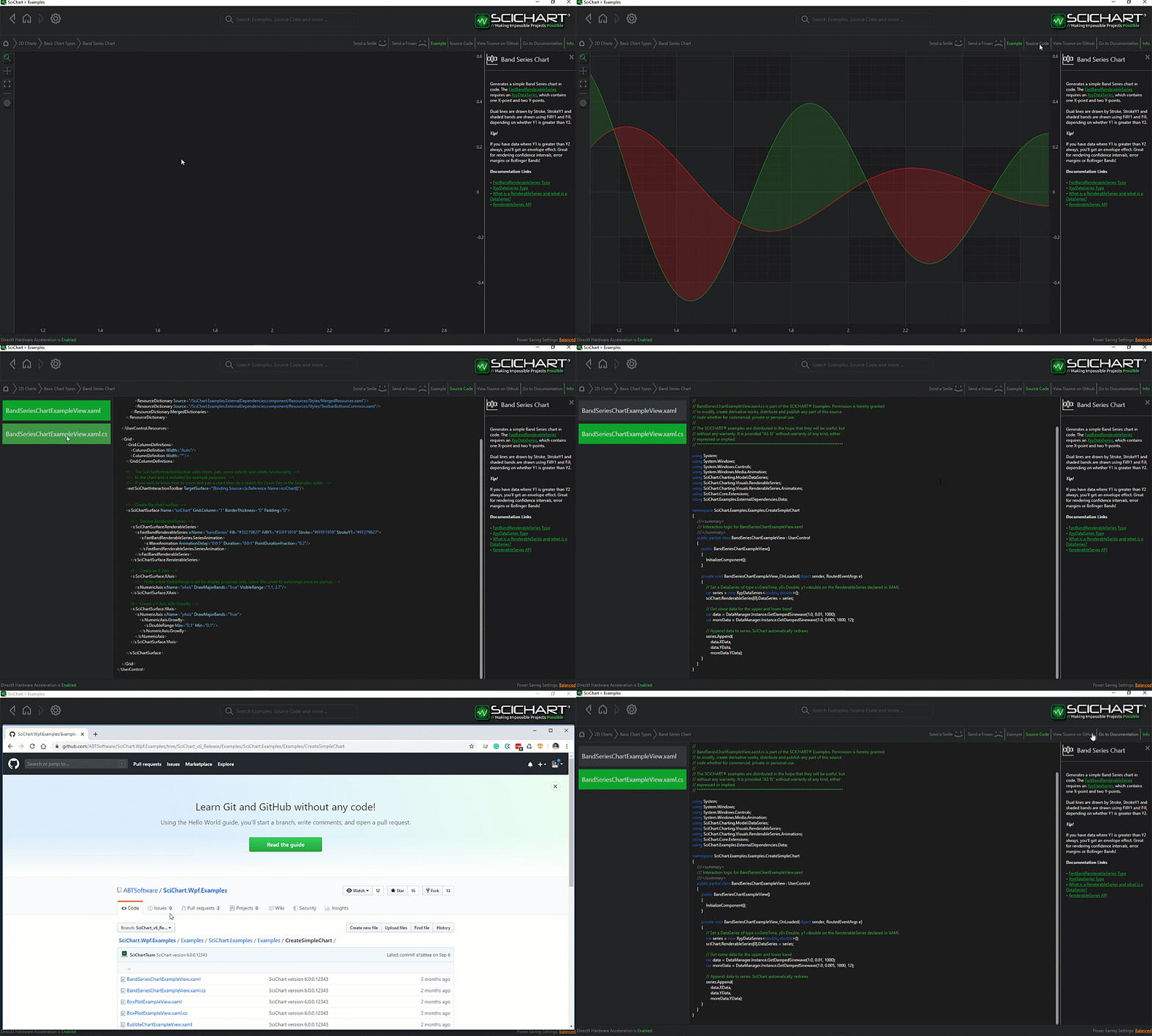
The C#/WPF source code for the WPF Ultrasound Heatmap Chart example is included below (Scroll down!).
Did you know you can also view the source code from one of the following sources as well?
- Clone the SciChart.WPF.Examples from GitHub.
- Or, view source in the SciChart WPF Examples suite.
- Also the SciChart WPF Trial contains the full source for the examples (link below).
PolarUniformHeatmapUltrasound.xaml
View source code<UserControl x:Class="SciChart.Examples.Examples.HeatmapChartTypes.PolarHeatmapCustomization_Ultrasound.PolarUniformHeatmapUltrasound"
xmlns="http://schemas.microsoft.com/winfx/2006/xaml/presentation"
xmlns:x="http://schemas.microsoft.com/winfx/2006/xaml"
xmlns:s="http://schemas.abtsoftware.co.uk/scichart"
xmlns:i="http://schemas.microsoft.com/xaml/behaviors"
xmlns:local="clr-namespace:SciChart.Examples.Examples.HeatmapChartTypes.PolarHeatmapCustomization_Ultrasound">
<UserControl.Resources>
<!-- Style for labels on the Angular Axis -->
<!-- Applies a 180 deg rotation to every label -->
<Style x:Key="XAxisTickLabelStyle" TargetType="s:DefaultTickLabel">
<Setter Property="LayoutTransform">
<Setter.Value>
<ScaleTransform ScaleX="-1" ScaleY="-1"/>
</Setter.Value>
</Setter>
</Style>
</UserControl.Resources>
<Grid ClipToBounds="True" Background="{StaticResource ThemedSurfaceChartBackground}">
<s:SciChartSurface x:Name="SciChartSurface" Background="Transparent">
<i:Interaction.Behaviors>
<!-- This behavior centers the chart in the viewport when the Polar Surface is resized -->
<local:SciChartSurfaceTransformBehavior ScaleFactor="1.3"/>
</i:Interaction.Behaviors>
<s:SciChartSurface.RenderableSeries>
<!-- PolarUniformHeatmapRenderableSeries is used to render the heatmap data -->
<s:PolarUniformHeatmapRenderableSeries x:Name="HeatmapRenderSeries"
UseLinearTextureFiltering="False"
Opacity="0.8">
<s:PolarUniformHeatmapRenderableSeries.ColorMap>
<s:HeatmapColorPalette Minimum="0" Maximum="255">
<GradientStop Offset="0.0" Color="Transparent"/>
<GradientStop Offset="1.0" Color="WhiteSmoke"/>
</s:HeatmapColorPalette>
</s:PolarUniformHeatmapRenderableSeries.ColorMap>
</s:PolarUniformHeatmapRenderableSeries>
</s:SciChartSurface.RenderableSeries>
<s:SciChartSurface.XAxis>
<!-- Defines the Angular Axis -->
<!-- VisibleRange controls how the heatmap is stretched across the polar surface -->
<!-- Extended VisibleRange is used to compress the data into a sector view -->
<!-- RotationAngle is applied to position the chart on the lower side of the Polar Surface -->
<s:PolarXAxis Name="AngularAxis"
AutoRange="Never"
AutoTicks="False"
BorderThickness="0"
DrawMajorGridLines="False"
FlipCoordinates="True"
IsLabelCullingEnabled="False"
MajorDelta="25"
RotationAngle="225"
VisibleRange="0,1000"
TickLabelStyle="{StaticResource XAxisTickLabelStyle}"/>
</s:SciChartSurface.XAxis>
<s:SciChartSurface.YAxis>
<!-- Defines the Angular Axis -->
<!-- VisibleRange controls how the heatmap is stretched across the polar surface -->
<!-- A negative VisibleRange.Min value allows creating a visual gap at the chart center -->
<s:PolarYAxis Name="RadialAxis"
Angle="-48"
AutoRange="Never"
DrawMajorGridLines="False"
DrawMajorTicks="False"
DrawMinorGridLines="False"
DrawMinorTicks="False"
FlipCoordinates="False"
VisibleRange="-50,206"/>
</s:SciChartSurface.YAxis>
<!-- Defines a couple of double-headed Arrow Annotations -->
<!-- Two overlapping single-headed ArrowAnnotations are used to create a single double-headed arrow -->
<s:SciChartSurface.Annotations>
<!-- First arrow -->
<s:CompositeAnnotation IsEditable="False"
X1="183.46"
X2="207"
Y1="65.32"
Y2="148.55">
<s:CompositeAnnotation.Annotations>
<s:LineArrowAnnotation HeadLength="4"
HeadWidth="9"
Stroke="{StaticResource MainThemeSolidBrush}"
X1="{Binding ParentAnnotation.X2, Mode=OneWay, RelativeSource={RelativeSource Self}}"
X2="{Binding ParentAnnotation.X1, Mode=OneWay, RelativeSource={RelativeSource Self}}"
Y1="{Binding ParentAnnotation.Y2, Mode=OneWay, RelativeSource={RelativeSource Self}}"
Y2="{Binding ParentAnnotation.Y1, Mode=OneWay, RelativeSource={RelativeSource Self}}"/>
<s:LineArrowAnnotation HeadLength="4"
HeadWidth="9"
Stroke="{StaticResource MainThemeSolidBrush}"
X1="{Binding ParentAnnotation.X1, Mode=OneWay, RelativeSource={RelativeSource Self}}"
X2="{Binding ParentAnnotation.X2, Mode=OneWay, RelativeSource={RelativeSource Self}}"
Y1="{Binding ParentAnnotation.Y1, Mode=OneWay, RelativeSource={RelativeSource Self}}"
Y2="{Binding ParentAnnotation.Y2, Mode=OneWay, RelativeSource={RelativeSource Self}}"/>
</s:CompositeAnnotation.Annotations>
</s:CompositeAnnotation>
<!-- Second arrow -->
<s:CompositeAnnotation IsEditable="False"
X1="87.3"
X2="56.42"
Y1="124.28"
Y2="166.8">
<s:CompositeAnnotation.Annotations>
<s:LineArrowAnnotation HeadLength="4"
HeadWidth="9"
Stroke="{StaticResource ExtraThemeStrokeBrush_2}"
X1="{Binding ParentAnnotation.X2, Mode=OneWay, RelativeSource={RelativeSource Self}}"
X2="{Binding ParentAnnotation.X1, Mode=OneWay, RelativeSource={RelativeSource Self}}"
Y1="{Binding ParentAnnotation.Y2, Mode=OneWay, RelativeSource={RelativeSource Self}}"
Y2="{Binding ParentAnnotation.Y1, Mode=OneWay, RelativeSource={RelativeSource Self}}"/>
<s:LineArrowAnnotation HeadLength="4"
HeadWidth="9"
Stroke="{StaticResource ExtraThemeStrokeBrush_2}"
X1="{Binding ParentAnnotation.X1, Mode=OneWay, RelativeSource={RelativeSource Self}}"
X2="{Binding ParentAnnotation.X2, Mode=OneWay, RelativeSource={RelativeSource Self}}"
Y1="{Binding ParentAnnotation.Y1, Mode=OneWay, RelativeSource={RelativeSource Self}}"
Y2="{Binding ParentAnnotation.Y2, Mode=OneWay, RelativeSource={RelativeSource Self}}"/>
</s:CompositeAnnotation.Annotations>
</s:CompositeAnnotation>
</s:SciChartSurface.Annotations>
</s:SciChartSurface>
<!-- Color Map for the heatmap -->
<Grid HorizontalAlignment="Left">
<Grid.RowDefinitions>
<RowDefinition Height="2*"/>
<RowDefinition Height="6*"/>
<RowDefinition Height="2*"/>
</Grid.RowDefinitions>
<s:HeatmapColorMap Grid.Row="1"
Margin="20"
VerticalAlignment="Stretch"
Background="Transparent"
BorderThickness="0"
ColorPalette="{Binding ColorMap, Source={x:Reference HeatmapRenderSeries}}"
Maximum="{Binding ColorMap.Maximum, Source={x:Reference HeatmapRenderSeries}}"
Minimum="{Binding ColorMap.Minimum, Source={x:Reference HeatmapRenderSeries}}"
Orientation="Vertical"
EnableAxisDrag="False">
<s:HeatmapColorMap.AxisStyle>
<Style TargetType="s:AxisBase">
<Setter Property="Visibility" Value="Collapsed"/>
</Style>
</s:HeatmapColorMap.AxisStyle>
</s:HeatmapColorMap>
</Grid>
<!-- The TextBlock at the top displays the chart title -->
<TextBlock HorizontalAlignment="Center"
VerticalAlignment="Top"
Margin="10"
FontSize="22"
Foreground="WhiteSmoke"
Text="Fetal ultrasound at 31 weeks"/>
</Grid>
</UserControl>PolarUniformHeatmapUltrasound.xaml.cs
View source code// *************************************************************************************
// SCICHART® Copyright SciChart Ltd. 2011-2026. All rights reserved.
//
// Web: http://www.scichart.com
// Support: support@scichart.com
// Sales: sales@scichart.com
//
// PolarUniformHeatmapUltrasound.xaml.cs is part of the SCICHART® Examples. Permission is hereby granted
// to modify, create derivative works, distribute and publish any part of this source
// code whether for commercial, private or personal use.
//
// The SCICHART® examples are distributed in the hope that they will be useful, but
// without any warranty. It is provided "AS IS" without warranty of any kind, either
// expressed or implied.
// *************************************************************************************
using System.Windows.Controls;
using SciChart.Charting.Model.DataSeries.Heatmap2DArrayDataSeries;
using SciChart.Examples.ExternalDependencies.Data;
namespace SciChart.Examples.Examples.HeatmapChartTypes.PolarHeatmapCustomization_Ultrasound
{
/// <summary>
/// Interaction logic for PolarUniformHeatmapUltrasound.xaml
/// </summary>
public partial class PolarUniformHeatmapUltrasound : UserControl
{
public PolarUniformHeatmapUltrasound()
{
InitializeComponent();
// Create a DataSeries and will it with the ultrasound image data
var data = DataManager.Instance.GetUltrasoundPolarHeatmapData();
HeatmapRenderSeries.DataSeries = new UniformHeatmapDataSeries<int, int, double>(data, 0, 1, 0, 1);
// Applies a custom LabelProvider to the Angular Axis to hide axis labels outside the specified range [0 - 256]
AngularAxis.LabelProvider = new UltrasoundPolarLabelProvider(0, 256);
// Applies a custom LabelProvider to the Radial Axis to hide axis labels outside the specified range (below zero)
RadialAxis.LabelProvider = new UltrasoundPolarLabelProvider(0, double.MaxValue);
}
}
}
UltrasoundPolarLabelProvider.cs
View source code// *************************************************************************************
// SCICHART® Copyright SciChart Ltd. 2011-2026. All rights reserved.
//
// Web: http://www.scichart.com
// Support: support@scichart.com
// Sales: sales@scichart.com
//
// UltrasoundPolarLabelProvider.cs is part of the SCICHART® Examples. Permission is hereby granted
// to modify, create derivative works, distribute and publish any part of this source
// code whether for commercial, private or personal use.
//
// The SCICHART® examples are distributed in the hope that they will be useful, but
// without any warranty. It is provided "AS IS" without warranty of any kind, either
// expressed or implied.
// *************************************************************************************
using System;
using SciChart.Charting.Visuals.Axes.LabelProviders;
namespace SciChart.Examples.Examples.HeatmapChartTypes.PolarHeatmapCustomization_Ultrasound
{
/// <summary>
/// A custom label provider that selectively hides labels outside a specified Visible Range.
/// </summary>
/// <remarks>
/// This label provider is useful for polar heatmap charts where labels should only be displayed
/// within a specific angular range (e.g., for ultrasound sector displays). Labels outside the
/// visible range are hidden by returning an empty string.
/// </remarks>
public class UltrasoundPolarLabelProvider : NumericLabelProvider
{
/// <summary>
/// Initializes a new instance of the <see cref="UltrasoundPolarLabelProvider"/> class.
/// </summary>
/// <param name="visibleMin">The minimum visible range in degrees. Labels below this value will be hidden.</param>
/// <param name="visibleMax">The maximum visible angle in degrees. Labels above this value will be hidden.</param>
public UltrasoundPolarLabelProvider(double visibleMin, double visibleMax)
{
VisibleMin = visibleMin;
VisibleMax = visibleMax;
}
/// <summary>
/// Gets the minimum visible angle in degrees.
/// Labels with angles below this value will not be displayed.
/// </summary>
public double VisibleMin { get; }
/// <summary>
/// Gets the maximum visible angle in degrees.
/// Labels with angles above this value will not be displayed.
/// </summary>
public double VisibleMax { get; }
/// <summary>
/// Formats the label for the specified data value, hiding labels outside the visible angular range.
/// </summary>
/// <param name="dataValue">The data value to format, representing an angle in degrees.</param>
/// <returns>
/// An empty string if the angle is outside the visible range (less than <see cref="VisibleMin"/>
/// or greater than <see cref="VisibleMax"/>); otherwise, the formatted label from the base implementation.
/// </returns>
/// <remarks>
/// This method converts the data value to a double representing an angle, then checks if it falls
/// within the visible range. Only labels within the range are formatted and displayed.
/// </remarks>
public override string FormatLabel(IComparable dataValue)
{
var angle = Convert.ToDouble(dataValue);
if (angle < VisibleMin || angle > VisibleMax)
return string.Empty;
return base.FormatLabel(dataValue);
}
}
}
SciChartSurfaceTransformBehavior.cs
View source code// *************************************************************************************
// SCICHART® Copyright SciChart Ltd. 2011-2026. All rights reserved.
//
// Web: http://www.scichart.com
// Support: support@scichart.com
// Sales: sales@scichart.com
//
// SciChartSurfaceTransformBehavior.cs is part of the SCICHART® Examples. Permission is hereby granted
// to modify, create derivative works, distribute and publish any part of this source
// code whether for commercial, private or personal use.
//
// The SCICHART® examples are distributed in the hope that they will be useful, but
// without any warranty. It is provided "AS IS" without warranty of any kind, either
// expressed or implied.
// *************************************************************************************
using System;
using System.Windows;
using System.Windows.Media;
using Microsoft.Xaml.Behaviors;
using SciChart.Charting.Visuals;
namespace SciChart.Examples.Examples.HeatmapChartTypes.PolarHeatmapCustomization_Ultrasound
{
/// <summary>
/// A behavior that applies render transforms for scaling and repositioning the SciChartSurface.
/// </summary>
/// <remarks>
/// This behavior is typically used in polar heatmap scenarios where custom positioning
/// of the chart surface is required. It automatically responds to size changes to maintain
/// the correct positioning.
/// </remarks>
public class SciChartSurfaceTransformBehavior : Behavior<SciChartSurface>
{
public double ScaleFactor { get; set; } = 1d;
/// <summary>
/// Called after the behavior is attached to the SciChartSurface.
/// Subscribes to the SizeChanged event.
/// </summary>
protected override void OnAttached()
{
base.OnAttached();
AssociatedObject.SizeChanged += SciChartSurface_SizeChanged;
}
/// <summary>
/// Called when the behavior is being detached from the SciChartSurface.
/// Unsubscribes from the SizeChanged event.
/// </summary>
protected override void OnDetaching()
{
base.OnDetaching();
AssociatedObject.SizeChanged -= SciChartSurface_SizeChanged;
}
/// <summary>
/// Handles the SizeChanged event of the SciChartSurface.
/// Updates the render transform for scaling and positioning the surface.
/// </summary>
/// <param name="sender">The SciChartSurface that raised the event.</param>
/// <param name="e">Event arguments containing the old and new size information.</param>
private void SciChartSurface_SizeChanged(object sender, SizeChangedEventArgs e)
{
var polarViewportSize = Math.Min(e.NewSize.Height, e.NewSize.Width);
var transformGroup = new TransformGroup();
transformGroup.Children.Add(new TranslateTransform(0, -polarViewportSize / 3.5));
transformGroup.Children.Add(new ScaleTransform(ScaleFactor, ScaleFactor, 0.5, 0.5));
AssociatedObject.RenderTransformOrigin = new Point(0.5, 0.5);
AssociatedObject.RenderTransform = transformGroup;
}
}
}