WPF Vector Field Chart
This example demonstrates a WPF Vector Field Chart using VectorFieldRenderableSeries with two dataset types. Also known as a Vector Field Plot or Quiver Plot, this chart is often used to display wind speed and direction maps, fluid dynamics and magnetic or gravitational force fields in physics.
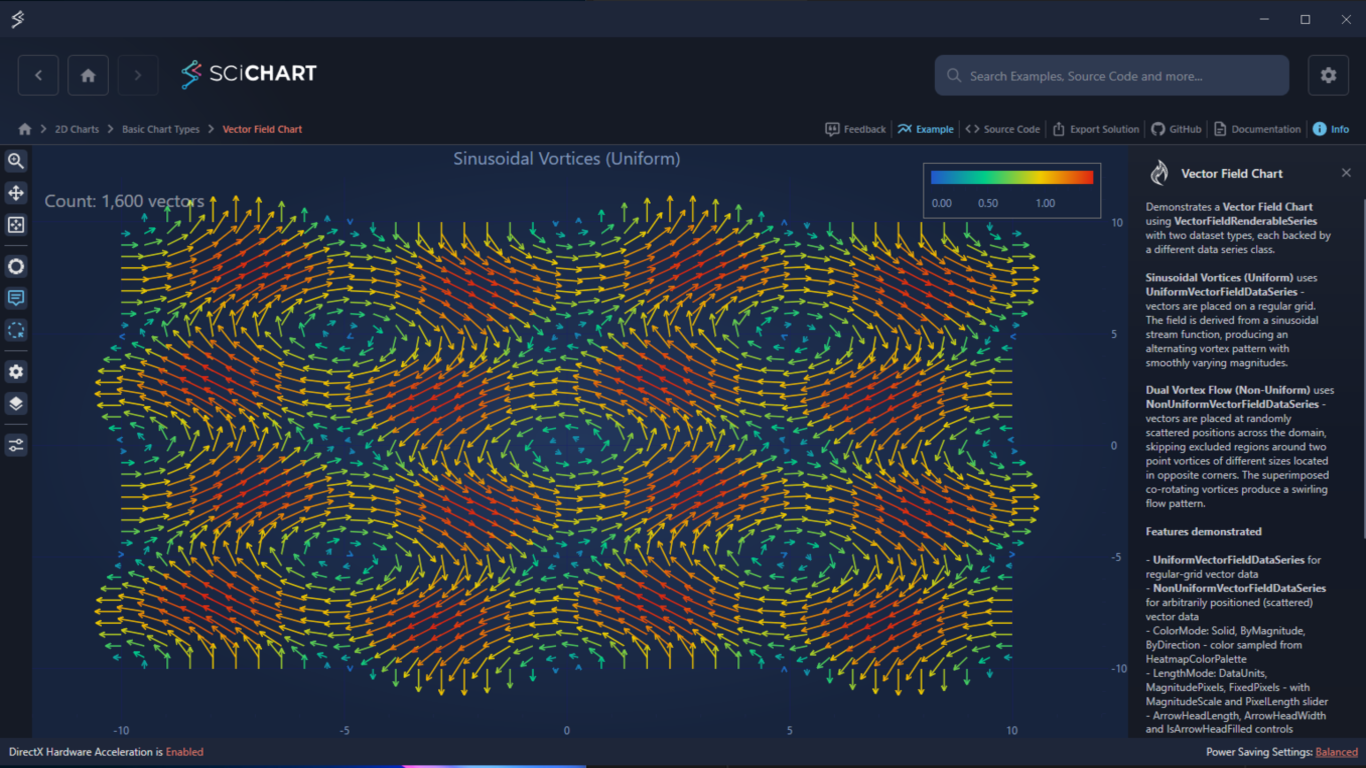
Sinusoidal Vortices (Uniform) uses UniformVectorFieldDataSeries on a regular grid, producing an alternating vortex pattern with smoothly varying magnitudes.
Dual Vortex Flow (Non-Uniform) uses NonUniformVectorFieldDataSeries with randomly scattered positions across the domain. This skips excluded regions around two point vortices.
Key Features of SciChart’s WPF Vector Field Chart
- UniformVectorFieldDataSeries for regular-grid vector data
- NonUniformVectorFieldDataSeries for arbitrarily positioned (scattered) vector data
- ColorMode: Solid, ByMagnitude, ByDirection — color sampled from HeatmapColorPalette
- LengthMode: DataUnits, MagnitudePixels, FixedPixels — with MagnitudeScale and PixelLength sliders
- ArrowHeadLength, ArrowHeadWidth and IsArrowHeadFilled controls
- Interactive control of vector field visual density using the CullingCellSize slider
- Per-vector inspection using TooltipModifier, displaying vector origin and magnitude on hover
- Vector selection with DataPointSelectionModifier, with visual highlighting via a PaletteProvider
Try It for Yourself
Give the WPF Vector Field Chart a try for yourself today. You can view the documentation or head straight to GitHub via the source code.
The C#/WPF source code for this example is included below.Download the WPF Vector Plot example or begin your free trial today to build high-performance WPF charts.
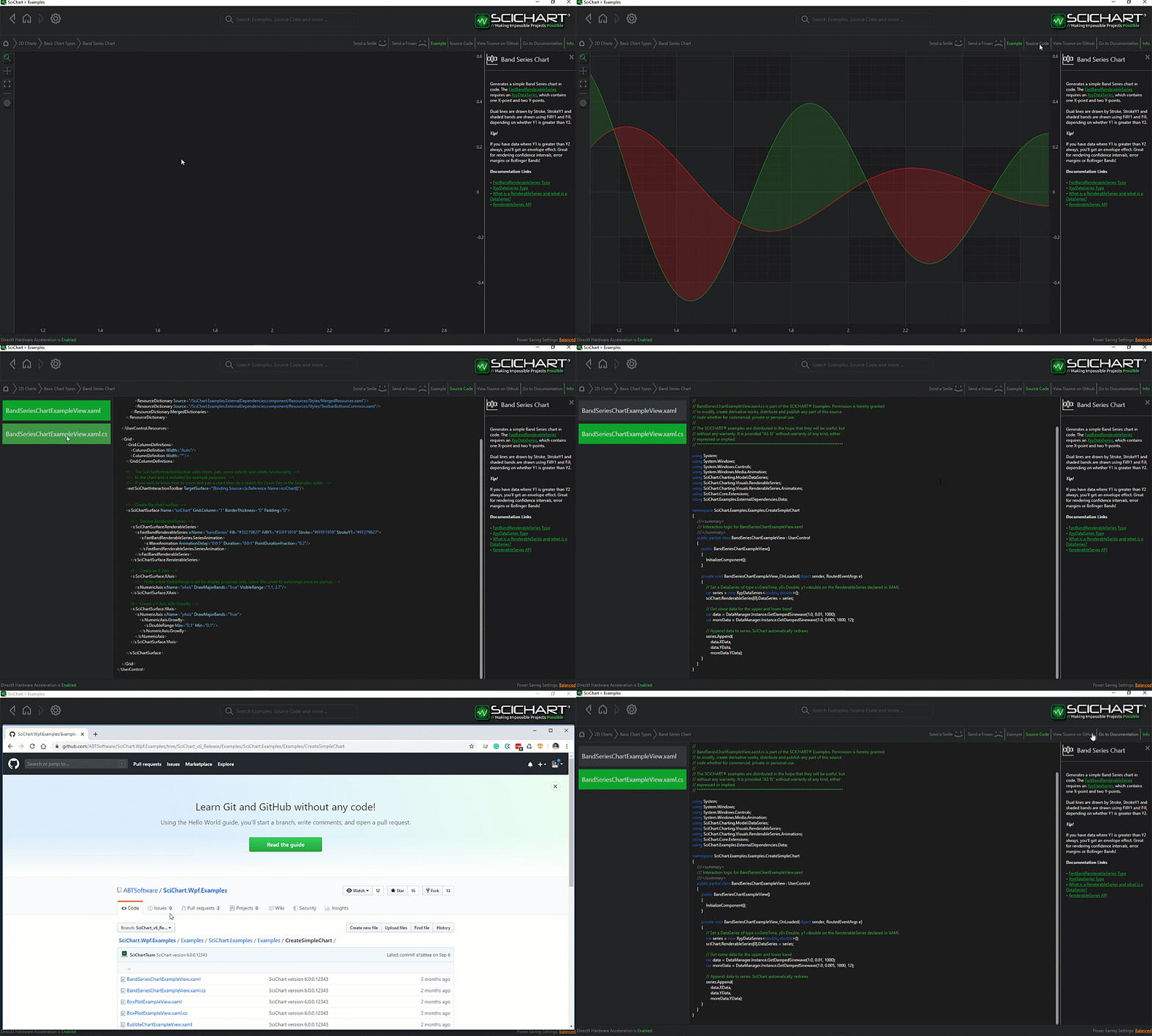
The C#/WPF source code for the WPF Vector Field Chart example is included below (Scroll down!).
Did you know you can also view the source code from one of the following sources as well?
- Clone the SciChart.WPF.Examples from GitHub.
- Or, view source in the SciChart WPF Examples suite.
- Also the SciChart WPF Trial contains the full source for the examples (link below).
VectorFieldChartView
View source code<UserControl x:Class="SciChart.Examples.Examples.CreateSimpleChart.VectorFieldChartView"
xmlns="http://schemas.microsoft.com/winfx/2006/xaml/presentation"
xmlns:x="http://schemas.microsoft.com/winfx/2006/xaml"
xmlns:d="http://schemas.microsoft.com/expression/blend/2008"
xmlns:ext="http://schemas.abtsoftware.co.uk/scichart/exampleExternals"
xmlns:local="clr-namespace:SciChart.Examples.Examples.CreateSimpleChart"
xmlns:mc="http://schemas.openxmlformats.org/markup-compatibility/2006"
xmlns:s="http://schemas.abtsoftware.co.uk/scichart"
Loaded="OnLoaded"
Unloaded="OnUnloaded"
d:DesignHeight="400"
d:DesignWidth="600"
mc:Ignorable="d">
<UserControl.Resources>
<!-- Highlights selected vectors in a bright accent color via IStrokePaletteProvider -->
<local:VectorSelectionPaletteProvider x:Key="SelectionPaletteProvider"/>
<!-- Linear palette: cool-blue → teal → yellow → warm-red.
Used for Solid / ByMagnitude colour modes. -->
<s:HeatmapColorPalette x:Key="CoolWarmLinearPalette" Minimum="0" Maximum="1.415">
<GradientStop Color="#FF2255CC" Offset="0.00"/>
<GradientStop Color="#FF00CC88" Offset="0.33"/>
<GradientStop Color="#FFEECC00" Offset="0.67"/>
<GradientStop Color="#FFDD2211" Offset="1.00"/>
</s:HeatmapColorPalette>
<!-- Circular palette: same hues with stops redistributed evenly and the first colour
repeated at offset 1.0 so the palette wraps smoothly for ByDirection mode. -->
<s:HeatmapColorPalette x:Key="CoolWarmCircularPalette" Minimum="0" Maximum="1">
<GradientStop Color="#FF2255CC" Offset="0.00"/>
<GradientStop Color="#FF00CC88" Offset="0.25"/>
<GradientStop Color="#FFEECC00" Offset="0.50"/>
<GradientStop Color="#FFDD2211" Offset="0.75"/>
<GradientStop Color="#FF2255CC" Offset="1.00"/>
</s:HeatmapColorPalette>
</UserControl.Resources>
<Grid>
<Grid.ColumnDefinitions>
<ColumnDefinition Width="Auto" />
<ColumnDefinition Width="*" />
</Grid.ColumnDefinitions>
<!-- Toolbar: standard zoom/pan modifiers plus two flyout menus for data and vector settings.
The toolbar also adds zoom-extents and mouse-wheel zoom automatically. -->
<ext:SciChartInteractionToolbar TargetSurface="{Binding ElementName=SciChartSurface}">
<ext:FlyoutSeparator/>
<!-- Data settings: choose between the uniform and non-uniform field, and set its resolution -->
<ext:FlyoutMenuButton ToolTipService.ToolTip="Data settings">
<ext:ToolbarIcon Kind="Cog" Height="16" Width="16" Style="{StaticResource ToolbarButtonIconStyle}"/>
<ext:FlyoutMenuButton.PopupContent>
<StackPanel Margin="5" MinWidth="200" Orientation="Vertical">
<!-- Field type: switches between UniformVectorFieldDataSeries and NonUniformVectorFieldDataSeries -->
<TextBlock Text="Field Type" Style="{StaticResource FlyoutMenuHeaderStyle}"/>
<ComboBox x:Name="FieldSourceCombo"
Margin="0,4,0,0"
SelectionChanged="OnFieldTypeChanged"/>
<!-- Grid size: visible only for the Uniform field; controls the n×n grid resolution -->
<TextBlock x:Name="GridSizeHeader"
Text="Grid Size"
Margin="0,10,0,4"
Style="{StaticResource FlyoutMenuHeaderStyle}"/>
<StackPanel x:Name="GridSizePanel" Orientation="Horizontal">
<Slider x:Name="GridSizeSlider"
Minimum="10" Maximum="100" Value="40"
Width="130" VerticalAlignment="Center"
IsSnapToTickEnabled="True" TickFrequency="5"
ValueChanged="OnGridSizeChanged"/>
<TextBlock Text="{Binding Source={x:Reference Name=GridSizeSlider}, Path=Value, StringFormat={}{0:0} × {0:0}}"
VerticalAlignment="Center"
Margin="6,0,0,0"/>
</StackPanel>
<!-- Vectors count: visible only for the Non-Uniform field; controls how many
scattered sample points are generated (rejection-sampled away from vortex cores) -->
<TextBlock x:Name="VectorsCountHeader"
Text="Vectors Count"
Margin="0,10,0,4"
Visibility="Collapsed"
Style="{StaticResource FlyoutMenuHeaderStyle}"/>
<StackPanel x:Name="VectorsCountPanel" Orientation="Horizontal" Visibility="Collapsed">
<Slider x:Name="VectorsCountSlider"
Minimum="600" Maximum="10000" Value="4000"
Width="130" VerticalAlignment="Center"
IsSnapToTickEnabled="True" TickFrequency="200"
ValueChanged="OnVectorsCountChanged"/>
<TextBlock Text="{Binding Source={x:Reference Name=VectorsCountSlider}, Path=Value, StringFormat={}{0:N0}}"
VerticalAlignment="Center"
Margin="6,0,0,0"/>
</StackPanel>
</StackPanel>
</ext:FlyoutMenuButton.PopupContent>
</ext:FlyoutMenuButton>
<!-- Culling options: LOD cell size and density control -->
<ext:FlyoutMenuButton ToolTipService.ToolTip="Culling options">
<ext:ToolbarIcon Kind="Layers" Height="16" Width="16" Style="{StaticResource ToolbarButtonIconStyle}"/>
<ext:FlyoutMenuButton.PopupContent>
<StackPanel Margin="5" MinWidth="200" Orientation="Vertical">
<!-- Cell size: 0 = disabled; higher values reduce draw calls more aggressively -->
<TextBlock Text="Culling Cell Size" Style="{StaticResource FlyoutMenuHeaderStyle}"/>
<StackPanel Orientation="Horizontal">
<Slider x:Name="LodCellSizeSlider"
Minimum="0" Maximum="20"
Value="{Binding Source={x:Reference Name=VectorSeries}, Path=CullingCellSizePx, Mode=TwoWay}"
Width="130" VerticalAlignment="Center"
IsSnapToTickEnabled="True" TickFrequency="0.5"/>
<TextBlock Text="{Binding Source={x:Reference Name=LodCellSizeSlider}, Path=Value, StringFormat={}{0:0.#} px}"
VerticalAlignment="Center"
Margin="6,0,0,0"/>
</StackPanel>
<!-- Max vectors per cell: 1 = single winner; higher values show more in dense regions -->
<TextBlock Text="Max Vectors Per Cell" Margin="0,10,0,4" Style="{StaticResource FlyoutMenuHeaderStyle}"/>
<StackPanel Orientation="Horizontal">
<Slider x:Name="MaxVectorsPerCellSlider"
Minimum="1" Maximum="20"
Value="{Binding Source={x:Reference Name=VectorSeries}, Path=CullingMaxVectorsPerCell, Mode=TwoWay}"
Width="130" VerticalAlignment="Center"
IsSnapToTickEnabled="True" TickFrequency="1"/>
<TextBlock Text="{Binding Source={x:Reference Name=MaxVectorsPerCellSlider}, Path=Value, StringFormat={}{0:0}}"
VerticalAlignment="Center"
Margin="6,0,0,0"/>
</StackPanel>
</StackPanel>
</ext:FlyoutMenuButton.PopupContent>
</ext:FlyoutMenuButton>
<ext:FlyoutSeparator/>
<!-- Vector options: color mapping, arrow length/width, normalization -->
<ext:FlyoutMenuButton ToolTipService.ToolTip="Vector options">
<ext:ToolbarIcon Kind="TuneVariant" Height="16" Width="16" Style="{StaticResource ToolbarButtonIconStyle}"/>
<ext:FlyoutMenuButton.PopupContent>
<StackPanel Margin="5" MinWidth="200" Orientation="Vertical">
<!-- Color mode: Solid (single colour), ByMagnitude, or ByDirection -->
<TextBlock Text="Color Mode" Style="{StaticResource FlyoutMenuHeaderStyle}"/>
<ComboBox x:Name="ColorModeCombo"
Margin="0,4,0,0"
SelectionChanged="OnColorModeChanged"/>
<!-- Length mode: Pixels (fixed px), ScaledPixels (mag×scale px), or DataUnits -->
<TextBlock Text="Length Mode" Margin="0,10,0,4" Style="{StaticResource FlyoutMenuHeaderStyle}"/>
<ComboBox x:Name="LengthModeCombo"
SelectionChanged="OnLengthModeChanged"/>
<!-- MagnitudeScale: visible only in MagnitudePixels mode -->
<TextBlock x:Name="MagnitudeScaleHeader" Text="Magnitude Scale" Margin="0,10,0,4" Visibility="Collapsed" Style="{StaticResource FlyoutMenuHeaderStyle}"/>
<StackPanel x:Name="MagnitudeScalePanel" Orientation="Horizontal" Visibility="Collapsed">
<Slider x:Name="MagnitudeScaleSlider"
Minimum="1" Maximum="100"
Value="{Binding Source={x:Reference Name=VectorSeries}, Path=MagnitudeScale, Mode=TwoWay}"
Width="130" VerticalAlignment="Center"/>
<TextBlock Text="{Binding Source={x:Reference Name=MagnitudeScaleSlider}, Path=Value, StringFormat={}{0:F0}}"
VerticalAlignment="Center"
Margin="6,0,0,0"/>
</StackPanel>
<!-- PixelLength: visible only in FixedPixels mode -->
<TextBlock x:Name="PixelLengthHeader" Text="Pixel Length" Margin="0,10,0,4" Visibility="Collapsed" Style="{StaticResource FlyoutMenuHeaderStyle}"/>
<StackPanel x:Name="PixelLengthPanel" Orientation="Horizontal" Visibility="Collapsed">
<Slider x:Name="PixelLengthSlider"
Minimum="5" Maximum="80"
Value="{Binding Source={x:Reference Name=VectorSeries}, Path=PixelLength, Mode=TwoWay}"
Width="130" VerticalAlignment="Center"/>
<TextBlock Text="{Binding Source={x:Reference Name=PixelLengthSlider}, Path=Value, StringFormat={}{0:F0}}"
VerticalAlignment="Center"
Margin="6,0,0,0"/>
</StackPanel>
<!-- Arrow head geometry controls -->
<TextBlock Text="Arrow Head Length" Margin="0,10,0,4" Style="{StaticResource FlyoutMenuHeaderStyle}"/>
<StackPanel Orientation="Horizontal">
<Slider x:Name="ArrowLengthSlider"
Minimum="3" Maximum="20"
Value="{Binding Source={x:Reference Name=VectorSeries}, Path=ArrowHeadLength, Mode=TwoWay}"
Width="130" VerticalAlignment="Center"
IsSnapToTickEnabled="True" TickFrequency="1"/>
<TextBlock Text="{Binding Source={x:Reference Name=ArrowLengthSlider}, Path=Value, StringFormat={}{0:F0} px}"
VerticalAlignment="Center"
Margin="6,0,0,0"/>
</StackPanel>
<TextBlock Text="Arrow Head Width" Margin="0,10,0,4" Style="{StaticResource FlyoutMenuHeaderStyle}"/>
<StackPanel Orientation="Horizontal">
<Slider x:Name="ArrowWidthSlider"
Minimum="2" Maximum="15"
Value="{Binding Source={x:Reference Name=VectorSeries}, Path=ArrowHeadWidth, Mode=TwoWay}"
Width="130" VerticalAlignment="Center"
IsSnapToTickEnabled="True" TickFrequency="1"/>
<TextBlock Text="{Binding Source={x:Reference Name=ArrowWidthSlider}, Path=Value, StringFormat={}{0:F0} px}"
VerticalAlignment="Center"
Margin="6,0,0,0"/>
</StackPanel>
<CheckBox x:Name="IsFilledCheckBox"
Content="Filled Arrow Head"
Margin="0,10,0,0"
IsChecked="{Binding Source={x:Reference Name=VectorSeries}, Path=IsArrowHeadFilled, Mode=TwoWay}"/>
</StackPanel>
</ext:FlyoutMenuButton.PopupContent>
</ext:FlyoutMenuButton>
</ext:SciChartInteractionToolbar>
<!-- Main chart surface. DataSeries is assigned from code-behind on field type change. -->
<s:SciChartSurface x:Name="SciChartSurface"
Grid.Column="1">
<s:SciChartSurface.RenderableSeries>
<!-- VectorFieldRenderableSeries renders each (X, Y, DX, DY) vector as an arrow.
ColorMap maps magnitude or direction to colour depending on the selected ColorMode.
PaletteProvider overrides the stroke color for selected vectors. -->
<s:VectorFieldRenderableSeries x:Name="VectorSeries"
Stroke="#4FC3F7"
StrokeThickness="2"
ArrowHeadLength="6"
ArrowHeadWidth="6"
IsArrowHeadFilled="False"
LengthMode="MagnitudePixels"
MagnitudeScale="30"
ColorMode="ByMagnitude"
AntiAliasing="True"
PaletteProvider="{StaticResource SelectionPaletteProvider}">
<s:VectorFieldRenderableSeries.ColorMap>
<!-- Initial palette (linear); swapped to CoolWarmCircularPalette by code-behind
when ColorMode = ByDirection and restored on any other mode. -->
<s:HeatmapColorPalette Minimum="0" Maximum="1.415">
<GradientStop Color="#FF2255CC" Offset="0.00"/>
<GradientStop Color="#FF00CC88" Offset="0.33"/>
<GradientStop Color="#FFEECC00" Offset="0.67"/>
<GradientStop Color="#FFDD2211" Offset="1.00"/>
</s:HeatmapColorPalette>
</s:VectorFieldRenderableSeries.ColorMap>
</s:VectorFieldRenderableSeries>
</s:SciChartSurface.RenderableSeries>
<!-- AutoRange="Never" so axis range is controlled from code-behind via RegenerateData() -->
<s:SciChartSurface.XAxis>
<s:NumericAxis x:Name="XAxis"
DrawMajorBands="False"
DrawMinorGridLines="False"
AutoRange="Never" />
</s:SciChartSurface.XAxis>
<s:SciChartSurface.YAxis>
<s:NumericAxis x:Name="YAxis"
DrawMajorBands="False"
DrawMinorGridLines="False"
AutoRange="Never" />
</s:SciChartSurface.YAxis>
<s:SciChartSurface.Annotations>
<!-- Displays the total rendered vector count, updated after each data regeneration -->
<s:TextAnnotation x:Name="VectorCountAnnotation"
CoordinateMode="Relative"
X1="0" Y1="0"
HorizontalAnchorPoint="Left"
VerticalAnchorPoint="Top"
Margin="5,5,0,0"
FontSize="20"
Opacity="0.5"
Foreground="#FFF"/>
</s:SciChartSurface.Annotations>
<s:SciChartSurface.ChartModifier>
<s:ModifierGroup>
<s:ZoomPanModifier/>
<s:ZoomExtentsModifier/>
<s:MouseWheelZoomModifier/>
<s:TooltipModifier ShowTooltipOn="MouseOver" />
<s:DataPointSelectionModifier AllowsMultiSelection="True"/>
</s:ModifierGroup>
</s:SciChartSurface.ChartModifier>
</s:SciChartSurface>
<!-- Horizontal colour legend bound to the VectorSeries colour map -->
<s:HeatmapColorMap Grid.Column="1"
Width="200"
Margin="0,20,30,0"
HorizontalAlignment="Right"
VerticalAlignment="Top"
Background="{StaticResource ThemedSurfaceChartBackground}"
Foreground="{Binding ElementName=SciChartSurface, Path=Foreground}"
ColorPalette="{Binding ElementName=VectorSeries, Path=ColorMap}"
Minimum="{Binding ElementName=VectorSeries, Path=ColorMap.Minimum, Mode=TwoWay}"
Maximum="{Binding ElementName=VectorSeries, Path=ColorMap.Maximum, Mode=TwoWay}"
TextFormatting="0.00"
BorderBrush="#777"
BorderThickness="1"
Orientation="Horizontal"/>
</Grid>
</UserControl>
VectorFieldChartView
View source code// *************************************************************************************
// SCICHART® Copyright SciChart Ltd. 2011-2026. All rights reserved.
//
// Web: http://www.scichart.com
// Support: support@scichart.com
// Sales: sales@scichart.com
//
// VectorFieldChartView.xaml.cs is part of the SCICHART® Examples. Permission is hereby granted
// to modify, create derivative works, distribute and publish any part of this source
// code whether for commercial, private or personal use.
//
// The SCICHART® examples are distributed in the hope that they will be useful, but
// without any warranty. It is provided "AS IS" without warranty of any kind, either
// expressed or implied.
// *************************************************************************************
using System;
using System.Collections.Generic;
using System.Windows;
using System.Windows.Controls;
using SciChart.Charting.Model.DataSeries;
using SciChart.Charting.Visuals.RenderableSeries;
using SciChart.Data.Model;
namespace SciChart.Examples.Examples.CreateSimpleChart
{
/// <summary>
/// Demonstrates a static <see cref="VectorFieldRenderableSeries"/> with two selectable field types:
/// <list type="bullet">
/// <item><description>
/// <b>Sinusoidal Vortices (Uniform)</b> — a <see cref="UniformVectorFieldDataSeries"/> on a regular
/// n×n grid, where the displacement is derived from a sinusoidal stream function producing
/// two counter-rotating vortices.
/// </description></item>
/// <item><description>
/// <b>Scattered Vortex Flow (Non-Uniform)</b> — a <see cref="NonUniformVectorFieldDataSeries"/>
/// with randomly placed sample points, driven by two point-vortex velocity fields.
/// Points inside the vortex cores are excluded to avoid singularities.
/// </description></item>
/// </list>
/// The toolbar lets users explore colour modes, length modes, arrow geometry, and LOD settings.
/// </summary>
public partial class VectorFieldChartView : UserControl
{
// Half-side of the square data domain; axes are set to [-DomainSize, DomainSize]
private const double DomainSize = 10.0;
// Sinusoidal field: half-wavelength of the stream function (controls vortex spacing)
private const double HalfWavelength = 5.0;
// Non-uniform field: scales the raw 1/r vortex velocity to a displayable magnitude
private const double VortexFieldScale = 3.0;
// Two vortex centres for the non-uniform point-vortex field.
// CoreRadius defines the exclusion zone around each singularity.
private static readonly (double X, double Y, double CoreRadius)[] VortexCenters =
{
(-4.0, -4.0, 2.0 / 1.5),
( 4.0, 4.0, 2.0 / 3.0),
};
// Display names for the two field types; index matches _currentFieldIndex
private static readonly string[] FieldSourceNames =
{
"Sinusoidal Vortices (Uniform)",
"Scattered Vortex Flow (Non-Uniform)",
};
private int _currentFieldIndex;
/// <summary>
/// Initializes a new instance of <see cref="VectorFieldChartView"/>.
/// </summary>
public VectorFieldChartView()
{
InitializeComponent();
}
private void OnLoaded(object sender, RoutedEventArgs e)
{
// Populate combo boxes; selecting the first item triggers data generation via OnFieldTypeChanged
foreach (string name in FieldSourceNames)
FieldSourceCombo.Items.Add(name);
FieldSourceCombo.SelectedIndex = 0;
foreach (VectorColorMode mode in Enum.GetValues(typeof(VectorColorMode)))
ColorModeCombo.Items.Add(mode);
ColorModeCombo.SelectedItem = VectorColorMode.ByMagnitude;
foreach (VectorLengthMode mode in Enum.GetValues(typeof(VectorLengthMode)))
LengthModeCombo.Items.Add(mode);
LengthModeCombo.SelectedItem = VectorLengthMode.MagnitudePixels;
}
private void OnUnloaded(object sender, RoutedEventArgs e)
{
// Clear combo boxes to prevent item duplication when the view is reloaded
FieldSourceCombo.Items.Clear();
ColorModeCombo.Items.Clear();
LengthModeCombo.Items.Clear();
VectorSeries.DataSeries.Clear();
}
/// <summary>
/// Generates data for the currently selected field type, updates the visible axis range,
/// and refreshes the vector count annotation.
/// </summary>
private void RegenerateData()
{
if (VectorSeries == null) return;
int count = _currentFieldIndex == 0
? GenerateUniformData()
: GenerateNonUniformData();
var axisRange = DomainSize + DomainSize * 0.2;
XAxis.VisibleRange = new DoubleRange(-axisRange, axisRange);
YAxis.VisibleRange = new DoubleRange(-axisRange, axisRange);
VectorCountAnnotation.Text = $"Count: {count:N0} vectors";
}
/// <summary>
/// Generates a <see cref="UniformVectorFieldDataSeries"/> on an n×n grid using a
/// sinusoidal stream function: DX = -sin(π·y/λ), DY = sin(π·x/λ).
/// This produces two counter-rotating vortices centred at the origin.
/// </summary>
private int GenerateUniformData()
{
int n = (int)GridSizeSlider.Value;
double xMin = -DomainSize, xMax = DomainSize;
double yMin = -DomainSize, yMax = DomainSize;
double xStep = (xMax - xMin) / (n - 1);
double yStep = (yMax - yMin) / (n - 1);
var dxs = new double[n, n];
var dys = new double[n, n];
var metadata = new IPointMetadata[n, n];
for (int xi = 0; xi < n; xi++)
{
double x = xMin + xi * xStep;
for (int yi = 0; yi < n; yi++)
{
double y = yMin + yi * yStep;
dxs[xi, yi] = -Math.Sin(Math.PI * y / HalfWavelength);
dys[xi, yi] = Math.Sin(Math.PI * x / HalfWavelength);
metadata[xi, yi] = new VectorPointMetadata();
}
}
VectorSeries.DataSeries = new UniformVectorFieldDataSeries(xMin, xStep, yMin, yStep, dxs, dys, metadata);
return n * n;
}
/// <summary>
/// Generates a <see cref="NonUniformVectorFieldDataSeries"/> with randomly scattered points
/// driven by two point-vortex (Biot-Savart) velocity fields. Points that fall inside a
/// vortex core are rejected to avoid near-singular velocity values.
/// </summary>
private int GenerateNonUniformData()
{
int targetCount = (int)VectorsCountSlider.Value;
var rng = new Random((int)DateTime.UtcNow.Ticks);
var xs = new List<double>(targetCount);
var ys = new List<double>(targetCount);
var dxs = new List<double>(targetCount);
var dys = new List<double>(targetCount);
var metadata = new List<IPointMetadata>(targetCount);
int attempts = 0;
while (xs.Count < targetCount && attempts < targetCount * 20)
{
attempts++;
double x = rng.NextDouble() * 2 * DomainSize - DomainSize;
double y = rng.NextDouble() * 2 * DomainSize - DomainSize;
// Reject points inside any vortex core to avoid singularities
bool inCore = false;
foreach (var (cx, cy, coreR) in VortexCenters)
{
double ex = x - cx, ey = y - cy;
if (ex * ex + ey * ey < coreR * coreR) { inCore = true; break; }
}
if (inCore) continue;
// Sum contributions from both point vortices (Biot-Savart: v = Γ/2π × r⊥/r²)
double u = 0, v = 0;
foreach (var (cx, cy, _) in VortexCenters)
{
double rx = x - cx, ry = y - cy;
double r2 = rx * rx + ry * ry;
u += VortexFieldScale * (-ry / r2);
v += VortexFieldScale * (+rx / r2);
}
xs.Add(x);
ys.Add(y);
dxs.Add(u);
dys.Add(v);
metadata.Add(new VectorPointMetadata());
}
VectorSeries.DataSeries = new NonUniformVectorFieldDataSeries(
xs.ToArray(), ys.ToArray(), dxs.ToArray(), dys.ToArray(), metadata);
return xs.Count;
}
/// <summary>
/// Sets the colour map range to match the active colour mode and field type.
/// Direction mode spans [0, 2π]; magnitude mode is clamped to the expected field peak.
/// </summary>
private void UpdateColorMapRange()
{
if (VectorSeries?.ColorMap == null || ColorModeCombo.SelectedItem == null) return;
VectorSeries.ColorMap.Minimum = 0;
if ((VectorColorMode)ColorModeCombo.SelectedItem == VectorColorMode.ByDirection)
{
VectorSeries.ColorMap.Maximum = 2 * Math.PI;
}
else
{
// Sinusoidal field magnitude ∈ [0, √2]; vortex field saturates at the larger core boundary
double pointVortexMax = VortexFieldScale / Math.Max(VortexCenters[0].CoreRadius, VortexCenters[1].CoreRadius);
VectorSeries.ColorMap.Maximum = _currentFieldIndex == 0 ? Math.Sqrt(2) : pointVortexMax;
}
}
private void OnFieldTypeChanged(object sender, SelectionChangedEventArgs e)
{
if (FieldSourceCombo.SelectedIndex < 0) return;
_currentFieldIndex = FieldSourceCombo.SelectedIndex;
// Show the grid-size slider for the uniform field and the count slider for non-uniform
bool isUniform = _currentFieldIndex == 0;
GridSizeHeader.Visibility = isUniform ? Visibility.Visible : Visibility.Collapsed;
GridSizePanel.Visibility = isUniform ? Visibility.Visible : Visibility.Collapsed;
VectorsCountHeader.Visibility = isUniform ? Visibility.Collapsed : Visibility.Visible;
VectorsCountPanel.Visibility = isUniform ? Visibility.Collapsed : Visibility.Visible;
SciChartSurface.ChartTitle = FieldSourceNames[_currentFieldIndex];
UpdateColorMapRange();
RegenerateData();
}
private void OnGridSizeChanged(object sender, RoutedPropertyChangedEventArgs<double> e)
{
RegenerateData();
}
private void OnVectorsCountChanged(object sender, RoutedPropertyChangedEventArgs<double> e)
{
RegenerateData();
}
private void OnColorModeChanged(object sender, SelectionChangedEventArgs e)
{
if (VectorSeries == null || ColorModeCombo.SelectedItem == null) return;
var mode = (VectorColorMode)ColorModeCombo.SelectedItem;
VectorSeries.ColorMode = mode;
VectorSeries.ColorMap = mode == VectorColorMode.ByDirection
? (HeatmapColorPalette)Resources["CoolWarmCircularPalette"]
: (HeatmapColorPalette)Resources["CoolWarmLinearPalette"];
UpdateColorMapRange();
}
private void OnLengthModeChanged(object sender, SelectionChangedEventArgs e)
{
if (VectorSeries == null || LengthModeCombo.SelectedItem == null) return;
var mode = (VectorLengthMode)LengthModeCombo.SelectedItem;
VectorSeries.LengthMode = mode;
MagnitudeScaleHeader.Visibility = mode == VectorLengthMode.MagnitudePixels ? Visibility.Visible : Visibility.Collapsed;
MagnitudeScalePanel.Visibility = mode == VectorLengthMode.MagnitudePixels ? Visibility.Visible : Visibility.Collapsed;
PixelLengthHeader.Visibility = mode == VectorLengthMode.FixedPixels ? Visibility.Visible : Visibility.Collapsed;
PixelLengthPanel.Visibility = mode == VectorLengthMode.FixedPixels ? Visibility.Visible : Visibility.Collapsed;
}
}
}
VectorFieldPaletteProvider
View source code// *************************************************************************************
// SCICHART® Copyright SciChart Ltd. 2011-2026. All rights reserved.
//
// Web: http://www.scichart.com
// Support: support@scichart.com
// Sales: sales@scichart.com
//
// VectorFieldPaletteProvider.cs is part of the SCICHART® Examples. Permission is hereby granted
// to modify, create derivative works, distribute and publish any part of this source
// code whether for commercial, private or personal use.
//
// The SCICHART® examples are distributed in the hope that they will be useful, but
// without any warranty. It is provided "AS IS" without warranty of any kind, either
// expressed or implied.
// *************************************************************************************
using System.ComponentModel;
using System.Windows.Media;
using SciChart.Charting.Model.DataSeries;
using SciChart.Charting.Visuals.PaletteProviders;
using SciChart.Charting.Visuals.RenderableSeries;
namespace SciChart.Examples.Examples.CreateSimpleChart
{
/// <summary>
/// Minimal <see cref="IPointMetadata"/> implementation for vector field data points.
/// Carries the <see cref="IsSelected"/> flag written by
/// <see cref="SciChart.Charting.ChartModifiers.DataPointSelectionModifier"/> and read by
/// <see cref="VectorSelectionPaletteProvider"/>.
/// </summary>
public sealed class VectorPointMetadata : IPointMetadata
{
public event PropertyChangedEventHandler PropertyChanged;
public bool IsSelected { get; set; }
}
/// <summary>
/// Returns a bright selection color (<see cref="Colors.OrangeRed"/>) for any vector whose
/// metadata has <see cref="IPointMetadata.IsSelected"/> set, and <c>null</c> otherwise
/// (preserving the series default or colormap color).
/// </summary>
public sealed class VectorSelectionPaletteProvider : IStrokePaletteProvider
{
private static readonly Color SelectionColor = Colors.White;
public void OnBeginSeriesDraw(IRenderableSeries rSeries) { }
public Color? OverrideStrokeColor(IRenderableSeries rSeries, int index, IPointMetadata metadata)
{
return metadata?.IsSelected == true ? SelectionColor : (Color?)null;
}
}
}